Introduzzjoni
The DigiTech Multi-Function LCD Wall Clock (Model XC0225) is a versatile device designed to provide convenient time display along with additional environmental information. This clock features a large LCD screen displaying time, date, day of the week, indoor temperature, and humidity. It also includes alarm and snooze functions, making it suitable for various settings, whether mounted on a wall or placed on a desktop.
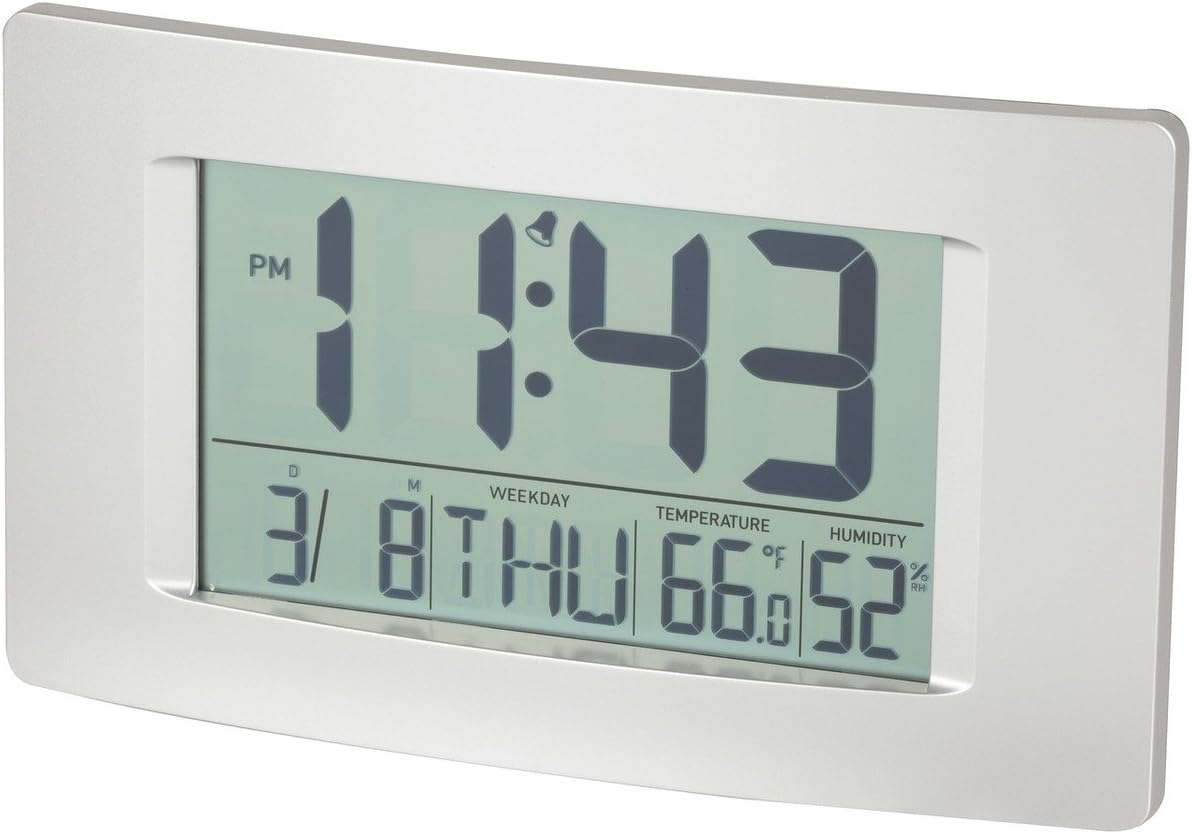
Figura 1: Quddiem view of the Multi-Function LCD Wall Clock.
Kontenut tal-Pakkett
- DigiTech Multi-Function LCD Wall Clock (Model XC0225)
- Manwal għall-Utent (dan id-dokument)
Nota: 3 x AA batteries are required for operation and are not included in the package.

Figure 2: Product packaging illustrating the clock and its features.
Setup
1. Installazzjoni tal-batterija
- Sib il-kompartiment tal-batterija fuq wara tal-arloġġ.
- Iftaħ l-għatu tal-kompartiment tal-batterija.
- Insert 3 x AA batteries, ensuring correct polarity (+ and -) as indicated inside the compartment.
- Agħlaq l-għatu tal-kompartiment tal-batterija sew.
2. L-Ewwel Tixgħil
Upon battery installation, the clock will power on automatically and display default settings. You may need to adjust the time, date, and other settings as described in the "Operating Instructions" section.
3. Għażliet ta 'Immuntar
- Poġġiment fuq id-Desktop: Utilize the integrated stand on the back of the clock to place it on any flat surface.
- Immuntar tal-ħajt: Use the integrated hang-hole on the back of the clock to mount it securely on a wall using a suitable screw or hook (not included).
Istruzzjonijiet Operattivi
The clock features several buttons on the back for setting and adjusting functions. Refer to the labels next to each button for their specific functions (e.g., MODE, UP, DOWN, ALARM, SNOOZE/LIGHT).
1. L-issettjar tal-Ħin u d-Data
- Agħfas il- MODALITÀ button repeatedly until the time display starts flashing.
- Uża l- UP or 'L isfel buttuni biex taġġusta s-siegħa.
- Agħfas MODALITÀ għal darb'oħra biex timxi għal minuti, imbagħad uża UP or 'L isfel biex taġġusta.
- Kompli agħfas MODALITÀ biex tiċċirkola bejn is-settings tas-sena, ix-xahar, u l-jum, billi taġġusta kull wieħed bi UP or 'L isfel.
- Agħfas MODALITÀ darba oħra biex toħroġ mill-modalità tas-settings.
2. Issettjar tal-Allarm
- Agħfas il- ALLARM button once to display the current alarm time.
- Agħfas u żomm il- ALLARM sakemm is-siegħa tal-allarm tibda teptip.
- Uża l- UP or 'L isfel buttuni biex taġġusta s-siegħa tal-allarm.
- Agħfas ALLARM għal darb'oħra biex tmur għall-minuti tal-allarm, imbagħad uża UP or 'L isfel biex taġġusta.
- Agħfas ALLARM darba oħra biex tikkonferma u toħroġ mill-modalità tas-settings tal-allarm.
- Biex tattiva/tiddiżattiva l-allarm, agħfas il-buttuna ALLARM button briefly when not in setting mode. An alarm icon will appear/disappear on the display.
3. Funzjoni Snooze
Meta l-allarm jinstema ', agħfas il-buttuna SNOOZE / DAWL button to activate the snooze function. The alarm will temporarily stop and sound again after the set snooze interval (1-60 minutes, adjustable in settings).
4. Għażla tal-Unità tat-Temperatura (°C/°F)
Agħfas fil-qosor il- UP button (or a dedicated °C/°F button if present) to toggle between Celsius (°C) and Fahrenheit (°F) temperature display.
5. Format 12/24 Hour
Agħfas fil-qosor il- 'L isfel button (or a dedicated 12/24H button if present) to switch between 12-hour and 24-hour time formats.
Manutenzjoni
1. Tindif
- Imsaħ il-wiċċ tal-arloġġ b'ċarruta ratba u niexfa.
- Do not use abrasive cleaners, solvents, or chemical sprays, as these may damage the display or casing.
2. Sostituzzjoni tal-batterija
When the display becomes dim or functions become erratic, it is time to replace the batteries. Follow the "Battery Installation" steps in the Setup section to replace the 3 x AA batteries. Always replace all batteries at the same time with new ones.
Issolvi l-problemi
| Problema | Kawża Possibbli | Soluzzjoni |
|---|---|---|
| Id-displej huwa vojt jew mudlam. | Il-batteriji huma mejta jew installati ħażin. | Replace batteries with new 3 x AA batteries, ensuring correct polarity. |
| Il-Ħin/Data mhumiex korretti. | Not set correctly after battery installation or power interruption. | Follow the "Setting Time and Date" instructions to reset. |
| L-allarm ma jdoqqx. | Alarm is not activated or alarm time is incorrect. | Ensure the alarm icon is displayed. Verify the alarm time setting. |
| Il-qari tat-temperatura/umdità jidher li mhux preċiż. | Clock placed near heat sources, vents, or in direct sunlight. | Relocate the clock to an area with stable ambient temperature and humidity. Allow time for readings to stabilize. |
Speċifikazzjonijiet
| Karatteristika | Dettall |
|---|---|
| Mudell | XC0225 |
| Tip ta 'Wiri | LCD diġitali |
| Daqs LCD | 194mm (W) x 110mm (H) |
| Funzjonijiet | Time, Date, Day of Week, Alarm, Snooze, Indoor Temperature, Indoor Humidity |
| Format tal-Ħin | 12 Hour / 24 Hour selectable |
| Firxa tat-Temperatura | -9.9°C sa +50°C (14.1°F sa 122.0°F) |
| Medda ta 'Umdità | 20% sa 95% Umdità Relattiva (RH) |
| Tul ta' Snooze | 1 - 60 minutes (adjustable) |
| Sors tal-Enerġija | 3 x Batteriji AA (mhux inklużi) |
| Dimensions (Overall, W x H x D) | 306mm x 176mm x 36mm (madwar) |
| Piż | 540g (without batteries) / 660g (shipping weight) |
| Għażliet ta 'Immuntar | Integrated Stand, Wall Hang-hole |

Figure 3: Main display area dimensions of the clock for reference.
Garanzija u Appoġġ
This DigiTech product comes with a 1-Sena Garanzija mid-data tax-xiri. Din il-garanzija tkopri difetti fil-materjali u l-abbilità taħt użu normali.
For technical support, warranty claims, or further assistance, please contact your retailer or the DigiTech customer service department. Please have your model number (XC0225) and proof of purchase ready when contacting support.


