Introduzzjoni
This manual provides essential information for the safe and efficient operation of your Behringer EUROPORT MPA200BT portable PA system. Please read these instructions thoroughly before using the device to ensure proper setup, usage, and maintenance. Retain this manual for future reference.
The Behringer EUROPORT MPA200BT is an all-in-one portable PA system designed for various applications, featuring 200 watts of power, Bluetooth connectivity for audio streaming, and a wireless microphone for vocal performances or presentations. Its battery operation allows for use in locations without direct power access.
Istruzzjonijiet Importanti dwar is-Sigurtà
Dejjem segwi dawn il-prekawzjonijiet bażiċi tas-sigurtà meta tuża tagħmir elettriku:
- Aqra l-istruzzjonijiet kollha qabel tħaddem il-prodott.
- Do not use this product near water or in wet environments.
- Naddaf biss b'ċarruta niexfa.
- Timblokkax il-fetħiet tal-ventilazzjoni. Installa skont l-istruzzjonijiet tal-manifattur.
- Tinstallax ħdejn xi sorsi tas-sħana bħal radjaturi, reġistri tas-sħana, stufi, jew apparat ieħor (inkluż amplifiers) li jipproduċu sħana.
- M'għandekx tegħleb l-iskop tas-sigurtà tal-plagg polarizzat jew tat-tip ta 'l-ert. Plagg polarizzat għandu żewġ xfafar b'waħda usa 'mill-oħra. Plagg tat-tip ta 'l-ert għandu żewġ xfafar u t-tielet prong ta' l-ert. Ix-xafra wiesgħa jew it-tielet prong huma pprovduti għas-sigurtà tiegħek. Jekk il-plagg ipprovdut ma jidħolx fl-iżbokk tiegħek, ikkonsulta elettriċista għas-sostituzzjoni tal-iżbokk skadut.
- Ipproteġi l-korda tad-dawl milli timxi fuqha jew maqrusa, partikolarment fil-plakek, ir-reċipjenti tal-konvenjenza, u l-punt fejn joħorġu mill-apparat.
- Uża biss aċċessorji/aċċessorji speċifikati mill-manifattur.
- Aqla’ dan l-apparat waqt maltempati tas-sajjetti jew meta ma jintużax għal perjodi twal ta’ żmien.
- Irreferi l-manutenzjoni kollha lil persunal tas-servizz kwalifikat. Is-servizz huwa meħtieġ meta l-apparat ikun ġie bil-ħsara b'xi mod, bħal korda tal-provvista tal-enerġija jew plagg ikun bil-ħsara, likwidu jkun inxtered jew oġġetti jkunu waqgħu fl-apparat, l-apparat ikun ġie espost għax-xita jew umdità, ma jaħdimx b'mod normali , jew twaqqgħet.
Kontenut tal-Pakkett
Upon unpacking your Behringer EUROPORT MPA200BT, please verify that all components are present and in good condition:
- Behringer EUROPORT MPA200BT Portable PA System
- Wireless Microphone (ULM300M)
- USB Receiver for Wireless Microphone (ULM300USB)
- Kejbil tal-Enerġija
- Manwal għall-Utent (dan id-dokument)

Image: The Behringer EUROPORT MPA200BT portable PA system shown with its accompanying wireless microphone.
Prodott Overview: Kontrolli u Konnessjonijiet
Familiarize yourself with the various controls and connection points on your MPA200BT unit.

Image: Rear panel of the MPA200BT, highlighting the main control interface, inputs, and outputs.

Immaġni: Dettaljata view of the MPA200BT's control panel, including display, rotary encoder, and buttons.
Karatteristiċi tal-Panew tal-Kontroll:
- Skrin tad-displej: Shows current settings, input levels, and Bluetooth status.
- Encoder li jdur: Used to navigate menus and adjust parameters. Press to confirm selections.
- PROCESS Button: Activates or deactivates sound processing effects.
- Buttuna SETUP: Jidħol fil-menù tas-setup tas-sistema.
- Buttuna ĦRUĠ: Joħroġ mill-menù jew mis-setting kurrenti.
- Buttuna ENTER: Jikkonferma l-għażliet fil-menus.
- Buttuna Bluetooth: Jibda l-modalità ta' tqabbil Bluetooth.
Konnessjonijiet ta' Input/Output:
- INPUT 1 & 2 (XLR/TRS Combo Jacks): For connecting microphones or line-level instruments.
- WIRELESS SYSTEM (USB Port): For connecting the ULM300USB wireless microphone receiver.
- MP3 Input (3.5mm Stereo Jack): Għall-konnessjoni ta' plejers tal-awdjo esterni.
- MIX OUTPUT (XLR): For sending the mixed audio signal to another PA system or recording device.
- Dħul tal-Enerġija AC: Għall-konnessjoni tal-kejbil tad-dawl.
Setup
- Konnessjoni tal-Enerġija:
Connect the supplied power cable to the AC Power Inlet on the rear of the MPA200BT and then to a suitable power outlet. The unit can also operate on its internal battery.
- Qawwa Inizjali Mixgħula:
Press the power switch to turn on the unit. The display will illuminate.
- Pożizzjonament:
Place the MPA200BT on a stable, flat surface or mount it on a speaker stand (sold separately). Ensure proper ventilation around the unit.
- Konnessjoni Inputs:
- Wired Microphones/Instruments: Connect to INPUT 1 or INPUT 2 using XLR or 1/4" TRS cables.
- External Audio Players: Connect to the MP3 Input using a 3.5mm stereo cable.
Istruzzjonijiet Operattivi
Streaming tal-Awdjo Bluetooth

Image: The Bluetooth logo, representing wireless audio streaming capability.
- Ensure the MPA200BT is powered on.
- Agħfas il- Bluetooth button on the control panel. The Bluetooth icon on the display will flash, indicating pairing mode.
- On your smartphone or Bluetooth-enabled device, navigate to the Bluetooth settings and select "BEHRINGER MPA200BT" from the list of available devices.
- Once paired, the Bluetooth icon on the MPA200BT display will stop flashing and remain solid.
- You can now stream audio from your device to the MPA200BT. Adjust the volume using your device's controls and the MPA200BT's master volume.
Wireless Microphone Usage (ULM300M/ULM300USB)
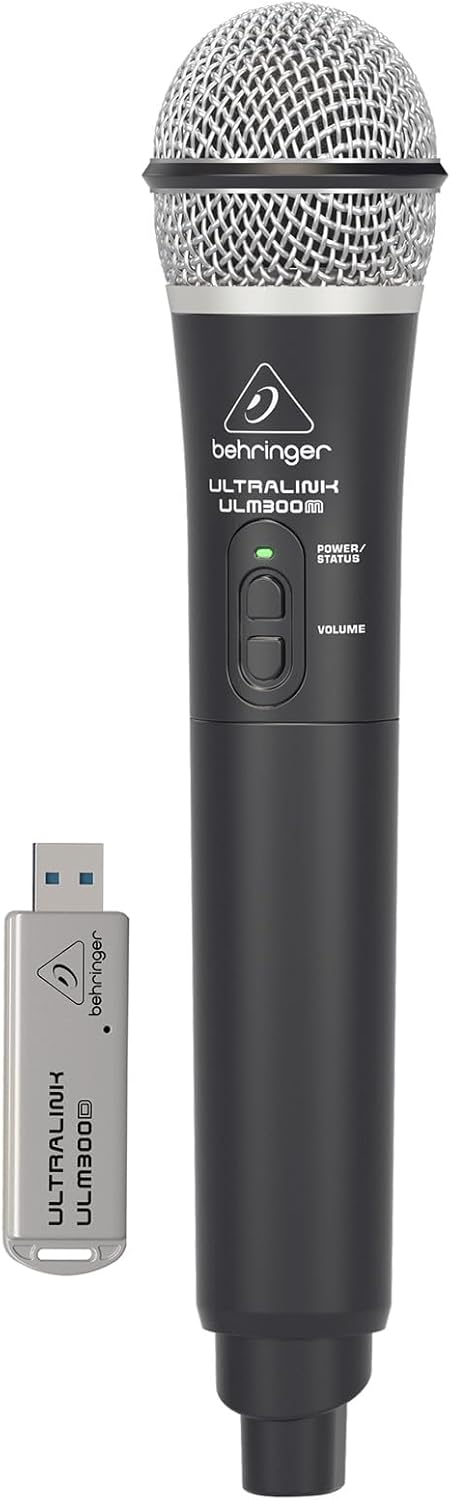
Image: The Behringer ULM300M wireless microphone shown with its USB receiver, the ULM300USB.
- Insert the ULM300USB receiver into the SISTEMA MINGĦAJR FILI USB port on the MPA200BT.
- Ensure the ULM300M wireless microphone has fresh batteries installed.
- Power on the wireless microphone. The status LED on both the microphone and the receiver should indicate a successful connection (usually a solid green light).
- Adjust the microphone's volume using the controls on the microphone itself and the MPA200BT's input gain settings.
Kontroll mill-bogħod permezz tal-App tal-Ismartphone

Image: A smartphone screen showing the graphical user interface of the Behringer remote control application, used to manage the PA system settings.
The MPA200BT can be controlled remotely using a dedicated smartphone application. This allows for adjustments to volume, EQ, and effects from a distance.
- Download the official Behringer MPA200BT control app from your device's app store (iOS/Android).
- Ensure your smartphone is connected to the MPA200BT via Bluetooth (as described in the "Bluetooth Audio Streaming" section).
- Open the app. It should automatically detect and connect to your MPA200BT unit.
- Use the app's interface to control various parameters of the PA system.
Operazzjoni tal-batterija
The MPA200BT features an internal rechargeable battery for portable use.
- The battery charges automatically when the unit is connected to AC power.
- A battery level indicator on the display shows the remaining charge.
- For optimal battery life, fully charge the unit before its first use and periodically when not in use for extended periods.
Manutenzjoni
- Tindif: Uża drapp artab u niexef biex tnaddaf il-barra tal-unità. Tużax prodotti tat-tindif jew solventi li joborxu.
- Ħażna: When not in use, store the MPA200BT in a cool, dry place, away from direct sunlight and extreme temperatures.
- Kura tal-batterija: If storing for extended periods, ensure the battery is partially charged (around 50%) and recharge it every few months to prevent deep discharge.
- Ventilazzjoni: Ensure that the ventilation openings are not obstructed during operation to prevent overheating.
Issolvi l-problemi
| Problema | Kawża Possibbli | Soluzzjoni |
|---|---|---|
| Ebda qawwa | Power cable not connected; unit not switched on; battery depleted. | Check power cable connection; ensure power switch is ON; charge battery. |
| Ebda output tal-ħoss | Volume too low; input source not connected or selected; faulty cable; microphone off. | Increase master volume and input gain; check input connections; test cables; ensure microphone is powered on and paired. |
| Tqabbil Bluetooth ifalli | MPA200BT not in pairing mode; device too far; interference. | Press Bluetooth button to enter pairing mode; move device closer; restart both devices. |
| Il-mikrofonu mingħajr fili mhux qed jaħdem | USB receiver not connected; microphone off; depleted batteries in microphone; interference. | Ensure ULM300USB is fully inserted; power on microphone; replace microphone batteries; ensure clear line of sight. |
| Squealing/Feedback | Mikrofonu qrib wisq tal-ispiker; qligħ tal-mikrofonu għoli wisq. | Move microphone further from speaker; reduce microphone input gain. |
Speċifikazzjonijiet
| Karatteristika | Dettall |
|---|---|
| Mudell | EUROPORT MPA200BT |
| Output Wattage | 200 Watts |
| Sors tal-Enerġija | Battery Powered / AC Power |
| Teknoloġija tal-Konnettività | Bluetooth |
| Numru ta 'Kanali | 2 |
| Piż tal-oġġett | 12.1 kg (26.6 lbs) |
| Dimensjonijiet tal-Prodott (L x W x H) | 11.02 x 10.11 x 16.53 pulzieri |
| Tip ta 'Immuntar | Mejda |
| Apparati Kompatibbli | Smartphone |
| Manifattur | Tribù tal-Mużika tal-Istati Uniti |
Garanzija u Appoġġ
Għal informazzjoni dettaljata dwar il-garanzija u appoġġ tekniku, jekk jogħġbok irreferi għall-paġna uffiċjali ta' Behringer webis-sit jew ikkuntattja s-servizz tal-konsumatur tagħhom. Żomm l-irċevuta tax-xiri tiegħek bħala prova tax-xiri.
Riżorsi onlajn: www.behringer.com
Manifattur: Tribù tal-Mużika tal-Istati Uniti
Vidjows Uffiċjali tal-Prodott
No relevant official product videos from the seller were found in the provided data for embedding.


