1. Introduzzjoni
This user manual provides essential information for the safe and efficient operation of your VOLT Micro UPS 800VA 480W Uninterruptible Power Supply. Please read this manual thoroughly before installation and use, and retain it for future reference. The UPS is designed to provide backup power to connected electronic devices during power outages, protecting them from data loss and hardware damage.
2. Istruzzjonijiet tas-Sigurtà
Always observe the following safety precautions to prevent injury and damage to the UPS or connected equipment:
- Tiftaħx il-UPS casing. Ġewwa m'hemm l-ebda partijiet li jistgħu jiġu rranġati mill-utent. Irreferi għal kull manutenzjoni għand persunal tas-servizz kwalifikat.
- Do not operate the UPS in environments with excessive dust, humidity, or extreme temperatures.
- Kun żgur li l-UPS huwa konness ma' sokit tal-enerġija ertjat.
- Do not connect appliances that draw high current, such as laser printers, heaters, or vacuum cleaners, to the UPS output.
- Position the UPS in a well-ventilated area, away from direct sunlight or heat sources.
- F'każ ta' nar, uża apparat tat-tifi tan-nar b'sustanza kimika niexfa. L-ilma jista' jikkawża xokk elettriku.
- Il-batterija interna ma tistax tiġi sostitwita mill-utent. Ikkuntattja persunal tas-servizz kwalifikat biex tissostitwixxi l-batterija.
3. Kontenut tal-Pakkett
Ivverifika li l-oġġetti kollha huma preżenti fil-pakkett:
- VOLT Micro UPS 800VA 480W 9Ah Unit
- 1 x USB Type B to USB Type B Cable
- 1 x Power Cord for Peripheral/Computer Connection
- 1 x CD with UPSILON 2000 Software
- 1 x Manwal tal-Utent (dan id-dokument)
4. Prodott Aktarview
The VOLT Micro UPS 800VA 480W features a compact design with an intuitive LCD display for monitoring operational status.
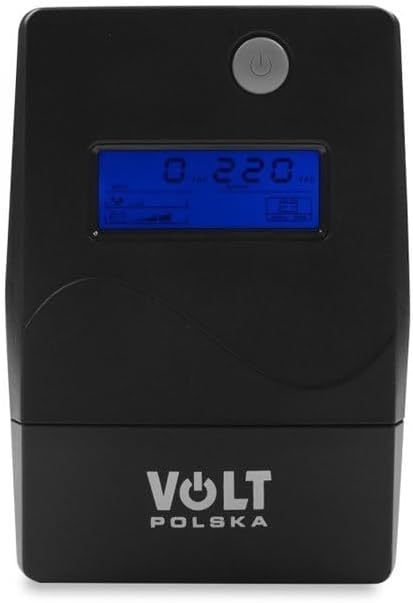
Figura 4.1: Quddiem view of the VOLT Micro UPS 800VA 480W, showing the power button and the LCD screen which displays real-time operational parameters.

Figura 4.2: Ġenb view of the UPS unit, illustrating its compact form factor and potential ventilation grilles.

Figura 4.3: Wara view of the UPS, highlighting the various input and output connection ports for devices and power.
4.1. LCD Display Informazzjoni
The LCD display provides real-time status updates:
- Input Voltage: Juri l-volum kurrentitage from the utility power.
- Ħruġ Voltage: Juri l-voltage fornuta mill-UPS lil apparati konnessi.
- Status tal-batterija: Jindika l-livell ta 'ċarġ tal-batterija interna.
- Livell tat-Tagħbija: Juri l-perċentwalitage tal-kapaċità tal-UPS li qed tintuża minn apparati konnessi.
- Modalità Operattiva: Indicates whether the UPS is operating on utility power, battery power, or in bypass mode.
5. Setup
5.1. Żpakkjar u Pożizzjonament Inizjali
- Neħħi l-UPS mill-imballaġġ tiegħu bir-reqqa.
- Place the UPS on a flat, stable surface in a well-ventilated area, away from direct sunlight, heat, and moisture.
- Kun żgur li hemm biżżejjed spazju madwar l-unità għal fluss tal-arja xieraq.
5.2. Iċċarġjar Inizjali
Before initial use, connect the UPS to a standard wall outlet and allow it to charge for at least 6 hours without any load. This ensures the internal battery is fully charged and ready to provide optimal backup time.
5.3. Tagħmir li Jqabbad
- Connect the UPS to a grounded wall outlet using the provided power cord.
- Plug your computer, monitor, and other critical electronic devices into the output sockets on the rear of the UPS. Ensure the total power consumption does not exceed the UPS's 480W capacity.
- For communication with your computer, connect the USB Type B to USB Type B cable from the UPS to an available USB port on your computer.
5.4. Software Installation (UPSILON 2000)
The included CD contains the UPSILON 2000 monitoring software. Install this software on your computer to enable advanced features such as:
- Real-time monitoring of UPS status.
- Scheduled shutdown of connected devices during extended power outages.
- Customizable alerts and notifications.
Follow the on-screen instructions provided by the software installer.
6. Istruzzjonijiet Operattivi
6.1. Tixgħel/Titfi l-UPS
- Biex Tixgħel: Agħfas u żomm il-buttuna tal-qawwa fuq il-pannell ta' quddiem għal madwar 3 sekondi sakemm tisma' ħoss ta' ħoss u d-displej LCD jixgħel.
- Biex Tintefa: Agħfas u żomm il-buttuna tal-qawwa għal madwar 3 sekondi sakemm l-UPS jintefa.
6.2. Operazzjoni Normali
When connected to utility power, the UPS will charge its battery and provide conditioned power to your connected devices. The LCD will display input/output voltage, battery status, and load level.
6.3. Battery Mode Operation
Fil-każ ta' qawwa outage, the UPS will automatically switch to battery mode, providing uninterrupted power to your connected devices. An audible alarm will sound, and the LCD will indicate battery operation. The duration of battery backup depends on the load connected.
6.4. Twissija ta' Tagħbija Eċċessiva
If the connected load exceeds the UPS's capacity (480W), an overload warning will be displayed on the LCD, and an alarm will sound. Immediately disconnect non-essential equipment to prevent damage to the UPS.
7. Manutenzjoni
7.1. Kura tal-batterija
- To maximize battery life, ensure the UPS is always connected to a power source to keep the battery charged.
- Evita skarika profonda frekwenti.
- If the UPS is to be stored for an extended period, fully charge it, then disconnect it from the power source. Recharge every 3 months to prevent battery degradation.
7.2. Tindif
Periodically clean the exterior of the UPS with a soft, dry cloth. Do not use liquid or aerosol cleaners, as they may contain flammable substances or cause electrical shock.
8 Issolvi l-problemi
Irreferi għat-tabella t'hawn taħt għal kwistjonijiet komuni u s-soluzzjonijiet tagħhom:
| Problema | Kawża Possibbli | Soluzzjoni |
|---|---|---|
| L-UPS ma jixgħelx | Battery discharged; Power cord not connected | Connect to utility power and charge for 6 hours; Ensure power cord is securely connected. |
| UPS beeps continuously in normal mode | Kondizzjoni ta 'tagħbija żejda | Disconnect non-essential equipment until the alarm stops. |
| Ħin qasir ta' backup | Battery not fully charged; Battery nearing end of life; Excessive load | Charge UPS for 6 hours; Reduce connected load; Consider battery replacement by qualified personnel. |
| UPS does not provide power during outage | UPS not turned on; Battery completely discharged | Ensure UPS is turned on; Allow UPS to charge fully. |
9. Speċifikazzjonijiet
| Karatteristika | Speċifikazzjoni |
|---|---|
| Brand | Volt Polska |
| Numru tal-Mudell | 5UP0800090 |
| Qawwa Nominali | 480 Watts |
| Qawwa apparenti | 800 VA |
| Input/Output Voltage | 230 Volts |
| Batterija Ampetà | 9 A |
| Kapaċità tal-batterija | 9 Ah |
| Batterija Rikarikabbli | Iva |
| Forma tal-mewġ (Modalità Batterija) | Approximation of sine wave |
| Charge Time (to 90%) | 6 sigħat |
| Dimensjonijiet (LxWxH) | 298 x 101 x 142 mm |
| Piż tal-oġġett | 4.9 Kilogrammi |
| Kulur | Iswed |
10. Garanzija u Appoġġ
For warranty information, please refer to the documentation provided at the time of purchase or contact your retailer. For technical support or service inquiries, please contact Volt Polska customer service through their official webis-sit jew id-dettalji ta' kuntatt ipprovduti mal-prodott tiegħek.


