Introduzzjoni
Grazzi tax-xiriasing the MUSKY DY 28 Plus Bluetooth Speaker Night Light. This versatile device combines a high-fidelity Bluetooth speaker, a multi-level adjustable LED night light, and an alarm clock function. It is designed for both indoor and outdoor use, offering portable audio and lighting solutions. Please read this manual carefully before use to ensure proper operation and to maximize the product's lifespan.
Informazzjoni dwar is-Sigurtà
- Tesponix l-apparat għal temperaturi estremi, dawl tax-xemx dirett, jew umdità għolja.
- Keep the device away from water and other liquids, despite its waterproof rating, to prevent damage to internal components.
- Tiżżarmax, issewwiex, jew timmodifikax l-apparat int stess. Irreferi kull manutenzjoni lil persunal kwalifikat.
- Uża biss il-kejbil tal-iċċarġjar provdut jew wieħed ekwivalenti ċċertifikat.
- Żomm fejn ma jintlaħaqx mit-tfal.
Kontenut tal-Pakkett
Jekk jogħġbok iċċekkja l-pakkett għall-oġġetti li ġejjin:
- MUSKY DY 28 Plus Bluetooth Speaker Night Light
- Cable tal-Iċċarġjar tal-USB
- Cable Awdjo 3.5mm (Kejbil AUX)
- Manwal għall-Utent
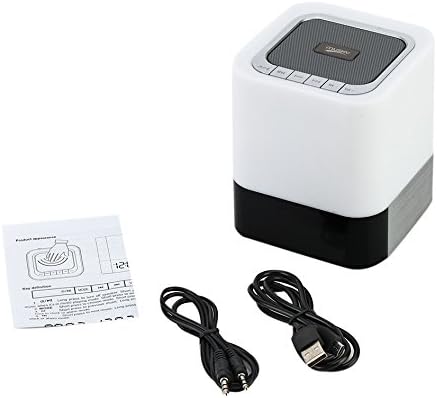
Image: The MUSKY DY 28 Plus speaker, along with its USB charging cable, 3.5mm audio cable, and user manual.
Prodott Overview
Familiarize yourself with the various parts and controls of your MUSKY DY 28 Plus speaker.

Image: A detailed diagram showing the front and top views of the speaker with labels for its buttons, ports, and features, including Power On/Off, Charging Port, Aux input, USB Input, Micro SD Slot, Touch Sensor, Play/Pause, Previous, Volume Down, Mode, Next, and Volume Up buttons.
Kontrolli u Portijiet:
- Buttuna mixgħul/mitfi: Located on the side, used to turn the device on or off.
- Charging Port (USB DC): Għall-konnessjoni tal-kejbil tal-iċċarġjar USB.
- Input AUX: Jack ta' 3.5mm għal konnessjoni awdjo bil-fili.
- USB Input (USB HOST): Għad-daqq tal-mużika minn flash drive USB.
- Slott Mikro SD: For playing music from a Micro SD card (TF card).
- Touch Sensor: Located on the top metal cover, used to adjust light brightness.
- Buttuna Play/Pause: To control music playback.
- Buttuna Preċedenti/Volum 'l isfel: Agħfas qasir għat-trakka ta' qabel, agħfas twil biex tnaqqas il-volum.
- Buttuna Li Jmiss/Volum 'il Fuq: Agħfas qasir għat-trakka li jmiss, agħfas twil biex tgħolli l-volum.
- Buttuna tal-Modalità: To switch between Bluetooth, AUX, TF card, and USB modes.
Setup
1. Iċċarġjar tal-Apparat
Before first use, fully charge the speaker. Connect the provided USB charging cable to the USB DC port on the speaker and the other end to a USB power adapter (not included) or a computer's USB port. The charging indicator light will show the charging status.
- A full charge provides approximately 6-8 hours of music playback or 10 hours of lighting time.
2. Tixgħil / Mitfi
- To turn on, slide the Power On/Off switch to the "ON" position.
- To turn off, slide the Power On/Off switch to the "OFF" position.
Istruzzjonijiet Operattivi
1. Modalità Bluetooth
The speaker uses advanced Bluetooth 4.0 technology for seamless wireless connection.
- Ixgħel l-ispiker. Dan jidħol awtomatikament fil-modalità ta' tqabbil Bluetooth, indikat minn dawl LED li jteptep.
- Ippermetti l-Bluetooth fuq l-ismartphone, it-tablet, jew apparat ieħor li jaħdem bil-Bluetooth tiegħek.
- Fittex għal "DY 28 Plus" in the list of available devices and select it to pair.
- Once successfully paired, the speaker will emit a confirmation sound, and the LED light will stop flashing.
- You can now play music wirelessly from your device.

Image: The MUSKY DY 28 Plus speaker displaying the time, with various smartphones floating above it, illustrating its compatibility with Bluetooth-enabled devices for wireless music playback.
2. MP3 Player Mode (TF Card / U Disk / AUX)
The speaker supports playing music directly from a TF card (Micro SD), U disk (USB flash drive), or via a 3.5mm AUX cable.

Image: A close-up of the MUSKY DY 28 Plus speaker's side panel, highlighting the Micro SD, USB HOST, AUX, and USB DC ports, with a USB stick and a 3.5mm audio cable connected, demonstrating its MP3 player capabilities.
- TF Card / U Disk: Insert a TF card (up to 32GB) or a U disk into the respective slot. The speaker will automatically detect the storage device and begin playing MP3/WAV/WMA format files. Use the "Mode" button to switch to this input if it doesn't auto-detect.
- Input AUX: Connect one end of the 3.5mm audio cable to the AUX port on the speaker and the other end to the audio output jack of your device (e.g., smartphone, laptop). The speaker will automatically switch to AUX mode.
3. Light Function (Night Light)
The integrated LED light offers three levels of brightness, controlled by the touch sensor.
- Gently tap the metal cover on the top of the speaker to turn on the light to its dimmest setting.
- Tap again to switch to the intermediate brightness level.
- Tap a third time for the brightest setting.
- Tap a fourth time to turn the light off.
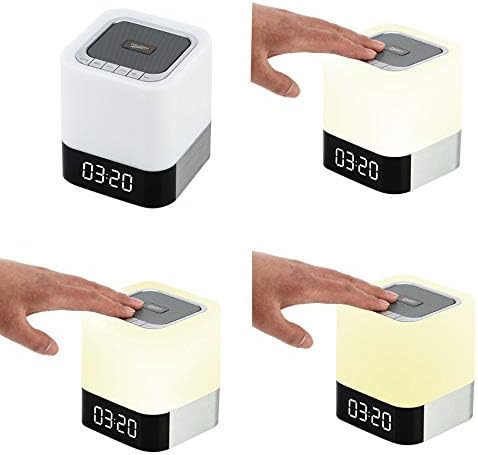
Image: A sequence of four images demonstrating the touch-controlled light function of the MUSKY DY 28 Plus speaker, showing the light off, then progressively increasing in brightness from dim to intermediate to bright with each tap on the top surface.
4. Funzjoni tal-Arloġġ tal-Allarm
Set an alarm and even customize your alarm sound.
- L-issettjar tal-allarm: Refer to the specific instructions in the included quick start guide for detailed steps on setting the time and alarm. (Note: Specific button presses for alarm setting are not detailed in the provided product description, so a general reference is made.)
- Custom Alarm Sound: To use your favorite song as an alarm, create a folder named 'ALARM' on your TF card or U disk. Place your desired MP3/WAV/WMA alarm file inside this folder. Insert the TF card or U disk into the speaker, and it will automatically use your custom alarm sound instead of the default.
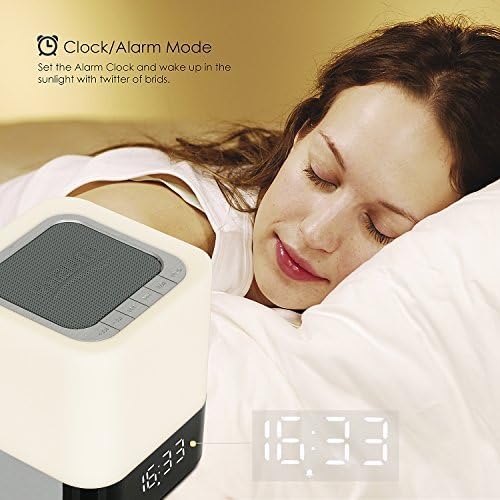
Image: The MUSKY DY 28 Plus speaker displaying the time, positioned on a bedside table next to a person sleeping, illustrating its use as an alarm clock.
5. Sejħiet mingħajr idejn
When connected via Bluetooth, the speaker can be used for hands-free phone calls.
- Tweġiba/Tmiem Sejħiet: Press the Play/Pause button to answer an incoming call or to end an ongoing call.
- Ċaħda ta 'Sejħiet: Agħfas fit-tul il-buttuna Play/Pause biex tirrifjuta telefonata li dieħla.
Manutenzjoni
- Tindif: Uża drapp artab u niexef biex tnaddaf il-wiċċ tal-ispiker. Tużax prodotti tat-tindif jew solventi li joborxu.
- Ħażna: Meta ma tkunx qed tużah għal perjodi twal, aħżen l-ispiker f'post frisk u niexef 'il bogħod mix-xemx diretta u minn temperaturi estremi.
- Kura tal-batterija: Biex ittawwal il-ħajja tal-batterija, evita li tiċċarġja kompletament il-batterija ta' spiss. Iċċarġja l-apparat regolarment, anke jekk ma jkunx qed jintuża.
Issolvi l-problemi
| Problema | Kawża Possibbli | Soluzzjoni |
|---|---|---|
| L-ispeaker ma jixgħelx. | Il-batterija hija baxxa jew eżawrita. | Iċċarġja l-ispiker kompletament. |
| Ma tistax tgħaqqad ma' apparat Bluetooth. | Speaker is not in pairing mode; device is too far; Bluetooth is off on source device. | Ensure speaker is in pairing mode (flashing LED). Move device closer. Turn on Bluetooth on your source device. Forget "DY 28 Plus" on your device and try pairing again. |
| L-ebda ħoss mill-ispiker. | Volume is too low; incorrect mode selected; audio cable not fully inserted. | Increase volume on both speaker and source device. Press the "Mode" button to select the correct input (Bluetooth, AUX, TF, USB). Ensure cables are securely connected. |
| Il-funzjoni tad-dawl mhux qed taħdem. | Battery is low; touch sensor not activated correctly. | Charge the speaker. Ensure you are tapping the metal cover on the top of the speaker. |
| Custom alarm not playing. | Incorrect folder name or file format; TF card/U disk not inserted. | Ensure the folder is named 'ALARM' and the file is MP3/WAV/WMA. Verify the TF card or U disk is properly inserted. |
Speċifikazzjonijiet
| Karatteristika | Dettall |
|---|---|
| Numru tal-Mudell | DY-28 Plus |
| Brand | MUSKY |
| Teknoloġija tal-Konnettività | Bluetooth 4.0 |
| Firxa Wireless | Sa 30 pied (madwar 9 metri) |
| Modalità tal-Ħruġ tal-Awdjo | Stereo |
| Qawwa tal-Ħruġ Massimu tal-Ispeaker | 10 Watts |
| Kapaċità tal-batterija | 4000mAh |
| Ħin ta 'Daqq tal-Mużika | 6-8 sigħat (madwar) |
| Ħin tad-Dawl | 10 siegħa (appross.) |
| Formati Awdjo Appoġġjati | MP3, WAV, WMA |
| Appoġġ għall-Karta TF | Sa 32GB |
| Apparati Kompatibbli | Laptop, Pillola, Smartphone |
| Materjal | Plastik |
| Dimensjonijiet tal-Prodott (L x W x H) | 10.01 x 10.01 x 11 ċm (madwar 4 x 4 x 4.3 pulzieri) |
| Piż tal-oġġett | 558 Gramma (madwar 1.23 libbra) |
| Waterproof | Yes (as per specifications, but general caution advised) |
Garanzija u Appoġġ
This product is covered by a standard manufacturer's warranty. For detailed warranty terms and conditions, please refer to the warranty card included with your purchase or contact the retailer. For technical support or customer service inquiries, please reach out to the MUSKY customer support team through the contact information provided on the product packaging or the official MUSKY websit.


