1. Introduzzjoni u Fuqview
The Denon AVR-S540BT is a 5.2 channel AV receiver designed to deliver an immersive home theater experience. It supports 4K Ultra HD video with advanced technologies like HLG (Hybrid Log-Gamma), HDR (High Dynamic Range), BT.2020, Wide Color Gamut, and 4:4:4 Pure Color sub-sampling, ensuring exceptional brightness, contrast, and color for your 4K TV.
Equipped with 5 powerful amplifiers, each delivering 140W per channel, this receiver provides dynamic and realistic sound across any room. It features built-in Bluetooth for wireless music streaming from up to eight different smart devices. For an integrated multi-room audio system, the AVR-S540BT is compatible with Denon HEOS Link, allowing playback from various digital streaming services.
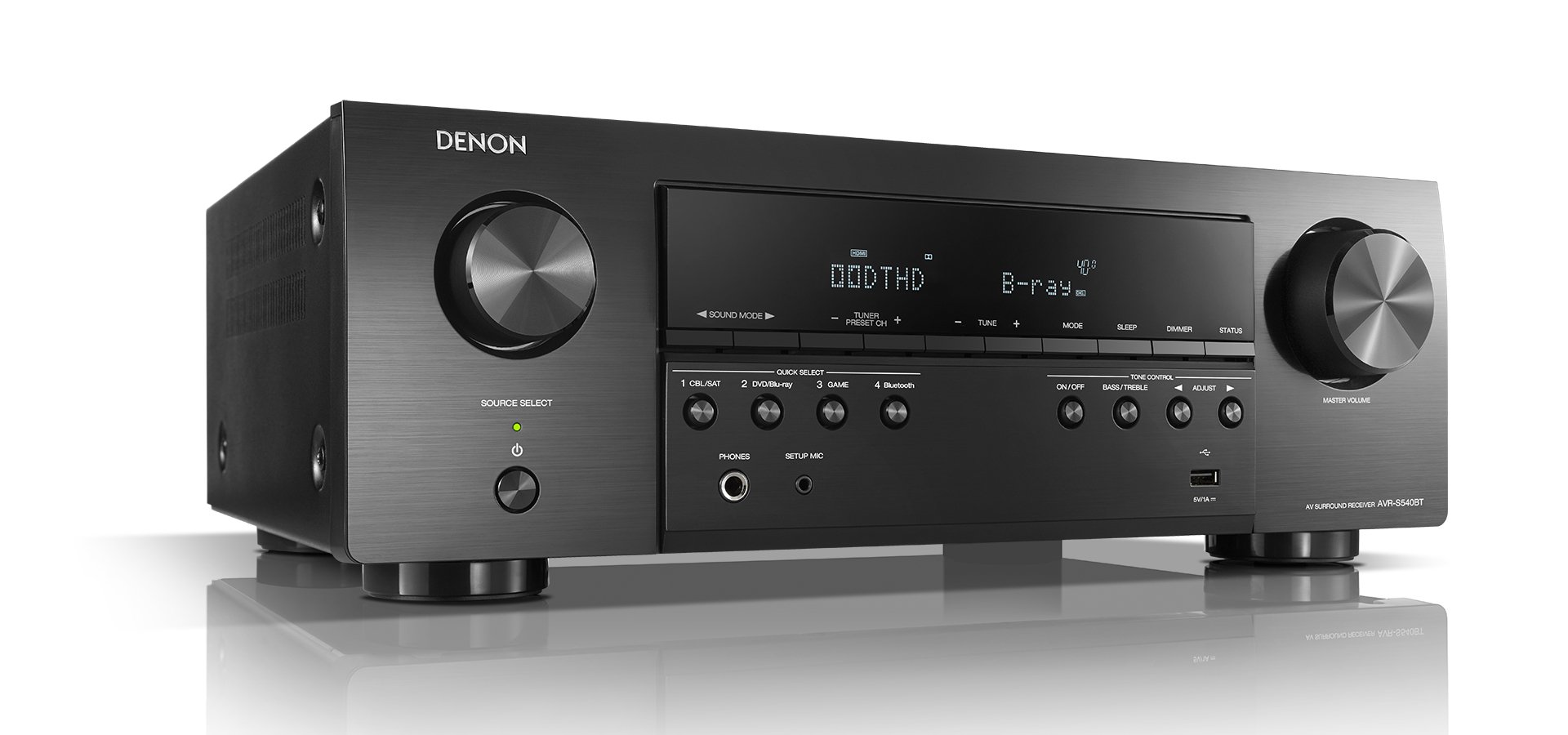
User-friendly features include an easy On-Screen Setup Assistant that guides you through connecting your TV and optimizing surround sound settings. Four Quick Select Buttons on the front panel allow you to store and quickly switch between preferred audio settings for different sources like television or Blu-Ray. The receiver can also be controlled using your Smart TV remote or the Denon 500 Series Remote app for iOS and Android devices.
2. X'hemm fil-Kaxxa
- Gwida Quick Start
- Kontrollur mill-bogħod
- Setup Mikrofonu
- Antenna FM
- AM Antenna
- 2 x Batteriji AA
3. Setup
Before connecting any components, ensure the receiver is powered off and unplugged. It is recommended to connect the receiver to a television screen using an HDMI cable to utilize the On-Screen Setup Assistant for guided configuration.
3.1. Konnessjonijiet tal-Ispeaker
The AVR-S540BT supports a 5.2 channel speaker configuration. Connect your front (left/right), center, and surround (left/right) speakers to the corresponding terminals on the rear panel. If using subwoofers, connect them to the SUBWOOFER PRE OUT jacks. Ensure correct polarity (positive to positive, negative to negative) for all speaker connections.
3.2. Video and Audio Input Connections
Connect your video sources (e.g., Blu-ray player, game console, media player) to the HDMI IN ports. The receiver features 5 HDMI inputs compatible with 4K/HDCP2.2. Connect your TV to the HDMI OUT (MONITOR) port, which supports ARC/eARC for audio return from your TV.
For audio-only devices, use the analog AUDIO IN (RCA) ports or the digital audio inputs (optical or coaxial). Connect the supplied AM and FM antennas to their respective terminals for radio reception.
3.3. Assistent tas-Setup Inizjali
After all connections are made, power on the receiver and your TV. The On-Screen Setup Assistant will appear on your TV, guiding you through speaker calibration, network settings, and input assignments. Use the supplied setup microphone for automatic room EQ calibration to optimize sound performance for your listening environment.
4. Istruzzjonijiet Operattivi
4.1. Għażla tas-Sors
Use the 'SOURCE SELECT' knob on the front panel or the corresponding buttons on the remote control to switch between connected input sources (e.g., CBL/SAT, Media Player, Blu-ray, Game, Bluetooth).
4.2. Kontroll tal-Volum
Adjust the 'MASTER VOLUME' knob on the front panel or the Volume +/- buttons on the remote control to set the desired listening level.
4.3. Kontroll tat-Tone
The receiver includes basic tone controls. Use the 'BASS/TREBLE' buttons and 'ADJUST' buttons on the front panel to fine-tune the bass and treble levels to your preference.
4.4. Streaming Bluetooth
To stream audio via Bluetooth, select 'Bluetooth' as the input source. On your smart device, search for available Bluetooth devices and select 'Denon AVR-S540BT' to pair. Once paired, you can play audio from your device through the receiver.
4.5. Daqq USB
Connect a USB storage device to the front USB port to play audio files. Use the receiver's controls or remote to navigate and select tracks.
4.6. Denon 500 Series Remote App
Download the Denon 500 Series Remote app from the iOS App Store or Google Play Store to control the receiver from your smartphone or tablet. This app provides comprehensive control over input selection, volume, sound modes, and more.
5. Integrazzjoni tal-Midja
5.1. Stampi tal-Prodott


5.2. Vidjows Uffiċjali tal-Prodott
6. Manutenzjoni
To ensure optimal performance and longevity of your Denon AVR-S540BT, follow these maintenance guidelines:
- Tindif: Gently wipe the exterior surfaces with a soft, dry cloth. Avoid using abrasive cleaners, solvents, or chemical sprays, as these can damage the finish.
- Ventilazzjoni: Ensure adequate ventilation around the receiver. Do not block the ventilation openings on the top, sides, or rear panel. Allow sufficient space (at least 10 cm or 4 inches) above the unit for proper heat dissipation.
- Korda tal-Enerġija: Periodically check the power cord for any signs of damage. If damaged, discontinue use and contact Denon customer support.
- Konnessjonijiet: Occasionally check all cable connections to ensure they are secure. Loose connections can lead to signal degradation or intermittent issues.
7 Issolvi l-problemi
If you encounter issues with your Denon AVR-S540BT, refer to the following common troubleshooting steps:
- Ebda Qawwa: Ensure the power cord is securely plugged into both the receiver and a working electrical outlet. Check if the power indicator light is on.
- Ebda Ħsejjes: Verify that the correct input source is selected. Check all speaker connections for proper wiring and polarity. Ensure the volume is not muted or set too low. Confirm that your TV's audio output settings are correctly configured if using ARC/eARC.
- L-ebda Vidjo: Confirm that the correct HDMI input is selected on the receiver and your TV is set to the correct HDMI input for the receiver. Check all HDMI cable connections.
- Kwistjonijiet ta' Konnessjoni Bluetooth: Ensure the receiver is in Bluetooth pairing mode. Delete the receiver from your device's Bluetooth list and attempt to re-pair. Ensure your device is within range.
- Il-Kontroll mill-bogħod Mhux Jaħdem: Check and replace the batteries in the remote control. Ensure there are no obstructions between the remote and the receiver's remote sensor.
- Setup Assistant Issues: If the On-Screen Setup Assistant does not appear or freezes, try restarting the receiver and your TV. Ensure the HDMI connection to the TV is stable.
For more detailed troubleshooting or persistent issues, consult the full user manual or contact Denon customer support.
8. Speċifikazzjonijiet
| Dimensjonijiet tal-Prodott | 12.56 x 17.09 x 5.94 pulzieri |
| Piż tal-oġġett | 16.8 liri |
| Numru tal-Mudell tal-Oġġett | AVRS540BT |
| Batteriji | 2 batteriji AA meħtieġa (inklużi) |
| Data L-Ewwel Disponibbli | 12 ta’ April, 2018 |
| Manifattur | Denon |
| Teknoloġija tal-Konnettività | Bluetooth |
| Tip ta' Kontrollur | Android, iOS |
| Apparati Kompatibbli | Television, Smartphone, Speaker, Personal Computer |
| Portijiet HDMI totali | 5 |
| Tip ta' Konnettur | HDMI, USB |
| Kodifikazzjoni Awdjo | Stereo |
| Modalità tal-Ħruġ tal-Awdjo | Stereo, Surround |
| Surround Sound Channel Konfigurazzjoni | 5.1 |
| Kodifikazzjoni tal-vidjo | H.264, H.265/HEVC |
9. Garanzija u Appoġġ
The Denon AVR-S540BT comes with a 2-year limited warranty. For warranty claims, technical support, or service inquiries, please refer to the contact information provided in your Quick Start Guide or visit the official Denon websit.
Proposition 65 Warning: This product may contain chemicals known to the State of California to cause cancer and birth defects or other reproductive harm. For more information, please visit www.p65warnings.ca.gov.


