1. Introduzzjoni
The Edifier M3600D is a high-performance 2.1 active speaker system designed for multimedia use. Featuring THX certification and a total RMS output of 200 Watts, this system delivers powerful and clear audio. It includes a robust subwoofer and two satellite speakers, offering versatile connectivity options for various audio sources.
2. X'hemm fil-Kaxxa
- 1 x Subwoofer
- 2 x Kelliema tas-Satellita
- 1 x Kejbil tal-Enerġija
- Connecting Cables (for satellites and audio input)
- 1 x Manwal għall-Utent
3. Setup
Follow these steps to set up your Edifier M3600D speaker system:
- Pjazzament: Position the subwoofer on the floor, ideally near a wall for enhanced bass. Place the satellite speakers on either side of your listening area, ensuring they are equidistant from you for optimal stereo imaging.
- Qabbad l-Ispeakers tas-Satellita: Connect the right and left satellite speakers to the corresponding output ports on the rear of the subwoofer using the provided cables. The right satellite speaker typically features the volume control and input selection.
- Qabbad is-Sors tal-Awdjo: Choose your preferred audio input method (Optical, Coaxial, Line In, or AUX) and connect the appropriate cable from your audio source (e.g., computer, TV, smartphone) to the subwoofer's input ports.
- Konnessjoni tal-Enerġija: Plug the power cable into the subwoofer's power input, then connect it to a wall outlet.
- Qawwa Mixgħul: Turn on the power switch located on the rear of the subwoofer. The system is now ready for operation.

Figure 3.1: Edifier M3600D Multimedia 2.1 Active Speaker System. This image shows the main subwoofer unit alongside the two satellite speakers, illustrating the complete system setup.
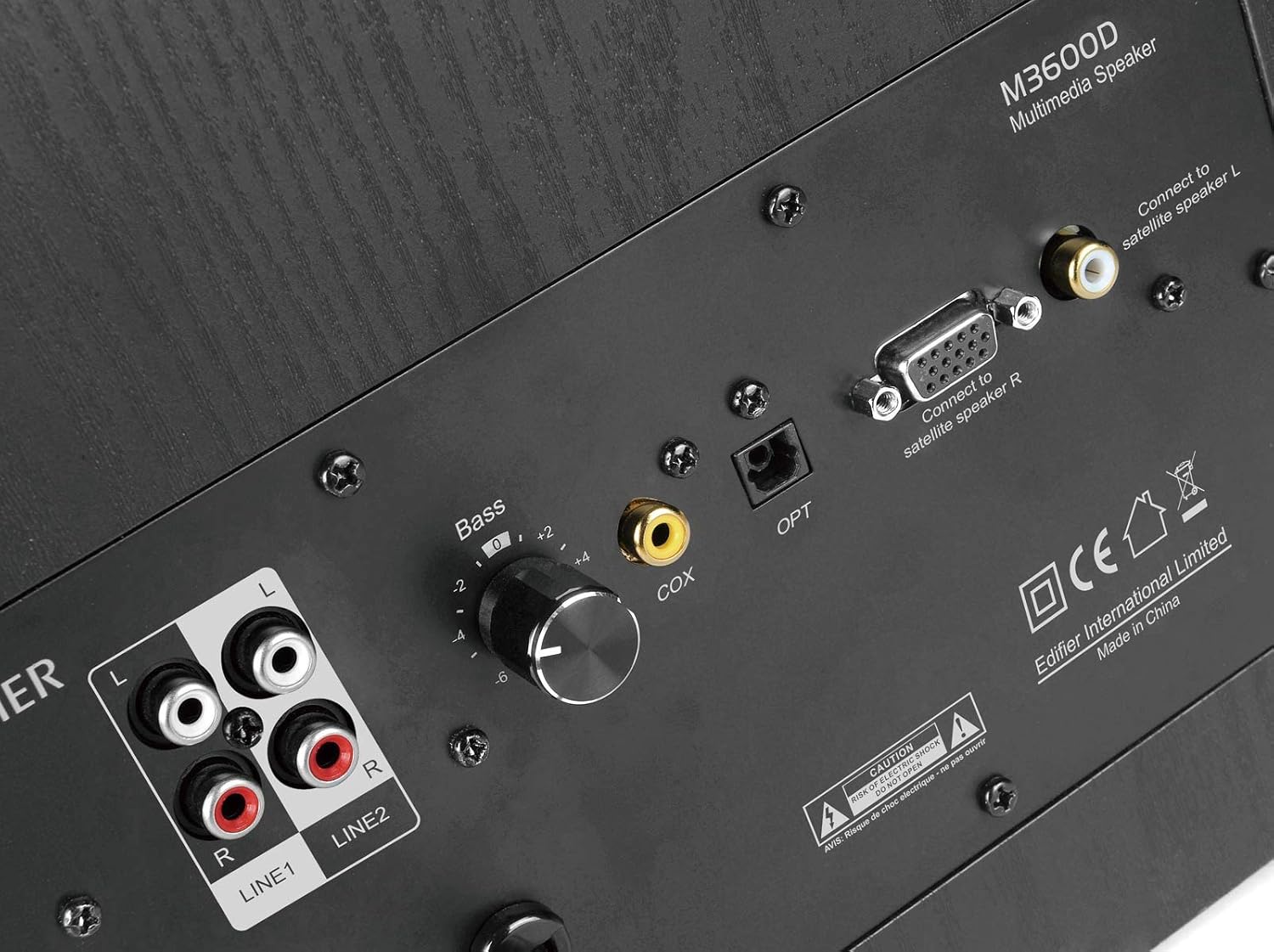
Figure 3.2: Rear panel of the M3600D subwoofer. This image highlights the various input ports (Line In 1, Line In 2, Coaxial, Optical) and the output connections for the satellite speakers, along with the bass control knob and power switch.
4. Istruzzjonijiet Operattivi
Once the system is set up, follow these instructions for operation:
- Power On/Off: Use the main power switch on the rear of the subwoofer to turn the system on or off.
- Kontroll tal-Volum: The large rotary dial on the front of the right satellite speaker controls the master volume. Rotate clockwise to increase volume and counter-clockwise to decrease it.
- Għażla tal-Input: Press the volume dial on the right satellite speaker to cycle through the available audio inputs (Optical, Coaxial, Line In 1, Line In 2, AUX). An indicator light will show the currently selected input.
- Aġġustament tal-bass: Use the 'Bass' control knob located on the rear panel of the subwoofer to adjust the bass level to your preference.
- Ħruġ tal-headphones: A 3.5mm headphone jack is available on the right satellite speaker for private listening. Plugging in headphones will mute the speakers.
5. Konnettività
The M3600D offers multiple connectivity options:
- Input Ottiku (OPT): For high-quality digital audio connection from devices like TVs, game consoles, or Blu-ray players.
- Coaxial Input (COX): Another digital audio input option, suitable for similar devices as the optical input.
- Linja In 1 (RCA): Stereo RCA input for connecting devices with RCA audio outputs.
- Linja In 2 (RCA): Additional stereo RCA input for another audio source.
- Input AUX (3.5mm): A standard 3.5mm auxiliary input for connecting smartphones, tablets, laptops, or MP3 players.
Nota: This system does not support Bluetooth connectivity. For wireless audio, an external Bluetooth adapter would be required (not included).
6. Speċifikazzjonijiet
| Karatteristika | Speċifikazzjoni |
|---|---|
| Isem tal-Mudell | M3600D |
| Tip ta' Kelliem | Sistema ta' Kelliema Multimedjali 2.1 (Subwoofer) |
| Potenza Totali | 200 Watts RMS (Subwoofer: 130W, Satellites: 2 x 35W) |
| Ċertifikat THX | Iva |
| Materjal | Wood (MDF cabinet with vinyl wood grain laminate) |
| Inputs | Optical, Coaxial, Line In (RCA x2), AUX (3.5mm) |
| Metodu ta' Kontroll | Rotary Volume/Input Dial (on satellite), Bass Knob (on subwoofer) |
| Dijametru tas-Subwoofer | 7 Centimeters (Woofer Diameter) |
| Daqs tas-Sewwieq tal-Awdjo | 17.78 Ċentimetru |
| Kulur | Iswed |
| Dimensjonijiet tal-Prodott | 12 x 16.75 x 11 pulzieri |
| Piż tal-oġġett | 21 Liri |
| Apparati Kompatibbli | Smartphone, Tablet, Desktop, Laptop, MP3 Player, Television, Projector |
7 Issolvi l-problemi
If you encounter issues with your M3600D speaker system, please refer to the following common troubleshooting steps:
- Ebda Ħsejjes:
- Ensure the power cable is securely connected and the power switch on the subwoofer is ON.
- Verify that the correct input source is selected on the right satellite speaker.
- Check all audio cables for secure connections between the source, satellites, and subwoofer.
- Increase the volume on both the speaker system and your audio source.
- If using headphones, ensure they are unplugged from the satellite speaker.
- Ħoss Mgħawġ:
- Naqqas il-volum kemm fuq is-sistema tal-ispikers kif ukoll fuq is-sors tal-awdjo tiegħek.
- Check if the audio source itself is producing distorted sound. Try a different source.
- Kun żgur li l-kejbils kollha huma konnessi sew u mhux bil-ħsara.
- Aġġusta l-pum tal-kontroll tal-bass fuq is-subwoofer.
- Ħoss intermittenti:
- Iċċekkja għal konnessjonijiet tal-kejbil maħlula.
- Ensure there are no strong electromagnetic interferences near the speakers.
- Try a different audio cable or input source to isolate the problem.
If the issue persists after trying these steps, please contact Edifier customer support.
8. Manutenzjoni
To ensure the longevity and optimal performance of your Edifier M3600D speaker system, follow these maintenance guidelines:
- Tindif: Uża drapp artab u niexef biex tnaddaf l-uċuħ tal-ispikers u s-subwoofer. Evita li tuża prodotti tat-tindif, xama’ jew solventi li joborxu.
- Pjazzament: Place the speakers on a stable, level surface to prevent accidental falls. Avoid placing them in direct sunlight, near heat sources, or in areas with high humidity or dust.
- Ventilazzjoni: Aċċerta ruħek li jkun hemm ventilazzjoni adegwata madwar is-subwoofer biex tevita li jkun hemm sħana żejda. Timblokkax xi fetħiet tal-ventilazzjoni.
- Ġestjoni tal-Kejbil: Żomm il-kejbils organizzati u ħielsa minn brim jew tensjoni eċċessiva biex tevita l-ħsara.
- Qawwa Mitfi meta ma tkunx qed tintuża: For extended periods of inactivity, it is recommended to turn off the system using the main power switch.
9. Garanzija u Appoġġ
The Edifier M3600D Multimedia 2.1 Active Speaker System comes with a Garanzija limitata ta 'sena. This warranty covers manufacturing defects and ensures hassle-free full replacement in the USA and Canada.
For warranty claims, technical assistance, or further inquiries, please contact Edifier USA customer support. Refer to the official Edifier webis-sit jew l-informazzjoni ta' kuntatt ipprovduta fl-imballaġġ tal-prodott tiegħek għall-aktar dettalji ta' appoġġ aġġornati.