1. Introduzzjoni
This manual provides essential information for the installation, operation, and maintenance of your Schlage S-6800 Digital Touchpad Door Lock. The S-6800 is designed to enhance home security with multiple access methods, including fingerprints, PIN codes, RFID cards, FOBS, and a traditional manual key override.
Schlage has a long-standing reputation for creating advanced security products. The S-6800 combines modern design with convenient features to offer a secure and flexible entry solution for your home.
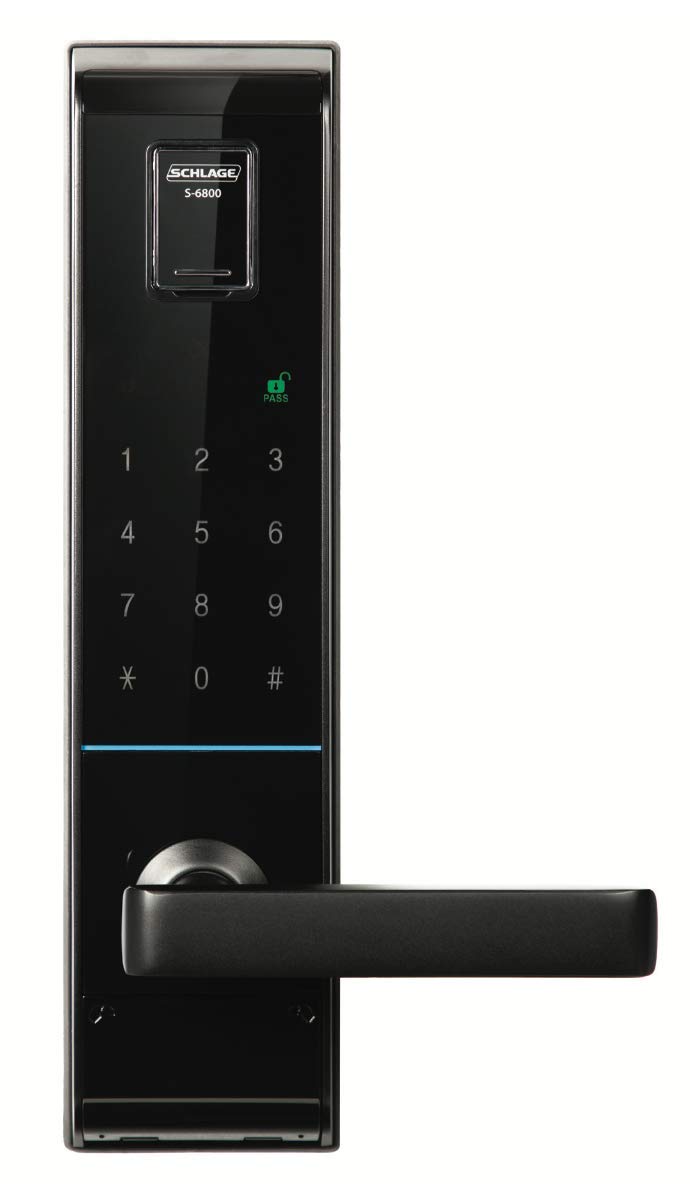
Figure 1: Schlage S-6800 Digital Touchpad Door Lock installed.
2. Komponenti tal-Prodott
The Schlage S-6800 Digital Touchpad Door Lock system includes the following main components:
- Exterior Lock Unit with Touchpad and Fingerprint Reader
- Interior Lock Unit with Battery Compartment and Manual Locking Mechanism
- Ħardwer tal-Immuntar
- Emergency Manual Override Key
- RFID Cards, FOBS, and Stick-on Patches for access
- Batteriji (inklużi)

Figure 2: Front and Back Units of the S-6800 Lock.

Figure 3: RFID Card, FOB, and Stick-on Patch.
3. Setup u Installazzjoni
The Schlage S-6800 is designed for door thicknesses between 40mm and 90mm, with a backset of 70mm. Ensure your door meets these specifications before installation.
3.1 Kontroll ta' Qabel l-Installazzjoni
- Verify all components are present as listed in Section 2.
- Confirm door dimensions (thickness and backset) are compatible.
3.2 Installazzjoni tal-batterija
The lock requires batteries for operation. Install the provided batteries into the interior unit's battery compartment. Ensure correct polarity.
3.3 General Installation Guidance
For detailed step-by-step installation instructions, please refer to the comprehensive installation guide included in your product packaging. Proper installation is crucial for optimal performance and security.
4. Istruzzjonijiet Operattivi
The S-6800 offers multiple convenient ways to access your home.
4.1 Access Methods
- Rikonoxximent tal-marki tas-swaba': The lock supports up to 100 unique fingerprints. To unlock, place your registered finger on the fingerprint reader.
- Dħul tal-Kodiċi PIN: Up to 10 different user PIN codes can be programmed. Enter your registered PIN on the touchpad, followed by the '#' key.
- RFID Cards, FOBS, and Stick-on Patches: The lock supports up to 50 RFID cards/FOBS. Present a registered card, FOB, or stick-on patch to the designated reader area on the exterior unit.
- Temporary Access Codes: Create temporary PIN codes for guests or contractors requiring short-term access. These codes can be set to expire after a specified period.
- Emergency Manual Key Override: In case of power failure or electronic malfunction, use the provided manual key to unlock the door.
4.2 Double Locking Feature
For enhanced security when you are inside your home, the S-6800 features a double locking mechanism. This function allows you to deactivate the touchpad and card access from the exterior, preventing unauthorized electronic entry.
5. Manutenzjoni
To ensure the longevity and optimal performance of your Schlage S-6800 Digital Touchpad Door Lock, follow these maintenance guidelines:
- Tindif: Clean the touchpad and fingerprint reader with a soft, dry cloth. Avoid abrasive cleaners or solvents that could damage the surface.
- Sostituzzjoni tal-batterija: When the low battery indicator appears, replace all batteries with new ones of the same type. Always use high-quality batteries.
- Reżistenza għat-temp: The S-6800 is weather-resistant (IP54 rated), meaning it is protected against dust ingress and splashing water. However, avoid direct exposure to heavy rain or prolonged submersion.
- Kontrolli regolari: Iċċekkja perjodikament li l-viti kollha huma ssikkati u li s-serratura taħdem bla xkiel.
6 Issolvi l-problemi
If you encounter issues with your Schlage S-6800 lock, consider the following common solutions:
- Is-Serratura Ma Tirrispondix: Iċċekkja l-batteriji. Ibdelhom jekk ikunu baxxi jew eżawriti.
- Access Denied (Fingerprint/PIN/Card): Ensure you are using a registered fingerprint, PIN, or card. Re-register if necessary. Clean the fingerprint sensor.
- Door Not Locking/Unlocking Properly: Iċċekkja għal xi ostakli fil-qafas tal-bieb jew fil-mekkaniżmu tal-lukkett. Kun żgur li s-serratura hija allinjata sew.
- Allarm integrat: The lock features a built-in alarm if the door is left unlocked for an extended period. Ensure the door is fully closed and locked to silence the alarm.
For persistent issues, consult the full troubleshooting guide in your product packaging or contact customer support.
7. Speċifikazzjonijiet
| Karatteristika | Speċifikazzjoni |
|---|---|
| Numru tal-Mudell | S-6800 |
| Brand | SCHLAGE |
| Exterior Dimensions (W x H x D) | 76 x 306 x 28 mm |
| Interior Dimensions (W x H x D) | 71 x 298.6 x 30.7 mm |
| Ħxuna tal-Bieb addattata | 40 - 90 mm |
| Backset | 70 mm |
| Kapaċità tal-marki tas-swaba' | Sa 100 |
| Kapaċità tal-Kodiċi PIN | Sa 10 |
| Card/FOB Capacity | Sa 50 |
| Reżistenza għat-temp | IP54 (Dust protected, protected against splashing water) |
| Tip Lock | Key Lock (with electronic access) |
| Metodu ta' Kontroll | Touch, Key Control |
| Protokoll tal-Konnettività | Wi-Fi |
| Piż tal-oġġett | 3.11 Kilogrammi |
| Komponenti Inklużi | Batterija |
8. Garanzija u Appoġġ
The Schlage S-6800 Digital Touchpad Door Lock comes with a Garanzija ta' sentejn, u tiżgura s-serħan tal-moħħ rigward il-kwalità u l-prestazzjoni tal-prodott.
For warranty claims, technical assistance, or further inquiries, please refer to the contact information provided in your product packaging or visit the official Schlage websit.


