1. Prodott Aktarview
Il- ViewSonic PS501X is a short throw projector designed for versatile use in educational and small business environments. It features 3,400 lumens brightness and native XGA (1024 x 768) resolution, ensuring clear image projection even in smaller rooms. The projector incorporates SuperColor technology for accurate color reproduction and offers flexible connectivity options.
Karatteristiċi ewlenin:
- Versatile Projection: Advanced visual features suitable for education and small business settings.
- Large Screen Capability: Projects a 120-inch image from a distance of 4 feet 10 inches with 3400 lumens.
- Setup sempliċi: Designed for easy plug-and-play operation for presentations, videos, and images.
- L estiżaamp Ħajja: SuperEco mode extends lamp ħajja sa 15,000 siegħa.
- Konnettività flessibbli: Supports various media players, PCs, Macs, and mobile devices via HDMI, USB, and VGA inputs.
2. Gwida ta' Setup
2.1 Unboxing
Carefully unpack the contents of the box. Ensure all items are present:
- ViewSonic PS501X Projector
- Kejbil tal-Enerġija
- Kejbil VGA
- Kontroll mill-bogħod
- Manwal għall-Utent (dan id-dokument)
2.2 Pożizzjonament Fiżiku
Place the projector on a stable, flat surface. For optimal short-throw projection, position the projector approximately 4 feet 10 inches from the screen to achieve a 120-inch image. Ensure adequate ventilation around the projector.
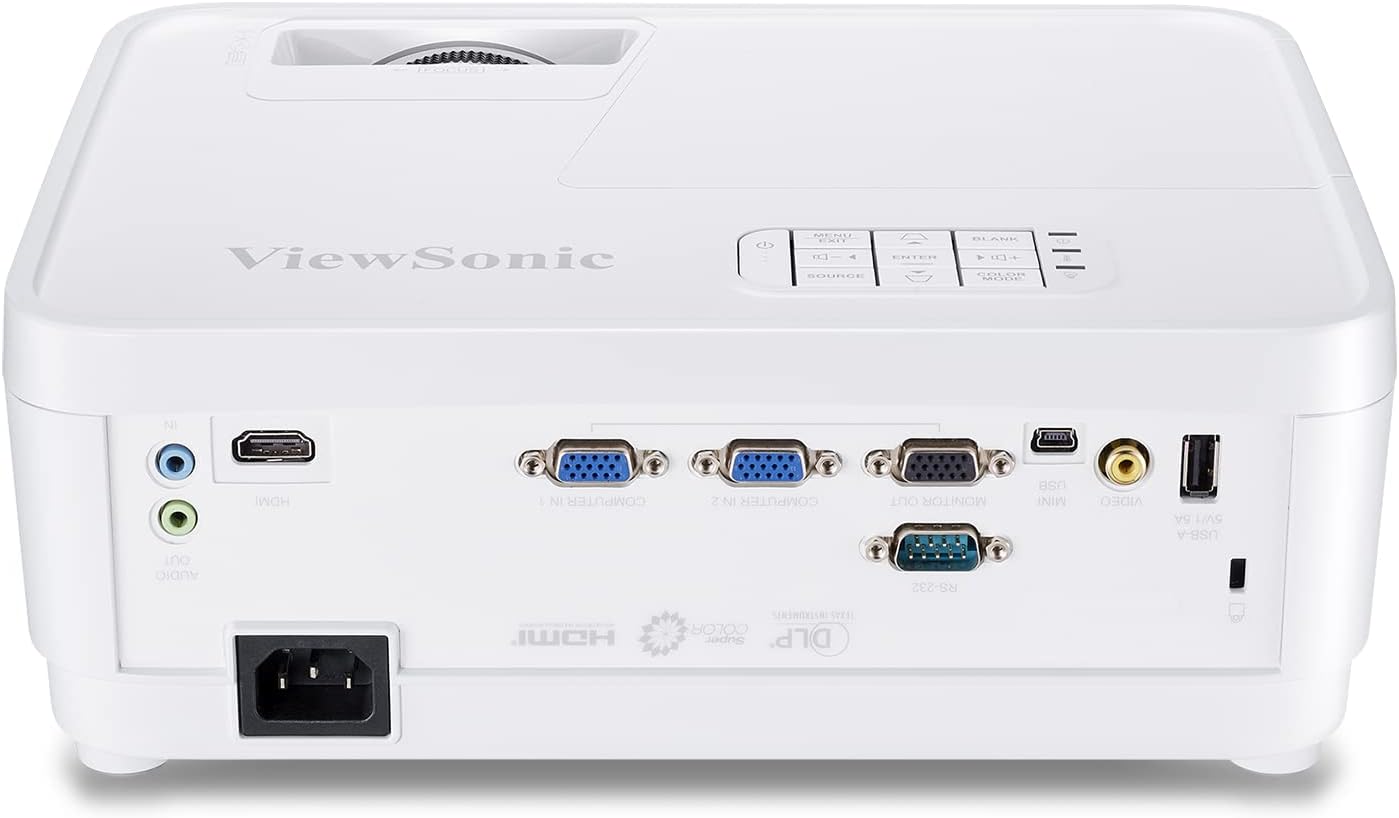
Figura 2.2.1: Quddiem view of the PS501X projector, showing the lens and top-mounted control panel.
2.3 Apparat li jgħaqqad
Connect your source devices (PC, Mac, media player) to the projector using the appropriate cables. The PS501X offers multiple input options:
- HDMI: Għal vidjow u awdjo diġitali ta' definizzjoni għolja.
- VGA: For analog video input from computers.
- USB: For connecting compatible devices.
- RS232: Għall-integrazzjoni tas-sistema ta' kontroll.

Figure 2.3.1: Rear panel of the PS501X projector, highlighting HDMI, VGA, and other connectivity ports.
After connecting, plug the power cable into the projector and a power outlet.
3. Istruzzjonijiet Operattivi
3.1 Power On/Off
Press the power button on the projector or the remote control to turn the unit on or off. Allow a few moments for the lamp to warm up or cool down.
3.2 Għażla tas-Sors tal-Input
Use the 'Source' button on the projector's control panel or remote to cycle through available input sources (HDMI, VGA, etc.) until your desired source is displayed.
3.3 Aġġustament tal-Immaġni
- Fokus: Dawwar iċ-ċirku tal-fokus fuq il-lenti tal-proġettazzjoni sakemm l-immaġni tkun qawwija u ċara.
- Korrezzjoni Keystone: If the image appears trapezoidal, use the keystone correction function (usually found in the OSD menu or dedicated buttons on the remote) to adjust the image geometry. The PS501X supports horizontal and vertical keystone correction.
- Settings tal-Kulur: Access the On-Screen Display (OSD) menu to adjust settings such as brightness, contrast, color temperature, and color effects (e.g., Movie, Photo, Vivid, User, Standard, Game modes) to suit your viewambjent u l-kontenut.
- Proporzjon tal-aspett: Adjust the aspect ratio (e.g., Full) via the OSD menu to match your content and prevent distortion.

Figure 3.3.1: Illustration of horizontal and vertical keystone correction for adjusting image shape.

Figura 3.3.2: Eżample of vibrant color accuracy provided by SuperColor technology.
4. Manutenzjoni
4.1 Lamp Life Management
The PS501X features a SuperEco mode that can extend the lamp life up to 15,000 hours. Utilizing this mode can significantly reduce power consumption and prolong the life of your projector lamp.

Figure 4.1.1: Visual representation of the extended lamp life in SuperEco mode.
4.2 Ventilazzjoni
To prevent overheating and ensure optimal performance, always ensure that the air vents on the projector are clear and unobstructed. Do not place the projector in an enclosed space without proper airflow.
4.3 Tindif
Regularly clean the projector's exterior with a soft, dry cloth. For the lens, use a specialized lens cleaning cloth and solution to avoid scratches. Avoid using abrasive cleaners or solvents.
5 Issolvi l-problemi
Jekk tiltaqa' ma' problemi bil- ViewSonic PS501X projector, refer to the following common troubleshooting steps:
- Ebda Immaġni murija:
- Kun żgur li l-proġettazzjoni tkun mixgħula u li l-amp huwa mdawwal.
- Verify that the input source is correctly selected and the cable connections are secure.
- Check the source device (PC, media player) to ensure it is outputting a signal.
- L-immaġni hija mċajpra:
- Aġġusta ċ-ċirku tal-fokus fuq il-lenti tal-proġekter.
- Kun żgur li l-wiċċ tal-projezzjoni huwa ċatt u li l-proġettazzjoni hija stabbli.
- L-Immaġni hija Distorta (Trapeżojdali):
- Use the keystone correction function in the OSD menu to adjust the image shape.
- Ensure the projector is positioned directly in front of the screen as much as possible.
- Ebda Awdjo:
- Check the audio cable connections (if using analog audio).
- Ensure the volume on both the projector and the source device is turned up and not muted.
- If using HDMI, verify that the audio output is correctly configured on the source device.
- Tisħin żejjed tal-proġettazzjoni:
- Kun żgur li l-ventijiet tal-arja kollha huma ħielsa minn ostakli.
- Ħaddem il-proġettur f'żona ventilata sew.
- If the issue persists, power off the projector and allow it to cool down before restarting.
6. Speċifikazzjonijiet
| Numru tal-Mudell | PS501X |
| Brand | ViewSonic |
| Riżoluzzjoni tal-Wiri | 1024 x 768 (XGA Native) |
| Luminożità | 3400 Lumens |
| Teknoloġija tal-Konnettività | HDMI, USB, VGA |
| Karatteristika Speċjali | Throw Qasira |
| Użi Rakkomandati | Business, Education, Home Cinema |
| Lamp Wattage | 190W |
| Dimensjonijiet tal-Prodott | 4.53 x 11.5 x 9.29 pulzieri |
| Piż tal-oġġett | 5.72 liri |
| Batteriji Meħtieġa | 2 batteriji AAA (għall-kontroll remot) |
| L-Ewwel Data Disponibbli | 3 ta’ Marzu, 2018 |
7. Garanzija u Appoġġ
7.1 Informazzjoni dwar Garanzija
For detailed warranty information regarding your ViewSonic PS501X projector, please refer to the warranty card included in your product packaging or visit the official ViewSonic websit. Żomm il-prova tax-xiri tiegħek għal talbiet ta' garanzija.
7.2 Appoġġ għall-Klijent
If you require further assistance or have questions not covered in this manual, please contact ViewSonic customer support. Contact details can be found on the ViewSonic webis-sit jew fid-dokumentazzjoni tal-prodott tiegħek.


