1. Introduzzjoni
This manual provides essential information and instructions for the safe and efficient use of your Nokia 8 Sirocco TA-1005 smartphone. Please read this guide thoroughly before operating your device to ensure optimal performance and longevity. This device is designed for use with GSM, 3G, and 4G LTE networks. Compatibility with CDMA networks, including Verizon, Sprint, and US Cellular, is not supported. Verify network compatibility with your service provider prior to use.
2. X'hemm fil-Kaxxa
Upon unboxing your Nokia 8 Sirocco TA-1005, verify that all components are present:
- Nokia 8 Sirocco TA-1005 Device
- Kejbil USB Type-C
- Adapter tal-Enerġija
- Headset
- Għodda Ejector SIM
- Gwida Quick Start
- Informazzjoni dwar is-Sikurezza u l-Garanzija
3. Layout tal-Apparat
Familiarize yourself with the physical components of your Nokia 8 Sirocco TA-1005.
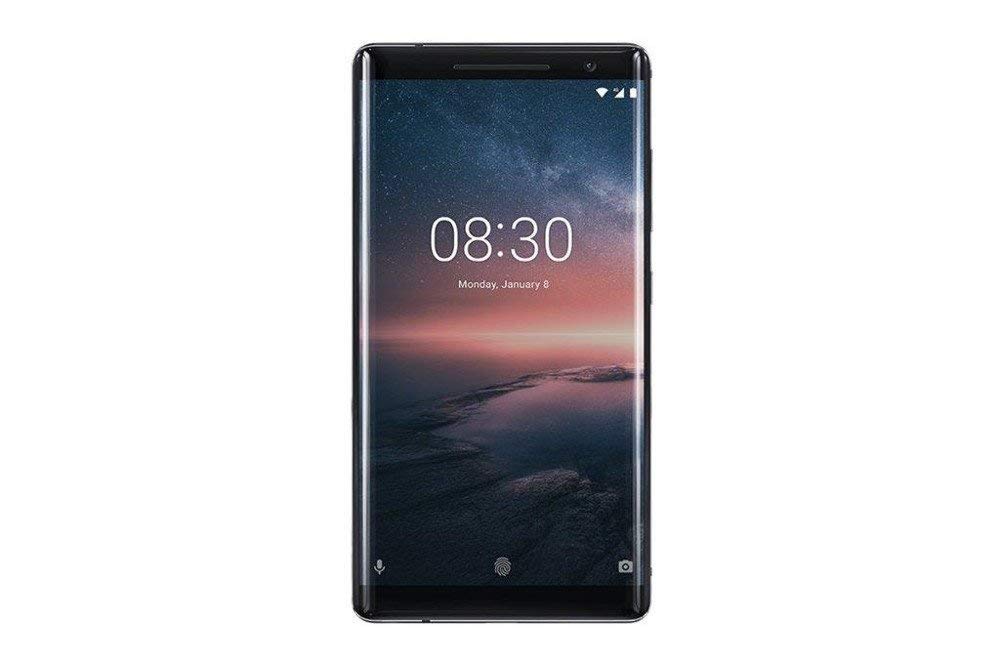
Figura 3.1: Wara view of the Nokia 8 Sirocco TA-1005. This image displays the dual camera setup with ZEISS optics, the circular fingerprint sensor below the camera, and the Nokia logo centrally placed. The 'androidone' branding is visible towards the bottom.
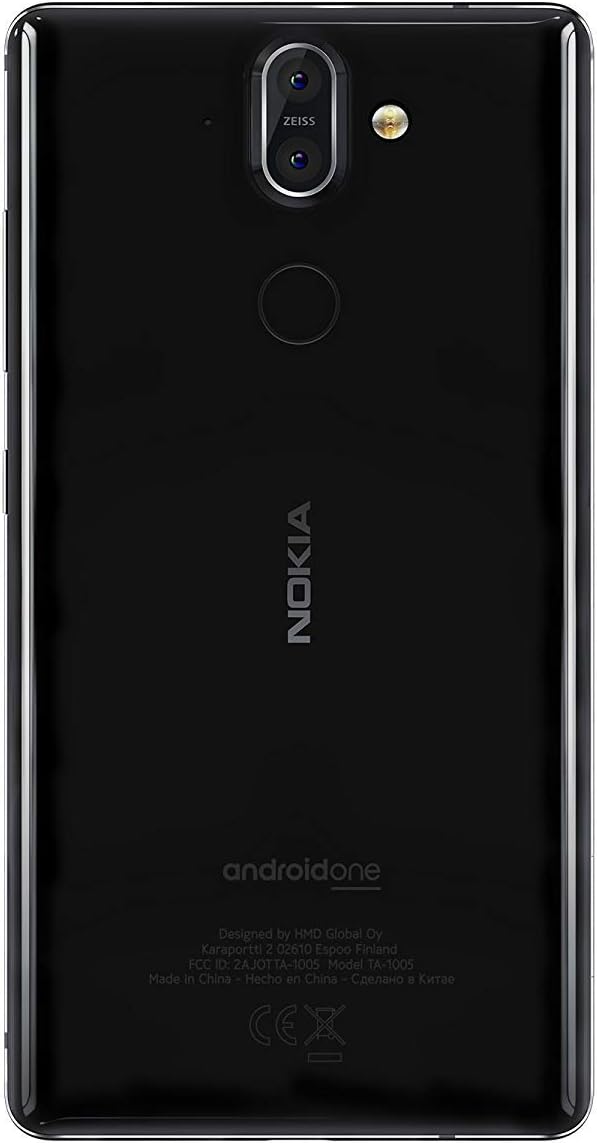
Figura 3.2: Quddiem view of the Nokia 8 Sirocco TA-1005. The image highlights the 5.5-inch P-OLED curved display, the front-facing camera at the top, and the on-screen navigation buttons. The device features minimal bezels.

Figura 3.3: Ġenb view of the Nokia 8 Sirocco TA-1005. This image illustrates the slim profile of the device, with the power button and volume rocker located on the right side for easy access.
Komponenti Ewlenin:
- Kamera ta' quddiem: Jinsab fil-parti ta' fuq tad-displej.
- Earpiece: Għas-sejħiet, li tinsab 'il fuq mid-displej.
- Wiri: 5.5-inch P-OLED capacitive touchscreen.
- Buttuni tal-Volum: On the right side, to adjust audio levels.
- Buttuna tal-Enerġija/Serratura: On the right side, to power on/off or lock/unlock the screen.
- Port USB tat-Tip Ċ: Fil-qiegħ, għall-iċċarġjar u t-trasferiment tad-dejta.
- Mikrofonu: Located at the bottom and top.
- Kelliem: Jinsab fil-qiegħ.
- SIM/Memory Card Tray: On the side, for inserting SIM cards.
- Kameras ta' wara: Dual cameras with ZEISS optics on the back.
- Flash: Dual-tone flash next to the rear cameras.
- Sensor tal-marki tas-swaba': On the back, below the rear cameras.
4. Setup
4.1. Daħħal is-SIM Card
- Sib it-trej tal-kard SIM fuq il-ġenb tat-tagħmir tiegħek.
- Daħħal l-għodda tal-ejecter tas-SIM fit-toqba ż-żgħira fuq it-trej biex tiftaħha.
- Place your Nano-SIM card(s) into the designated slot(s) on the tray, ensuring the gold contacts face downwards.
- Imbotta b'attenzjoni t-trej lura fl-apparat sakemm tikklikkja f'postha.
Nota: This device does not support external memory cards.
4.2. Tixgħel u Mitfi
- Biex Tixgħel: Press and hold the Power/Lock button until the Nokia logo appears.
- Biex Tifi: Press and hold the Power/Lock button until the power options menu appears, then select "Power off".
4.3. Setup Inizjali
Upon first power-on, the device will guide you through the initial setup process. This includes selecting your language, connecting to a Wi-Fi network, setting up your Google account, and configuring security features like fingerprint unlock or a PIN/pattern.
5. Istruzzjonijiet Operattivi
5.1. Nagħmlu Sejħiet
- Open the "Phone" application.
- Daħħal in-numru tat-telefon billi tuża t-tastiera tan-numri jew agħżel kuntatt mill-ktieb tal-indirizzi tiegħek.
- Tektek l-ikona tas-sejħa biex tibda s-sejħa.
5.2. Tibgħat Messaġġi
- Open the "Messages" application.
- Tektek l-ikona "Ibda ċ-chat" jew "Messaġġ ġdid".
- Daħħal in-numru tar-riċevitur jew agħżel mill-kuntatti.
- Ittajpja l-messaġġ tiegħek fil-qasam tat-test.
- Tektek l-ikona tal-ibgħat.
5.3. Uża l-Kamera
- Iftaħ l-applikazzjoni "Kamera".
- Qafas is-suġġett tiegħek fuq l-iskrin.
- Tektek il-buttuna tax-shutter biex tieħu ritratt.
- Switch between photo and video modes, or access advanced settings like portrait mode or panorama, as desired.
5.4. Konnettività tal-Internet
- Wi-Fi: Mur fuq Settings > Netwerk u internet > Wi-Fi. Turn Wi-Fi on and select an available network. Enter the password if required.
- Data mobbli: Mur fuq Settings > Netwerk u internet > Netwerk mobbli. Ensure "Mobile data" is enabled.
5.5. Karatteristiċi tas-Sigurtà
Your Nokia 8 Sirocco TA-1005 offers various security options:
- Nisfruttaw il-marki tas-swaba': Irreġistra l-marki tas-swaba' tiegħek permezz ta' Settings > Security & Location > Fingerprint.
- Lock tal-Iskrin: Issettja PIN, mudell, jew password permezz ta' Settings > Security & Location > Screen lock.
6. Manutenzjoni
6.1. Tindif tal-Apparat
Use a soft, lint-free cloth to clean your device. Avoid using harsh chemicals or abrasive materials, which can damage the screen or finish.
6.2. Kura tal-batterija
- Charge your device using only Nokia-approved chargers and cables.
- Evita li tesponi l-apparat għal temperaturi estremi.
- Tħallix il-batterija tiċċarġja kompletament ta' spiss.
6.3. Aġġornamenti tas-Software
Iċċekkja u installa aġġornamenti tas-softwer regolarment biex tiżgura li t-tagħmir tiegħek ikollu l-aħħar karatteristiċi, irqajja tas-sigurtà, u titjib fil-prestazzjoni. Mur fuq Settings > Sistema > Aġġornament tas-sistema.
7 Issolvi l-problemi
Jekk tiltaqa' ma' problemi bit-tagħmir tiegħek, irreferi għas-soluzzjonijiet komuni li ġejjin:
| Problema | Soluzzjoni |
|---|---|
| L-apparat ma jixgħelx | Ensure the battery is charged. Connect to a charger for at least 30 minutes. If unresponsive, perform a force restart by holding the Power button for 10-15 seconds. |
| Sinjal tan-netwerk fqir | Check SIM card insertion. Move to an area with better network coverage. Restart the device. Verify network settings in Settings > Netwerk u internet > Netwerk mobbli. |
| Applications are crashing | Neħħi l-cache tal-app (Settings > Apps u notifiki > [Isem tal-App] > Ħażna u cache > Neħħi l-cacheAġġorna l-app mill-Google Play Store. Jekk il-problema tippersisti, iddiżinstalla u erġa' installa l-app. |
| Il-batterija tiskula malajr | Reduce screen brightness. Close unused background apps. Disable Wi-Fi, Bluetooth, and GPS when not in use. Check battery usage in Settings> Battery biex jiġu identifikati applikazzjonijiet li jikkunsmaw l-enerġija. |
| L-apparat ma jirrispondix | Perform a force restart by holding the Power button for 10-15 seconds. If the issue continues, consider a factory reset (Settings > Sistema > Irrisettja l-għażliet > Ħassar id-dejta kollha (reset tal-fabbrika)). Twissija: Ir-risettjar tal-fabbrika se jħassar id-dejta kollha fuq l-apparat tiegħek. Agħmel backup tad-dejta importanti qabel ma tipproċedi. |
8. Speċifikazzjonijiet
Detailed technical specifications for the Nokia 8 Sirocco TA-1005:
| Karatteristika | Dettall |
|---|---|
| Isem tal-Mudell | 8 Sirocco |
| Numru tal-Mudell | TA-1005 |
| Sistema Operattiva | Android 8.0 (Oreo) |
| Proċessur | Qualcomm MSM8998 Snapdragon 835, Octa-core (4x2.5 GHz Kryo & 4x1.8 GHz Kryo) |
| GPU | Adreno 540 |
| RAM | 6 GB |
| Ħażna Interna | 128 GB |
| Wiri | 5.5 inches, P-OLED capacitive touchscreen, 1440 x 2560 pixels, Corning Gorilla Glass 5 |
| Kamera ta' wara | 12MP Wide (f/1.7) + 13 MP Tele (f/2.6), dual-tone flash |
| Kamera ta' Quddiem | 5MP |
| Kapaċità tal-batterija | 3250 mAh |
| Iċċarġjar | Appoġġ għall-Iċċarġjar Mgħaġġel |
| Konnettività | Wi-Fi 802.11a/b/g/n, Bluetooth, USB Type-C |
| Dimensjonijiet | 43.36 x 43.17 x 0.75 ċm |
| Piż | 181 g |
| Tip ta' SIM | Nano-SIM |
| Appoġġ tan-Netwerk | 2G GSM, 3G, 4G LTE (Note: Not compatible with CDMA networks) |
9. Safety and Warranty Information
9.1. Linji Gwida dwar is-Sigurtà
- Do not use the device in prohibited areas, such as aircraft or hospitals.
- Evita li tesponi l-apparat għall-ilma jew umdità eċċessiva.
- Use only original or approved accessories.
- Tippruvax iżarma jew isewwi l-apparat lilek innifsek.
- Armi l-apparat u l-batterija tiegħu b'mod responsabbli skont ir-regolamenti lokali.
9.2. Informazzjoni dwar Garanzija
Your Nokia 8 Sirocco TA-1005 is covered by a limited manufacturer's warranty. Please refer to the separate warranty document included in your product packaging or visit the official Nokia support websit għal termini u kundizzjonijiet dettaljati. Żomm il-prova tax-xiri tiegħek għal talbiet ta' garanzija.


