1. Introduzzjoni
Thank you for choosing the Baseus Encok S06 Magnetic Bluetooth In-Ear Earphones. This manual provides essential information for the proper setup, operation, maintenance, and troubleshooting of your new earphones. Please read this manual thoroughly before use to ensure optimal performance and longevity of the product.
The Baseus Encok S06 features a dual battery design for extended playback, Bluetooth 4.1 for stable connectivity, and a magnetic design for convenient storage. It includes an in-built microphone with CVC Noise Suppression and a 3-button remote for easy control of music and calls.

Immaġni 1.1: Fuqview of the Baseus Encok S06 Earphones.
This image displays the complete Baseus Encok S06 earphones, highlighting their in-ear design, magnetic earbuds, and the inline control module. The black color and sleek design are visible.
2. X'hemm fil-Kaxxa
Upon unboxing your Baseus Encok S06 earphones, please verify that all the following components are present:
- Baseus Encok S06 Earphones
- Ear-hooks (various sizes)
- Ear-muffs (small and big sizes)
- Kejbil tal-Iċċarġjar (Mikro USB)

Immaġni 2.1: Kontenut tal-pakkett tal-prodott.
This image shows all items included in the Baseus Encok S06 package: the earphones themselves, two pairs of ear-hooks, two pairs of ear-muffs (small and large), and a Micro USB charging cable.
3. Setup
3.1 Iċċarġjar tal-Earphones
Before first use, fully charge your earphones.
- Sib il-port tal-iċċarġjar fuq il-modulu tal-kontroll inline.
- Connect the provided Micro USB charging cable to the port.
- Qabbad it-tarf l-ieħor tal-kejbil ma' sors ta' enerġija USB (eż., port USB tal-kompjuter, adapter tal-ħajt).
- The indicator light will show charging status (refer to product specific LED behavior, typically red for charging, blue/off for fully charged).
- Charging typically takes approximately 1-2 hours for a full charge.
3.2 Tqabbil ma' Apparat Bluetooth
To connect your earphones to a smartphone, tablet, or other Bluetooth-enabled device:
- Kun żgur li l-earphones huma mitfija.
- Press and hold the multi-function button (usually the center button on the inline remote) for approximately 5-7 seconds until the indicator light flashes red and blue alternately. This indicates pairing mode.
- Fuq it-tagħmir tiegħek, attiva l-Bluetooth u fittex tagħmir ġdid.
- Select "Baseus Encok S06" (or similar name) from the list of available devices.
- Once connected, the indicator light on the earphones will typically flash blue slowly or turn off.
- Jekk tintalab għal password, daħħal "0000".
The earphones will automatically attempt to reconnect to the last paired device when turned on.
4. Istruzzjonijiet Operattivi
The Baseus Encok S06 features an intuitive 3-button inline remote for easy control.
| Buttuna/Azzjoni | Funzjoni |
|---|---|
| Buttuna b'ħafna funzjonijiet (Ċentru) |
|
| Buttuna 'l fuq tal-volum (+). |
|
| Buttuna 'l isfel tal-volum (-) |
|
The magnetic design allows the earbuds to snap together when not in use, preventing tangles and making them easy to wear around your neck.
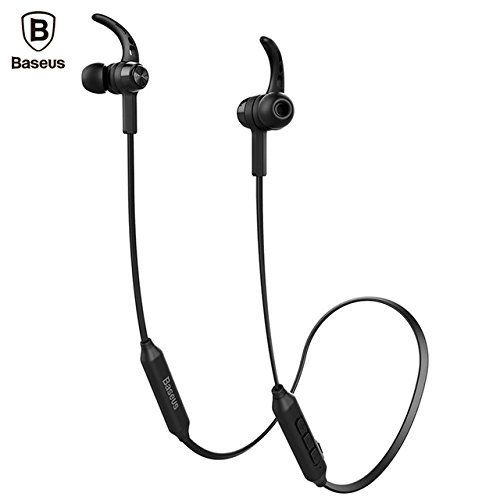
Image 4.1: Close-up of the inline control module.
Din l-immaġni tipprovdi deskrizzjoni dettaljata view of the Baseus Encok S06 earphones, specifically highlighting the inline control module with its three buttons and the magnetic earbuds.
5. Manutenzjoni
Manutenzjoni xierqa tiżgura l-lonġevità u l-prestazzjoni ottimali tal-earphones tiegħek.
- Tindif: Use a soft, dry, lint-free cloth to clean the earphones. Do not use harsh chemicals, cleaning solvents, or strong detergents. For ear tips, remove them and clean with a mild soap solution, then rinse thoroughly and dry completely before reattaching.
- Ħażna: When not in use, store the earphones in a cool, dry place, away from direct sunlight and extreme temperatures. The magnetic design helps keep the cables tangle-free.
- Evita l-umdità: Do not expose the earphones to water or excessive moisture. While designed for daily use, they are not waterproof.
- Immaniġġja b'Kura: Avoid dropping the earphones or subjecting them to strong impacts. Do not pull on the cable excessively.
6 Issolvi l-problemi
If you encounter issues with your Baseus Encok S06 earphones, refer to the following common solutions:
| Problema | Kawża / Soluzzjoni Possibbli |
|---|---|
| Earphones won't turn on. |
|
| Ma tistax tqabbad mat-tagħmir. |
|
| L-ebda ħoss jew volum baxx. |
|
| Il-kwalità tas-sejħa hija fqira. |
|
7. Speċifikazzjonijiet
| Karatteristika | Dettall |
|---|---|
| Isem tal-Mudell | ENCKS6 |
| Brand | Baseus |
| Teknoloġija tal-Konnettività | Wireless (Bluetooth) |
| Teknoloġija tal-Komunikazzjoni mingħajr Fili | Bluetooth 4.1 |
| Tqegħid tal-widnejn | Fil-widnejn |
| Fattur tal-Formola | Fil-widnejn |
| Metodu ta' Kontroll | Button (3-button inline remote) |
| Karatteristiċi Speċjali | Magnetic design, Built-in microphone with CVC Noise Suppression, Dual Battery |
| Piż tal-oġġett | 60 Gramm |
8. Garanzija u Appoġġ
8.1 Informazzjoni dwar Garanzija
Dan il-prodott jiġi ma 'a 6-il xahar garanzija provided by the manufacturer from the date of purchase. Please retain your proof of purchase for warranty claims. The warranty covers manufacturing defects and malfunctions under normal use. It does not cover damage caused by misuse, accidents, unauthorized modifications, or normal wear and tear.
8.2 Appoġġ għall-Klijent
For further assistance, technical support, or warranty inquiries, please contact Baseus customer service through their official webis-sit jew il-bejjiegħ bl-imnut li mingħandu xtrajt il-prodott.
Importanti: Do not attempt to disassemble or repair the earphones yourself, as this will void the warranty.


