1. Introduzzjoni
Grazzi tax-xiriasing the Sharp HT-SB140MT 2.0 150W Soundbar. This soundbar is designed to enhance your audio experience, providing clear and powerful sound for your television, music, and other media. With its sleek design and versatile connectivity options, including Bluetooth, HDMI ARC/CEC, Optical, and Auxiliary inputs, it integrates seamlessly into any home entertainment setup. This manual provides essential information for safe and effective use, including setup, operation, maintenance, and troubleshooting.
2. Informazzjoni dwar is-Sigurtà
- Sors tal-Enerġija: Tiżgura l-provvista tal-enerġija voltage matches the requirements specified on the soundbar. Use only the provided power cable.
- Ventilazzjoni: Do not block any ventilation openings. Maintain adequate space around the soundbar for proper airflow.
- Ilma u Umdità: Tesponix is-soundbar għal taqtir jew titjir ta' ilma. Tpoġġix oġġetti mimlija b'likwidi, bħal vażuni, fuq l-apparat.
- Sħana: Do not place the soundbar near heat sources such as radiators, heat registers, stoves, or other apparatus (including amplifiers) li jipproduċu sħana.
- Tindif: Unplug the soundbar from the power outlet before cleaning. Use a dry, soft cloth for cleaning. Do not use liquid cleaners or aerosol cleaners.
- Servizzi: Tippruvax isservi dan il-prodott int stess. Irreferi l-manutenzjoni kollha lil persunal tas-servizz kwalifikat.
- Batteriji: The remote control uses a CR2 battery. Ensure correct polarity when inserting batteries. Do not mix old and new batteries.
3. Kontenut tal-Pakkett
Jekk jogħġbok iċċekkja li l-oġġetti kollha huma preżenti fil-pakkett:
- Sharp HT-SB140MT Soundbar
- Kontroll mill-bogħod
- Kejbil tal-Enerġija
- Manwal għall-Utent (dan id-dokument)
4. Prodott Aktarview

Figura 4.1: Quddiem View
The front of the soundbar features the Sharp logo and LED indicators for source selection and status. Control buttons for power, input, and volume are located on the top panel.
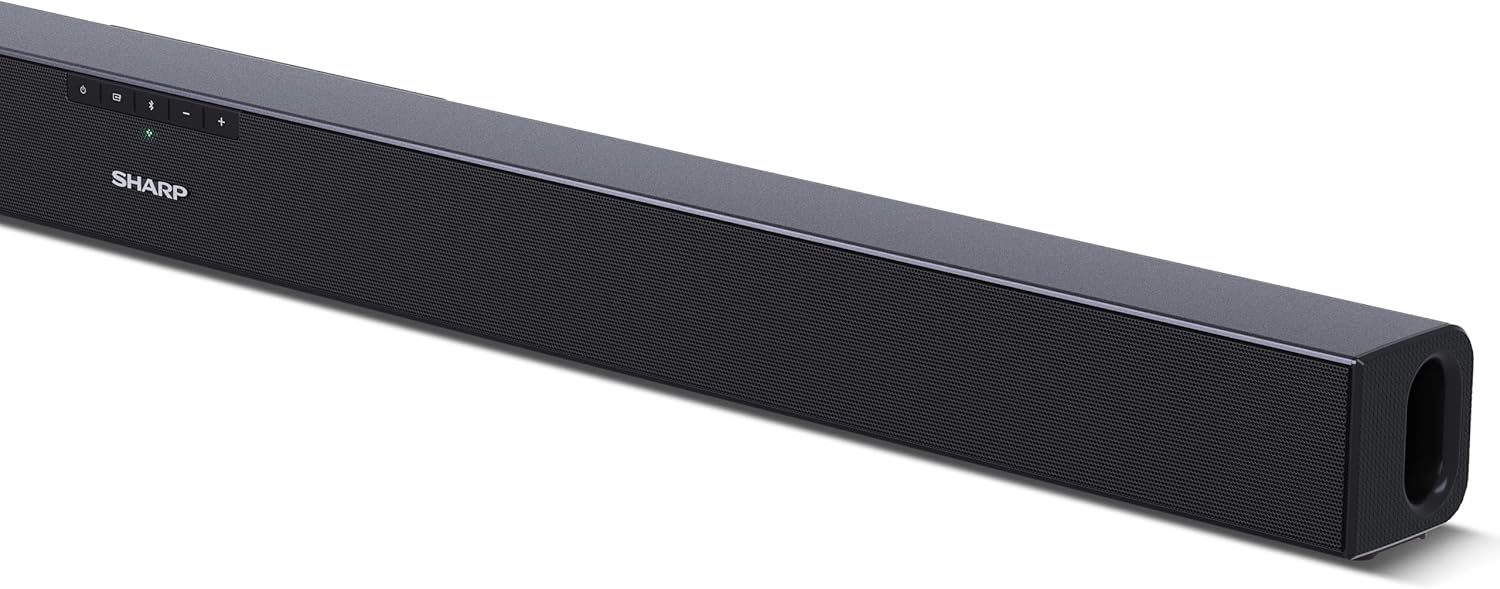
Figura 4.2: Wara View (Konnessjonijiet)
The rear panel provides all necessary connection ports: HDMI ARC, Optical (S/PDIF), and Auxiliary (3.5mm) input, along with the power input.

Figura 4.3: Kontroll mill-bogħod
The included remote control allows for convenient operation of the soundbar, including power, input selection, volume, bass, and treble adjustments.
5. Setup
5.1 Tqegħid
The Sharp HT-SB140MT Soundbar can be placed on a flat surface, such as a TV stand, or wall-mounted. Its slim profile of 6 cm allows it to fit easily under most TV screens without obstructing the view.

Figure 5.1: Soundbar Placement
The soundbar is ideally positioned directly in front of your television for optimal sound projection.
5.2 Konnessjoni mat-TV tiegħek
Agħżel wieħed mill-metodi ta 'konnessjoni li ġejjin:
- HDMI ARC/CEC (Rakkomandat): Connect an HDMI cable (not included) from the HDMI ARC port on your TV to the HDMI ARC port on the soundbar. This allows your TV remote to control the soundbar's volume and power. Ensure HDMI ARC/CEC is enabled in your TV's settings.
- Digital Optical Audio (S/PDIF): Connect an optical cable (not included) from the Optical Out port on your TV to the OPTICAL IN port on the soundbar. Select the Optical input on the soundbar.
- Awżiljarju (AUX): Connect a 3.5mm audio cable (not included) from the headphone jack or AUX Out port on your TV to the AUX IN port on the soundbar. Select the AUX input on the soundbar.
5.3 Konnessjoni tal-Enerġija
After connecting the audio cable, plug the power cable into the soundbar's power input and then into a wall outlet (220-240V / 50Hz).
6. Istruzzjonijiet Operattivi
6.1 Power On/Off
Agħfas il-buttuna tal-Power fuq is-soundbar jew ir-remote control biex tixgħel jew titfi l-unità.
6.2 Għażla tas-Sors
Press the Input button on the soundbar or the remote control repeatedly to cycle through the available input sources: HDMI ARC, Optical, AUX, and Bluetooth. The LED indicator on the soundbar will change to reflect the selected source.
6.3 Aġġustament tal-Volum
Use the Volume Up (+) and Volume Down (-) buttons on the soundbar or the remote control to adjust the sound level.
6.4 Tqabbil tal-Bluetooth
Biex tikkonnettja apparat Bluetooth:
- Select Bluetooth input on the soundbar. The Bluetooth LED indicator will flash, indicating pairing mode.
- Fuq l-apparat intelliġenti tiegħek (smartphone, tablet, eċċ.), attiva l-Bluetooth u fittex apparati disponibbli.
- Select "SHARP HT-SB140MT" from the list of devices.
- Once connected, the Bluetooth LED indicator will stop flashing and remain solid. You can now stream audio wirelessly to the soundbar.
6.5 Sound Modes (Equalizer)
The soundbar features an equalizer with different sound modes to optimize audio for various content types. Use the EQ button on the remote control to cycle through these modes (e.g., Movie, Music, News). You can also adjust Bass and Treble levels using dedicated buttons on the remote.
7. Manutenzjoni
7.1 Tindif
To clean the soundbar, unplug it from the power outlet. Use a soft, dry, lint-free cloth to wipe down the surfaces. Do not use abrasive cleaners, waxes, or solvents as they may damage the finish.
7.2 Ħażna
If you plan to store the soundbar for an extended period, disconnect it from the power supply and store it in a cool, dry place, away from direct sunlight and extreme temperatures.
8 Issolvi l-problemi
Jekk tiltaqa' ma' problemi bis-soundbar tiegħek, irreferi għall-problemi u s-soluzzjonijiet komuni li ġejjin:
| Problema | Kawża Possibbli | Soluzzjoni |
|---|---|---|
| L-ebda ħoss mill-soundbar. | Is-soundbar hija mitfija jew immutejata. Sors ta' input mhux korrett magħżul. Il-kejbils mhumiex konnessi sew. Is-settings tal-ħruġ tal-awdjo tat-TV mhumiex korretti. | Ensure the soundbar is powered on and not muted. Select the correct input source (HDMI ARC, Optical, AUX). Check all cable connections (HDMI, Optical, AUX). Verify your TV's audio output settings are set to external speakers or the correct digital output. |
| L-apparat Bluetooth ma jistax jikkonnettja. | Soundbar is not in pairing mode. L-apparat huwa barra mill-firxa. Interferenza minn apparati oħra. | Ensure the soundbar is in Bluetooth input mode and the LED is flashing. Mexxi l-apparat Bluetooth tiegħek eqreb lejn is-soundbar (fi żmien 10 metri). Turn off other Bluetooth devices nearby. Try unpairing and re-pairing. |
| Il-kontroll mill-bogħod mhux qed jaħdem. | Battery is low or inserted incorrectly. Ostruzzjoni bejn ir-remote u s-soundbar. Il-kontroll remot huwa difettuż. | Replace the CR2 battery and ensure correct polarity. Remove any obstructions between the remote and the soundbar's sensor. Jekk il-kwistjonijiet jippersistu, ikkuntattja l-appoġġ tal-klijent. |
9. Speċifikazzjonijiet
| Isem tal-Mudell | HT-SB140(MT) |
| Tip ta' Kelliem | Soundbar |
| Surround Sound Channel Konfigurazzjoni | 2.0 |
| Qawwa Massima tal-Ħruġ tal-Ispeaker | 150 Watts |
| Rispons ta' Frekwenza | 60 Hz |
| Teknoloġija tal-Konnettività | Bluetooth, HDMI ARC/CEC, Digital Optical Audio (S/PDIF), 3.5mm Auxiliary (AUX) |
| Teknoloġija tal-Komunikazzjoni mingħajr Fili | Bluetooth |
| Firxa Massima (Bluetooth) | 10 Meters |
| Metodu ta' Kontroll | Kontroll mill-bogħod |
| Sors tal-Enerġija | AC (Mains) |
| Input Voltage | 220-240 volt |
| Kulur | Iswed |
| Materjal | Plastik, Metall |
| Tip ta 'Immuntar | Wall Mount, Mejda |
| Dimensjonijiet tal-Prodott (L x W x H) | 95 x 6 x 6 ċm |
| Piż tal-oġġett | 1.5 Kilogrammi |
| Komponenti Inklużi | Kontroll mill-bogħod |
| Batterija Meħtieġa | 1 batterija CR2 |
| Waterproof | Nru |
| Disponibbiltà ta' Spare Parts | 5 Snin |
| Aġġornamenti tas-Softwer Garantiti Sa | Informazzjoni mhux disponibbli |
10. Garanzija u Appoġġ
The Sharp HT-SB140MT Soundbar comes with a Limited Warranty. Please refer to the warranty card included in your package for specific terms and conditions. Spare parts are available for up to 5 years from the date of purchase.
For technical support, service, or warranty claims, please contact Sharp customer service through their official website or the contact information provided in your product documentation. When contacting support, please have your product model number (HT-SB140(MT)) and purchase details ready.


