Introduzzjoni
The House of Marley No Bounds portable Bluetooth speaker is designed for outdoor use, featuring a rugged construction with sustainable materials. It offers wireless audio streaming, speakerphone functionality, and is built to withstand water and dust exposure.
Kontenut tal-Pakkett
- No Bounds Portable Bluetooth Speaker
- Cable tal-Iċċarġjar tal-USB
- Carabiner
Prodott Overview
Iffamiljarizza ruħek mal-komponenti u l-kontrolli tal-ispiker.
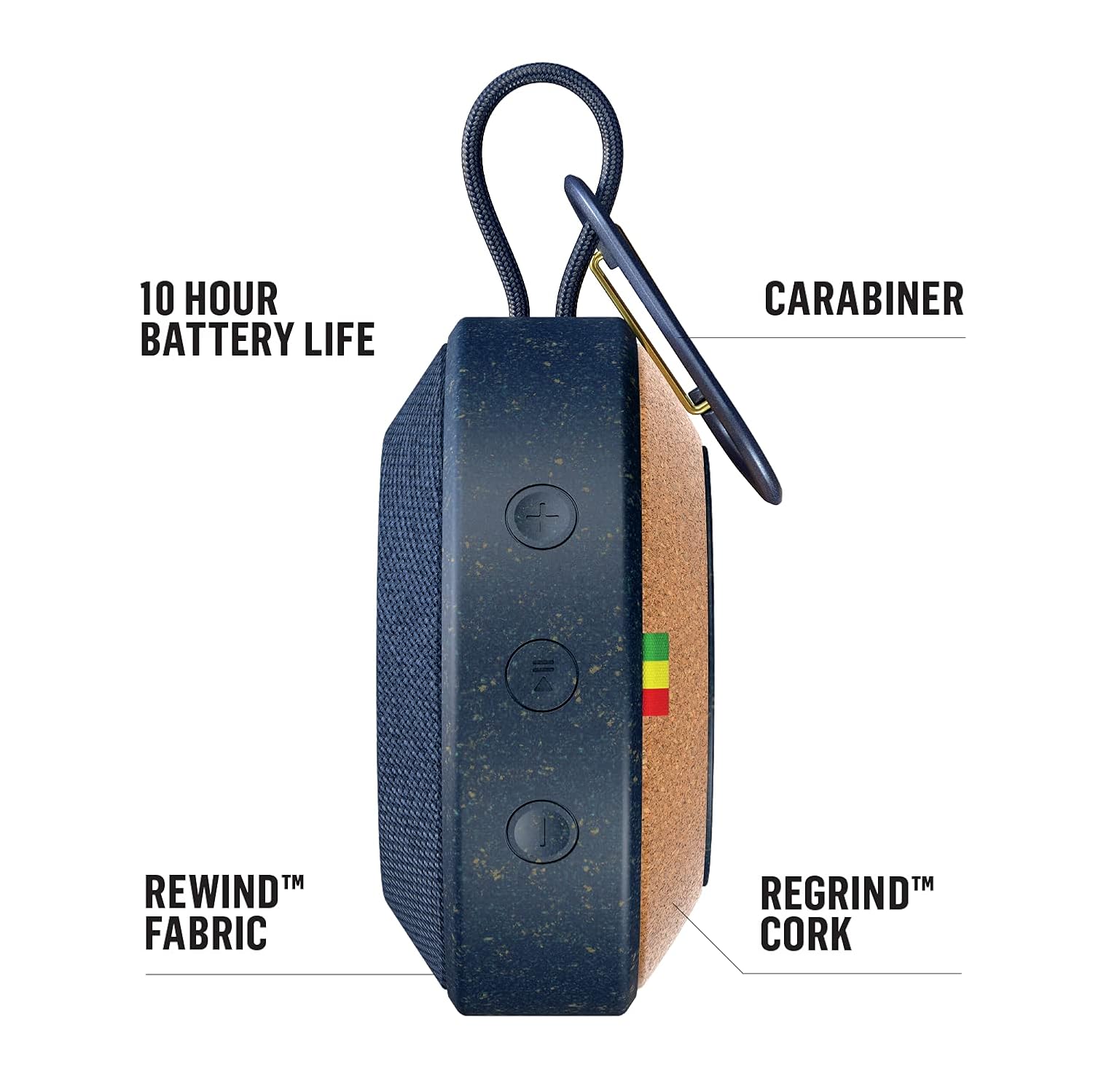

Kontrolli u Portijiet:
- Buttuna tal-Qawwa: Agħfas u żomm biex tixgħel jew titfi l-ispiker.
- Buttuni tal-Volum (+/-): Aġġusta l-volum tal-awdjo.
- Buttuna ta' Tqabbil tal-Bluetooth: Jibda l-modalità ta' tqabbil Bluetooth.
- Port tal-Aux-in: For wired audio connection using a 3.5mm audio cable (not included).
- Port tal-Iċċarġjar tal-USB: Għall-iċċarġjar tal-batterija interna.
Setup
1. Iċċarġja l-Ispeaker
- Connect the provided USB charging cable to the speaker's USB charging port.
- Qabbad it-tarf l-ieħor tal-kejbil USB ma' adapter tal-enerġija USB (mhux inkluż) jew mal-port USB tal-kompjuter.
- Id-dawl indikatur tal-iċċarġjar se jixgħel. Ħalli madwar 2-3 sigħat għal iċċarġjar sħiħ.
- Ladarba jkun iċċarġjat kompletament, id-dawl indikatur jinbidel jew jintefa. Skonnettja l-kejbil tal-iċċarġjar.
2. Tixgħil / Mitfi
- To power on, press and hold the Power button until you hear an audible tone and the indicator light illuminates.
- To power off, press and hold the Power button again until you hear an audible tone and the indicator light turns off.
3. Tqabbil tal-Bluetooth

- Kun żgur li l-kelliem ikun mixgħul.
- Press the Bluetooth pairing button. The Bluetooth indicator light will flash, indicating it is in pairing mode.
- Fuq l-apparat tiegħek (smartphone, tablet, eċċ.), attiva l-Bluetooth u fittex apparati disponibbli.
- Select "No Bounds" from the list of devices.
- Once paired, the Bluetooth indicator light will become solid, and you will hear a confirmation tone.
4. Wireless Dual Speaker Pairing
The No Bounds speaker supports pairing with another No Bounds speaker for a stereo audio experience.
- Ensure both No Bounds speakers are powered on and not connected to any other Bluetooth device.
- On one speaker, press and hold the Bluetooth button for 3 seconds until you hear a tone. This speaker will be the primary speaker.
- On the second speaker, press the Bluetooth button briefly. This speaker will connect as the secondary speaker.
- Once connected, the indicator lights on both speakers will confirm the successful pairing.
- Connect your device to the primary speaker via Bluetooth as described in step 3.
Operazzjoni
1. Daqq Awdjo
- Bluetooth: After successful pairing, play audio from your connected device. The sound will stream wirelessly to the speaker.
- Aux-in: Connect a 3.5mm audio cable from your audio source to the speaker's Aux-in port. The speaker will automatically switch to Aux-in mode.
2. Funzjoni tal-Ispeakerphone
When connected via Bluetooth to a smartphone, the built-in microphone allows you to answer calls directly through the speaker.
- To answer an incoming call, press the Play/Pause button.
- Biex ittemm telefonata, agħfas il-buttuna Play/Pause mill-ġdid.
- Biex tirrifjuta sejħa deħlin, agħfas u żomm il-buttuna Play/Pause.
3. Using the Carabiner
The integrated metal carabiner allows for convenient portability. Clip the speaker to your bag, belt loop, or other secure points for easy transport.
4. Reżistenza għall-Ilma u t-Trab (IP67)

The No Bounds speaker is rated IP67, meaning it is protected against dust ingress and can withstand immersion in water up to 1 meter for 30 minutes. This makes it suitable for use by the pool, at the beach, or in other outdoor environments. Ensure all ports are securely closed before exposing the speaker to water or dust.
Manutenzjoni
1. Tindif
- Imsaħ il-kelliem b 'soft, damp drapp.
- Tużax prodotti tat-tindif li joborxu, solventi, jew kimiċi ħarxa.
- Ensure the speaker is dry before charging or using.
2. Ħażna
- Aħżen l-ispiker f'post frisk u niexef 'il bogħod minn temperaturi estremi.
- Evita espożizzjoni fit-tul għad-dawl tax-xemx dirett.
3. Kura tal-batterija
- To prolong battery life, fully charge the speaker before first use.
- Evita li l-batterija tixxotta kompletament ta' spiss.
- Jekk taħżinha għal perjodu estiż, iċċarġja l-batterija sa madwar 50% kull ftit xhur.
Issolvi l-problemi
| Problema | Kawża Possibbli | Soluzzjoni |
|---|---|---|
| L-ispeaker ma jixgħelx | Batterija baxxa | Iċċarġja l-ispiker kompletament. |
| L-ebda ħoss | Volume too low; Not paired; Incorrect input source | Increase volume on speaker and device; Re-pair Bluetooth; Ensure correct input (Bluetooth/Aux) is selected. |
| Tqabbil Bluetooth ifalli | L-ispiker mhux fil-modalità ta' tqabbil; L-apparat wisq 'il bogħod; Interferenza | Kun żgur li l-ispiker jinsab fil-modalità ta' tqabbil; Mexxi l-apparat eqreb; Itfi apparati Bluetooth oħra. |
| Kwalità fqira tal-awdjo | Apparat wisq 'il bogħod; Ostakli; Batterija baxxa | Mexxi l-apparat eqreb lejn l-ispiker; Neħħi l-ostakli; Iċċarġja l-ispiker. |
Speċifikazzjonijiet

| Karatteristika | Dettall |
|---|---|
| Isem tal-Mudell | EM-JA015-BL |
| Brand | Marley |
| Tip ta' Kelliem | Barra, Portabbli |
| Teknoloġija tal-Konnettività | Bluetooth, Awżiljarju |
| Komunikazzjoni bla fili | Bluetooth |
| Klassifikazzjoni li ma jgħaddix ilma minnha | IP67 |
| Sors tal-Enerġija | Li jaħdem bil-batterija (batterija tal-jone tal-litju meħtieġa) |
| Ħajja tal-batterija | Sa 10 sigħat |
| Qawwa tal-Ħruġ Massimu tal-Ispeaker | 10 Watts |
| Firxa tal-Qawwa RMS | 3 Watts |
| Modalità tal-Ħruġ tal-Awdjo | Stereo |
| Materjal | Aluminum, Metal, Rewind Fabric, Regrind Silicone, Regrind Cork |
| Piż tal-oġġett | 227 g (0.5 Liri) |
| Metodu ta' Kontroll | App, Buttuni fuq l-apparat |
| Apparati Kompatibbli | Laptop, MP3 Player, Smartphone, Tablet |
Garanzija u Appoġġ
Għal informazzjoni dwar il-garanzija u l-appoġġ għall-klijenti, jekk jogħġbok irreferi għas-sit uffiċjali ta' House of Marley. webis-sit jew ikkuntattja lill-bejjiegħ tiegħek. Tista' wkoll iżżur is-sit Ħanut Marley fuq Amazon għal aktar dettalji dwar il-prodott u riżorsi ta' appoġġ.


