Introduzzjoni
Dan il-manwal jipprovdi struzzjonijiet komprensivi għall-Xfinity Comcast XR15 Voice Control Remote. Iddisinjat għal interazzjoni bla xkiel mat-tagħmir Xfinity X1, Xi6, Xi5, u XG2, dan ir-remote jtejjeb l-esperjenza tad-divertiment tiegħek b'kmandi tal-vuċi intuwittivi u karatteristiċi konvenjenti.
Prodott Overview
Ir-Remote tal-Kontroll tal-Vuċi Xfinity XR15 huwa ddisinjat għal użu faċli u kontroll effiċjenti tas-sistema ta' divertiment Xfinity tiegħek. Il-karatteristiċi ewlenin jinkludu kontroll tal-vuċi, tastiera b'dawl minn wara, funzjonalità Aim Anywhere, u aċċess faċli għal karatteristiċi ta' aċċessibbiltà bħal Closed Captioning, deskrizzjoni bil-vidjo, u gwida bil-vuċi.
Tqassim mill-Bogħod u Funzjonijiet tal-Buttuni
Iffamiljarizza ruħek mal-buttuni tar-remote u l-funzjonijiet korrispondenti tagħhom:

Figura 1: Funzjonijiet tal-Buttuni tar-Remote tal-Xfinity XR15
- Input tat-TV: Jaqleb għall-input disponibbli li jmiss fuq it-TV tiegħek.
- Qawwa: Jixgħel jew jitfi t-TV. Meta jiġi pprogrammat, jista' wkoll jikkontrolla t-TV Box u ċerti apparati awdjo. L-X1 TV Box huwa ddisinjat biex jibqa' mixgħul.
- VOL +/-: Iżżid jew tnaqqas il-volum meta jiġi pprogrammat b'kodiċi validu tat-TV jew tar-riċevitur AV.
- Siekta: Jixgħel jew jitfi l-ħoss.
- CH +/-: Jagħżel il-kanal li jmiss 'il fuq jew 'l isfel.
- Play/Pawsa: Jilgħab jew iwaqqaf it-TV diretta, kontenut ta' XFINITY On Demand, jew DVR.
- FF (Avvanza 'l Quddiem): Jimxi 'l quddiem malajr il-kontenut ta' XFINITY On Demand jew DVR.
- Rew (Irriwindjar): Rewinds ta' kontenut XFINITY On Demand jew DVR.
- Ħruġ: Joħroġ mill-gwidi fuq l-iskrin; iwaqqaf u joħroġ mill-kontenut ta' XFINITY On Demand u DVR. Jirritorna għall-punt "Live" meta jerġa' jdoqq it-TV live.
- Rekord (punt aħmar): Jirrekordja l-programm kurrenti jew isalva programmi futuri fuq id-DVR tiegħek.
- Xfinity: Juri l-menù prinċipali tal-gwida, li jipprovdi aċċess għall-karatteristiċi kollha tal-gwida, inklużi DVR u XFINITY On Demand.
- Gwida: Juri l-listi tat-TV.
- Dahar: Jinnaviga lura fil-menus jew fl-iskrins preċedenti.
- Informazzjoni (i): Juri informazzjoni dwar programmi u notifiki.
- Kontroll tal-Vuċi (Buttuna tal-Mikrofonu): Uża kmandi tal-vuċi biex tfittex netwerks, programmi, tissettja reġistrazzjonijiet tad-DVR, u tikseb rakkomandazzjonijiet.
- Ċwievet tan-Numri (0-9): Uża test predittiv (T9) biex tfittex kontenut malajr jew iddaħħal direttament in-numri tal-kanali.

Figura 2: Quddiem view ta' żewġ Remoti Xfinity XR15
Setup
Ir-remote Xfinity XR15 huwa ddisinjat għal tqabbil faċli mat-tagħmir Xfinity tiegħek. Huwa kompatibbli mat-tagħmir Xi6, Xi5, XG2, u X1.
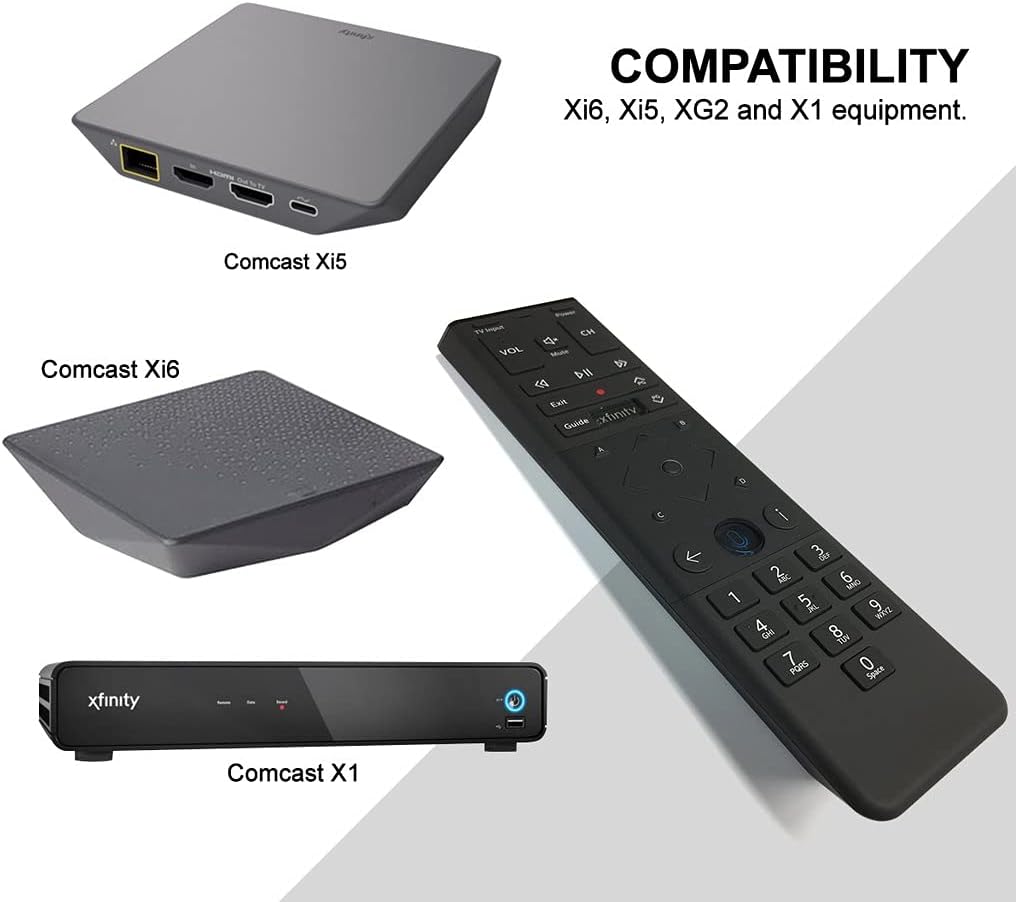
Figura 3: Kompatibilità tal-Kontroll mill-Bogħod tal-Xfinity XR15
Tqabbil Awtomatiku
Għal ħafna mill-X1 TV Boxes, ir-remote jingħaqad awtomatikament meta tużah għall-ewwel darba. Sempliċement ipponta r-remote lejn it-TV Box tiegħek u agħfas kwalunkwe buttuna. Segwi kwalunkwe indikazzjoni fuq l-iskrin biex tlesti l-proċess ta' tqabbil.
Tqabbil Manwali (jekk it-tqabbil awtomatiku jfalli)
- Kun żgur li t-TV Box tiegħek hija mixgħula.
- Agħfas u żomm il- Xfinity u Informazzjoni (i) Agħfas il-buttuni simultanjament għal ħames sekondi sakemm l-LED tal-istatus fuq ir-remote jinbidel minn aħmar għal aħdar.
- Segwi l-istruzzjonijiet fuq l-iskrin biex tlesti t-tqabbil.
Tqabbil mat-TV tiegħek għall-Kontroll tal-Volum u l-Qawwa
Biex tikkontrolla l-volum u l-qawwa tat-TV tiegħek, ikollok bżonn tipprogramma r-remote:
- Ixgħel it-TV u l-Xfinity TV Box tiegħek.
- Agħfas u żomm il- Setup buttuna (ġeneralment buttuna żgħira u mdaħħla fuq ir-remote, jew xi kultant il- Xfinity u Mute buttuni simultanjament) sakemm l-LED tal-istatus fuq ir-remote jinbidel minn aħmar għal aħdar.
- Daħħal il-kodiċi ta' 5 ċifri għall-marka tat-TV tiegħek. Lista ta' kodiċijiet komuni tista' tinstab fuq is-sit ta' appoġġ ta' Xfinity. websit.
- Ipponta r-remote lejn it-TV tiegħek u agħfas il-buttuna Qawwa buttuna. Jekk it-TV jintefa, ir-remote huwa pprogrammat. Jekk le, ipprova l-kodiċi li jmiss għall-marka tat-TV tiegħek.
Istruzzjonijiet Operattivi
Bl-użu tal-Kontroll tal-Vuċi
Il-karatteristika tal-kontroll tal-vuċi tippermettilek issib kontenut malajr, tibdel il-kanali, u tikkontrolla d-DVR tiegħek. Biex tuża l-kontroll tal-vuċi:

Figura 4: Buttuna tal-Mikrofonu tal-Kontroll tal-Vuċi
- Agħfas u żomm il- Mikrofonu buttuna (li tinsab taħt il-kuxxinett direzzjonali).
- Tkellem b'mod ċar fil-mikrofonu fil-parti ta' fuq tar-remote.
- Irrilaxxa l- Mikrofonu agħfas il-buttuna meta tkun lestejt titkellem.
Exampil-kmandi tal-vuċi:
- "Sib [Titlu tal-Film]"
- "Mur għal [Isem/Numru tal-Kanal]"
- "Irrekordja [Uri l-Isem]"
- "X'hemm illejla?"
- "Urini kummiedji"
Ir-rikonoxximent tal-vuċi tar-remote jirrispondi ħafna, u jippermetti navigazzjoni u skoperta ta' kontenut malajr.
Manutenzjoni
Sostituzzjoni tal-batterija
Ir-remote Xfinity XR15 jeħtieġ żewġ batteriji AA (inklużi). Biex tissostitwixxi l-batteriji:

Figura 5: Kompartiment tal-batterija
- Sib l-għatu tal-batterija fuq wara tar-remote.
- Żerżaq l-għatu 'l isfel u erfa'h.
- Neħħi l-batteriji l-qodma u daħħal żewġ batteriji AA ġodda, waqt li tiżgura l-polarità korretta (+/-).
- Erġa’ poġġi l-għatu tal-batterija billi żżerżaqha lura f’postu sakemm tikklikkja.
Għal prestazzjoni ottimali, uża batteriji alkalini ta’ kwalità għolja.
Issolvi l-problemi
Jekk tiltaqa' ma' problemi bir-remote Xfinity XR15 tiegħek, ipprova s-soluzzjonijiet li ġejjin:
| Problema | Soluzzjoni |
|---|---|
| Ir-remote mhux qed jirrispondi għall-kmandi. |
|
| Il-kontroll tal-vuċi mhux qed jaħdem. |
|
| Il-buttuni tal-volum jew tal-qawwa ma jikkontrollawx it-TV. |
|
Għal aktar assistenza, jekk jogħġbok żur is-sit uffiċjali tal-appoġġ ta' Xfinity websit jew ikkuntattja lis-servizz tal-konsumatur tagħhom.
Speċifikazzjonijiet
| Karatteristika | Dettall |
|---|---|
| Numru tal-Mudell | XR15 |
| Dimensjonijiet | 7 x 5.3 x 1.6 pulzieri |
| Piż tal-oġġett | 10.2 uqija |
| Batteriji | 2 batteriji AA (inklużi) |
| Apparati Kompatibbli | Kaxxi tat-TV X1, Xi6, Xi5, XG2 |
| Karatteristika Speċjali | Kontroll bil-vuċi, Tastiera b'dawl minn wara, Immira Kullimkien |
| Kulur | Iswed |
Garanzija u Appoġġ
Għal informazzjoni dwar il-garanzija tal-prodott, jekk jogħġbok irreferi għad-dokumentazzjoni pprovduta max-xiri tiegħek jew żur is-sit uffiċjali tal-appoġġ ta' Xfinity. websit. Xfinity tipprovdi diversi riżorsi ta' appoġġ, inklużi gwidi online, FAQs, u għażliet ta' kuntatt għas-servizz tal-konsumatur.
Appoġġ onlajn: www.xfinity.com/support


