1. Introduzzjoni
Grazzi tax-xiriasing the Sharp HT-SBW110 2.1 Bluetooth Soundbar System. This manual provides essential information for setting up, operating, and maintaining your soundbar system. Please read it thoroughly before use to ensure proper functionality and safety.
The HT-SBW110 is a powerful 2.1 channel soundbar system designed to enhance your audio experience, featuring 180W total RMS power, a dedicated wireless subwoofer, and versatile connectivity options including Bluetooth, HDMI ARC, Optical, and AUX inputs.

Figure 1.1: Sharp HT-SBW110 Soundbar and Subwoofer
This image displays the Sharp HT-SBW110 soundbar and its accompanying separate subwoofer, showcasing id-disinn iswed eleganti tagħhom.
2. Kontenut tal-Pakkett
Jekk jogħġbok iċċekkja li l-oġġetti kollha huma preżenti fil-pakkett:
- Sharp HT-SBW110 Soundbar
- Subwoofer bla fili
- Kontroll mill-bogħod
- Power Cable for Soundbar
- Power Cable for Subwoofer
- Manwal għall-Utent (dan id-dokument)
- Batteries for Remote Control (1 x CR2)
3. Informazzjoni dwar is-Sigurtà
Always follow basic safety precautions when using this product to reduce the risk of fire, electric shock, or injury:
- Tesponix dan l-apparat għal taqtir jew titjir ta' ilma.
- Tpoġġix oġġetti mimlija bil-likwidi, bħal vażuni, fuq l-apparat.
- Aċċerta ruħek li jkun hemm ventilazzjoni adegwata. Timblokkax xi fetħiet tal-ventilazzjoni.
- Do not place the soundbar or subwoofer near heat sources such as radiators, heat registers, stoves, or other apparatus (including amplifiers) li jipproduċu sħana.
- Uża biss aċċessorji/aċċessorji speċifikati mill-manifattur.
- Aqla’ dan l-apparat waqt maltempati tas-sajjetti jew meta ma jintużax għal perjodi twal ta’ żmien.
- Irreferi l-manutenzjoni kollha lil persunal tas-servizz kwalifikat.
4. Setup
4.1 Tqegħid
Soundbar: Place the soundbar on a flat, stable surface directly in front of your TV, centered for optimal sound dispersion. Ensure there are no obstructions in front of the soundbar's speakers.
Subwoofers: The wireless subwoofer can be placed anywhere in the room, ideally within 5-10 meters of the soundbar, for best bass response. Avoid placing it in enclosed spaces that might muffle the sound.
The soundbar is also wall-mountable. Refer to the included wall-mounting template (if provided) for proper installation.
4.2 Konnessjonijiet
Connect your soundbar to your TV or other audio sources using one of the following methods:

Figure 4.1: Soundbar Rear Panel Connections
This image shows the rear panel of the Sharp HT-SBW110 soundbar, highlighting the various input ports including HDMI ARC, Optical, and AUX.
- HDMI ARC (Rakkomandat):
Connect an HDMI cable from the HDMI ARC port on your soundbar to the HDMI ARC port on your TV. This allows audio from your TV to be sent to the soundbar and enables control of the soundbar volume using your TV remote (if your TV supports HDMI CEC).
- Ottiċi:
Connect an optical audio cable from the OPTICAL input on your soundbar to the optical digital audio output on your TV or other audio source.
- AUX:
Connect a 3.5mm audio cable from the AUX input on your soundbar to the headphone jack or audio output of your device (e.g., smartphone, MP3 player).
- Konnessjoni tal-Enerġija:
Connect the power cables to the soundbar and subwoofer, then plug them into a wall outlet (AC 220-240V, 50Hz).
The subwoofer will automatically pair with the soundbar once both are powered on. A blue indicator light on the subwoofer will confirm a successful connection.
5. Istruzzjonijiet Operattivi
5.1 Kontroll mill-bogħod fuqview
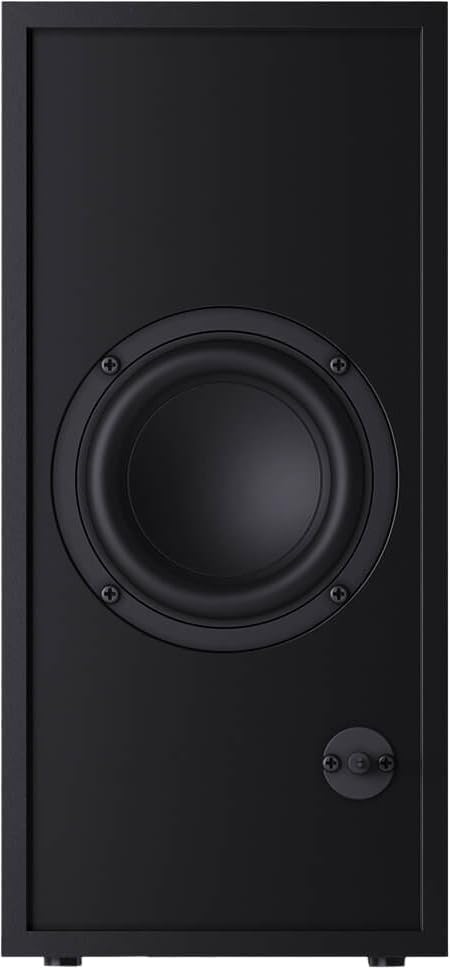
Figura 5.1: Kontroll mill-bogħod
This image displays the sleek, minimalist remote control for the Sharp HT-SBW110 soundbar, showing its various buttons for power, input selection, volume, bass, treble, and EQ modes.
The remote control allows you to manage all functions of your soundbar system. Insert the provided CR2 battery into the remote control before first use.
- Buttuna tal-Qawwa (⏷): Jixgħel/Jitfi s-soundbar.
- Buttuna tad-Dħul/Sors (↵): Switches between HDMI ARC, Optical, AUX, and Bluetooth inputs.
- Volum 'il fuq/Niżżel (+/-): Jaġġusta l-livell tal-volum ewlieni.
- Buttuna Mute (🔇): Itfi jew jattiva l-ħoss.
- Bass +/-: Adjusts the bass level of the subwoofer.
- Treble +/-: Jaġġusta l-livell tat-triple.
- Buttuna EQ: Cycles through preset equalizer modes: Music, Film, Talk.
- Buttuna Bluetooth (Ⓘ): Enters Bluetooth pairing mode.
5.2 Operazzjoni Bażika
- Power On/Off: Press the Power button on the remote or on the soundbar's top panel.
- Agħżel Input: Press the Input/Source button repeatedly to cycle through available inputs (HDMI ARC, Optical, AUX, Bluetooth). The LED indicator on the soundbar will change color to indicate the selected input.
- Aġġusta Volum: Use the Volume +/- buttons on the remote or the soundbar to adjust the listening level.
- Change EQ Mode: Press the EQ button to select between Music, Film, or Talk sound modes.
5.3 Tqabbil tal-Bluetooth
- Press the Input/Source button on the soundbar or remote until the Bluetooth input is selected (usually indicated by a blue LED).
- The soundbar will automatically enter pairing mode, and the Bluetooth LED will flash.
- Fuq l-apparat Bluetooth tiegħek (smartphone, tablet, eċċ.), attiva l-Bluetooth u fittex apparati disponibbli.
- Select "SHARP HT-SBW110" from the list of devices.
- Once paired, the Bluetooth LED on the soundbar will stop flashing and remain solid blue. You can now play audio from your device through the soundbar.
6. Manutenzjoni
- Tindif: Uża drapp artab u niexef biex tnaddaf l-uċuħ tas-soundbar u s-subwoofer. Tużax prodotti tat-tindif likwidi jew sprejs tal-ajrusol.
- Ventilazzjoni: Ensure that the ventilation openings on the soundbar and subwoofer are not blocked by dust or debris.
- Ħażna: Jekk taħżen l-unità għal perjodu estiż, aqlagħha mill-plagg tal-elettriku u aħżenha f'post frisk u niexef.
7 Issolvi l-problemi
| Problema | Kawża Possibbli | Soluzzjoni |
|---|---|---|
| Ebda qawwa | Kejbil tal-enerġija mhux imqabbad; Sokit tal-enerġija mhux attiv. | Ensure power cables are securely connected to the soundbar, subwoofer, and wall outlet. Try a different outlet. |
| L-ebda ħoss | Input mhux korrett magħżul; Volum baxx wisq; Kejbils mhux imqabbda sew. | Select the correct input source. Increase volume. Check all audio cable connections. Ensure TV audio output is set to external speakers. |
| Tqabbil Bluetooth ifalli | Is-soundbar mhux fil-modalità ta' tqabbil; L-apparat wisq 'il bogħod; Interferenza. | Ensure soundbar is in Bluetooth pairing mode (flashing blue LED). Move device closer to soundbar. Avoid strong electromagnetic interference. Try unpairing and re-pairing. |
| Il-kontroll mill-bogħod ma jaħdimx | Batteriji eżawriti; Ostruzzjoni bejn ir-remote u s-soundbar. | Replace batteries. Ensure clear line of sight between remote and soundbar's IR receiver. |
Jekk il-problema tippersisti, jekk jogħġbok irreferi għat-taqsima tal-Garanzija u l-Appoġġ għal aktar assistenza.
8. Speċifikazzjonijiet
| Kanali tal-Awdjo | 2.1 Kanali |
| Qawwa RMS totali | 180 W |
| Soundbar RMS Power | 30 W |
| Qawwa RMS tas-Subwoofer | 30 W |
| Medda ta' Frekwenzi | 60 - 20000 Hz |
| Teknoloġija tal-Konnettività | Fili & Wireless |
| Verżjoni Bluetooth | 4.2 |
| Portijiet HDMI | 1 (ARC) |
| Input Awdjo Ottiku | 1 |
| Input AUX | Iva |
| Vol Input ACtage | 220 - 240 V |
| Frekwenza tal-Input AC | 50 Hz |
| Konsum ta 'Enerġija Tipiku | 30 W |
| Konsum ta' Enerġija Standby | 0.5 W |
| Dimensjonijiet tas-Soundbar (W x D x H) | 800 x 60 x 60 mm (31.5 x 2.4 x 2.4 pulzieri) |
| Piż tal-Soundbar | 1.3 kg (2.9 lbs) |
| Subwoofer Dimensions (W x D x H) | 150 x 320 x 220 mm (5.9 x 12.6 x 8.7 pulzieri) |
| Piż tas-Subwoofer | 2.7 kg (6 lbs) |
| Kulur | Iswed |
| Immontabbli fuq il-ħajt | Iva |
| Kontroll mill-bogħod | Inkluż |
| Ċertifikazzjonijiet | CE (EMC), CB (Safety), ErP (Energy) |
9. Garanzija u Appoġġ
This Sharp HT-SBW110 Soundbar System comes with a limited warranty. Please refer to the warranty card included in your package for specific terms and conditions.
Spare parts availability is guaranteed for 1 year from the date of purchase.
For technical support, troubleshooting beyond this manual, or warranty claims, please contact Sharp customer service or visit the official Sharp website for your region. Contact information can typically be found on the product packaging or Sharp's official websit.


