Introduzzjoni
Welcome to the user manual for your Mustool G600 Digital Portable Microscope. This guide provides detailed instructions to help you set up, operate, and maintain your device, ensuring optimal performance and longevity. Please read this manual thoroughly before using the microscope.
Prodott Overview
The Mustool G600 is a versatile digital portable microscope designed for detailed observation of tiny objects. It features a high-definition display and adjustable magnification, making it suitable for various applications.
Karatteristiċi Ewlenin
- 4.3-inch HD LCD display for clear viewing.
- HD 3.6MP CCD sensor for high-resolution imaging.
- Adjustable magnification from 1x to 600x.
- Eight high-brightness LEDs for optimal illumination.
- Support for Micro SD card up to 64GB (not included) for storage.
- Built-in Li-ion battery providing approximately 6 hours of continuous working time.
- Auto turn-off function for power saving.
- Object distance: 15mm to infinity.
- Appoġġ b'ħafna lingwi.
Komponenti

Figure 1: Mustool G600 Digital Portable Microscope in operation, showing a circuit board under its lens and the magnified image on the display.
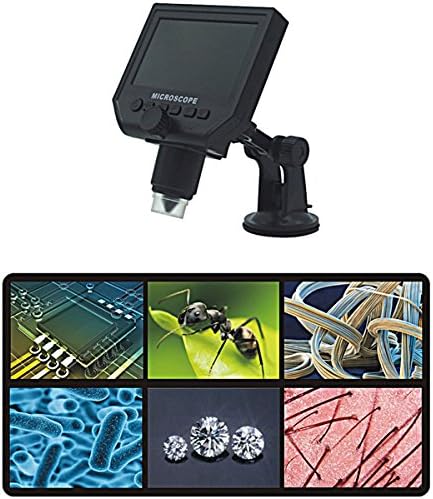
Figure 2: The Mustool G600 Digital Portable Microscope detached from its stand, showcasing the device's compact design and the adjustable stand.

Figure 3: The Mustool G600 Digital Portable Microscope display, illustrating various magnified views such as circuit components, an ant, textile fibers, bacteria, diamonds, and hair strands.

Figura 4: Quddiem view of the Mustool G600 Digital Portable Microscope mounted on its suction cup stand, highlighting the 4.3-inch LCD screen and control buttons.

Figura 5: Ġenb view of the Mustool G600 Digital Portable Microscope, illustrating the adjustable arm of the stand and the microscope's lens assembly.

Figura 6: Wara view of the Mustool G600 Digital Portable Microscope, showing the various ports for power, data, and Micro SD card insertion.
Kontenut tal-Pakkett
Jekk jogħġbok ivverifika li l-oġġetti kollha elenkati hawn taħt huma inklużi fil-pakkett tiegħek. Jekk xi oġġetti huma neqsin jew bil-ħsara, jekk jogħġbok ikkuntattja l-appoġġ għall-klijenti.
- 1 x Mustool G600 LCD Digital Microscope
- 1 x EU Plug Power supply (Note: Adapter may vary by region)
- 1 x Data line (USB cable)
- 1 x Multi-functional support (Stand)
- 1 x User’s manual (This document)
Setup
Iċċarġjar tal-batterija
Before first use, fully charge the microscope's built-in Li-ion battery.
- Connect the provided power supply to the microscope's charging port.
- Ipplaggja l-provvista tal-enerġija f'sokit elettriku standard.
- Id-dawl indikatur tal-iċċarġjar jixgħel. Ladarba jkun iċċarġjat kompletament, id-dawl jista’ jibdel il-kulur jew jintefa.
- Ċarġ sħiħ jipprovdi madwar 6 sigħat ta' tħaddim kontinwu.
Immuntar tal-Istand
The multi-functional support allows for stable positioning of the microscope.
- Attach the microscope unit to the adjustable arm of the stand. Ensure it is securely fastened.
- Place the suction cup base on a clean, flat, non-porous surface. Press down firmly on the suction cup lever to secure the stand.
- Adjust the arm and microscope angle as needed for your viewing suġġett.
Inserting a Micro SD Card (Optional)
To save images and videos, insert a Micro SD card (up to 64GB, not included).
- Locate the Micro SD card slot on the side or back of the microscope unit.
- Gently insert the Micro SD card with the gold contacts facing down (or as indicated by the slot diagram) until it clicks into place.
- Biex tneħħiha, imbotta l-karta bil-mod 'il ġewwa mill-ġdid sakemm toħroġ 'il barra.
Istruzzjonijiet Operattivi
Tixgħel/Jitfi
Agħfas u żomm il- Qawwa button (usually marked with a power symbol) for a few seconds to turn the microscope on or off. The LCD screen will illuminate.
Aġġustament tal-Ingrandiment u l-Focus
The microscope offers 1x to 600x continuous magnification.
- Place the object you wish to observe directly under the microscope lens.
- Dawwar il-kbir Buttuna tal-Fokus (typically located on the side of the microscope body) to bring the image into sharp focus on the LCD screen.
- Adjust the distance between the lens and the object (object distance: 15mm to infinity) using the stand's adjustment mechanisms to achieve the desired magnification and clarity.
L-aġġustament tal-luminożità LED
The microscope is equipped with 8 adjustable high-brightness LEDs.
Sib il- Kontroll tal-luminożità LED (often a small knob or button) on the microscope body. Rotate or press it to increase or decrease the illumination on your subject.
Qbid Stampi u Vidjows
To capture still images or record videos, ensure a Micro SD card is inserted.
- Filwaqt li viewing your subject, press the Modalità button to switch between photo mode, video mode, and playback mode.
- Fil-modalità tar-ritratti, agħfas il-buttuna OK/Qbid buttuna biex tieħu stampa.
- Fil-modalità tal-vidjo, agħfas il-buttuna OK/Qbid buttuna biex tibda tirrekordja. Agħfasha mill-ġdid biex twaqqaf ir-reġistrazzjoni.
- Maqbuda files huma ssejvjati fuq il-karta Micro SD.
Navigazzjoni tal-Menu
Uża l- Menu button to access settings and options.
Uża l- 'l fuq/' l isfel or Xellug/Lemin buttuni tal-vleġeġ biex tinnaviga fl-għażliet tal-menù.
Agħfas il- OK buttuna biex tikkonferma l-għażliet.
Common settings include resolution (1080P, 720P, VGA), language, date/time, and auto-off timer.
Manutenzjoni
Tindif
To ensure clear viewing and extend the life of your microscope:
- Gently wipe the LCD screen with a soft, lint-free cloth. For stubborn smudges, slightly dampNaddaf id-drapp bl-ilma jew b'prodott tat-tindif tal-iskrin.
- Use a soft brush or air blower to remove dust from the lens. For smudges on the lens, use a specialized lens cleaning solution and cloth.
- Clean the microscope body with a dry or slightly damp drapp. Tużax tindif jew solventi li joborxu.
Ħażna
When not in use, store the microscope in a cool, dry place, away from direct sunlight and extreme temperatures.
Keep the lens covered to prevent dust accumulation.
Kura tal-batterija
Biex ittawwal il-ħajja tal-batterija:
- Evita li tiċċarġja l-batterija kompletament ta' spiss.
- Jekk taħżenha għal perjodu estiż, iċċarġja l-batterija sa madwar 50% tal-kapaċità tagħha.
- Recharge the battery every few months if not in use to prevent deep discharge.
Issolvi l-problemi
| Problema | Kawża Possibbli | Soluzzjoni |
|---|---|---|
| Microscope does not turn on. | Il-batterija hija eżawrita. | Iċċarġja l-batterija billi tuża l-provvista tal-enerġija pprovduta. |
| L-immaġni hija mċajpra. | Incorrect focus or object distance. | Adjust the focus knob and/or the distance between the lens and the object. |
| Screen is too dark/bright. | Il-luminożità tal-LED mhux aġġustata. | Adjust the LED brightness control. |
| Ma nistax insalva immaġni/vidjows. | L-ebda kard Micro SD ma ddaħħlet jew il-kard hija mimlija/korrotta. | Insert a Micro SD card, ensure it has sufficient space, or try formatting the card (this will erase all data). |
| Microscope turns off automatically. | Auto turn-off function is enabled or battery is low. | Charge the battery. Check menu settings to adjust or disable the auto turn-off timer. |
Jekk il-problema tippersisti wara li tipprova dawn is-soluzzjonijiet, jekk jogħġbok ikkuntattja l-appoġġ għall-klijenti.
Speċifikazzjonijiet
| Karatteristika | Dettall |
|---|---|
| Mudell | Mustool G600 |
| Wiri | Display LCD ta '4.3 pulzieri HD |
| Pixel | HD 3.6MP CCD |
| Riżoluzzjoni | 1080P, 720P, VGA |
| Tkabbir | 1-600x (Continuous) |
| Distanza tal-Oġġetti | 15mm - infinity |
| Sors tad-Dawl | 8 Adjustable High Brightness LEDs |
| Appoġġ għall-Ħażna | Micro SD card up to 64GB (Not included) |
| Sors tal-Enerġija | Mibnija fil-batterija Li-ion |
| Ħajja tal-batterija | Approx. 6 hours continuous working |
| Itfi Awtomatiku | Iva |
| Appoġġ Lingwistiku | English, Spanish, Russian, Korean, Japanese, Thai, Hebrew, Portuguese, German, French, Italian, Turkish, Czech, Chinese |
| Materjal | Glass/Glass-like (Lens), Other components as per design |
| Kulur | Iswed |
| UPC | 783050248461 |
Garanzija u Appoġġ
The Mustool G600 Digital Portable Microscope comes with a standard manufacturer's warranty. Please refer to the warranty card included in your package for specific terms and conditions.
For technical support, troubleshooting assistance beyond this manual, or warranty claims, please contact Mustool customer service through the retailer where you purchased the product or visit the official Mustool websit.
Please have your product model (G600) and purchase information ready when contacting support.


