Introduzzjoni
This manual provides instructions for the operation and maintenance of your Timex Expedition Digital Chrono Alarm Timer 33mm Watch, Model TW4B13100. This digital outdoor watch features a chronograph, alarm, and timer, designed for everyday use.

Figura 1: Quddiem view of the Timex Expedition Digital Watch. The watch features a black case, a clear digital display showing the time and date, and a durable gray and blue striped fabric strap. Buttons for 'SET', 'MODE', 'START/SPLIT', and 'STOP/RESET' are visible on the sides of the watch case.
Setup
Initial Activation and Time Setting
Upon first use, or after a battery replacement, you may need to activate the watch and set the time and date.
- If a plastic guard is present under the SET button, remove it.
- Agħfas u żomm il- SET button until the display flashes, indicating time setting mode.
- Uża l- BIDU / TAQSAM button to adjust the flashing segment (e.g., hours, minutes).
- Agħfas il- MODALITÀ button to advance to the next segment (e.g., minutes, AM/PM, month, day, year).
- Irrepeti l-passi 3 u 4 sakemm is-settings mixtieqa kollha jkunu kkonfigurati.
- Agħfas il- SET button again to exit time setting mode.
Informazzjoni dwar il-batterija
Your watch comes with one product-specific battery included. When the display dims or functions become erratic, it may be time to replace the battery. Timex recommends having battery replacement performed by a qualified service center to maintain water resistance.
Modi Operattivi
The watch features multiple modes accessible via the MODALITÀ buttuna.

Figura 2: Ġenb view of the Timex Expedition Digital Watch. This image highlights the textured buttons on the right side of the watch case, labeled 'START/SPLIT' and 'STOP/RESET', which are used for various functions across different modes.
Modalità Ħin
Din hija l-modalità tal-wiri awtomatika, li turi l-ħin attwali, il-jum tal-ġimgħa, u d-data.
Kronografu (Stopwatch)
The chronograph measures elapsed time.
- Mill-Modalità Ħin, agħfas MODALITÀ until "CHRONO" or a similar indicator appears.
- Agħfas BIDU / TAQSAM biex tibda timing.
- Agħfas BIDU / TAQSAM again to record a split time (the display will freeze, but timing continues in the background). Press BIDU / TAQSAM again to return to current elapsed time.
- Agħfas STOP / RESET biex iwaqqaf il-kronografu.
- With the chronograph paused, press STOP / RESET again to reset it to zero.
Timer (Countdown)
The countdown timer allows you to set a specific duration, after which an alarm will sound.
- Mill-Modalità Ħin, agħfas MODALITÀ until "TIMER" or a similar indicator appears.
- Agħfas u żomm SET sakemm il-wiri jteptep.
- Użu BIDU / TAQSAM to adjust the hours, minutes, or seconds.
- Agħfas MODALITÀ biex tiċċaqlaq bejn sigħat, minuti u sekondi.
- Agħfas SET biex tikkonferma l-issettjar tat-tajmer.
- Agħfas BIDU / TAQSAM biex tibda l-countdown.
- Agħfas STOP / RESET to pause or resume the timer.
- When the timer reaches zero, an alarm will sound. Press any button to silence it.
Allarm
The watch features an alarm function to alert you at a set time.
- Mill-Modalità Ħin, agħfas MODALITÀ until "ALARM" or a similar indicator appears.
- Agħfas u żomm SET sakemm il-ħin tal-allarm jteptep.
- Użu BIDU / TAQSAM biex taġġusta s-sigħat u l-minuti.
- Agħfas MODALITÀ to move between hours, minutes, and AM/PM.
- Agħfas SET biex tikkonferma l-ħin tal-allarm.
- Biex tattiva/tiddiżattiva l-allarm, agħfas BIDU / TAQSAM waqt li tkun fil-Modalità ta' Allarm (ikona ta' qanpiena ġeneralment tindika attivazzjoni).
- Meta jdoqq l-allarm, agħfas kwalunkwe buttuna biex isikketha.
Dawl tal-Lejl INDIGLO
The INDIGLO night-light illuminates the watch display for visibility in low-light conditions.
- Agħfas il- INDIGLO button (typically located on the front of the watch, below the display) to activate the backlight.
- The light will remain on for a few seconds.
Manutenzjoni
Reżistenza għall-Ilma
This watch is water resistant to 100 meters (330 feet). This means it is suitable for showering, swimming, and snorkeling. It is not suitable for scuba diving.
- Tagħfasx buttuni waqt li l-arloġġ ikun imxarrab jew mgħaddas.
- Avoid exposing the watch to extreme temperature changes (e.g., hot shower then cold water).
- Wara l-espożizzjoni għall-ilma mielaħ, laħlaħ l-arloġġ b'ilma frisk u nixxef sew.
Tindif
Clean your watch regularly to remove dirt and debris.
- For the case and crystal, use a soft, damp drapp.
- For the fabric strap, it can be gently hand-washed with mild soap and water. Ensure it is completely dry before wearing.
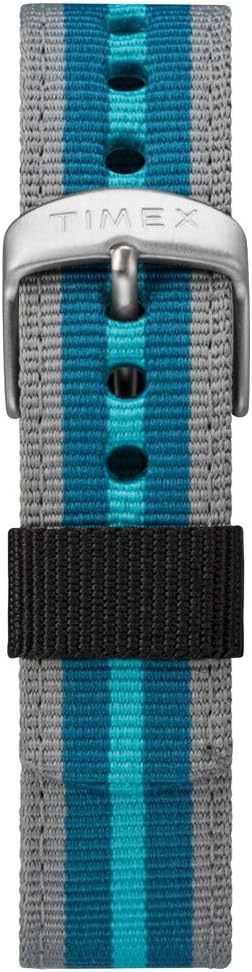
Figura 3: Close-up view of the Timex Expedition watch's fabric strap. The strap features alternating stripes of gray and two shades of blue, secured by a silver-colored buckle with the Timex logo.
Issolvi l-problemi
| Problema | Kawża Possibbli | Soluzzjoni |
|---|---|---|
| Id-displej huwa vojt jew mudlam. | Batterija baxxa jew mejta. | Ibdel il-batterija. |
| Il-buttuni ma jirrispondux. | Watch may be in a locked mode or internal error. | Try pressing all buttons simultaneously for a few seconds to reset (if applicable). If problem persists, consult service. |
| Il-ħin mhux korrett. | Il-ħin ma ġiex issettjat sew jew il-batterija hija baxxa. | Re-set the time and date. If issue recurs, replace battery. |
Speċifikazzjonijiet
- Ditta: Timex
- Numru tal-Mudell: TW4B13100
- Tip ta' wiri: Diġitali
- Dijametru tal-Każ: 33mm
- Reżistenza għall-Ilma: 100 metru (330 pied)
- Karatteristiċi: Chronograph, Alarm, Timer, INDIGLO Night-Light
- Materjal taċ-ċinga: Tessili
- Batterija: 1 batterija speċifika tal-prodott (inkluża)
- Dipartiment: Unisex-adult
Prodott Overview Video
For a visual guide on the Timex Expedition Digital watch, please refer to the video below.
Vidjo 1: An fuqview of the Timex Expedition Digital 33mm Nylon Strap watch. This video demonstrates the watch's design and features, providing a visual understanding of its appearance and basic functionalities.
Garanzija u Appoġġ
Timex watches are manufactured to high standards and are backed by a limited warranty. For specific warranty details, registration, or support inquiries, please refer to the official Timex website or contact Timex customer service.
Tista' żżur il-ħanut uffiċjali ta' Timex għal aktar informazzjoni: Ħanut Timex fuq Amazon


