1. Prodott Aktarview
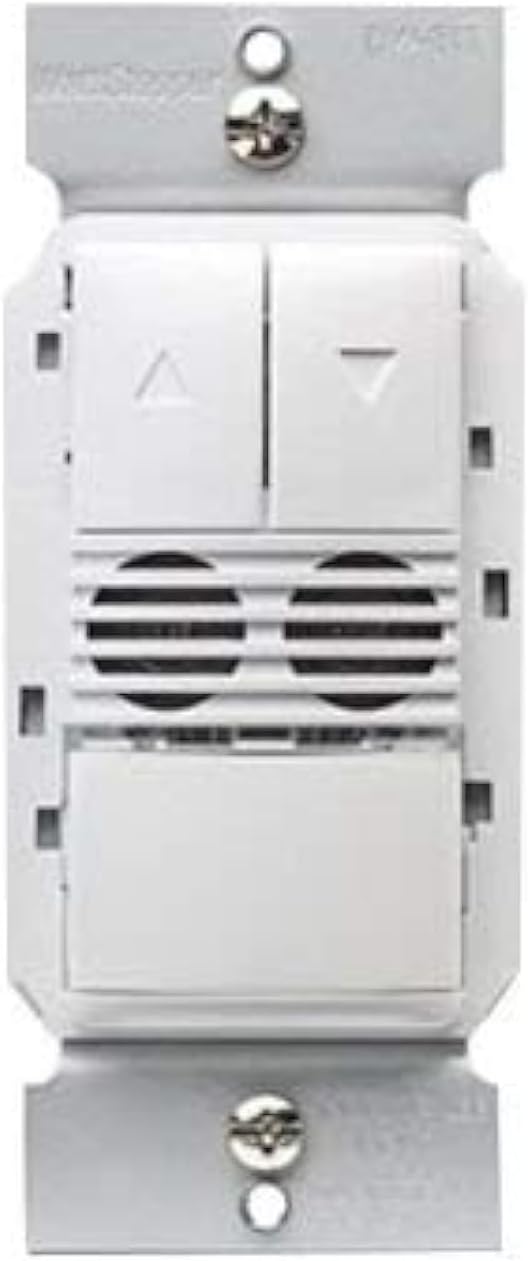
The Legrand Wattstopper DW-311-W is a state-of-the-art dual technology dimming wall switch occupancy sensor designed for efficient lighting control. This device combines passive infrared (PIR) and ultrasonic (US) technologies to accurately detect occupancy, ensuring lights are only on when needed. It operates on 120/277 Volt AC and provides dimming control, making it suitable for various commercial and residential applications. The sensor is designed to enhance energy savings and convenience by automatically turning lights on and off based on room occupancy and ambient light levels.

2. Informazzjoni dwar is-Sigurtà
TWISSIJA: Riskju ta' Xokk Elettriku. Installazzjoni ħażina tista' twassal għal korriment serju jew mewt.
- Always turn off power at the circuit breaker or fuse(s) before installing or servicing the device.
- This device is intended for installation in accordance with the National Electrical Code and local regulations.
- L-installazzjoni għandha ssir minn elettriċista kwalifikat.
- Uża wajer tar-ram biss.
- Do not touch wires or terminals when the circuit breaker is ON.
3. Għodod Meħtieġa
- Tornavit (ras Phillips rakkomandata)
- Stripper tal-Wajer
- Voltage Tester (Electroprobe)
- Electrical Tape (optional, for labeling)
4. Installazzjoni
Follow these steps carefully to install your new dimming occupancy sensor. Ensure power is OFF at the circuit breaker before beginning.
- Itfi l-Enerġija: Sib is-circuit breaker li jikkontrolla s-swiċċ li qed tissostitwixxi u itfih. Ivverifika li l-provvista tal-enerġija hija mitfija billi tuża voltagtester.
- Neħħi Swiċċ Eżistenti: Unscrew and carefully pull the existing wall plate and switch out of the wall box.
- Identifika l-Wajers: With the power temporarily turned ON (exercise extreme caution), use a voltage tester to identify the HOT wire (line wire) and the LOAD wire. The HOT wire will cause the tester to light up or beep. The LOAD wire should not have power when the light switch is off. Label these wires if desired. Turn power OFF at the circuit breaker again before proceeding.
- Identify Neutral and Ground Wires: The NEUTRAL wire is typically white. The GROUND wire is typically bare copper or green.
- Identify 0-10V Dimming Wires (if applicable): For 0-10V dimming systems, you will also have two low voltage wires, typically purple (positive) and grey (negative), connected to the ballast.
- Disconnect Old Switch: Detach all wires from the old switch.
- Wire the New Sensor: Refer to the wiring diagram below and the general wiring instructions for a dual technology dimming sensor.
4.1 Konnessjonijiet tal-Wiring
- Qabbad il- Wajer iswed from the sensor to the HOT (Line) wire from the wall box.
- Qabbad il- Wajer aħmar from the sensor to the LOAD wire from the wall box.
- Qabbad il- Wajer abjad from the sensor to the NEUTRAL wire from the wall box.
- Qabbad il- Wajer aħdar from the sensor to the GROUND wire from the wall box.
- For 0-10V dimming: Connect the Wajer vjola from the sensor to the Positive (+) 0-10V dimming wire from the ballast.
- For 0-10V dimming: Connect the Wajer griż from the sensor to the Negative (-) 0-10V dimming wire from the ballast.
Secure all connections with wire nuts, ensuring no bare wire is exposed.
- Immonta s-Sensor: Carefully push the wired sensor back into the wall box. Secure it with the provided screws.
- Installa Pjanċa tal-Ħajt: Attach the wall plate over the sensor.
- Irrestawra l-Enerġija: Erġa' ixgħel il-kurrent mis-circuit breaker.
5. Operazzjoni
The DW-311-W sensor operates in either Occupancy Mode (lights turn ON automatically when motion is detected) or Vacancy Mode (lights must be turned ON manually, but turn OFF automatically). It also features dimming control.
- Manwal ON/OFF: Press the main paddle button to manually turn lights ON or OFF.
- Kontroll tad-Dimming: Use the UP (▲) and DOWN (▼) buttons to adjust the light intensity.
- Operazzjoni Awtomatika: In Occupancy Mode, lights will turn on automatically when motion is detected and turn off after a set time delay when the area is vacant. In Vacancy Mode, lights are turned on manually and turn off automatically.
6. Programming and Settings
The sensor offers adjustable settings for optimal performance. These settings are typically accessed by removing the push buttons on the face of the device to reveal adjustment dials.
- Dewmien tal-Ħin: Adjusts how long the lights remain ON after the last detected motion. Common settings include 15 seconds, 5 minutes, 10 minutes, 15 minutes, 20 minutes, or 30 minutes.
- Sensor Sensitivity Range: Controls the detection range of the motion sensor. Adjust this based on the size of the room and desired coverage.
- Light Level (Ambient Light Sensor): Determines the ambient light threshold at which the sensor will allow lights to turn ON automatically. This helps prevent lights from turning on if there is already sufficient natural light.
6.1 Switching Occupancy and Vacancy Modes
You can change the device's operating mode between Occupancy and Vacancy:
- To change to Occupancy Mode: Press and hold down both the UP (▲) and DOWN (▼) buttons for approximately 5 seconds until the LED indicator flashes 2 times.
- To change to Vacancy Mode: Press and hold down both the UP (▲) and DOWN (▼) buttons for approximately 5 seconds until the LED indicator flashes 4 times.
7. Speċifikazzjonijiet
| Karatteristika | Dettall |
|---|---|
| Mod ta' Operazzjoni | Awtomatiku |
| Vol Operattivtage | 120/277 Volt (AC) |
| Tip ta' Kuntatt | Normalment Miftuħ |
| Tip ta' Konnettur | Hardwired |
| Brand | Legrand |
| Terminal | Invita |
| Tip ta 'Ċirkwit | 1-mod |
| Tip ta' Attwatur | Dimmer |
| Kuntatt Materjal | Ram, Brass, Azzar Inossidabbli |
| Numru ta' Pożizzjonijiet | 2 |
| Metodu ta' Kontroll | Mess |
| Protokoll tal-Konnettività | Wi-Fi |
| Kulur | ABJAD |
| Wattage | 1200 watt |
| Għadd ta' Unitajiet | 1.0 Għadd |
| Manifattur | Wattstopper |
| Tip ta' Kontroll | Dimming and Occupancy Control |
| UPC | 754182939428 |
| Dimensjonijiet tal-Pakkett | 5.08 x 3.07 x 2.6 pulzieri |
| Piż tal-oġġett | 7.8 uqija |
| Numru tal-mudell tal-oġġett | DW-311-W |
| Data L-Ewwel Disponibbli | 2 ta’ Awwissu, 2017 |