Introduzzjoni
Grazzi tax-xiriasing the VONYX SPX-PA9210 Portable PA System. This manual provides essential information for the safe and efficient operation of your device. Please read it thoroughly before use and retain it for future reference.
Istruzzjonijiet tas-Sigurtà
- Aqra l-istruzzjonijiet kollha bir-reqqa qabel ma tħaddem l-apparat.
- Żomm l-unità 'l bogħod mill-ilma, l-umdità, u temperaturi estremi.
- Tiftaħx is-casing; irreferi s-servizz kollu lil persunal kwalifikat.
- Uża biss l-adapter tal-enerġija speċifikat għall-iċċarġjar.
- Żgura ventilazzjoni xierqa biex tevita sħana żejda.
- Evita espożizzjoni fit-tul għal livelli ta 'volum għoli biex tevita ħsara fis-smigħ.
Kontenut tal-Pakkett
Ivverifika li l-oġġetti kollha huma preżenti fil-pakkett:
- VONYX SPX-PA9210 Portable PA System Unit
- 2 x UHF Wireless Microphones
- Adapter tal-Enerġija/Kejbil tal-Iċċarġjar
- Manwal għall-Utent (dan id-dokument)
Prodott Overview
The VONYX SPX-PA9210 is a portable PA system designed for various audio applications. It features integrated speakers, media playback options, and wireless microphones for versatile use.
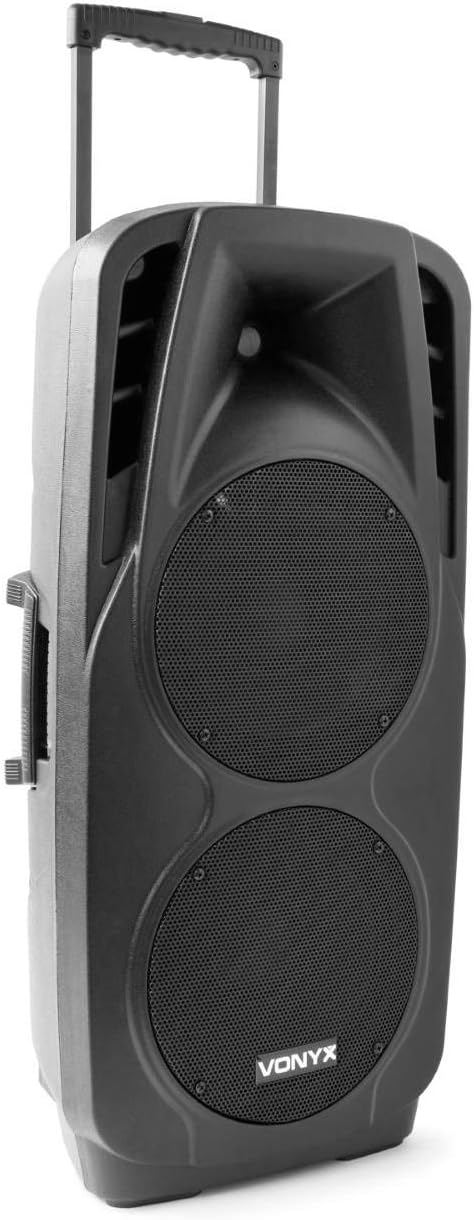
An image showing the VONYX SPX-PA9210 portable PA system. It features a black casing, two large speaker grilles on the front, and a retractable handle at the top for easy transport. A side handle is also visible.
Karatteristiċi ewlenin:
- Integrated 2x 10-inch speakers with titanium tweeter controller.
- Built-in media player with USB and SD/MMC card slots.
- Konnettività Bluetooth għal streaming awdjo mingħajr fili.
- High-performance 12V/7A rechargeable battery for 4-6 hours of autonomy.
- Two UHF wireless microphones with up to 50m range.
- Integrated trolley with telescopic handle and wheels for portability.
- LCD screen for media information display.
Setup
1. Iċċarġjar Inizjali
Before first use, fully charge the internal 12V/7A battery. Connect the provided power adapter to the charging port on the PA system and then to a suitable power outlet. The charging indicator will show the charging status. A full charge typically provides 4-6 hours of operation.
2. Tixgħil / Mitfi
- To power on the unit, locate the power switch (usually on the rear or control panel) and set it to the "ON" position.
- To power off, set the switch to the "OFF" position.
3. Issettjar tal-Mikrofonu
- Insert fresh batteries into the two UHF wireless microphones.
- Turn on the microphones. They should automatically connect to the PA system.
- Adjust the microphone volume on the PA system's control panel. The wireless range is up to 50 meters.
Istruzzjonijiet Operattivi
1. Media Playback (USB/SD/MMC)
- Insert a USB flash drive or an SD/MMC card into the corresponding slot on the control panel.
- The system will automatically detect the media and begin playback, or you may need to select the input source using the "Mode" button.
- Use the playback controls (Play/Pause, Next, Previous) on the control panel to manage your music.
- The LCD screen will display track information.
2. Tqabbil tal-Bluetooth
- Press the "Mode" button on the PA system until "Mode" button on the PA system until "Bluetooth" is selected.
- Fuq l-ismartphone, it-tablet, jew apparat ieħor li jaħdem bil-Bluetooth tiegħek, attiva l-Bluetooth u fittex apparati disponibbli.
- Select "VONYX SPX-PA9210" (or similar name) from the list to pair.
- Once paired, you can stream audio wirelessly from your device to the PA system.
3. Volume and Tone Controls
- Adjust the master volume knob to control the overall sound output.
- Separate volume controls are available for microphones and media playback.
- Use the bass and treble controls (if available) to adjust the tone of the audio.
Manutenzjoni
1. Tindif
Wipe the exterior of the unit with a soft, dry cloth. Do not use abrasive cleaners or solvents. Ensure no liquids enter the device.
2. Kura tal-batterija
- Biex ittawwal il-ħajja tal-batterija, evita li tiċċarġja kompletament il-batterija ta' spiss.
- Charge the unit regularly, even if not in use, to maintain battery health.
- Aħżen l-unità f'post frisk u niexef meta ma tkunx qed tużaha għal perjodi twal.
Issolvi l-problemi
- Ebda Qawwa: Ensure the unit is charged or connected to a power source, and the power switch is in the "ON" position.
- Ebda Ħsejjes: Check all volume controls (master, microphone, media player). Ensure the correct input source is selected. Verify microphone batteries.
- Bluetooth Mhux Konnessjoni: Ensure the PA system is in Bluetooth mode and discoverable. Turn off and on Bluetooth on your device and try pairing again. Move closer to the PA system.
- Ħoss Mgħawġ: Reduce the volume. Check audio cables if using wired inputs. Ensure microphones are not too close to the speakers (feedback).
Speċifikazzjonijiet
| Brand | VONYX |
| Numru tal-Mudell | Sky-170.082 (SPX-PA9210) |
| Dimensjonijiet (L x W x H) | 27 x 38.5 x 81 ċm |
| Piż | 16.25 kg |
| Teknoloġija tal-Konnettività | Bluetooth, USB |
| Użu Rakkomandat tal-Prodott | Smartphones jew Pilloli |
| Karatteristiċi Speċjali | Bluetooth, USB Port, Portable, LCD Screen |
| Sors tal-Enerġija | Wireless (Internal Battery) |
| Batterija | 12V/7A, 4-6 hours autonomy |
| Materjal | Acrylonitrile Butadiene Styrene (ABS) |
| Numru ta 'Kanali | 5 |
| Kelliema | 2x 10-inch woofers, Titanium tweeter controller |
| Mikrofoni | 2x UHF Wireless Microphones (up to 50m range) |
Garanzija u Appoġġ
For warranty information and technical support, please refer to the documentation provided with your purchase or contact VONYX customer service directly.
Disponibbiltà ta' Spare Parts: Informazzjoni dwar id-disponibbiltà ta' spare parts għal dan il-prodott bħalissa mhijiex disponibbli.
Aġġornamenti tas-Software: Informazzjoni dwar aġġornamenti tas-softwer garantiti għal dan il-prodott bħalissa mhijiex disponibbli.


