1. Introduzzjoni
This manual provides essential information for the safe and efficient operation of your AUXUS iRis AX32LSP01-SM 32-inch Smart Android LED TV. Please read these instructions thoroughly before using the product and retain them for future reference.
The AUXUS iRis AX32LSP01-SM features a 32-inch HD Ready LED display, integrated Android operating system for smart functionality, wireless display capabilities, and multiple connectivity options. It is designed to provide an immersive viewing and interactive experience.

Figura 1.1: Quddiem view of the AUXUS iRis 32-inch Smart Android LED TV, showcasinid-displej tiegħu.
2. Informazzjoni dwar is-Sigurtà
Osserva l-prekawzjonijiet ta' sigurtà li ġejjin biex tevita ħsara lit-TV u tiżgura s-sigurtà personali:
- Tesponix it-TV għax-xita jew għall-umdità biex tevita nar jew xokk elettriku.
- Tiftaħx it-TV casing. Irreferi s-servizz kollu lil persunal kwalifikat.
- Aċċerta ruħek li jkun hemm ventilazzjoni xierqa. Timblokkax il-fetħiet tal-ventilazzjoni.
- Poġġi t-TV fuq wiċċ stabbli u livellat biex tevita li jaqa’.
- Ipproteġi l-korda tad-dawl milli jimxi fuqu jew maqrusa.
- Skonnettja t-TV waqt maltempati bis-sajjetti jew meta ma tużahx għal perjodi twal.
3. Kontenut tal-Pakkett
Ivverifika li l-oġġetti kollha huma preżenti fil-pakkett:
- 1 x AUXUS iRis 32-inch LED TV
- 1 x Table Top Stand (set)
- 1 x Manwal tal-Utent (dan id-dokument)
- 1 x Karta tal-Garanzija
- 1 x Kontroll mill-bogħod
4. Setup
4.1 Disimballaġġ
Neħħi t-TV u l-aċċessorji kollha mill-imballaġġ bir-reqqa. Żomm il-materjali tal-imballaġġ għal trasport jew manutenzjoni fil-futur.
4.2 Installazzjoni ta' Stand
If using the table-top stand, attach the stand bases to the bottom of the TV using the provided screws. Ensure the stand is securely fastened before placing the TV on a flat, stable surface.
4.3 Immuntar tal-ħajt
The TV supports VESA-compatible wall mounts (not included). Consult a professional for wall mounting to ensure proper installation and safety.
4.4 Konnessjoni tal-Periferali
Refer to the back panel diagram for port locations. Ensure the TV is powered off before making any connections.
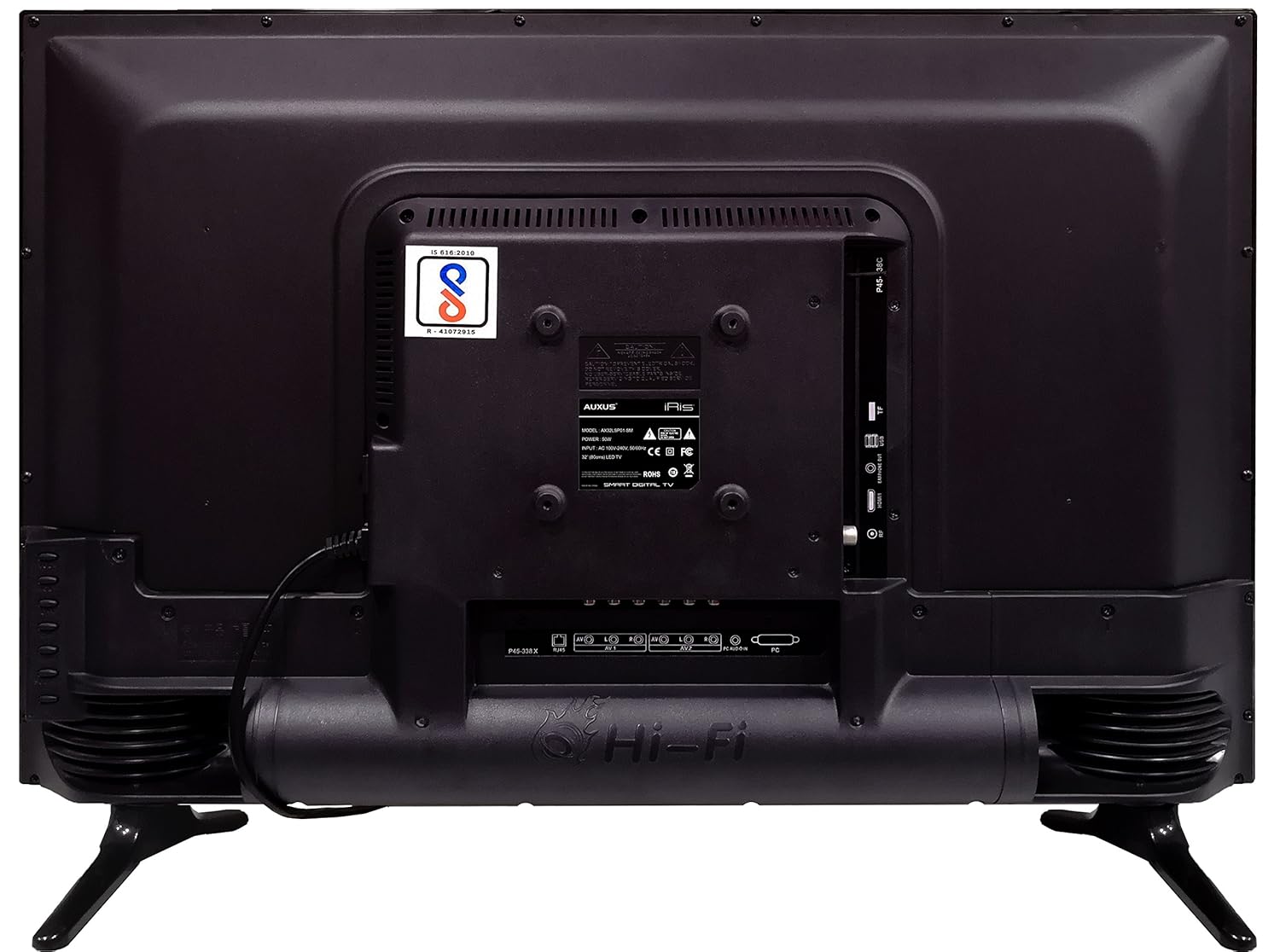
Figure 4.1: Rear panel of the TV with various input/output ports.

Figura 4.2: Dettaljat view of the bottom interface ports.

Figure 4.3: Icons representing multiple connectivity options.
- Qawwa: Qabbad il-korda tal-enerġija mat-TV u mbagħad ma' sokit tal-ħajt.
- Antenna/Kejbil: Connect an antenna or cable TV signal to the RF port.
- USB: Insert USB drives for media playback or software updates into the USB ports. The TV has 2 USB ports.
- Ethernet (RJ45): Qabbad kejbil Ethernet għal konnessjoni tal-internet bil-fili.
- AV (Audio/Video): Use RCA cables for older devices. The TV has AV1 and AV2 inputs.
- PC IN (VGA): Connect a computer using a VGA cable for video and a 3.5mm audio cable for sound (PC AUDIO IN).
- Headphone: Connect headphones to the 3.5mm jack for private listening.
5. It-tħaddim tat-TV
5.1 L-Ewwel Setup
- After connecting the power, press the Power button on the remote control or TV.
- Segwi l-istruzzjonijiet fuq l-iskrin biex tagħżel il-lingwa, il-pajjiż u ż-żona tal-ħin tiegħek.
- Connect to your network: Choose Wi-Fi and enter your password, or ensure an Ethernet cable is connected.
- Complete the channel scan if connecting an antenna/cable.
5.2 Kontroll mill-Bogħod
The remote control allows you to navigate menus, adjust volume, change channels, and access smart features. Familiarize yourself with its buttons for optimal use.
5.3 Smart TV Features (Android OS)
Your TV runs on the Android operating system, providing access to a variety of applications and internet services.

Figure 5.1: TV displaying a smart interface, such as Netflix.
- Navigazzjoni: Use the directional pad and 'OK' button on the remote to browse the Android interface.
- Wirja bla fili: Utilize the built-in wireless display feature to mirror content from compatible smartphones or tablets to your TV.
- Internet Browsing & Apps: Connect to the internet to browse websites or download and use applications from the app store.
- Logħob: The Android platform supports various games, offering an adrenaline-pumping gaming experience.
5.4 Issettjar tal-Immaġni u l-Ħoss
Access the TV's settings menu to customize picture and sound preferences.
- Stampa: Adjust brightness, contrast, color, sharpness, and select picture modes (e.g., Standard, Dynamic, Movie).
- Ħoss: Optimize audio with settings for volume, balance, equalizer, and sound modes. The TV features 'Boomr Speakers' for enhanced audio output.
5.5 Għażla tas-Sors tal-Input
Press the 'Source' or 'Input' button on your remote to switch between connected devices (HDMI 1, HDMI 2, AV 1, AV 2, PC, TV).
6. Manutenzjoni
6.1 Tindif tat-TV
- Dejjem aqla’ t-TV qabel ma tnaddaf.
- Use a soft, dry cloth to wipe the screen and TV casing.
- For stubborn marks on the screen, use a screen cleaner specifically designed for LED displays, applied to the cloth, not directly to the screen.
- Evita li tuża cleaners li joborxu, xama', jew solventi.
6.2 Aġġornamenti tas-Software
Iċċekkja perjodikament għal aġġornamenti tas-softwer permezz tal-menu tas-settings tat-TV biex tiżgura prestazzjoni ottimali u aċċess għall-aħħar karatteristiċi.
7 Issolvi l-problemi
Jekk tiltaqa' ma' problemi bit-TV tiegħek, irreferi għall-problemi u s-soluzzjonijiet komuni li ġejjin:
| Problema | Soluzzjoni Possibbli |
|---|---|
| Ebda qawwa | Check if the power cord is securely connected and the power outlet is working. |
| L-ebda stampa, iżda l-ħoss huwa preżenti | Kun żgur li s-sors tad-dħul korrett huwa magħżul. Iċċekkja l-konnessjonijiet tal-kejbil ma' apparati esterni. |
| L-ebda ħoss, iżda l-istampa hija preżenti | Check volume level and mute status. Verify audio cable connections. |
| Il-kontroll mill-bogħod ma jaħdimx | Ibdel il-batteriji. Kun żgur li ma jkunx hemm ostakli bejn ir-remote u t-TV. |
| Android system hangs or is slow | Restart the TV by unplugging it for a few minutes. Close unused applications. |
| Problemi ta' konnessjoni tan-netwerk | Check Wi-Fi password or Ethernet cable connection. Restart your router. |
8. Speċifikazzjonijiet
| Karatteristika | Speċifikazzjoni |
|---|---|
| Brand | AUXUS |
| Isem tal-Mudell | AX32LSP01-SM |
| Daqs tal-Iskrin | 32 Pulzier (82 ċm) |
| Teknoloġija tal-Wiri | LED, Pannell IPS |
| Riżoluzzjoni | Lest għall-HD (1366 x 768p) |
| ViewIng Angolu | 178 Grad |
| Sistema Operattiva | Android |
| Kapaċità tal-Ħażna Diġitali | 8 GB |
| RAM | 1 GB |
| Modalità tal-Ħruġ tal-Awdjo | Surround (Boomr Speakers) |
| Portijiet HDMI | Multipli |
| Portijiet USB | 2 |
| Teknoloġija tal-Konnettività | Ethernet, Wi-Fi (Wireless Display) |
| Portijiet Oħrajn | AV (RCA), PC IN (VGA), PC Audio In, Headphone (3.5mm), RF (Antenna) |
| Tip ta 'Immuntar | Wall Mount / Table Top Stand |
| Dimensjonijiet tal-Prodott (LxWxH) | 84 x 13 x 59 ċm |
| Piż tal-oġġett | 6.5 kg |
9. Garanzija u Appoġġ
Your AUXUS iRis AX32LSP01-SM TV comes with a warranty. Please refer to the included Warranty Card for specific terms, conditions, and duration of the warranty coverage.
For technical support, service requests, or further inquiries, please contact AUXUS customer service. Contact details can typically be found on the warranty card or the official AUXUS websit.


