1. Introduzzjoni
This manual provides essential information for the setup, operation, maintenance, and troubleshooting of your Avaya IP Office 500 1603-I IP VOIP 3 Button Display Telephone. The Avaya 1603-I is an entry-level IP telephone designed for basic users and is ideal for common areas, stockrooms, lobbies, or drop-in desks.

Figura 1: Quddiem view of the Avaya 1603-I IP Phone, showing the display, three programmable buttons, navigation keys, and numeric keypad.
2. Setup
Follow these steps to properly set up your Avaya 1603-I IP telephone:
- Spakkja l-Apparat: Carefully remove all components from the packaging, including the telephone unit, handset, handset cord, and desk stand.
- Waħħal l-Istand tal-Iskrivanija: Align the desk stand with the slots on the back of the telephone unit and snap it into place. Ensure it is securely attached for stable placement.
- Qabbad il-Handset: Plug one end of the coiled handset cord into the handset and the other end into the designated handset port on the telephone unit.
- Qabbad man-Netwerk: Connect an Ethernet cable from your network switch or router to the LAN port on the back of the telephone. If your network supports Power over Ethernet (PoE), the phone will power on automatically. If PoE is not available, connect an appropriate power adapter (sold separately) to the power port.
- Ivverifika l-Konnessjonijiet: Ensure all cables are securely connected. The phone display should illuminate, indicating it is receiving power and attempting to connect to the network.
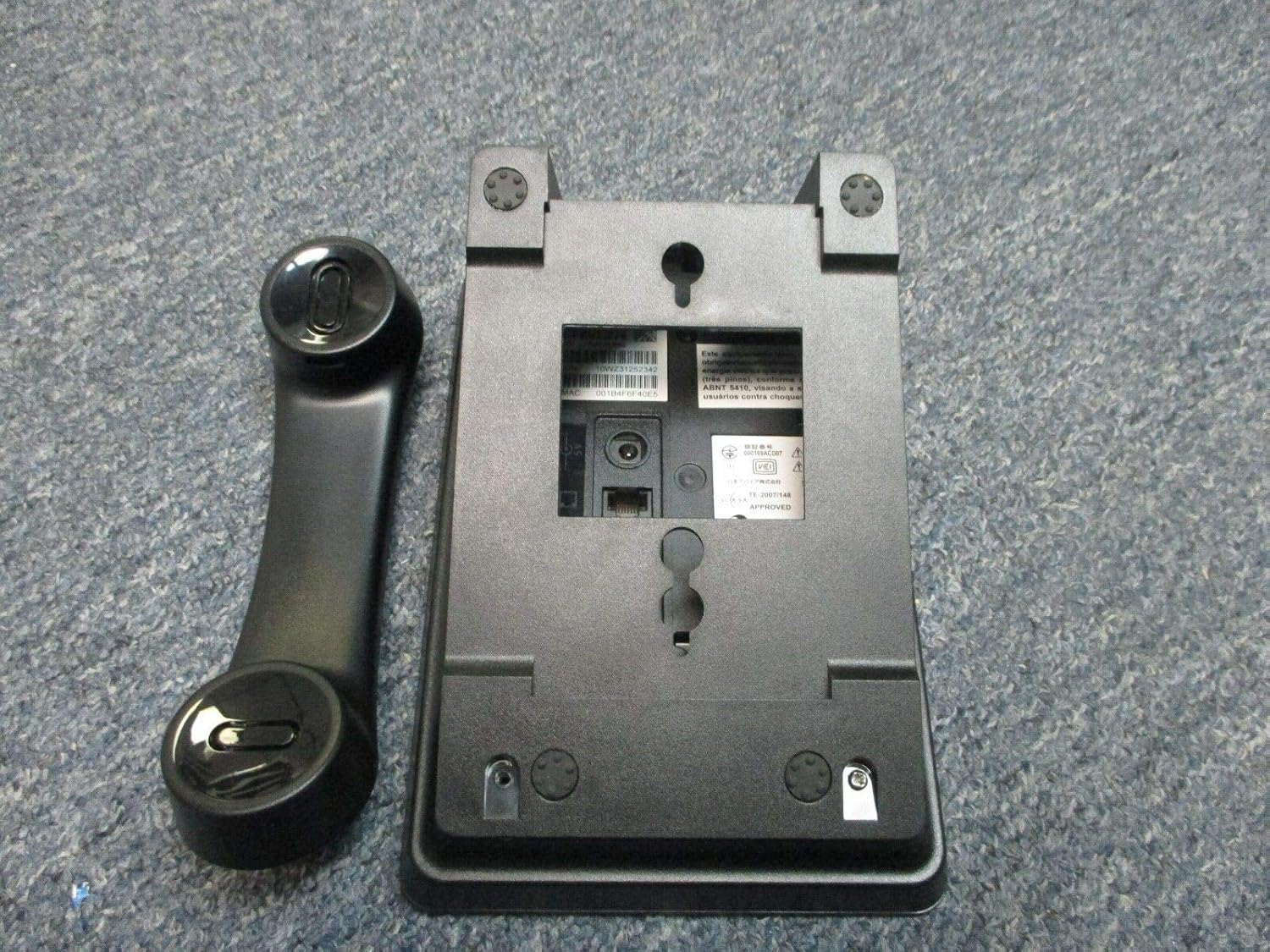
Figura 2: Wara view of the Avaya 1603-I IP Phone, showing the ports for connections and the attachment points for the desk stand.

Figure 3: Close-up of the product label, displaying model number, Avaya ID, serial number, and MAC address, located on the underside of the phone.
3. Istruzzjonijiet Operattivi
This section outlines the basic functions and operations of your Avaya 1603-I IP telephone.
3.1 Funzjonijiet Bażiċi tas-Sejħiet
- Tagħmel Sejħa:
- Aqbad l-idejn jew agħfas il-buttuna Kelliem buttuna.
- Ċempel in-numru mixtieq billi tuża t-tastiera numerika.
- Agħfas il- # ċavetta jew stenna li s-sejħa tikkonnettja awtomatikament.
- Tweġiba għal Sejħa:
- When the phone rings, pick up the handset or press the flashing line button.
- Alternattivament, agħfas il- Kelliem buttuna biex twieġeb fil-modalità tal-ispikerphone.
- Tmiem Sejħa:
- Hang up l-idejn jew agħfas il- Kelliem Agħfas il-buttuna mill-ġdid jekk qed tuża l-ispikerphone.
3.2 Keypad and Button Functions
The Avaya 1603-I features a standard numeric keypad and several dedicated function buttons:
- Wiri: Juri informazzjoni dwar is-sejħa, l-għażliet tal-menù, u l-istatus.
- Programmable Buttons (3): Located below the display, these buttons can be configured for line appearances, speed dials, or feature access. Their function is indicated by the display.
- Ċwievet tan-Navigazzjoni: Used to scroll through menus and options on the display.
- ŻOMM: Ipoġġi s-sejħa kurrenti fuq hold.
- KONFERENZA: Jibda telefonata konferenza.
- TRASFERIMENT: Transfers an active call to another extension or external number.
- ĊANTA: Iċempel l-aħħar numru li ċempel.
- MENU: Accesses the phone's menu options for settings and features.
- KELLIMER: Jixgħel/jitfi l-modalità tal-ispikerphone.
- VOLUM: Adjusts the volume for the handset, speakerphone, or ringer.
- MUTE: Ijattiva l-mikrofonu waqt sejħa.
4. Manutenzjoni
Proper maintenance ensures the longevity and optimal performance of your Avaya 1603-I IP telephone.
- Tindif: Uża artab, ftit damp cloth to clean the phone's surface. Avoid using abrasive cleaners, solvents, or strong chemicals, as these can damage the plastic and electronic components.
- Tneħħija tat-Trab: Regularly wipe down the phone to prevent dust buildup, especially around the keypad and display.
- Kundizzjonijiet Ambjentali: Keep the phone in a dry environment, away from direct sunlight, excessive heat, and moisture. Do not expose the phone to extreme temperatures.
- Ġestjoni tal-Kejbil: Ensure all cables are not kinked or strained, which can lead to damage over time.
5 Issolvi l-problemi
If you encounter issues with your Avaya 1603-I IP telephone, refer to the following common problems and solutions:
| Problema | Kawża Possibbli | Soluzzjoni |
|---|---|---|
| No dial tone or phone not powering on. | No power (PoE or power adapter), loose network cable. | Check Ethernet cable connection to the LAN port. Ensure PoE is active on the network port or connect a compatible power adapter. |
| Id-displej huwa vojt jew ma jistax jinqara. | Power issue, phone frozen, display settings. | Perform a power cycle (unplug and re-plug the Ethernet cable/power adapter). Check if the phone is receiving power. |
| Ma nistax nagħmel jew nirċievi telefonati. | Network connectivity issue, incorrect configuration. | Verify network cable connection. Contact your IT administrator or service provider to check network settings and phone registration. |
| Poor audio quality (static, echo). | Faulty handset cord, network congestion, environmental interference. | Ensure handset cord is securely connected. Try adjusting volume. If issue persists, contact IT support. |
For more complex issues, please contact your system administrator or Avaya support.
6. Speċifikazzjonijiet
The following are the technical specifications for the Avaya IP Office 500 1603-I IP VOIP 3 Button Display Telephone:
- Mudell: 1603-I
- Ditta: Avaya
- Dimensjonijiet tal-Prodott: 10 x 10 x 6 pulzieri
- Kulur: Iswed
- Tip tat-Telefon: Corded
- Sors tal-Enerġija: Elettriku bil-fili (kompatibbli mal-PoE)
- Tip ta' Dialer: Tastiera Unika
- Operazzjoni Multiline: Operazzjoni b'ħafna linji
- Identifikazzjoni ta' min iċempel: Nru
- Tip ta' Sistema ta' Tweġiba: Diġitali (Note: This feature typically refers to network-based voicemail services rather than an integrated answering machine for this IP phone model.)
- Kapaċità tar-reġistrazzjoni: minuti 22 (Note: This capacity is typically for network-based voicemail recordings.)
- Manifattur: Avaya Inc.
- ASIN: B078HP75RY
7. Garanzija u Appoġġ
For information regarding the warranty of your Avaya IP Office 500 1603-I IP VOIP 3 Button Display Telephone, please refer to the documentation provided at the time of purchase or contact your vendor. Warranty terms and conditions are typically provided by the manufacturer, Avaya Inc., or the authorized reseller.
For technical support, configuration assistance, or advanced troubleshooting, please contact your organization's IT department or your Avaya authorized service provider. Ensure you have your product's model number (1603-I) and serial number (found on the product label, see Figure 3) ready when seeking support.