1. Introduzzjoni
The Cooler Master MasterBox Q300L is a Micro-ATX tower designed for compact yet functional PC builds. This manual provides essential information for setting up, operating, and maintaining your computer case, ensuring optimal performance and longevity.
2. Informazzjoni dwar is-Sigurtà
- Dejjem skonnettja l-enerġija qabel ma twettaq kwalunkwe installazzjoni jew manutenzjoni.
- Handle components with care to prevent damage from static electricity.
- Żomm il-partijiet żgħar u l-materjali tal-ippakkjar 'il bogħod mit-tfal.
- Kun żgur li jkun hemm ventilazzjoni xierqa madwar il-kaxxa biex tevita li tissaħħan iżżejjed.
- Evita li tpoġġi l-kaxxa fid-dawl tax-xemx dirett jew ħdejn sorsi ta’ sħana.
3. Kontenut tal-Pakkett
Ivverifika li l-oġġetti kollha huma preżenti fil-pakkett:
- 1 computer case
- Kaxxa tal-aċċessorji (viti, standoffs, rabtiet tal-kejbil)
- Manwal għall-Utent (dan id-dokument)
4. Karatteristiċi ewlenin
The MasterBox Q300L offers several design elements for an optimized building experience:
- Ample Interior: Designed for Micro-ATX or Mini-ITX motherboards, allowing for easy expansion.
- Components Clearance: Supports CPU coolers up to 159mm, GPU cards up to 360mm, and PSUs up to 160mm.
- Versatile Cooling: Maximize cooling with support for a 240mm liquid cooler and up to 5 fans.
- Modular I/O Panel: The I/O panel can be adjusted to six different locations (front, top, or bottom on both sides).
- Edge-To-Edge Panel: A transparent acrylic side panel showcases your internal components.
- Open Thermal Design: Perforated design on all sides ensures optimal airflow and heat dissipation.
- Filtri Manjetiċi tat-Trab: Unique patterned dust filters provide easy cleaning and a distinctive look.
- Routing Space: 28mm of space behind the motherboard tray for efficient cable management.
- Multiple Positioning: The case can be oriented either vertically or horizontally.
Viżwali tal-Karatteristiċi
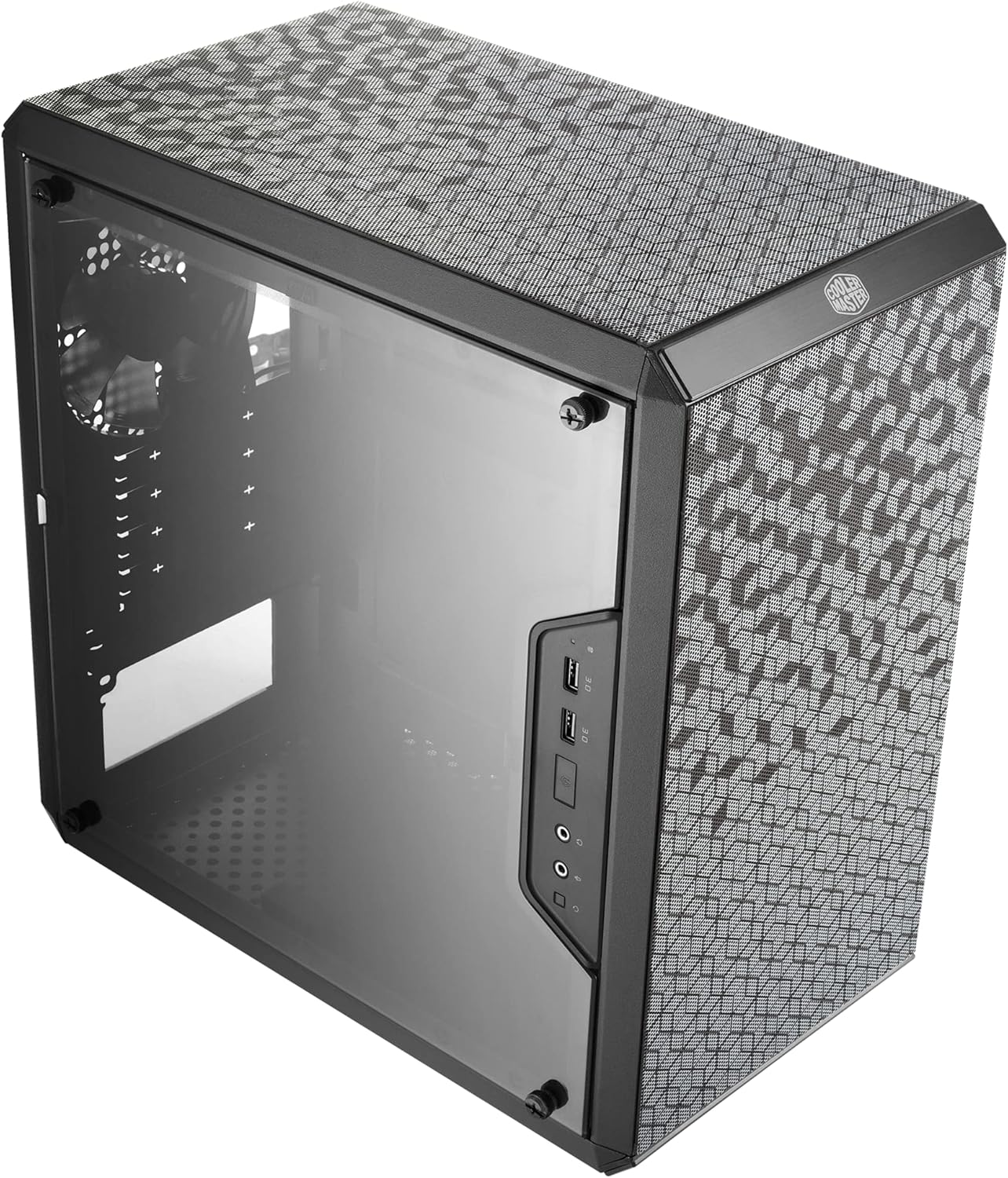
Figura 4.1: B'mod ġenerali view of the Cooler Master MasterBox Q300L Micro-ATX Tower.

Figure 4.2: Magnetic dust filters with a unique pattern for easy removal and cleaning.

Figure 4.3: Diagram illustrating component clearance for CPU cooler (159mm), GPU (360mm), and PSU (160mm).

Figura 4.4: Intern view showing versatile cooling options, including support for a 240mm liquid cooler and multiple 120mm/140mm fans.

Figure 4.5: Illustration of the modular I/O panel, which can be repositioned on the front, top, or bottom on either side of the case.

Figure 4.6: The transparent edge-to-edge acrylic side panel, allowing a clear view tal-komponenti interni.

Figure 4.7: The perforated design on all sides of the case, promoting optimal airflow and heat dissipation.

Figure 4.8: Internal layout showing ample space for Mini-ITX and Micro-ATX motherboards.

Figura 4.9: View of the 28mm routing space behind the motherboard tray for efficient cable management.

Figure 4.10: The case can be oriented either vertically or horizontally to suit your setup.
5. Gwida ta' Setup
Follow these steps to assemble your PC components within the MasterBox Q300L case.
- Ipprepara l-Motherboard: Install your CPU, RAM modules, and M.2 SSDs onto the motherboard before placing it into the case.
- Installa l-Unità tal-Provvista tal-Enerġija (PSU): Mount the PSU into its designated compartment, typically at the bottom rear of the case. Secure it with screws.
- Install Cooling System: If using an AIO liquid cooler, install the radiator and fans to the top or front panel as per your configuration. If using an air cooler, install it onto the CPU on the motherboard.
- Installa Motherboard: Carefully place the prepared motherboard into the case, aligning it with the standoffs. Secure it with screws.
- Installa Karta Grafika: Insert your graphics card into the appropriate PCI-E slot on the motherboard and secure it with the retention mechanism and screws.
- Qabbad Kejbils: Connect all necessary power cables from the PSU to the motherboard, graphics card, and other components. Connect data cables for storage drives. Route cables through the designated cutouts for tidy management.
- Close Side Panels: Once all components are installed and cables are managed, reattach the side panels, including the transparent acrylic panel.
Setup Videos
Video 5.1: Assembly demonstration for a mini Micro-ATX case, showing component installation steps.
Vidjo 5.2: Prodott lestview and assembly demonstration for a computer case, highlighting internal features and installation.
6. Istruzzjonijiet Operattivi
After successful assembly, connect your peripherals (monitor, keyboard, mouse) and power cable to the PC. Press the power button on the I/O panel to start your system. Ensure all fans are spinning and components are receiving power.
7. Manutenzjoni
- Filtri tat-Trab: Regularly remove and clean the magnetic dust filters located on the top, front, and bottom panels. Use compressed air or a soft brush to remove accumulated dust.
- Tindif Intern: Periodically use compressed air to clean dust from internal components such as CPU cooler fins, GPU heatsinks, and case fans.
- Tindif ta' barra: Imsaħ l-uċuħ ta 'barra b'artab, damp cloth. Avoid abrasive cleaners that may damage the finish or acrylic panel.
8 Issolvi l-problemi
- Ebda Qawwa: Check all power connections, including the PSU cable, motherboard power, and front panel power switch connection. Ensure the PSU switch is in the 'ON' position.
- Is-sħana żejda: Verify that all case fans and CPU/GPU coolers are functioning correctly. Clean dust filters and ensure adequate airflow.
- I/O Panel Issues: Ensure all front panel connectors (USB, audio) are correctly plugged into the motherboard headers.
9. Speċifikazzjonijiet
| Karatteristika | Dettall |
|---|---|
| Brand | Cooler Master |
| Isem tal-Mudell | Q300L |
| Numru tal-Mudell tal-Oġġett | MCB-Q300L-KANN-S00 |
| Tip ta' Każ | Mini-Torri |
| Kompatibbiltà tal-motherboard | Mikro-ATX, Mini-ITX |
| Kulur | Iswed |
| Materjal | Azzar Liga, plastik |
| Piż tal-oġġett | 1.06 libbra (480 Gramm) |
| Dimensjonijiet tal-Prodott (LxWxH) | 15.39 x 9.06 x 15 pulzieri |
| Clearance tal-CPU Cooler | 159mm |
| Approvazzjoni tal-GPU | 360mm |
| Clearance tal-PSU | 160mm |
| Metodu tat-tkessiħ | Arja |
| Numru ta 'USB 3.0 Ports | 2 |
10. Garanzija u Appoġġ
Għal informazzjoni dwar il-garanzija u appoġġ tekniku, jekk jogħġbok irreferi għall-websajt uffiċjali ta' Cooler Master. webis-sit jew ikkuntattja s-servizz tal-konsumatur tagħhom. Żomm l-irċevuta tax-xiri tiegħek għal talbiet ta’ garanzija.


