1. Introduzzjoni
Grazzi tax-xiriasing the GPX PDB1077B Portable DVD Player. This device offers versatile entertainment with its 10.1-inch display, DVD/CD playback capabilities, and built-in Bluetooth wireless transmitter for audio streaming to compatible headphones. This manual provides detailed instructions for setup, operation, and maintenance to ensure optimal performance and longevity of your device.
2. Informazzjoni Importanti dwar is-Sigurtà
Please read all safety warnings and instructions carefully before using this product. Retain this manual for future reference.
- Sors tal-Enerġija: Use only the specified power adapter. Incorrect voltage jista 'jagħmel ħsara lill-apparat u jħassar il-garanzija.
- Ilma u Umdità: Tesponix l-apparat għax-xita, għall-umdità, jew tgħaddasx fl-ilma.
- Sħana: Żomm l-apparat 'il bogħod minn sorsi ta' sħana bħal radjaturi, reġistri tas-sħana, stufi, jew apparat ieħor (inkluż amplifiers) li jipproduċu sħana.
- Ventilazzjoni: Aċċerta ruħek li jkun hemm ventilazzjoni xierqa. Timblokkax xi fetħiet tal-ventilazzjoni.
- Tindif: Naddaf biss b'ċarruta niexfa. Tużax tindif likwidu jew tindif aerosol.
- Servizzi: Tippruvax isservi dan il-prodott int stess. Irreferi l-manutenzjoni kollha lil persunal tas-servizz kwalifikat.
- Sigurtà tal-batterija: The device contains a rechargeable battery. Do not expose to excessive heat or direct sunlight. Dispose of batteries properly according to local regulations.
- Protezzjoni tas-Smigħ: Evita li tisma' f'livelli ta' volum għoljin għal perjodi estiżi biex tevita ħsara fis-smigħ.
3. Kontenut tal-Pakkett
Iċċekkja li l-oġġetti kollha elenkati hawn taħt huma inklużi fil-pakkett tiegħek:
- GPX PDB1077B Portable DVD Player
- Headphones Bluetooth mingħajr fili
- Kontroll mill-bogħod
- Adapter tal-Enerġija AC/DC
- Adapter tal-Enerġija tal-Karozza
- AV Cable
- Manwal għall-Utent (dan id-dokument)
4. Prodott Aktarview
Familiarize yourself with the components of your GPX PDB1077B Portable DVD Player.
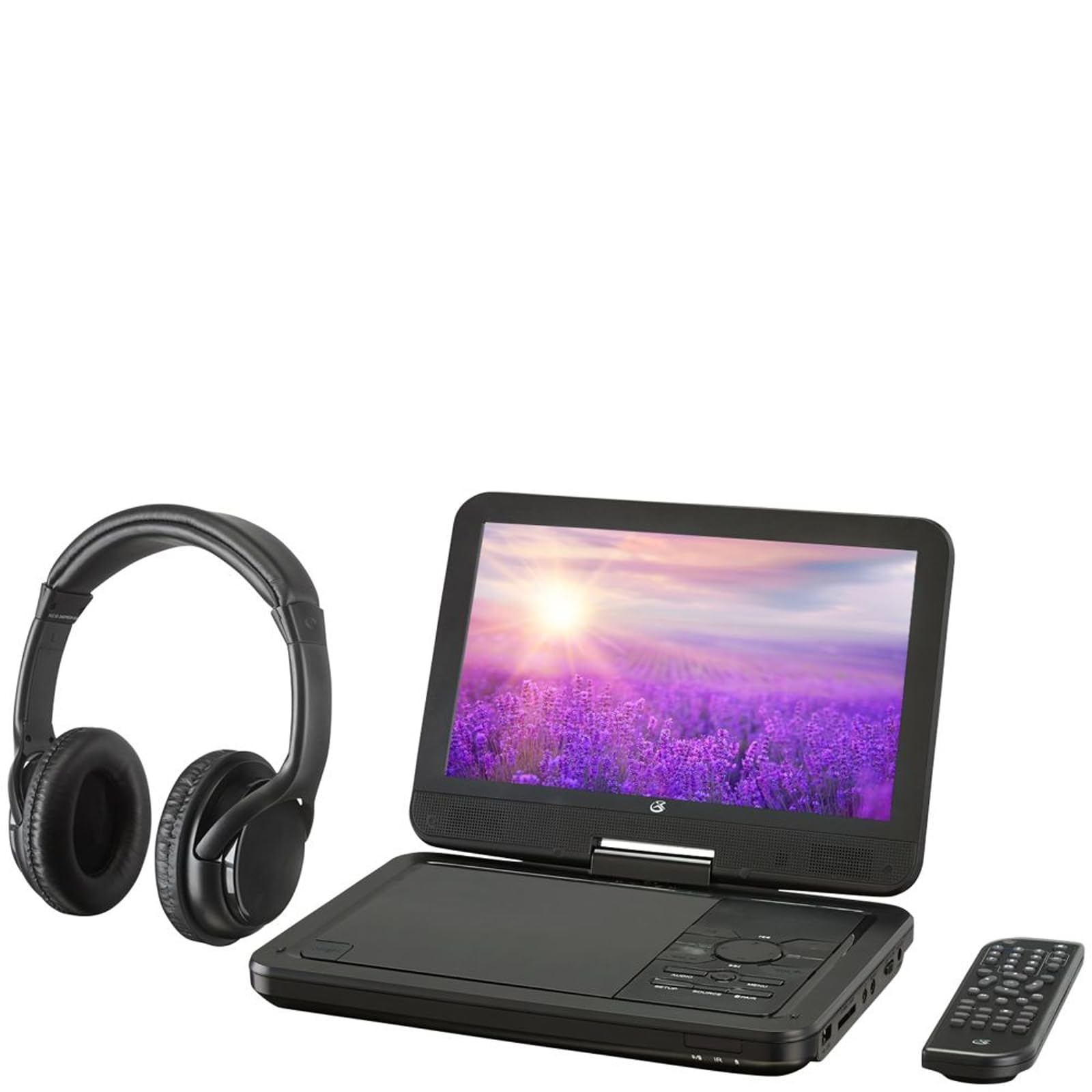
Figura 4.1: The GPX PDB1077B Portable DVD Player, showing the 10.1-inch screen, control panel, wireless Bluetooth headphones, and remote control.
4.1 Portable DVD Player Unit
The main unit features a swivel screen, disc tray, and control buttons. Key components include:
- Display LCD ta '10.1 pulzieri: Għal viewing video content.
- Trej tad-Diska: Għall-inseriment ta' DVDs u CDs.
- Panel tal-Kontroll: Buttons for playback, menu navigation, volume, and source selection.
- Portijiet: USB, SD card slot, AV out, headphone jack, DC in.
- Kelliema: Kelliema stereo integrati.
4.2 Wireless Bluetooth Headphones
The included headphones connect wirelessly to the DVD player via Bluetooth for private listening.
Figura 4.2: A close-up view of the black wireless Bluetooth headphones, featuring padded earcups and an adjustable headband.
4.3 Kontroll mill-Bogħod
Il-kontroll remot jipprovdi aċċess konvenjenti għall-funzjonijiet kollha mill-bogħod.
Figura 4.3: A close-up view of the compact black remote control with various buttons for playback, menu navigation, and volume adjustment.
5. Gwida ta' Setup
5.1 Iċċarġjar tal-Apparat
- Connect the AC/DC power adapter to the DC IN port on the DVD player.
- Ipplaggja l-adapter fi żbokk tal-ħajt standard.
- Id-dawl indikatur tal-iċċarġjar se jixgħel. Ħalli madwar 3-4 sigħat għal iċċarġjar sħiħ.
- For in-car use, connect the car power adapter to the DC IN port and your vehicle's 12V power outlet.
5.2 Tixgħel/Jitfi
- To power on, slide the POWER switch to the ON position. The screen will light up.
- Biex titfi, żżerżaq is-swiċċ POWER għall-pożizzjoni OFF.
5.3 Connecting Bluetooth Headphones
- Ensure the DVD player is powered on.
- Turn on the Bluetooth headphones and put them into pairing mode (refer to headphone manual if needed).
- On the DVD player, navigate to the Bluetooth settings menu.
- Select "Scan for Devices" or similar option.
- Choose your headphones from the list of available devices to pair.
- Once paired, audio will automatically transmit to the headphones.
5.4 Connecting to an External Display (Optional)
Use the included AV cable to connect the DVD player to a TV or monitor.
- Connect one end of the AV cable to the AV OUT port on the DVD player.
- Connect the other end to the AV IN ports (Yellow for Video, White for Left Audio, Red for Right Audio) on your external display.
- Select the correct AV input on your external display.
6. Istruzzjonijiet Operattivi
6.1 Playing DVDs and CDs
- Open the disc tray by gently lifting the screen.
- Poġġi DVD jew CD fuq l-ispindle bin-naħa tat-tikketta tħares 'il fuq.
- Gently close the disc tray.
- Il-plejer awtomatikament jiskopri d-diska u jibda l-daqq jew juri l-menù tad-diska.
- Use the navigation buttons (Up, Down, Left, Right, Enter) on the control panel or remote to navigate menus.
- Agħfas il- DĦABBA/PAWŻA buttuna biex tibda jew tieqaf daqq.
- Agħfas il- STOP buttuna biex twaqqaf il-plejbek.
6.2 L-Użu tal-Midja USB u SD Card
- Daħħal flash drive USB fil-port USB jew kard SD fl-islott tal-kard SD.
- Agħfas il- SORS button on the control panel or remote to select "USB" or "SD".
- Innaviga permezz tiegħek files billi tuża l-buttuni tal-kontroll.
- Agħżel a file (e.g., MP3, JPEG) and press DĦUL biex tilgħab jew view.
6.3 Aġġustament tas-Settings
Access the system settings to customize your viewesperjenza ta’ smigħ.
- Agħfas il- SETUP button on the remote or control panel.
- Use the navigation buttons to select options such as:
- Issettjar tal-wiri: Adjust brightness, contrast, color.
- Settings tal-awdjo: Adjust volume, equalizer.
- Settings tal-Lingwa: Agħżel il-lingwa tal-OSD, il-lingwa tal-awdjo, u l-lingwa tas-sottotitli.
- Kontroll tal-Ġenituri: Set rating levels for disc playback.
- Agħfas DĦUL biex tikkonferma l-għażliet u SETUP għal darb'oħra biex toħroġ.
6.4 L-użu tal-Kontroll mill-bogħod
The remote control provides full functionality. Ensure batteries are correctly inserted (2 x AAA, not included).
| Buttuna | Funzjoni |
|---|---|
| QAWWA | Jixgħel jew jitfi l-plejer. |
| SETUP | Jaċċessa l-menù tas-setup tas-sistema. |
| SORS | Switches between DVD, USB, SD, and AV input modes. |
| DĦABBA/PAWŻA | Jibda jew iwaqqaf il-plejbek. |
| STOP | Jieqaf daqq. |
| VOL + / VOL- | Jaġġusta l-livell tal-volum. |
| NAVIGATE (Up/Down/Left/Right/ENTER) | Jinnaviga l-menus u jikkonferma l-għażliet. |
| MENU | Accesses the disc menu during DVD playback. |
7. Manutenzjoni
7.1 Tindif tal-Apparat
- Kun żgur li l-apparat ikun mitfi u splaggjat qabel it-tindif.
- Uża drapp artab, niexef u mingħajr suf biex timsaħ l-uċuħ ta’ barra.
- For the screen, use a screen-specific cleaning solution and a microfiber cloth, applying gentle pressure.
- Tużax prodotti tat-tindif li joborxu, xama', jew solventi.
7.2 Kura tad-Diska
- Immaniġġja d-diski mit-truf tagħhom biex tevita l-marki tas-swaba’.
- Store discs in their cases when not in use to prevent scratches.
- Naddaf id-diski maħmuġin b'ċarruta ratba u mingħajr suf, billi timsaħ miċ-ċentru 'l barra.
7.3 Kura tal-Batterija
- To prolong battery life, fully charge the device before first use.
- If storing the device for an extended period, charge it to approximately 50% every few months.
- Evita li tesponi l-apparat għal temperaturi estremi.
8 Issolvi l-problemi
If you encounter issues with your GPX PDB1077B, refer to the following common problems and solutions.
| Problema | Kawża Possibbli | Soluzzjoni |
|---|---|---|
| Ebda Qawwa | Battery drained; Power adapter not connected properly; Power switch off. | Charge the device; Ensure power adapter is securely connected; Slide power switch to ON. |
| No Disc Playback | Diska mdaħħla ħażin; Id-diska hija maħmuġa jew mibruxa; Il-format tad-diska mhux appoġġjat. | Reinsert disc label-side up; Clean or replace disc; Check supported media types in specifications. |
| Ebda Ħoss | Volume too low; Mute function active; Headphones not connected/paired correctly. | Increase volume; Deactivate mute; Reconnect or re-pair headphones. |
| Bluetooth Headphones Not Pairing | Headphones not in pairing mode; Player not in Bluetooth scan mode; Interference. | Ensure headphones are in pairing mode; Activate Bluetooth scan on player; Move closer to player, away from other devices. |
| Il-Kontroll Remot Mhux Jaħdem | Batteries are dead or inserted incorrectly; Obstruction between remote and player; Remote sensor blocked. | Replace batteries, check polarity; Remove obstructions; Ensure remote sensor on player is clear. |
9. Speċifikazzjonijiet
Technical specifications for the GPX PDB1077B Portable DVD Player.
| Karatteristika | Dettall |
|---|---|
| Mudell | PDB1077B |
| Daqs tal-Wiri | 10.1 pulzieri |
| Tip ta 'Wiri | LCD |
| Riżoluzzjoni Nattiva | 1024 x 600 |
| Midja Appoġġjata | DVD, DVD±R/RW, CD, CD-R/RW, MP3 CD, JPEG CD |
| Konnettività | Bluetooth wireless transmitter, USB port, SD card slot, AV Out, Headphone Jack, DC In |
| Sors tal-Enerġija | Built-in rechargeable battery, AC/DC adapter, Car adapter |
10. Garanzija u Appoġġ għall-Klijent
GPX products are designed for reliability and performance. For specific warranty information, please refer to the warranty card included with your purchase or visit the official GPX website. If you require technical assistance or have questions regarding your device, please contact GPX customer support.
GPX Official Websit: www.gpx.com
Please note that warranty terms and customer support availability may vary by region.


