1. Introduzzjoni
The Intelbras XPE 1013 Plus Electronic Intercom System is a universal 13-key intercom designed for efficient and secure communication within condominiums. This device integrates seamlessly with ANATEL standard central branch positions, offering advanced features to enhance property security and user convenience. Its robust design and easy installation make it an ideal solution for modern residential complexes.
Il-karatteristiċi ewlenin jinkludu:
- Universal compatibility with ANATEL standard central branch positions.
- Installazzjoni u manutenzjoni faċli.
- Door lock opening via apartment command or personal password.
- Direct communication with apartments from the gate.
- Two inputs for external buttons and two inputs for open door sensors.
- Interlocking control for pedestrian entry (e.g., airlock or cage system).
- TampSejbien ta' er għal sigurtà mtejba.
- Full-range internal power supply (90 to 240 VAC, automatic).
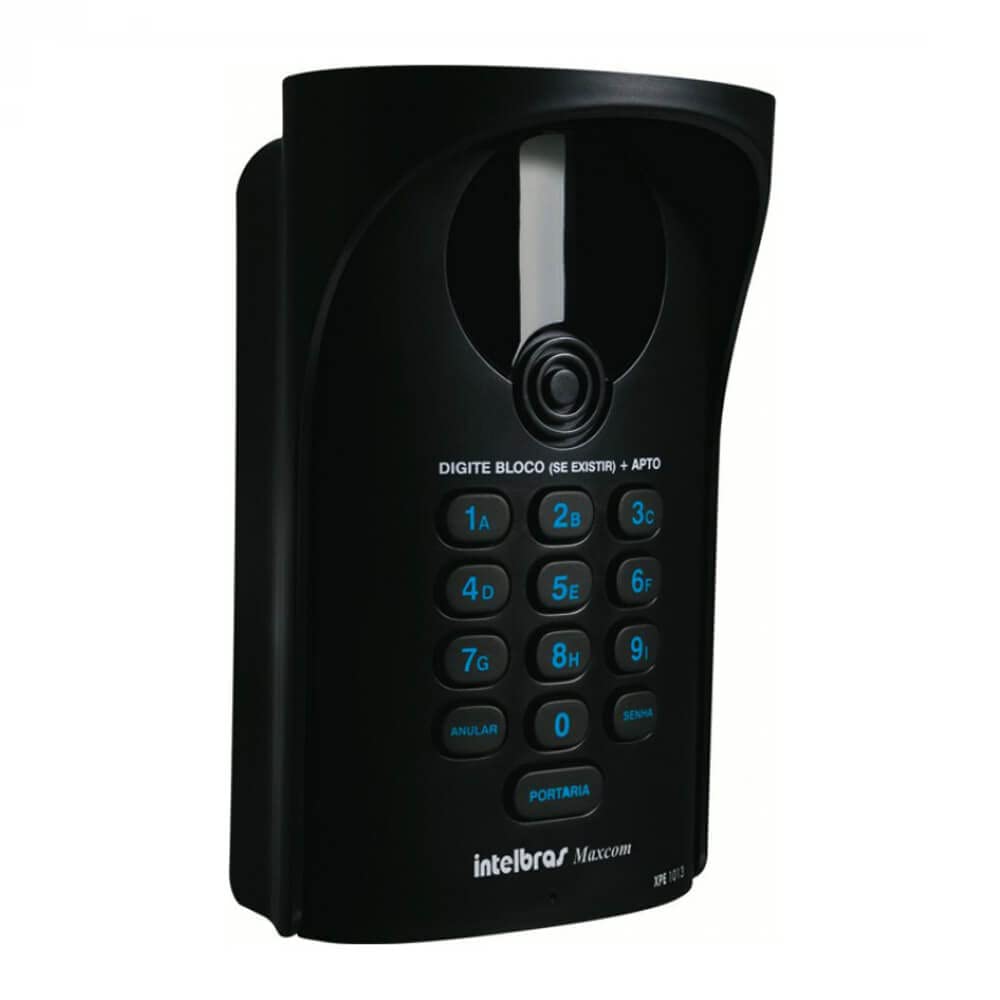
Figura 1: Quddiem view of the Intelbras XPE 1013 Plus Intercom, showing the keypad and speaker.
2. Setup u Installazzjoni
The XPE 1013 Plus is designed for straightforward installation. For optimal performance and safety, professional installation is recommended.
2.1. Mounting the Intercom
Choose a suitable location at the condominium gate or entrance, ensuring it is protected from direct weather exposure if possible. Mount the intercom securely using appropriate fasteners.

Figura 2: Angolat view of the Intelbras XPE 1013 Plus Intercom, highlighting its compact design.
2.2. Konnessjonijiet elettriċi
- Provvista tal-Enerġija: Connect the intercom to a 90-240 VAC power source. The internal power supply is full-range and automatic.
- Central Branch Connection: Connect the intercom to the central branch position of your condominium's PABX system. Ensure correct polarity and wiring according to the central's manual.
- Button Inputs: Connect external door opening buttons to the designated inputs (2 available).
- Inputs tas-Sensor: Connect open door sensors to the designated inputs (2 available) for monitoring door status.
- Kontroll tal-Lock: Wire the electric lock to the intercom's lock control output.

Figura 3: Ġenb view of the Intelbras XPE 1013 Plus Intercom, showing its profile u punti ta' mmuntar.
2.3. Programmazzjoni Inizjali
Refer to the detailed programming guide for your specific central branch system. Basic programming includes:
- Assigning apartment numbers to corresponding internal extensions.
- Setting up personal access passwords for residents.
- Configuring the 'Portaria' (Concierge) button to dial a specific extension.
3. Istruzzjonijiet Operattivi
3.1. Calling an Apartment
- To call an apartment, visitors should enter the apartment number using the keypad. If the system uses block numbers, first enter the block number, then the apartment number.
- The intercom will connect to the corresponding apartment's internal phone.
- Residents can then communicate with the visitor.
3.2. Opening the Door Lock
- From the Apartment: During a call, the resident can dial a specific code on their internal phone to open the door lock. Consult your central branch system's manual for the exact code.
- Using a Personal Password: Authorized users can enter their personal password directly on the intercom's keypad to open the door.
3.3. Calling the Concierge (Portaria)
Agħfas il- PORTARIA button on the intercom keypad to establish direct communication with the concierge or security desk.
3.4. Interlocking Control (Eclusa/Gaiola)
The intercom supports interlocking control for pedestrian entry systems. This feature ensures that only one gate or door can be opened at a time, enhancing security. Configuration details for this feature are typically managed through the central branch system.
4. Manutenzjoni
The Intelbras XPE 1013 Plus is designed for durability and ease of maintenance.
- Tindif: Uża artab, damp cloth to clean the intercom's surface. Avoid abrasive cleaners, solvents, or excessive moisture, which can damage the device.
- Spezzjoni: Periodically inspect the intercom for any signs of physical damage, loose connections, or wear and tear.
- Aġġornamenti tas-Software: Consult Intelbras' official support channels for any available firmware updates that may improve performance or add new features.
5 Issolvi l-problemi
If you encounter issues with your XPE 1013 Plus intercom, consider the following troubleshooting steps:
- Ebda Qawwa: Check the power connection and ensure the power outlet is functional. Verify that the internal power supply is receiving voltage.
- Ebda Komunikazzjoni: Ensure all wiring to the central branch system is secure and correctly connected. Verify the central branch system is operational.
- Door Lock Not Opening: Check the wiring to the electric lock. Confirm that the correct apartment code or personal password is being used. Ensure the lock mechanism itself is not faulty.
- Tamper Allarm: The intercom features tamper detection. If a tamper alarm is indicated, inspect the device for signs of unauthorized opening or removal. Contact technical support if the issue persists after inspection.
- It-Tastiera Ma Tirrispondix: Check for physical obstructions or damage to the keypad. If unresponsive, a reset may be required (consult technical support).
For persistent issues, contact Intelbras technical support or a qualified technician.
6. Speċifikazzjonijiet
| Karatteristika | Speċifikazzjoni |
|---|---|
| Brand | Intelbras |
| Mudell | XPE 1013 Plus |
| Numru tal-Parti | 762 |
| Kulur | Iswed |
| Materjal | Plastik |
| Sors tal-Enerġija | Electric Power (Full-range 90-240 VAC) |
| Kwantità għal kull Pakkett | 1 |
| Dimensjonijiet tal-Prodott (L x W x H) | 15 x 15 x 20 ċm |
| Piż tal-Prodott | 420 g |
| GTIN (EAN) | 7896637646291 |
| Konnettività | Wired (for central branch systems) |
| Karatteristiċi Speċjali | 2 Button Inputs, 2 Sensor Inputs, Interlocking Control, Tamper Sejbien |
7. Garanzija u Appoġġ
7.1. Informazzjoni dwar Garanzija
The Intelbras XPE 1013 Plus typically comes with a manufacturer's warranty against defects in materials and workmanship. For specific warranty terms and duration, please refer to the warranty card included with your product or visit the official Intelbras website. Extended warranty plans may also be available for purchase, offering coverage for 12 or 24 months against failures and defects.
7.2. Appoġġ Tekniku
For technical assistance, troubleshooting, or service requests, please contact Intelbras customer support through their official website or the contact information provided in your product documentation. Ensure you have your product model (XPE 1013 Plus) and any relevant purchase details ready when contacting support.


