1. Introduzzjoni
This manual provides instructions for the installation, operation, and maintenance of the Nexxt Solutions Naxos800 8-Port Fast Ethernet Network Switch. The Naxos800 is an unmanaged compact desktop switch designed for small office/home office (SOHO) environments, student dormitories, and small enterprises, offering reliable network connectivity.
2. Karatteristiċi ewlenin
- 8 Fast Ethernet Ports: Provides 8 UTP/STP 10/100Mbps ports with auto MDI/MDIX.
- Plug and Play: Simple setup requiring no software configuration.
- Swiċċ mhux immaniġġjat: Operates without requiring complex management interfaces.
- Store-and-Forward Technology: Ensures efficient packet transmission.
- Tagħlim tal-indirizz MAC: Supports auto-learning and aging with a built-in 1000 MAC address table.
- Disinn kompatt: Suitable for desktop or wall mounting.
- Iffrankar tal-Enerġija: Disinn ta 'konsum ta' enerġija baxxa.
- Kontroll tal-Fluss: Full duplex and half duplex back pressure flow control.
- Durabilità: Integrated lightning protection and a sturdy metal case.
- Operazzjoni kwieta: Fanless design for silent performance.
3. Kontenut tal-Pakkett
Ivverifika li l-pakkett tiegħek fih l-oġġetti li ġejjin:
- One (1) Nexxt Solutions Naxos800 8-Port Fast Ethernet Switch
- Adapter tal-Enerġija wieħed (1).

Image: The Nexxt Solutions Naxos800 switch, its power adapter, and product packaging.
4. Prodott Aktarview

Immaġni: Quddiem view of the Naxos800 switch, showing the Nexxt logo and eight green LED indicators for port activity.
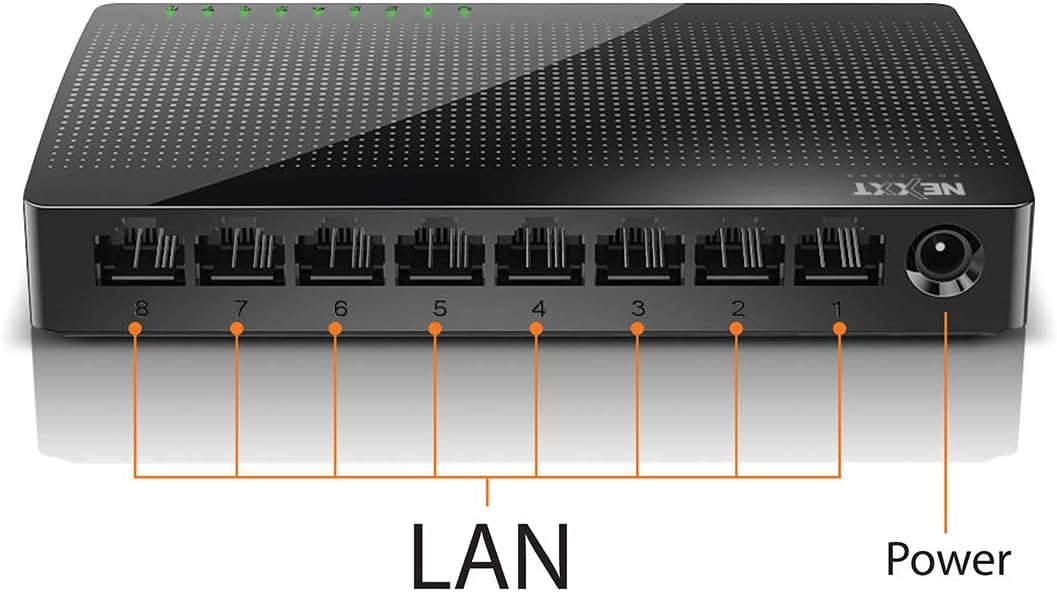
Immaġni: Wara view of the Naxos800 switch, highlighting the eight LAN ports (numbered 1-8) and the power input port.
Indikaturi LED
The front panel features LED indicators for each port, providing visual status:
- LED aħdar (solidu): Indicates a stable link connection.
- LED aħdar (jteptep): Indicates data activity on the corresponding port.
- LED Mitfi: No link or connection detected.
5. Setup u Installazzjoni
The Naxos800 switch is designed for simple plug-and-play installation. No software or complex configuration is required.
- Pjazzament: Place the switch on a stable, flat surface or mount it on a wall using appropriate hardware (not included). Ensure adequate ventilation around the device.
- Qabbad mal-Enerġija: Connect the provided power adapter to the power input port on the switch and then plug the adapter into a standard electrical outlet. The power LED (if present, or the port LEDs will light up) should illuminate.
- Qabbad man-Netwerk:
- Connect your router or modem to any of the 8 LAN ports on the Naxos800 switch using an Ethernet cable.
- Connect your network devices (e.g., computers, gaming consoles, IP cameras, Smart TVs, printers) to the remaining LAN ports on the Naxos800 switch using an Ethernet cable.
- Ivverifika l-Konnessjoni: Once devices are connected, the corresponding LED indicators on the switch's front panel should light up green (solid for link, flashing for activity).

Image: Diagram illustrating a typical network setup. An ADSL or Cable Modem connects to a Router, which then connects to the Naxos800 switch. Various devices like laptops, media players, game consoles, IP cameras, Smart TVs, and IP phones are connected to the Naxos800 switch.
6. Tħaddim tas-Swiċċ
The Naxos800 is an unmanaged switch, meaning it operates automatically without user intervention once connected. It functions as an internet splitter, expanding the number of wired network connections available from your router or modem.
- Sejbien Awtomatiku tal-Veloċità: Each port automatically detects the speed of the connected device (10Mbps or 100Mbps) and adjusts accordingly.
- MDI/MDIX Awtomatiku: Eliminates the need for crossover cables; the switch automatically detects and corrects for straight-through or crossover cable types.
- Trażmissjoni tad-Data: Data packets are forwarded between connected devices at Fast Ethernet speeds. The store-and-forward architecture ensures data integrity.
7. Manutenzjoni
The Naxos800 switch requires minimal maintenance.
- Tindif: Uża drapp artab u niexef biex tnaddaf il-barra tas-swiċċ. Tużax prodotti tat-tindif likwidi jew aerosol.
- Ventilazzjoni: Kun żgur li l-fetħiet tal-ventilazzjoni ma jkunux imblukkati biex tevita sħana żejda.
- Ċiklu tal-Enerġija: If the device experiences issues, a simple power cycle (unplugging and replugging the power adapter) can often resolve minor problems.
8 Issolvi l-problemi
If you encounter issues with your Naxos800 switch, refer to the following common problems and solutions:
| Problema | Kawża Possibbli | Soluzzjoni |
|---|---|---|
| No power / Device not turning on. | L-adapter tal-enerġija mhux imqabbad jew difettuż; is-sokit tal-enerġija mhux qed jaħdem. | Ensure the power adapter is securely connected to the switch and a working electrical outlet. Try a different outlet. |
| No link light for a connected device. | Ethernet cable faulty or improperly connected; device not powered on or faulty; incorrect port. |
|
| Slow network speeds. | Network congestion; faulty cable; device limitations. |
|
9. Speċifikazzjonijiet
| Attribut | Valur |
|---|---|
| Numru tal-Mudell | ASIDT084U3 |
| Portijiet | 8 x 10/100Mbps Fast Ethernet (UTP/STP) |
| Bandwidth tal-Backplane | 1.6 Gbps |
| Tabella ta' l-Indirizz MAC | 1000 daħla |
| Kontroll ta' Aċċess | CDMA |
| Kontroll tal-Fluss | Full duplex and half duplex back pressure |
| Dimensjonijiet (L x W x H) | 12.4 x 5.9 x 2.3 ċm |
| Piż | 140 g |
| Input tal-Enerġija | Adapter tal-Enerġija Esterni (inkluż) |
Nota: L-ispeċifikazzjonijiet huma soġġetti għal tibdil mingħajr avviż minn qabel.
10. Garanzija u Appoġġ
The Nexxt Solutions Naxos800 8-Port Fast Ethernet Network Switch comes with a Garanzija limitata ta 'sena. For warranty claims or technical support, please contact Nexxt Solutions customer service. Refer to the official Nexxt Solutions webis-sit għall-aktar informazzjoni ta' appoġġ u dettalji ta' kuntatt aġġornati.
Nexxt Solutions is a US company committed to quality and customer service.


