Introduzzjoni
This document provides comprehensive instructions for the De'Longhi Blade Stand, model MA1062. This accessory is designed for use with specific De'Longhi Robox food processor models, including KR700, KR750, and KR1000. Please read this manual thoroughly before use to ensure proper installation and operation.
To verify product details and compatibility, locate the identification plate, typically found on the underside of your household appliance. Ensure your food processor model is listed as compatible with this blade stand.
Setup
The blade stand is an accessory for your De'Longhi Robox food processor. Always ensure your food processor is unplugged from the power outlet before attempting any installation or removal of accessories.
- Kun żgur li l-proċessur tal-ikel ikun mitfi u splaggjat.
- Carefully remove the food processor bowl and any existing accessories.
- Locate the central shaft or attachment point within your Robox food processor bowl where the blade stand is to be inserted.
- Align the base of the blade stand (Model MA1062) with the attachment point and gently push down until it is securely seated. It should feel stable and not wobble.
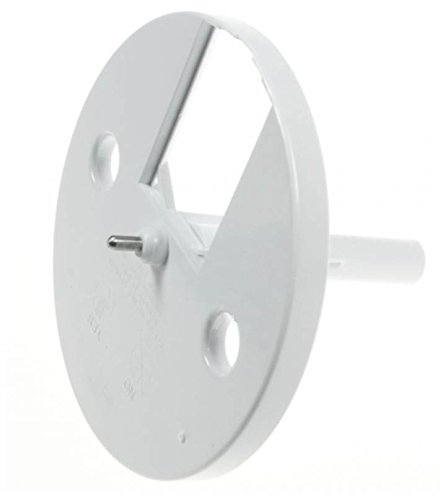
Image: The De'Longhi Blade Stand (MA1062) shown from a top-down perspective, illustrating its base and central shaft. This image helps identify the correct orientation for insertion into the food processor.
Istruzzjonijiet Operattivi
Once the blade stand is securely installed in your food processor bowl, you can proceed with attaching the appropriate blade for your food preparation task.
- With the blade stand in place, select the desired blade (e.g., chopping blade, dough blade) compatible with your Robox food processor.
- Carefully place the blade onto the central shaft of the blade stand, ensuring it sits correctly and is stable. Do not force the blade.
- Place the food processor bowl with the installed blade stand and blade onto the motor base.
- Żid l-ingredjenti tiegħek mal-iskutella.
- Close the food processor lid and ensure all safety mechanisms are engaged before operating the appliance. The appliance will not operate if the lid is not properly secured.
- Plug in the food processor and operate according to the instructions provided in your main De'Longhi Robox food processor manual.

Immaġni: Angolata view of the De'Longhi Blade Stand (MA1062), highlighting the design of its base and the central shaft where blades are mounted. This perspective helps in understanding the accessory's structure.
Manutenzjoni
To ensure the longevity and hygiene of your De'Longhi Blade Stand, regular cleaning is essential.
- Before cleaning, always ensure the food processor is unplugged from the power outlet and the blade stand is removed from the bowl.
- Wash the blade stand with warm, soapy water. Use a soft sponge or cloth to clean all surfaces.
- Laħlaħ sewwa taħt ilma ġieri biex tneħħi r-residwu kollu tas-sapun.
- Dry the blade stand completely before storage or re-use. Air drying is recommended, or use a clean, dry cloth.
- Avoid using abrasive cleaners, harsh chemicals, or scouring pads, as these can damage the plastic material.
Issolvi l-problemi
- Blade Stand Does Not Fit: Ensure you have the correct model (MA1062) and that your food processor is one of the compatible De'Longhi Robox models (KR700, KR750, KR1000). Check for any obstructions in the attachment point.
- Blade Stand Appears Unstable: Re-check its installation within the food processor bowl. Ensure it is fully seated and aligned correctly with the central shaft.
- Food Processor Not Operating: If the food processor itself is not working, ensure the lid is properly closed and locked, and the appliance is plugged in. For issues unrelated to the blade stand, refer to the main De'Longhi Robox food processor instruction manual.
Speċifikazzjonijiet
| Brand | De'Longhi |
| Numru tal-Mudell | MA1062 |
| Kompatibilità | De'Longhi Robox KR700, KR750, KR1000 Food Processors |
| ASIN | B076TCJBZF |
| Manifattur | De'Longhi |
| L-Ewwel Data Disponibbli | 21 ta’ Frar, 2020 |
Informazzjoni dwar Garanzija
Specific warranty information for this accessory is typically covered under the warranty terms of the main De'Longhi Robox food processor or may be available from the point of purchase. Please retain your proof of purchase for any warranty claims.
Appoġġ għall-Klijent
For further assistance, technical support, or inquiries regarding the De'Longhi Blade Stand (MA1062), please contact De'Longhi customer service. You can usually find contact details in your main appliance manual or on the official De'Longhi website. Alternatively, contact the retailer where the product was purchased for support.


