1. Introduzzjoni
Grazzi tax-xiriasing the Philco PH80 Boombox MP3/USB/CD Radio. This versatile audio system features a CD player, MP3/USB playback capabilities, and an FM radio tuner. Please read this manual carefully before operating the unit to ensure proper use and to maximize its performance.
The Philco PH80 is a portable audio system designed for ease of use and quality sound. It operates on a Bivolt power supply, making it suitable for various electrical environments.
2. Informazzjoni dwar is-Sigurtà
Biex tiżgura tħaddim sikur u tevita ħsara, jekk jogħġbok osserva l-prekawzjonijiet li ġejjin:
- Tesponix l-unità għax-xita jew għall-umdità biex tevita nar jew xokk elettriku.
- Timblokkax il-fetħiet tal-ventilazzjoni. Kun żgur li jkun hemm biżżejjed spazju madwar l-unità għal fluss tal-arja xieraq.
- Evita li tpoġġi l-unità ħdejn sorsi tas-sħana bħal radjaturi, reġistri tas-sħana, stufi, jew apparat ieħor (inkluż amplifiers) li jipproduċu sħana.
- Uża biss aċċessorji/aċċessorji speċifikati mill-manifattur.
- Aqla 'l-unità waqt maltempati tas-sajjetti jew meta ma tintużax għal perjodi twal.
- Irreferi l-manutenzjoni kollha lil persunal tas-servizz kwalifikat. Is-servizz huwa meħtieġ meta l-apparat ikun ġie bil-ħsara b'xi mod, bħal korda tal-provvista tal-enerġija jew plagg ikun bil-ħsara, likwidu jkun inxtered jew oġġetti jkunu waqgħu fl-apparat, l-apparat ikun ġie espost għax-xita jew umdità, ma jaħdimx b'mod normali , jew twaqqgħet.
3. Prodott Aktarview
Familiarize yourself with the components and controls of your Philco PH80 Boombox.
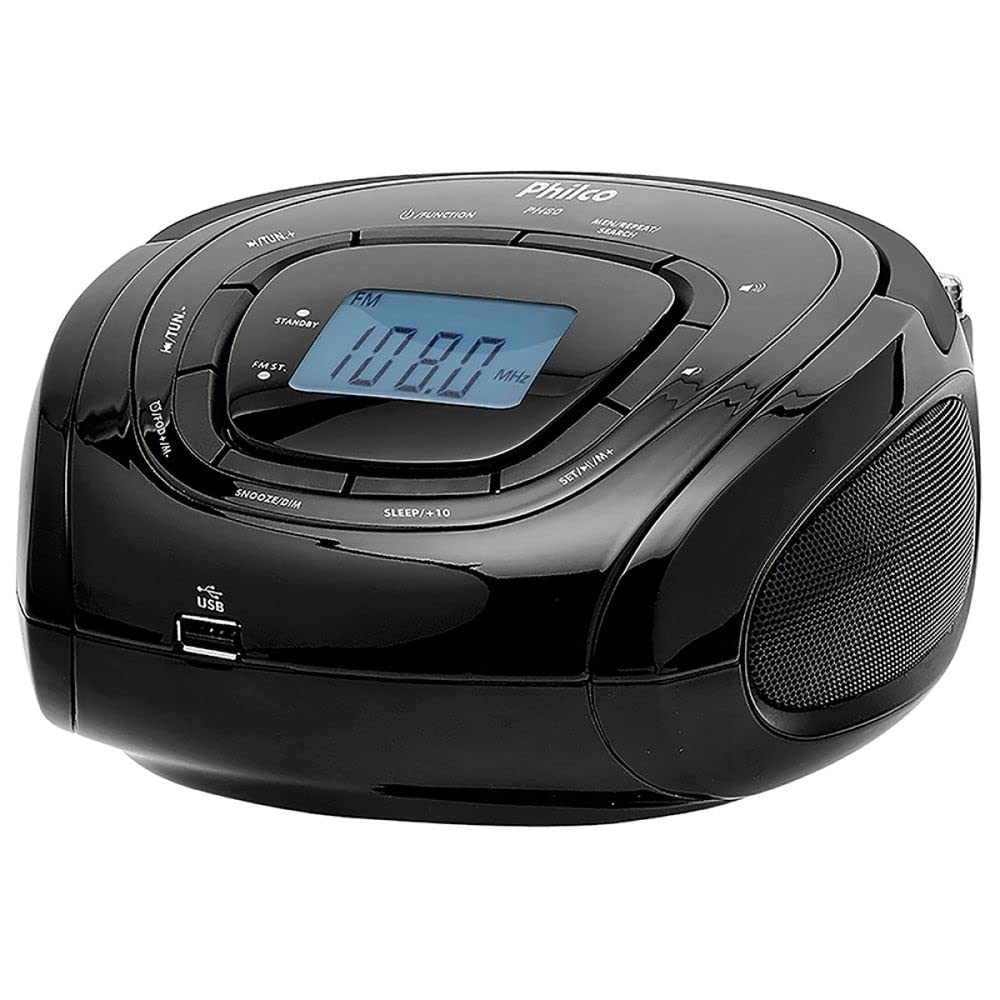
Figura 1: Quddiem u Fuq View of the Philco PH80 Boombox.
Komponenti Ewlenin:
- Kompartiment tas-CD: For playing audio CDs (located on top, under the lid).
- Display LCD: Shows current mode, frequency, time, and track information.
- Buttuni tal-Kontroll:
- FUNZJONI: Selects operating mode (e.g., CD, FM, USB).
- STANDBY: Buttuna mixgħul/mitfi.
- FM: Direct access to FM radio mode.
- MIN/REPEAT/SEARCH: Used for minute setting, track repeat, and radio search.
- SET/H/M: Used for setting hour and minute for clock/alarm.
- SLEEP/+10: Activates sleep timer or skips 10 tracks/minutes.
- SNOOZE/DIM: Snooze function for alarm or display dimmer.
- MALAJR: Fast forward/rewind or quick tuning.
- Kontroll tal-Volum: Adjusts audio output level (indicated by speaker icon).
- Port USB: Għall-konnessjoni ta' flash drives USB għad-daqq ta' MP3.
- Kelliema: Kelliema stereo integrati għall-ħruġ tal-awdjo.
- Antenna teleskopika: For improving FM radio reception.
- Input ta' Enerġija: Għall-konnessjoni tal-korda tal-enerġija AC.
4. Setup
4.1 Konnessjoni tal-Enerġija
- Kun żgur li l-unità titqiegħed fuq wiċċ stabbli u ċatt.
- Qabbad il-korda tal-enerġija AC mad-dħul tal-enerġija fuq wara tal-unità.
- Plug the other end of the power cord into a standard electrical outlet. The Philco PH80 supports Bivolt (110V/200V) operation.
4.2 Aġġustament tal-Antenna
For optimal FM radio reception, fully extend the telescopic antenna. Adjust its position and direction to achieve the clearest signal.
5. Istruzzjonijiet Operattivi
5.1 Power On/Off
Agħfas il- STANDBY buttuna biex tixgħel jew titfi l-unità.
5.2 Għażla tal-Modalità
Agħfas il- FUNZJONI button repeatedly to cycle through available modes: CD, FM Radio, USB.
5.3 Tħaddim tar-Radju FM
- Agħfas il- FUNZJONI button until "FM" appears on the display, or press the dedicated FM buttuna.
- To automatically search for stations, press and hold the MIN/REPEAT/SEARCH buttuna. Ir-radju jiskennja u jieqaf fl-istazzjon qawwi li jmiss.
- Biex tixgħel manwalment, uża l- FAST buttons (left/right arrows) to adjust the frequency incrementally.
- Adjust the volume using the volume control knob/buttons.
5.4 Daqq ta' CD
- Open the CD compartment (usually a lid on top) and place an audio CD with the label side facing up. Close the compartment securely.
- Agħfas il- FUNZJONI sakemm tintgħażel il-modalità "CD".
- Playback should begin automatically. Use the navigation buttons (e.g., FAST) biex taqbeż it-traċċi.
- Agħfas MIN/REPEAT/SEARCH to toggle repeat modes (e.g., repeat one, repeat all).
5.5 Daqq tal-USB
- Daħħal flash drive USB li fih awdjo MP3 files fil-port USB.
- Agħfas il- FUNZJONI button until "USB" mode is selected.
- Playback should begin automatically. If not, use the navigation buttons (e.g., FAST) to select a track.
- Agħfas MIN/REPEAT/SEARCH to toggle repeat modes (e.g., repeat one, repeat all).
5.6 Clock and Alarm Settings
The unit features a digital clock and alarm functions.
- Issettjar tal-Arloġġ: Fil-modalità standby, agħfas u żomm SET/H/M. The hour will flash. Use the FAST buttuni biex taġġusta s-siegħa, imbagħad agħfas SET/H/M again to set minutes. Repeat for minutes.
- L-issettjar tal-allarm: (Specific steps not detailed in provided data, general guidance) Refer to the full manual for detailed alarm setting instructions. Typically involves pressing an alarm button, then using SET/H/M u FAST buttons to set the alarm time and source.
- Timer ta 'l-Irqad: Agħfas SLEEP/+10 repeatedly to set a sleep timer (e.g., 10, 20, 30 minutes). The unit will turn off automatically after the set time.
- Snooze/Dimmer: Meta l-allarm ħsejjes, agħfas SNOOZE/DIM to temporarily silence it. Pressing this button in normal operation may adjust the display brightness.
5.7 Kontroll mill-Bogħod
The Philco PH80 comes with a remote control for convenient operation. Point the remote control directly at the unit's sensor. Ensure there are no obstructions between the remote and the unit.
6. Manutenzjoni
6.1 Tindif tal-Unità
Imsaħ il-barra tal-unità b'ċarruta ratba u niexfa. Tużax prodotti tat-tindif li joborxu, xama', jew solventi għax jistgħu jagħmlu ħsara lill-finitura. Evita li tisprejja likwidi direttament fuq l-unità.
6.2 Ħażna
If the unit will not be used for an extended period, unplug it from the power outlet and store it in a cool, dry place, away from direct sunlight and extreme temperatures.
7 Issolvi l-problemi
If you encounter issues with your Philco PH80, refer to the following common problems and solutions:
| Problema | Kawża / Soluzzjoni Possibbli |
|---|---|
| Ebda qawwa |
|
| L-ebda ħoss |
|
| Akkoljenza fqira tal-FM |
|
| CD playback issues |
|
| Problemi ta' daqq bil-USB |
|
If the problem persists after trying these solutions, please contact Philco customer support for assistance.
8. Speċifikazzjonijiet
| Karatteristika | Speċifikazzjoni |
|---|---|
| Mudell | PH80 |
| Manifattur | Philco |
| Numru tal-Parti | 56603117 |
| Voltage | 110 Volt, 200 Volt (Bivolt) |
| Standards Kompatibbli | MP3 |
| Piż | 2500 Gramma (2.5 kg) |
| Dimensjonijiet (L x W x H) | 17 x 37 x 27 ċm |
| ASIN | B076HZRWTR |
| EAN | 7891356003202 |
9. Garanzija u Appoġġ
For warranty information and customer support, please refer to the documentation included with your product or visit the official Philco websit. Żomm l-irċevuta tax-xiri tiegħek bħala prova tax-xiri għal talbiet ta' garanzija.
You can visit the official Philco store on Amazon for more information: Philco Official Store


