1. Introduzzjoni
This manual provides detailed instructions for the setup, operation, and maintenance of your CHERRY DW 5100 Wireless Keyboard and Mouse Combo. Please read this manual thoroughly before using the product to ensure optimal performance and longevity.
Kontenut tal-Pakkett
The CHERRY DW 5100 package includes the following items:
- CHERRY DW 5100 Wireless Keyboard
- CHERRY DW 5100 Wireless Mouse
- Riċevitur USB
- 4 x Batteriji AAA (2 għat-tastiera, 2 għall-maws)
- Manwal ta 'Istruzzjoni (dan id-dokument)

Image 1.1: The CHERRY DW 5100 Wireless Keyboard and Mouse Combo. The image displays the full-size black keyboard with a numeric keypad and media keys, alongside the ergonomic black wireless mouse.
2. Setup
2.1 Installazzjoni tal-batterija
The CHERRY DW 5100 keyboard and mouse require AAA batteries for operation. Two AAA batteries are needed for the keyboard and two for the mouse.
- Għat-Tastiera: Locate the battery compartment on the underside of the keyboard. Open the cover, insert two AAA batteries, ensuring correct polarity (+/-), and close the cover.
- Għall-Ġurdien: Locate the battery compartment on the underside of the mouse. Open the cover, insert two AAA batteries, ensuring correct polarity (+/-), and close the cover.

Image 2.1: The CHERRY DW 5100 Wireless Mouse shown with its USB receiver. The receiver is compact and designed to be plugged into a computer's USB port.
2.2 Konnessjoni tal-Apparati
The keyboard and mouse connect wirelessly to your computer via a single USB receiver.
- Daħħal ir-riċevitur USB f'port USB disponibbli fuq il-kompjuter tiegħek.
- Ensure the keyboard and mouse are powered on (check for an on/off switch, usually on the underside).
- Il-kompjuter tiegħek għandu jiskopri u jinstalla awtomatikament id-drajvers meħtieġa. Dan il-proċess jista' jieħu ftit mumenti.
- Once drivers are installed, the keyboard and mouse are ready for use.
The wireless connection operates on a 2.4 GHz frequency, providing a range of up to 10 meters (approximately 33 feet).
3. Istruzzjonijiet Operattivi
3.1 Funzjonijiet tat-Tastiera
The CHERRY DW 5100 keyboard features a standard QWERTY layout with 10 additional keys for enhanced functionality.
Immaġni 3.1: Mill-qrib view of the CHERRY DW 5100 Wireless Keyboard. This image highlights the full QWERTY layout, numeric keypad, and the additional function keys located above the numeric pad and below the spacebar.
Ċwievet addizzjonali:
- Kontroll Multimedia: Dedicated keys for volume up, volume down, mute, play/pause, previous track, and next track.
- Shortcuts tal-Applikazzjoni: Keys for launching common applications such as email, web browser, u kalkulatur.
- Modalità Sleep: A key to put your computer into sleep mode.
Refer to your operating system's settings for potential customization of these additional keys.
3.2 Funzjonijiet tal-Maws
The CHERRY DW 5100 mouse is ergonomically designed for right-handed users and features multiple buttons for efficient navigation.

Immaġni 3.2: Fuq view of the CHERRY DW 5100 Wireless Mouse. This image shows the left and right click buttons, the scroll wheel, and the DPI switch button located below the scroll wheel.
- Ikklikkja fuq ix-Xellug/Lemin: Buttuni standard tal-maws.
- Scroll Wheel: For vertical scrolling and as a middle click button.
- Swiċċ DPI: Located below the scroll wheel, this button allows you to adjust the mouse's resolution (DPI) on the fly, changing cursor speed and precision. Press the button to cycle through available DPI settings.
- Buttuni tal-kbir: Two side buttons located on the left side of the mouse, typically used for "back" and "forward" navigation in web browsers u file esploraturi.
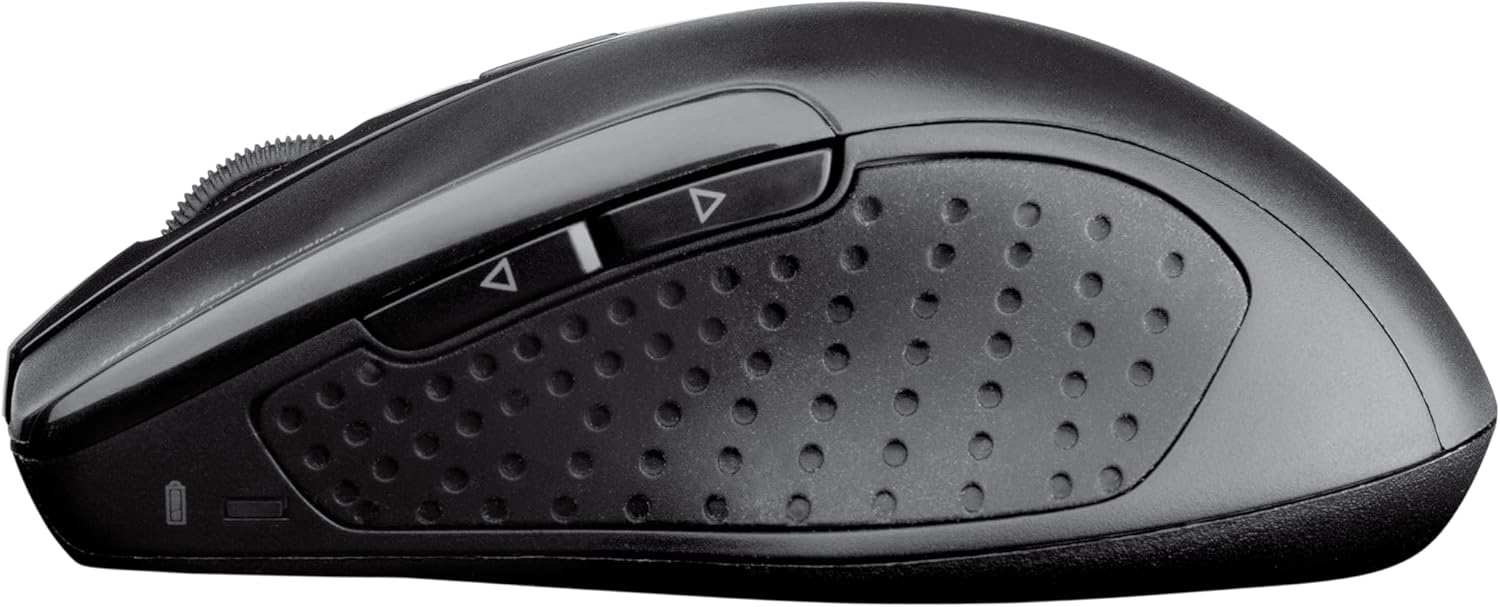
Immaġni 3.3: Ġenb view of the CHERRY DW 5100 Wireless Mouse. This image clearly shows the two thumb buttons on the left side and the textured rubber grip for enhanced comfort and control.
4. Manutenzjoni
4.1 Tindif
- Disconnect the USB receiver from your computer before cleaning.
- Uża drapp ratba u mingħajr ħelu ftit dampLaħlaħ bl-ilma jew b'soluzzjoni ħafifa tat-tindif biex timsaħ l-uċuħ tat-tastiera u l-maws.
- Avoid using harsh chemicals, abrasive cleaners, or solvents, as these can damage the product's finish.
- Għat-tindif bejn iċ-ċwievet tat-tastiera, uża arja kkompressata biex tneħħi t-trab u l-fdalijiet.
4.2 Sostituzzjoni tal-batterija
The CHERRY DW 5100 is designed for a long battery life of up to two years. When batteries are low, the performance may degrade, or the devices may stop responding.
- Replace batteries as described in Section 2.1.
- Always use fresh, high-quality AAA alkaline batteries.
- Armi batteriji użati skont ir-regolamenti lokali.
5 Issolvi l-problemi
| Problema | Kawża Possibbli | Soluzzjoni |
|---|---|---|
| It-tastiera/maws ma jirrispondix |
|
|
| Laggy or erratic mouse movement |
|
|
| Iċ-ċwievet tat-tastiera mhux qed jirreġistraw |
|
|
6. Speċifikazzjonijiet
| Karatteristika | Dettall |
|---|---|
| Isem tal-Mudell | CHERRY DW 5100 |
| Numru tal-Mudell tal-Oġġett | JD-0520EU-2 |
| Teknoloġija tal-Konnettività | Mingħajr fili (2.4 GHz) |
| Firxa Wireless | Sa 10 metri (33 pied) |
| Layout tat-Tastiera | EU Layout, QWERTY |
| Additional Keyboard Keys | 10 multimedia and application keys |
| Tip tal-ġurdien | Ergonomic, Right-handed, 6-button with DPI switch |
| Sors tal-Enerġija | Mħaddma bil-batterija |
| Batteriji Meħtieġa | 4 x AAA (2 for keyboard, 2 for mouse) |
| Ħajja Stima tal-Batterija | Sa 2 snin |
| Sistemi Operattivi Kompatibbli | Windows 10, Windows 7, Windows 8 |
| Pjattaforma tal-Ħardwer | PC, Laptop |
| Kulur | Iswed |
| Dimensjonijiet tal-Prodott (Tastiera) | Madwar 18.43 x 6.7 x 0.87 pulzieri (46.8 x 17 x 2.2 cm) |
| Piż tal-oġġett | Madwar 2.05 libbra (0.93 kg) |
| Manifattur | ĊIRASA |
7. Garanzija u Appoġġ
Għal informazzjoni dwar il-garanzija u appoġġ tekniku, jekk jogħġbok irreferi għas-sit uffiċjali ta' Cherry webis-sit jew ikkuntattja lid-dipartiment tas-servizz tal-konsumatur tagħhom. Id-dettalji tipikament jistgħu jinstabu fuq l-imballaġġ tal-prodott jew fuq il-manuskritt tal-manifattur. websit.
Manifattur: ĊIRASA
Websit: www.cherry.de/en/ (General Cherry websit, link ta' appoġġ speċifiku jista' jvarja skont ir-reġjun)


