Introduzzjoni
This manual provides comprehensive instructions for the setup, operation, maintenance, and troubleshooting of your Musky Portable Bluetooth Speaker. Please read this manual carefully before using the product to ensure proper function and longevity.

Figura 1: Quddiem view of the Musky Portable Bluetooth Speaker, displaying the LED clock.
Kontenut tal-Pakkett
Ivverifika li l-oġġetti kollha huma preżenti fil-pakkett:
- Musky Portable Bluetooth Speaker
- Cable Awdjo 3.5mm
- Kejbil tal-Iċċarġjar (USB)
- Qarrej tal-Kard
- Manwal għall-Utent (dan id-dokument)
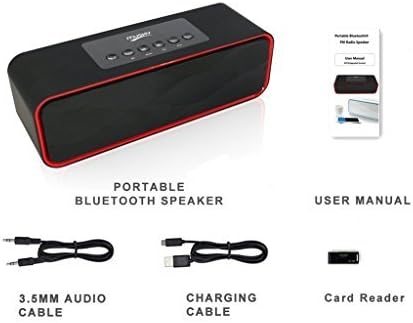
Figure 2: Included accessories: 3.5mm audio cable, charging cable, and card reader, alongside the speaker and user manual.
Prodott Overview
Kontrolli u Portijiet

Figure 3: Top panel controls of the speaker.
- Play/Pause/Call Answer Button: Controls media playback and answers/ends phone calls.
- Buttuna Agħżel il-Modalità: Switches between Bluetooth, FM Radio, Micro SD card, USB flash drive, and AUX-in modes.
- Buttuna tat-Trekk ta 'Qabel: Skips to the previous track or station.
- Buttuna tat-Trekk li jmiss: Skips to the next track or station.
- Volum - Buttuna: Tnaqqas il-volum.
- Volum + Buttuna: Iżżid il-volum.

Figure 4: Rear panel ports for USB, TF (Micro SD) card, and AUX input.
- Port USB: Għall-plejbek ta' flash drive tal-USB.
- Slot tal-Kard TF (Mikro SD): Għall-plejbek ta' kard Micro SD.
- Port tal-AUX-in: Għall-konnessjoni ta' apparati awdjo esterni permezz ta' kejbil awdjo ta' 3.5mm.
- Port tal-Iċċarġjar: Port mikro USB għall-iċċarġjar tal-ispiker.
Setup
Iċċarġjar lill-Ispeaker
Before first use, fully charge the speaker. Connect the supplied USB charging cable to the speaker's charging port and the other end to a USB power adapter (not included) or a computer's USB port. The LED display will indicate charging status.
Tixgħel/Jitfi
To power on the speaker, press and hold the power button (usually integrated with the Play/Pause button or a dedicated switch). To power off, press and hold the same button again.
Istruzzjonijiet Operattivi
Modalità Bluetooth
- Power on the speaker. It will automatically enter Bluetooth pairing mode, indicated by a soft tone.
- Ippermetti l-Bluetooth fuq l-apparat tiegħek (smartphone, tablet, eċċ.) u fittex apparati disponibbli.
- Select "Musky Speaker" (or similar name) from the list to pair. Once connected, a confirmation tone will sound.
- Issa tista' ddoqq l-awdjo mit-tagħmir tiegħek permezz tal-ispiker.

Figure 5: Illustrates wireless Bluetooth connectivity for audio streaming.
Modalità tar-Radju FM
- Agħfas il- Agħżel Modalità Agħfas il-buttuna sakemm jidher "FM" fuq id-displej LED.
- To auto-scan and save stations, press and hold the Play/Pawsa button. The speaker will scan and store available FM stations.
- Uża l- Track Preċedenti u Track li jmiss buttuni biex tinnaviga bejn l-istazzjonijiet salvati.
- Tip: For improved FM reception, connect the supplied 3.5mm audio cable or a USB cable to the AUX-in or USB port, as it acts as an external antenna.
Micro SD Card / USB Flash Drive Mode
- Insert a Micro SD card into the TF slot or a USB flash drive into the USB port.
- L-ispiker awtomatikament jaqleb għall-modalità korrispondenti u jibda jdoqq l-awdjo files. Jekk le, agħfas il-buttuna Agħżel Modalità button until the correct mode is active.
- Uża l- Track Preċedenti u Track li jmiss buttuni biex taqbeż il-binarji.
- The speaker supports auto-play function for both Micro SD card and USB thumb drive.
Modalità AUX-in
- Connect one end of the 3.5mm audio cable to the speaker's AUX-in port and the other end to the audio output of your external device.
- Agħfas il- Agħżel Modalità Agħfas il-buttuna sakemm jidher "AUX" fuq id-displej LED.
- L-awdjo issa se jindaqq permezz tal-ispiker mit-tagħmir konness tiegħek.
Funzjoni ta 'l-Arloġġ ta' Allarm
The speaker features an alarm clock with an LED display. The display remains on to function as a desk or bedside clock.
- L-issettjar tal-allarm: Refer to the specific instructions in the full manual for detailed steps on setting the time and alarm.
- Ħoss ta 'allarm: You can set the alarm to wake you with bird singing sounds or your own music (if playing from SD card/USB). Radio cannot be set as an alarm sound.
- Tul ta' Allarm: The alarm will sound for 1 minute and will repeat once if no button is pressed.
Manutenzjoni
- Tindif: Uża drapp artab u niexef biex tnaddaf il-wiċċ tal-ispiker. Tużax prodotti tat-tindif jew solventi li joborxu.
- Ħażna: Aħżen l-ispiker f'post frisk u niexef 'il bogħod mix-xemx diretta u minn temperaturi estremi.
- Kura tal-batterija: Biex ittawwal il-ħajja tal-batterija, evita li tiċċarġja kompletament il-batterija ta’ spiss. Iċċarġja l-ispiker regolarment, anke jekk ma jkunx qed jintuża għal perjodi twal.
- Film Protettiv: A thin protective film may be present on the control panel. This can be peeled off.
Issolvi l-problemi
| Problema | Kawża Possibbli | Soluzzjoni |
|---|---|---|
| L-ispiker ma jixgħelx. | Batterija baxxa. | Iċċarġja l-ispiker kompletament. |
| Ma tistax tqabbad permezz tal-Bluetooth. | L-ispiker mhux fil-modalità ta' tqabbil; il-Bluetooth tal-apparat mitfi; wisq 'il bogħod mill-ispiker. | Ensure speaker is in Bluetooth mode. Turn device Bluetooth off/on. Move device closer to speaker (within 33 feet). |
| L-ebda ħoss mill-ispiker. | Volume too low; incorrect mode selected; audio source issue. | Increase speaker and device volume. Verify correct mode (BT, FM, SD, USB, AUX). Check audio source playback. |
| Riċeviment ħażin tar-radju FM. | Sinjal dgħajjef. | Connect a 3.5mm audio cable or USB cable to the AUX-in/USB port to act as an external antenna. Reposition the speaker. |
| Audio lag/poor quality in Bluetooth mode. | Interference; distance; device compatibility. | Reduce distance between speaker and device. Minimize obstacles. Ensure device supports aptX for low latency if desired. |
| Cannot select folders on SD card/USB drive. | Feature not supported. | The speaker does not support folder selection. All songs on the card/drive will be played sequentially. |
| Voice prompt removed, max volume warning beep added. | This is an upgraded version feature. | This is intended behavior for the upgraded model. Voice prompt version may be available upon request from manufacturer. |
Speċifikazzjonijiet
| Karatteristika | Dettall |
|---|---|
| Brand | Musky |
| Numru tal-Mudell | 5647426339 |
| Tip ta' Kelliem | Multi Kamra |
| Karatteristika Speċjali | Radio, Alarm Clock, LED Display |
| Teknoloġija tal-Konnettività | Bluetooth, Awżiljarju, USB |
| Qawwa tal-Ħruġ Massimu tal-Ispeaker | 10 Watts (2x5W Acoustic Drivers) |
| Sors tal-Enerġija | Mħaddma bil-batterija |
| Tip ta 'batterija | 1 batterija tal-jone tal-litju (inkluża) |
| Ħajja tal-batterija | Up to 8-10 hours of playtime |
| Dimensjonijiet tal-Prodott | 8.7 x 2.8 x 2.8 pulzieri |
| Piż tal-oġġett | 1.5 liri |
| Kulur | Iswed |
| Metodu ta' Kontroll | Buttuni |
| Modalità tal-Ħruġ tal-Awdjo | Stereo |
| UPC | 605757354439 |

Figure 6: Speaker dimensions for reference.

Figure 7: Internal components, highlighting the HIFI speakers and passive vibration diaphragm for enhanced bass.
Garanzija u Appoġġ
For warranty information and customer support, please refer to the contact details provided with your purchase or visit the official Musky websit. Żomm l-irċevuta tax-xiri tiegħek għal pretensjonijiet ta' garanzija.
Mistoqsijiet Frekwenti (FAQ):
- Q: Can I select folders on an SD card/USB drive? A: Le.
- Q: Will it charge my phone? A: Iva.
- Q: Can I charge and listen to music at the same time? A: Yes. It is safe to keep the charging cable plugged in all the time.
- Q: Can I loop/repeat my songs when playing music from SD card/USB drive? A: Yes. It loops all the songs. To repeat a single song, there should be only one song on the SD card/USB drive.
- Q: Can I connect it with my Bluetooth headsets? A: No. This is a Bluetooth receiving device, not a transmitting device.
- Q: How to convert M4A/MP4 music into Mp3? A: You can use a free audio converter.
- Q: How can I improve the reception of the radio? A: You can use an audio cable or USB cable as an external antenna; the longer the better.


