1. Prodott Aktarview
The UNIWEIGH Digital Kitchen Scale is a high-precision weighing instrument designed for various applications including cooking, baking, jewelry, and portion control. It features a sleek, compact design with a stainless steel platform and an easy-to-read backlit LCD screen.

Image 1: The UNIWEIGH Digital Kitchen Scale with raspberries on its weighing platform, demonstrating its use for food measurement.
Karatteristiċi ewlenin:
- High Precision: Weighs from 0.5g up to 3000g (6.61 lbs) with 0.1g accuracy.
- Multi-Functions: Includes unit conversion, tare function, and piece counting.
- Clear Backlit LCD: Blue backlit screen for easy readability.
- Compact Design: Portable and easy to store.
- Durable Materials: Stainless steel platform and ABS plastic frame.

Image 2: Visual representation of the scale's key features: maximum weight capacity, accuracy, low battery alarm, tare function, and overload alarm.
2. Setup
2.1 Installazzjoni tal-batterija
- Iftaħ il-kompartiment tal-batterija fuq in-naħa ta 'taħt tal-iskala.
- Insert the two AAA batteries (included), ensuring correct polarity (+/-).
- Agħlaq il-kompartiment tal-batterija sew.
2.2 Tqegħid Inizjali
Place the scale on a hard, flat, and stable surface. Avoid placing it on soft or uneven surfaces, as this can affect accuracy. Ensure there are no vibrations or air currents that could interfere with weighing.
3. Istruzzjonijiet Operattivi
3.1 Power On/Off
- Agħfas il- ON/OFF button to turn the scale on. The LCD will display "88888" and then "0.0g" when ready.
- Biex titfi, agħfas u żomm il-buttuna ON/OFF button for a few seconds. The scale also features a 180-second auto-off function to conserve battery power.

Image 3: A close-up of the scale's blue backlit LCD screen displaying '0.0g', with the ON/OFF, M, PCS, and T buttons visible.
3.2 Konverżjoni tal-Unità
- Agħfas il- M (Mode) button to cycle through the available measurement units: grams (g), ounces (oz), grain (gn), carat (ct), troy ounces (ozt), and pennyweight (dwt).

Image 4: Icons illustrating the various measurement units available on the scale: grams, carats, ounces, grains, troy ounces, and pennyweights.
3.3 Funzjoni tat-tara
The tare function allows you to subtract the weight of a container, so you only measure the weight of its contents.
- Poġġi kontenitur vojt fuq il-pjattaforma tal-użin.
- Agħfas il- T (Tare) button. The display will reset to "0.0g".
- Add the items you wish to weigh into the container. The display will show only the net weight of the items.
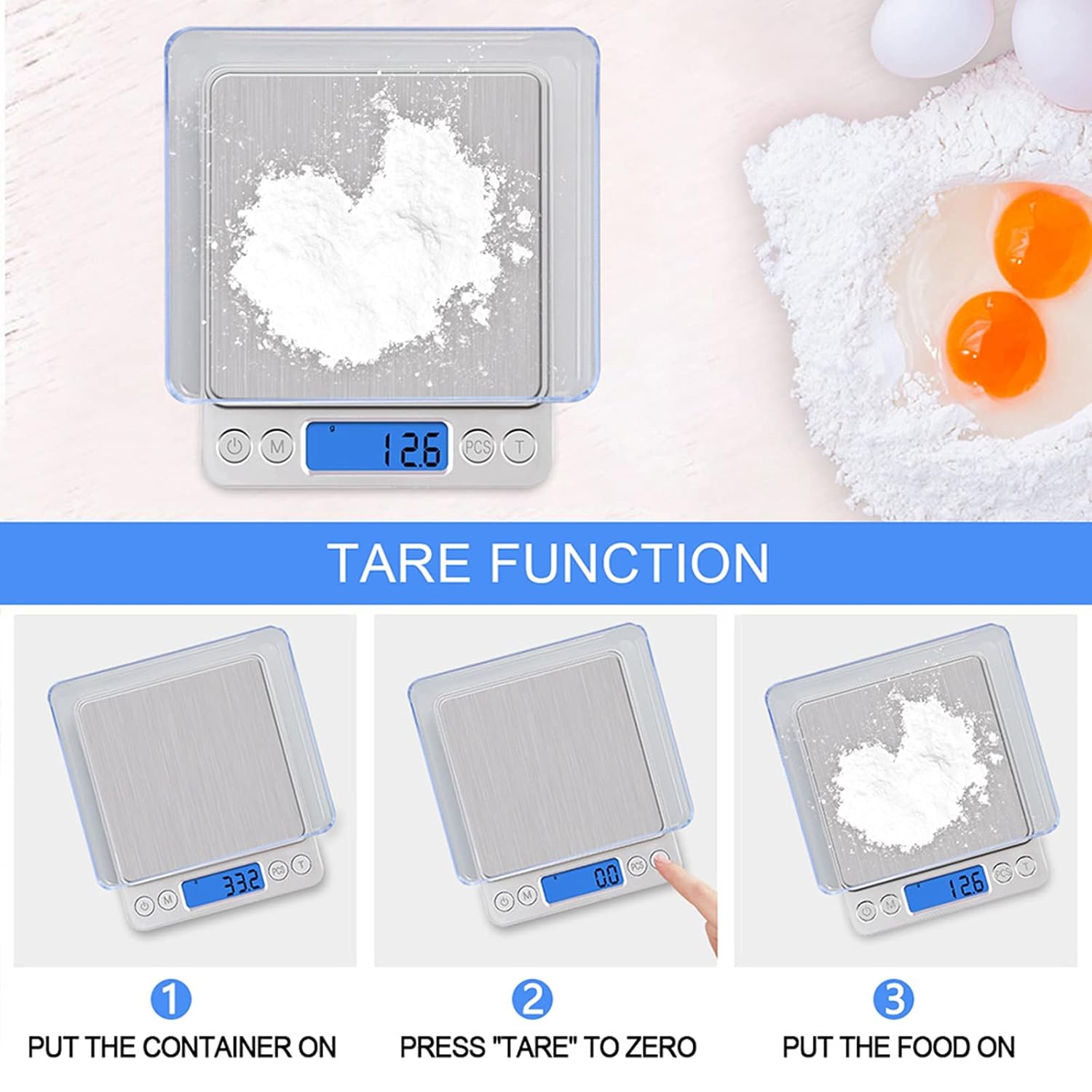
Image 5: A three-step visual guide demonstrating the tare function: 1) Place container, 2) Press 'Tare' to zero, 3) Add food to weigh.
3.4 Funzjoni tal-Għadd
- To use the piece counting function, place a sample quantity (e.g., 25, 50, 75, or 100 pieces) of the items on the platform.
- Agħfas u żomm il- PCS button until the display shows "PCS" and a number (e.g., "25").
- Agħfas il- M buttuna biex tagħżel l-sample quantity that matches the number of items on the platform.
- Agħfas PCS again to confirm. The scale is now in counting mode. You can add more items, and the display will show the total count.
- Biex toħroġ mill-modalità tal-għadd, agħfas il-buttuna M buttuna.
4. Manutenzjoni
4.1 Tindif
Imsaħ l-iskala bi ftit damp cloth. Do not immerse the scale in water or use abrasive cleaners. The stainless steel platform is easy to clean.

Image 6: A hand cleaning the stainless steel platform of the scale with a sponge, highlighting its easy-to-clean surface.
4.2 Ħażna
Store the scale in a cool, dry place. Its compact size allows for easy storage in drawers or cabinets.

Image 7: The compact UNIWEIGH Digital Kitchen Scale shown next to a magazine, illustrating its small size for convenient storage.
5 Issolvi l-problemi
- "Lo" displayed: Indicates low battery. Replace the AAA batteries.
- "O-Ld" displayed: Indicates overload. Remove items immediately to prevent damage.
- Qari mhux preċiż: Ensure the scale is on a flat, stable surface. Avoid vibrations, drafts, or extreme temperature changes. Recalibrate if necessary (refer to calibration instructions in the full manual, if provided).
6. Speċifikazzjonijiet
| Karatteristika | Speċifikazzjoni |
|---|---|
| Brand | UNIWEEIGH |
| Numru tal-Mudell | 8541976219 |
| Kapaċità tal-piż | 0.5g to 3000g (6.61 lbs) |
| Eżattezza | 0.1g (0.01 oz) |
| Unitajiet ta' Miżura | g, oz, gn, ct, ozt, dwt |
| Tip ta 'Wiri | LCD backlit |
| Sors tal-Enerġija | 2 x batteriji AAA (inklużi) |
| Itfi Awtomatiku | 180 sekonda |
| Dimensjonijiet tal-Prodott | 12.7 x 10.67 x 1.52 ċm (5" x 4.2" x 0.6") |
| Materjal | Stainless steel platform, ABS plastic frame |
7. Garanzija u Appoġġ
UNIWEIGH products are rigorously tested and calibrated before shipment. For any support inquiries or warranty information, please refer to the contact details provided with your product packaging or visit the official UNIWEIGH websit.

