Introduzzjoni
This instruction manual provides essential information for the safe and effective use of your Accessory USA 12V AC DC Adapter. This adapter is designed to provide reliable power to compatible devices, including AT&T Uverse Receiver VIP-1200, VIP-1216, Motorola Wireless Cable Box, HD Recorder, and HD DVR.
Jekk jogħġbok aqra dan il-manwal bir-reqqa qabel l-installazzjoni u t-tħaddim, u żommu għal referenza futura.
Informazzjoni dwar is-Sigurtà
Your Accessory USA adapter is designed with safety in mind. It is CE / FCC / RoHS certified and tested to meet or exceed OEM specifications. It includes OVP (Over Voltage output Protection), OCP (Over Current output Protection), and SCP (Short Circuit output Protection).
- Kun żgur li l-adapter jintuża biss ma' apparati li jaqblu mal-volum tiegħutage and current specifications. Refer to the device's manual for power requirements.
- Tesponix l-adapter għall-ilma, umdità, jew temperaturi estremi.
- Evita li twaqqa' l-adapter jew li tissottomettih għal impatti qawwija.
- Do not attempt to open or modify the adapter. This can lead to electric shock and will void any warranty.
- Always unplug the adapter from the power outlet when not in use or during electrical storms.
- Żomm fejn ma jintlaħaqx mit-tfal.
Kontenut tal-Pakkett
Ivverifika li l-oġġetti kollha huma preżenti fil-pakkett:
- 1 x Accessory USA 12V AC DC Adapter Unit
- 2 x Power Cords (as per product specifications)
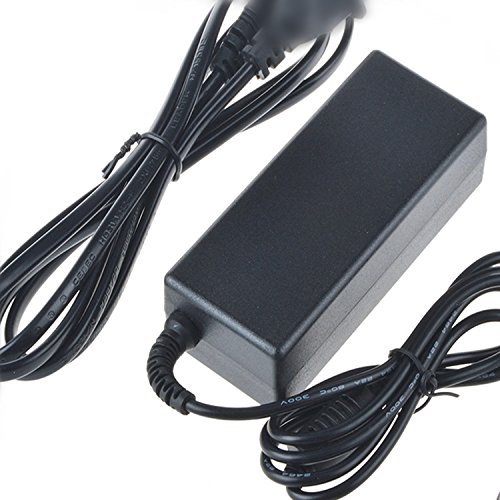
Image of the Accessory USA 12V AC DC Adapter, showing the main unit and attached power cord.
Setup
- Ivverifika l-Kompatibbiltà: Before connecting, ensure your device requires a 12V DC power input and that the connector type matches the adapter's output plug. This adapter is compatible with AT&T Uverse Receiver VIP-1200, VIP-1216, ATT U-verse Motorola Wireless Cable Box, HD Recorder, and HD DVR.
- Qabbad mal-Apparat: Insert the DC output plug of the adapter firmly into the power input port of your compatible device.
- Qabbad mal-Power Outlet: Plug the AC input cord of the adapter into a standard electrical wall outlet (100-240V AC).
- Qawwa Mixgħul: Once connected, your device should receive power. If your device has a power button, turn it on.
Istruzzjonijiet Operattivi
The Accessory USA 12V AC DC Adapter operates automatically once connected to a power source and a compatible device. It provides a stable 12V DC output to power your equipment.
- Kun żgur li l-adapter jitqiegħed f'żona ventilata sew biex tevita li jisħon iżżejjed.
- Do not cover the adapter with cloths or other materials during operation.
- If the adapter feels excessively hot, disconnect it immediately and check for proper ventilation or device compatibility.
Manutenzjoni
- Tindif: Disconnect the adapter from both the power outlet and the device before cleaning. Use a soft, dry cloth to wipe the exterior. Do not use liquid cleaners or solvents.
- Ħażna: When not in use, store the adapter in a cool, dry place, away from direct sunlight and moisture. Avoid tightly winding the cords to prevent damage.
- Spezzjoni: Periodically inspect the adapter and its cords for any signs of damage, such as cuts, fraying, or bent pins. If damage is found, discontinue use and replace the adapter.
Issolvi l-problemi
If you encounter issues with your adapter, refer to the following common troubleshooting steps:
- L-ebda Enerġija għall-Apparat:
- Ensure the adapter is securely plugged into a working wall outlet. Test the outlet with another device.
- Verify that the DC output plug is fully inserted into your device's power input.
- Confirm that your device is compatible with a 12V DC power supply and that the adapter's connector matches.
- Check the adapter and cords for any visible damage.
- Qawwa intermittenti:
- Kun żgur li l-konnessjonijiet kollha huma sodi u stabbli.
- Avoid bending or stressing the power cords, especially at the connectors.
- If the issue persists, the adapter or the device itself may be faulty.
- Is-sħana żejda tal-adapter:
- Kun żgur li l-adapter ikun f'żona ventilata sew u mhux mgħotti.
- Confirm that the connected device's power requirements do not exceed the adapter's capacity.
- If overheating continues, discontinue use.
If troubleshooting steps do not resolve the issue, contact the seller or manufacturer for further assistance.
Speċifikazzjonijiet
| Brand | Aċċessorju tal-Istati Uniti |
| Numru tal-Mudell | KTAUB-0904315 |
| Input Voltage | AC 100-240V (Standard Wall Outlet) |
| Ħruġ Voltage | DC 12 Volts |
| Apparati Kompatibbli | AT&T Uverse Receiver VIP-1200, VIP-1216, ATT U-verse Motorola Wireless Cable Box, HD Recorder, HD DVR |
| Ċertifikazzjonijiet | CE, RoHS, FCC |
| Karatteristiċi ta' Protezzjoni | OVP, OCP, SCP |
Garanzija u Appoġġ
Specific warranty details for this product are typically provided by the seller or manufacturer at the time of purchase. Please refer to your purchase documentation or contact the seller directly for information regarding warranty coverage and support.
For technical assistance or inquiries, please reach out to Accessory USA customer support through their official channels or the platform where the product was purchased.


