1. Introduzzjoni
Thank you for choosing the Eurom Alutherm 2000 Wi-Fi convection heater. This manual provides essential information for the safe and efficient operation, installation, and maintenance of your new heater. Please read these instructions carefully before use and keep them for future reference.
The Eurom Alutherm 2000 Wi-Fi is an elegant convection heater designed to integrate seamlessly into any interior. With a power output of 2000 W, it is capable of heating spaces between 49-65 m³, making it suitable for living rooms, bedrooms, or offices. This heater can be wall-mounted for continuous heating and features a built-in thermostat to maintain your desired temperature. Control is made convenient through the free Eurom Smart app, which also allows for connecting multiple heaters.
2. Istruzzjonijiet tas-Sigurtà
Dejjem osserva l-prekawzjonijiet ta’ sigurtà li ġejjin biex tnaqqas ir-riskju ta’ nar, xokk elettriku, jew korriment:
- Aqra l-istruzzjonijiet kollha qabel tuża dan il-heater.
- Tużax dan il-heater fil-viċinanza immedjata ta’ banju, doċċa jew pixxina.
- Tgħattix il-ħiter. Jekk tgħatti l-ħiter, dan jista’ jwassal għal sħana żejda u nar.
- Żomm materjali fjammabbli bħal għamara, purtieri, u oġġetti kombustibbli oħra mill-inqas metru (3 piedi) 'il bogħod minn quddiem u l-ġnub tal-heater.
- Tiżgura l-voltagIl-volum indikat fuq it-tikketta tal-klassifikazzjoni jikkorrispondi għall-volum tal-provvista tal-elettriku tiegħektage.
- Tħaddemx heater b'korda jew plagg bil-ħsara, jew wara li l-heater ma jkunx qed jaħdem sew jew ikun waqa' jew ikun ġarrab ħsara b'xi mod.
- Dan l-apparat mhuwiex maħsub għall-użu minn persuni (inklużi tfal) b’kapaċitajiet fiżiċi, sensorji jew mentali mnaqqsa, jew nuqqas ta’ esperjenza u għarfien, sakemm ma jkunux ingħataw superviżjoni jew istruzzjoni dwar l-użu tal-apparat minn persuna responsabbli għas-sigurtà tagħhom.
- It-tfal għandhom ikunu sorveljati biex jiżguraw li ma jilagħbux bl-apparat.
3. Prodott Aktarview
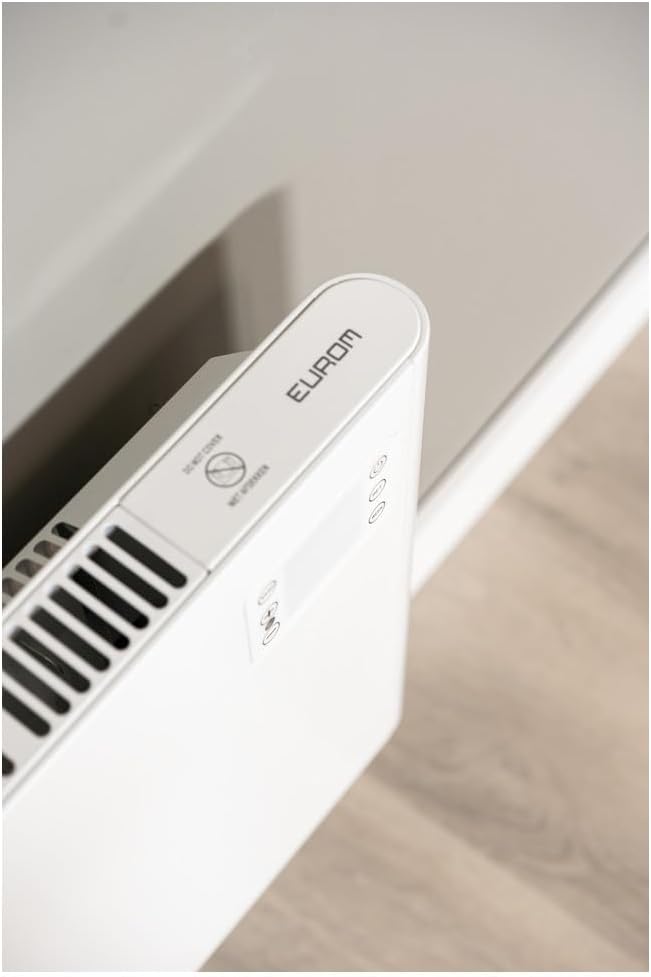
The Eurom Alutherm 2000 Wi-Fi heater features a sleek design and intuitive controls. Below are key components and their descriptions.



4. Setup u Installazzjoni
The Eurom Alutherm 2000 Wi-Fi heater offers flexible installation options: wall-mounted or freestanding.
4.1 Immuntar tal-ħajt
For permanent heating, the unit can be securely mounted to a wall. Refer to the included mounting template and hardware for precise installation. Ensure the heater is installed at a safe distance from flammable materials and that there is adequate clearance for air circulation.

4.2 Tqegħid Freestanding
If you prefer a portable solution, attach the provided feet to the base of the heater. Place the heater on a stable, level surface, ensuring it is not obstructed and has sufficient space around it for proper operation.

4.3 Konnessjoni tal-Enerġija
Once installed, plug the heater into a suitable electrical outlet. Ensure the main power switch (Figure 3.4) is in the 'OFF' position before plugging in. After plugging in, switch the main power switch to 'ON'.
5. Istruzzjonijiet Operattivi
The Alutherm 2000 Wi-Fi can be operated via its integrated control panel, the remote control, or the Eurom Smart app.
5.1 Operazzjoni tal-Panew tal-Kontroll
The control panel (Figure 3.6) allows direct adjustment of settings:
- Buttuna tal-Qawwa: Jixgħel jew jitfi l-ħiter.
- Buttuna tal-Modalità: Cycles through different operating modes (e.g., Comfort, ECO, Anti-frost).
- Buttuna SET: Confirms selections or enters settings menus.
- Aġġustament tat-Temperatura (+/-): Iżżid jew tnaqqas it-temperatura mixtieqa.
- Buttuna tal-ĠIMGĦA: Accesses weekly programming settings.
5.2 Operazzjoni tal-Kontroll mill-bogħod
The remote control (Figure 3.5) provides convenient access to all heater functions from a distance. Its buttons mirror the functions available on the control panel.
5.3 Eurom Smart App Control (Wi-Fi)
For advanced control and scheduling, download the free Eurom Smart app. This app allows you to:
- Turn the heater on/off remotely.
- Set and adjust the desired temperature.
- Program weekly heating schedules.
- Connect and manage multiple Eurom Wi-Fi heaters.
Follow the in-app instructions for pairing your heater with the app and connecting to your home Wi-Fi network.
6. Manutenzjoni
Manutenzjoni regolari tiżgura prestazzjoni ottimali u lonġevità tal-ħiter tiegħek.
- Tindif: Dejjem aqla’ l-plagg tal-heater u ħallih jiksaħ kompletament qabel ma tnaddaf. Uża drapp artab u nadif.amp drapp biex timsaħ l-uċuħ ta’ barra. Tużax prodotti tat-tindif jew solventi li joborxu.
- Ħażna: Jekk se taħżen il-ħiter għal perjodu twil ta' żmien, kun żgur li jkun nadif u niexef. Aħżnu f'post frisk u niexef, preferibbilment fl-imballaġġ oriġinali tiegħu.
- Spezzjoni: Periodically check the power cord and plug for any signs of damage. If damage is found, do not use the heater and contact qualified service personnel.
7 Issolvi l-problemi
If you encounter issues with your Eurom Alutherm 2000 Wi-Fi heater, refer to the following common problems and solutions:
| Problema | Kawża Possibbli | Soluzzjoni |
|---|---|---|
| Il-heater ma jixgħelx. | Ebda provvista tal-enerġija; Is-swiċċ prinċipali tal-enerġija mitfi; Il-protezzjoni kontra s-sħana żejda hija attivata. | Check power outlet and plug; Ensure main power switch (Figure 3.4) is ON; Unplug, allow to cool for 30 minutes, then restart. |
| Heater not heating to desired temperature. | Temperature setting too low; Room size exceeds heater capacity; Obstruction of air vents. | Increase temperature setting; Ensure heater is appropriate for room size; Clear any obstructions from air vents. |
| Problemi bil-konnessjoni tal-Wi-Fi. | Weak Wi-Fi signal; Incorrect app pairing; Router issues. | Ensure heater is within Wi-Fi range; Re-pair the heater with the Eurom Smart app; Restart your Wi-Fi router. |
| Heater overheats or runs continuously. | Thermostat malfunction; Air vents blocked; Software glitch. | Ensure vents are clear and heater is not covered; If issue persists, unplug and contact support. (Note: A user review mentioned potential overheating issues if the management module gets stuck. Always monitor the heater.) |
| Heater does not restart automatically after power outage. | Design limitation. | This model may require manual restart after a power interruption. |
If the problem persists after attempting these solutions, please contact Eurom customer support.
8. Speċifikazzjonijiet
| Karatteristika | Speċifikazzjoni |
|---|---|
| Brand | Eurom |
| Numru tal-Mudell | EUM360776 |
| Kulur | Abjad |
| Dimensjonijiet tal-Prodott (L x W x H) | 101 x 46 x 12 ċm |
| Piż | 6 Kilogrammi |
| Klassi tal-Effiċjenza tal-Enerġija | B |
| Karatteristiċi Speċjali | Wi-Fi Compatible, Electronic Thermostat |
| Fattur tal-Formola | Torri |
| Użu fuq ġewwa/barra | Ġewwa |
| Sors tal-Enerġija | Corded Elettriku |
| Metodu tat-Tisħin | Konvezzjoni |
| Tip ta 'Immuntar | Mount Wall |
9. Garanzija u Appoġġ
For warranty information, please refer to the documentation provided with your purchase or visit the official Eurom website. If you require technical assistance, spare parts, or have any questions regarding your Eurom Alutherm 2000 Wi-Fi heater, please contact Eurom customer support directly. Contact details can typically be found on the product packaging or the manufacturer's websit.


