1. Introduzzjoni
This manual provides essential instructions for the setup, operation, and maintenance of your GPX HTB037B 29-inch Bluetooth Soundbar. Please read this manual thoroughly before using the product to ensure proper functionality and to maximize your audio experience. Keep this manual for future reference.
2. Informazzjoni dwar is-Sigurtà
- Do not expose the soundbar to water or moisture.
- Evita li tpoġġi s-soundbar ħdejn sorsi ta' sħana bħal radjaturi, reġistri tas-sħana, stufi, jew apparat ieħor (inkluż amplifiers) li jipproduċu sħana.
- Uża biss aċċessorji/aċċessorji speċifikati mill-manifattur.
- Spluggja dan l-apparat waqt maltempati tas-sajjetti jew meta ma jintużax għal perjodi twal.
- Irreferi l-manutenzjoni kollha lil persunal tas-servizz kwalifikat. Is-servizz huwa meħtieġ meta l-apparat ikun ġie bil-ħsara b'xi mod, bħal korda tal-provvista tal-enerġija jew plagg ikun bil-ħsara, likwidu jkun inxtered jew oġġetti jkunu waqgħu fl-apparat, l-apparat ikun ġie espost għax-xita jew umdità, ma jaħdimx b'mod normali , jew twaqqgħet.
- Żgura ventilazzjoni xierqa madwar l-unità.
3. Kontenut tal-Pakkett
Iċċekkja li l-oġġetti kollha huma preżenti meta tiftaħ il-pakkett:
- GPX HTB037B 29-inch Bluetooth Soundbar
- Connection Cables (e.g., RCA audio cable, 3.5mm auxiliary cable)
- Adapter tal-Enerġija
- Remote Control (batteries may be required, not included)
- Manwal għall-Utent (dan id-dokument)
4. Prodott Aktarview
The GPX HTB037B is a 29-inch Bluetooth soundbar designed to enhance your audio experience for televisions, smartphones, and other compatible devices. It features integrated stereo speakers with a fabric grille and multiple connectivity options.
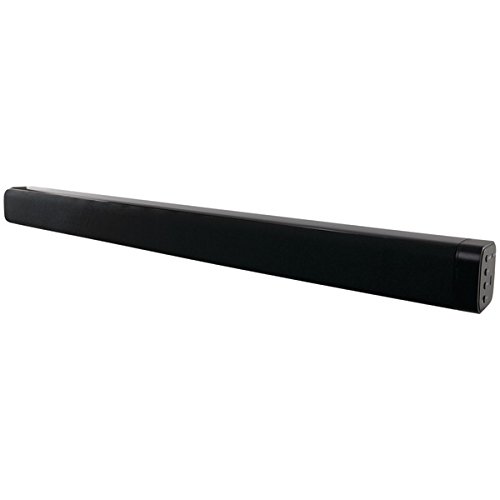
Stampa 1: GPX HTB037B 29-inch Bluetooth Soundbar. This image displays the soundbar's sleek black, rectangular design with a visible fabric speaker grille on the front. The right side panel, where connection ports are typically located, is also visible.
Karatteristiċi ewlenin:
- Integrated stereo speakers with fabric speaker grille
- Bluetooth wireless technology (A2DP profile appoġġ)
- Input awżiljarju ta '3.5mm
- Inputs tal-awdjo stereo RCA
5. Setup
5.1 Tqegħid
Place the soundbar on a stable, flat surface, such as a TV stand or desktop. Ensure there is adequate space around the unit for proper ventilation.
5.2 Konnessjoni tal-Enerġija
- Connect the power adapter to the DC input port on the soundbar.
- Ipplaggja l-adapter tal-enerġija fi żbokk elettriku standard.
5.3 Konnessjonijiet tal-Awdjo
Agħżel wieħed mill-metodi li ġejjin biex tqabbad is-sors tal-awdjo tiegħek:
5.3.1 Konnessjoni Bluetooth
- Qawwa fuq il-soundbar.
- Select Bluetooth mode on the soundbar (refer to operating instructions for mode selection).
- Enable Bluetooth on your audio device (e.g., smartphone, tablet, laptop).
- Fittex għal available devices and select "GPX HTB037B" (or similar name) from the list.
- Ladarba jkun imqabbad, l-awdjo mit-tagħmir tiegħek se jindaqq permezz tas-soundbar.
5.3.2 3.5mm Auxiliary Input
- Connect one end of a 3.5mm audio cable (not always included) to the AUX IN port on the soundbar.
- Connect the other end of the 3.5mm audio cable to the headphone jack or auxiliary output of your audio device.
- Select AUX mode on the soundbar.
5.3.3 RCA Stereo Audio Inputs
- Connect the red and white RCA plugs of an RCA audio cable (included) to the corresponding RCA input ports on the soundbar.
- Connect the other end of the RCA cable to the audio output ports (usually red and white) of your television or other audio source.
- Select RCA mode on the soundbar.
6. Istruzzjonijiet Operattivi
6.1 Power On/Off
Agħfas il-buttuna tal-Power fuq is-soundbar jew ir-remote control biex tixgħel jew titfi l-unità.
6.2 Għażla tal-Modalità
Press the Mode button on the soundbar or remote control to cycle through available input modes: Bluetooth, AUX, and RCA.
6.3 Kontroll tal-Volum
Adjust the volume using the Volume Up (+) and Volume Down (-) buttons on the soundbar or remote control. You can also control the volume from your connected audio device.
6.4 Daqq tal-Bluetooth
Once successfully paired via Bluetooth, you can control playback (play/pause, skip tracks) directly from your connected device. Some remote controls may also offer basic playback controls.
7 Issolvi l-problemi
| Problema | Soluzzjoni Possibbli |
|---|---|
| Ebda qawwa | Ensure the power adapter is securely connected to the soundbar and a working electrical outlet. |
| L-ebda ħoss | Check volume levels on both the soundbar and the connected audio device. Ensure the correct input mode (Bluetooth, AUX, RCA) is selected. Verify audio cables are securely connected. |
| Tqabbil Bluetooth ifalli | Ensure the soundbar is in Bluetooth pairing mode. Disable and re-enable Bluetooth on your device. Move your device closer to the soundbar. Clear previous pairings on your device and try again. |
| Distorsjoni tal-ħoss | Reduce the volume on both the soundbar and the audio source. Check for interference from other electronic devices. Ensure audio cables are not damaged. |
8. Speċifikazzjonijiet
- Mudell: HTB037B
- Ditta: GPX
- Tip ta' Kelliem: Soundbar
- Daqs tal-Kelliem: 29 Pulzier
- Modalità tal-Ħruġ tal-Awdjo: Stereo (Kanal 2.0)
- Teknoloġija tal-Konnettività: Bluetooth, Auxiliary (3.5mm), RCA
- Komunikazzjoni bla fili: Bluetooth (A2DP profile)
- Apparati Kompatibbli: Laptop, MP3 Player, Smartphone, Tablet, Television, Video Game Console
- Sors tal-Enerġija: Kejbil Elettriku
- Kulur: Iswed
- Dimensjonijiet tal-Prodott: 78 x 22 x 21 ċm (madwar 30.7 x 8.7 x 8.3 pulzieri)
- Piż tal-Prodott: 400 Grams (approximately 0.88 lbs)
- Tip ta 'Immuntar: Desktop Mount
- Manifattur: GPX, Inc.
- Sena Mudell: 2017
9. Manutenzjoni
- Tindif: Uża drapp artab u niexef biex tnaddaf il-barra tas-soundbar. Tużax prodotti tat-tindif likwidi jew materjali li joborxu.
- Ħażna: Jekk se taħżen is-soundbar għal perjodu estiż, skonnettjaha mill-provvista tal-enerġija u aħżenha f'post frisk u niexef.
- Ventilazzjoni: Ensure the speaker grilles and ventilation openings are free from dust and obstructions.
10. Garanzija u Appoġġ
For warranty information and customer support, please refer to the documentation provided at the time of purchase or contact GPX, Inc. directly through their official webis-sit jew il-kanali tas-servizz tal-konsumatur. Żomm il-prova tax-xiri tiegħek għal talbiet ta' garanzija.


