Introduzzjoni
This manual provides detailed instructions for the installation, operation, and maintenance of your Blackvue DR750S-2CH dashcam system, including the Power Magic Pro hardwiring kit. Please read this manual thoroughly before using the product to ensure proper functionality and to maximize your device's lifespan.
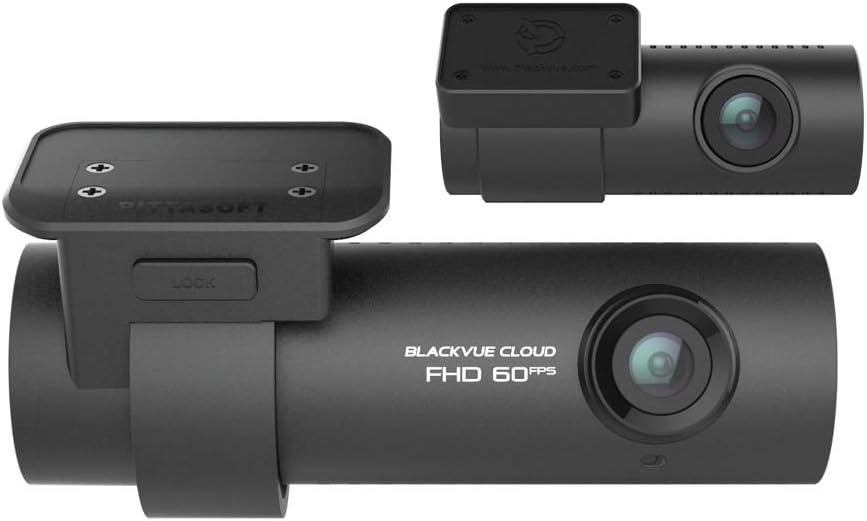
Image: The Blackvue DR750S-2CH dashcam system, showing both the front and rear camera units. The front camera is larger and features the 'BLACKVUE CLOUD FHD 60FPS' branding, while the rear camera is more compact.
1. Setup
1.1 Kontenut tal-Pakkett
Ivverifika li l-komponenti kollha huma preżenti fil-pakkett tiegħek:
- Blackvue DR750S-2CH Front Camera
- Blackvue DR750S-2CH Rear Camera
- Power Cord (for cigarette lighter socket)
- Kejbil ta 'Konnessjoni tal-Kamera ta' wara
- Power Magic Pro Hardwire Kit
- 16GB Karta MicroSD
- Mounting Hardware (adhesive pads, cable clips)
- Manwal għall-Utent (dan id-dokument)
1.2 MicroSD Card Preparation
Before initial use, it is recommended to format the included MicroSD card. This ensures optimal performance and compatibility. Use the Blackvue Viewer software on your computer for formatting. Regular formatting (e.g., once a month) is recommended for stable operation.
1.3 Installazzjoni tal-Kamera
- Kamera ta' quddiem: Mount the front camera on the center of your windshield, ideally behind the rearview mirror, to ensure an unobstructed view. Clean the windshield surface thoroughly before attaching the adhesive mount.
- Kamera ta' wara: Mount the rear camera on the center of your rear window. Ensure the lens is clear of any obstructions.
- Rotot tal-kejbil: Carefully route the power cable and the rear camera connection cable along the vehicle's headliner and A-pillars to conceal them and prevent interference with driving.
1.4 Power Magic Pro Installation
The Power Magic Pro allows the dashcam to operate in Parking Mode after the vehicle's ignition is turned off, while preventing vehicle battery drain. Professional installation is recommended for the Power Magic Pro.

Image: The Blackvue Power Magic Pro unit, a black rectangular box with 'POWER MAGIC PRO' printed on it, featuring dip switches for voltage and timer settings. This device manages power supply to the dashcam in parking mode.
- Qabbad mal-Enerġija tal-Vettura: Connect the Power Magic Pro's red wire to a constant power fuse (BATT+), the yellow wire to an accessory power fuse (ACC+), and the black wire to a ground point.
- Connect to Dashcam: Plug the dashcam's power cable into the Power Magic Pro's output.
- Ikkonfigura Settings: Use the dip switches on the Power Magic Pro to set the desired voltage cut-off (e.g., 12.0V, 12.5V) and timer (e.g., 12H, 24H, INF) to protect your vehicle's battery.
2. Operating the Dashcam
2.1 Power On and Recording Modes
Once powered, the dashcam will automatically begin recording. The DR750S-2CH supports various recording modes:
- Reġistrazzjoni Normali: Continuous recording while driving.
- Reġistrazzjoni ta' Avvenimenti: Triggered by impacts detected by the G-sensor.
- Reġistrazzjoni tal-Modalità ta' Parkeġġ: Activated when the vehicle is parked, detecting motion or impacts.

Image: A diagram of the Blackvue DR750S-2CH front camera highlighting the speaker and recording LED. The recording LED changes color to indicate the current recording mode: Red for Normal, Orange for Event, and Green for Parking Mode. Icons for Various Recording Options, Impact Detection, and Motion Detection are also shown.
2.2 LED Indicators and Voice Guidance
The dashcam provides visual and audible feedback:
- LED tar-reġistrazzjoni: Indicates the current recording mode (Red for Normal, Orange for Event, Green for Parking).
- GPS LED: Blue when GPS reception is active.
- Allarmi tal-Vuċi: The dashcam announces status changes, such as power on, recording start, mode changes, and shutdown. Voice guidance can be customized or turned off via the Blackvue App/Viewer.
2.3 Wi-Fi Connectivity and Blackvue App
The DR750S-2CH features built-in Wi-Fi for seamless connection to your smartphone or tablet via the Blackvue App.
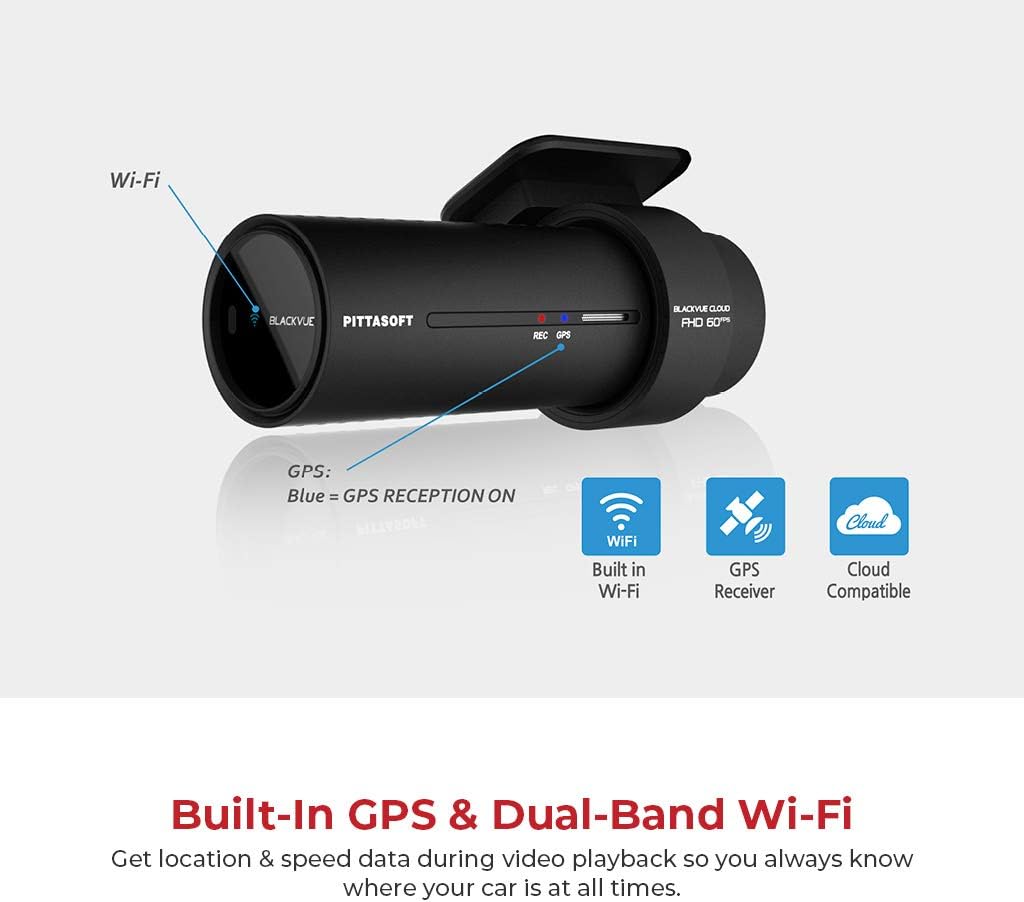
Image: A diagram of the Blackvue DR750S-2CH front camera highlighting the GPS and Wi-Fi features. It shows the GPS antenna and indicates 'Blue = GPS RECEPTION ON'. Icons for Built-in Wi-Fi, GPS Receiver, and Cloud Compatible are displayed.
- Qabbad mal-Wi-Fi: Turn on the dashcam's Wi-Fi by pressing the Wi-Fi button (or using the proximity sensor if configured). On your mobile device, connect to the Blackvue Wi-Fi network (default SSID and password are in the manual or on the device).
- Blackvue App: Download the Blackvue App from your device's app store. Use the app to:
- View foo ħajtage mill-kameras.
- Daqq ta' vidjows irreġistrati.
- Download videos to your mobile device.
- Adjust dashcam settings (e.g., recording quality, G-sensor sensitivity, voice guidance).
2.4 Funzjonalità tal-GPS
The built-in GPS module records vehicle speed and location data, which can be viewed during video playback using the Blackvue App or Viewer software.
2.5 Proximity Sensor and Buttons

Image: A diagram of the Blackvue DR750S-2CH front camera showing the customizable proximity sensor on the left side and the Wi-Fi (ON/OFF) / Format button on the right side. Instructions for toggling Wi-Fi, resetting Wi-Fi password/SSID, and formatting the microSD card are provided.
- Sensor ta' Prossimità: By default, waving your hand near the sensor triggers manual recording. This function can be customized via the Blackvue App to toggle audio recording ON/OFF.
- Buttuna Wi-Fi: Press to toggle Wi-Fi ON/OFF. Hold for 5 seconds to reset Wi-Fi password and SSID.
- Format Button: Hold the Wi-Fi button for 5 seconds and then press the proximity sensor to format the MicroSD card.
3. Manutenzjoni
3.1 Ġestjoni tal-Kard MicroSD
Regular maintenance of the MicroSD card is crucial for reliable operation. Over time, frequent writing and deleting of files can degrade the card's performance. It is recommended to:
- Format Regularly: Format the MicroSD card using the Blackvue App or Viewer software at least once a month.
- Use High-Quality Cards: Always use genuine, high-endurance MicroSD cards recommended by Blackvue.
- Backup Important Footage: Regularly transfer important video files to a computer or cloud storage to prevent accidental loss.
3.2 Tindif
Keep the camera lenses and the dashcam body clean using a soft, dry cloth. Avoid using harsh chemicals or abrasive materials that could damage the device.
4 Issolvi l-problemi
If you encounter issues with your Blackvue DR750S-2CH, refer to the following common solutions:
- Id-dashcam mhux qed tixgħel: Check power connections. Ensure the Power Magic Pro is correctly installed and configured, and that your vehicle's power outlet is functional.
- Kwistjonijiet ta' konnessjoni Wi-Fi: Ensure Wi-Fi is enabled on the dashcam. Try resetting the Wi-Fi password and SSID by holding the Wi-Fi button for 5 seconds. Restart both the dashcam and your mobile device.
- Il-GPS mhux qed jirreġistra d-dejta: Ensure the GPS LED is blue, indicating active reception. If not, try repositioning the dashcam or driving in an open area. Format the MicroSD card.
- Parking Mode not activating: Verify the Power Magic Pro is correctly wired to a constant power source and its settings (voltage cut-off, timer) are appropriate.
- Kwistjonijiet bil-kwalità tal-vidjow: Ensure camera lenses are clean. Format the MicroSD card. Check recording settings in the Blackvue App.
For further assistance, consult the Blackvue support websit jew ikkuntattja lis-servizz tal-konsumatur.
5. Speċifikazzjonijiet
| Karatteristika | Speċifikazzjoni |
|---|---|
| Isem tal-Mudell | DR750S-2CH |
| Sensor tal-Kamera ta 'Quddiem | STARVIS CMOS Sensor (Approx. 2.1 M Pixel) |
| Sensor tal-Kamera ta 'wara | STARVIS CMOS Sensor (Approx. 2.1 M Pixel) |
| Riżoluzzjoni tal-vidjo | Front: 1080p Full HD (60fps), Rear: 1080p Full HD (30fps) |
| Konnettività | Built-in Wi-Fi (802.11n), Built-in GPS |
| Karatteristiċi Speċjali | Built-In Microphone, Cloud Compatible, Enhanced Night Vision |
| Ħażna | MicroSD Card (up to 128GB supported, 16GB included) |
| Modi ta 'Reġistrazzjoni | Normal, Event, Parking (Motion Detection, Impact Detection) |
| Metodu ta' Kontroll | Voice, Blackvue App |
| Dimensions (Front Camera) | 10.16 x 2.54 x 2.54 ċm |
| Piż | 953 g (total package weight) |
6. Garanzija u Appoġġ
Your Blackvue DR750S-2CH dashcam is covered by a manufacturer's warranty. For specific warranty terms and conditions, please refer to the warranty card included in your product packaging or visit the official Blackvue website. For technical support, firmware updates, and frequently asked questions, please visit the Blackvue support portal.


