Prodott Overview
The MOTOROLA Talkabout T280 is a rechargeable two-way radio designed for instant communication. It features 22 channels, a maximum talking range of 25 miles under optimal conditions, and weather alert capabilities. The T280 is suitable for various communication needs, including outdoor activities and emergency preparedness.
Il-karatteristiċi ewlenin jinkludu:
- 22 FRS channels for communication.
- Rechargeable NiMH battery packs with micro-USB charging.
- Weatherproof design for durability.
- Emergency preparedness features, including weather alerts.

Immaġni: Taħt view of the Motorola T280 radio, featuring the 'Talkabout' branding.
Kontenut tal-Pakkett
The MOTOROLA Talkabout T280 bundle includes the following items:
- Two (2) T280 Radios
- One (1) Y Cable with Dual Micro-USB Chargers
- Two (2) NiMH Rechargeable Battery Packs
- Żewġ (2) Klipps taċ-Ċinturin
- One (1) Red Carry Case
- Emergency Preparedness Checklist
Setup
1. Installazzjoni tal-batterija
- Kun żgur li r-radju jkun mitfi.
- Sib l-għatu tal-kompartiment tal-batterija fuq wara tar-radju.
- Iftaħ l-għatu tal-kompartiment tal-batterija.
- Insert the NiMH rechargeable battery pack, ensuring correct polarity. The radio also supports 4 AAA alkaline batteries (not included) as an alternative.
- Agħlaq l-għatu tal-kompartiment tal-batterija sew.

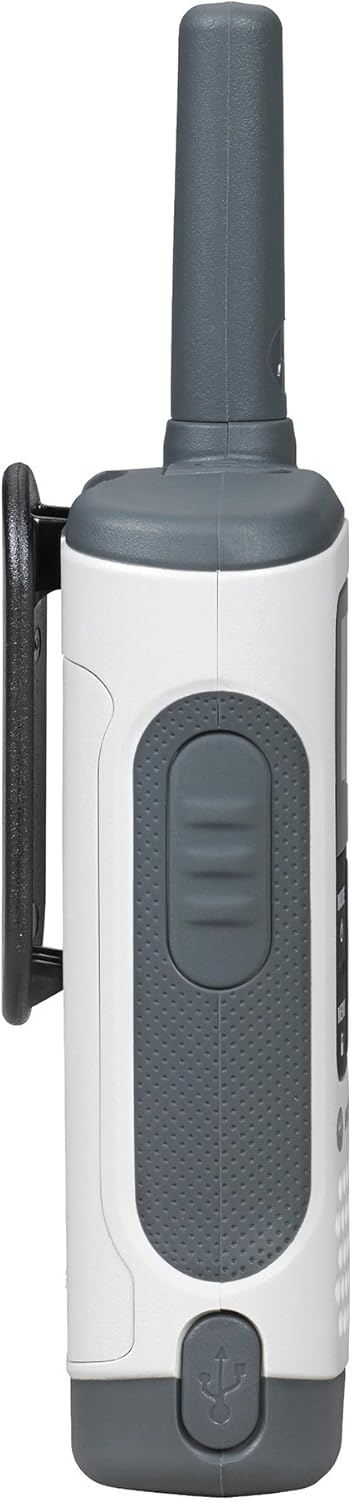
Immaġni: Ġenb view of the Motorola T280 radio, illustrating the general area for battery access and the belt clip attachment point.
2. Iċċarġjar tal-batteriji
- Connect the Y cable with dual micro-USB chargers to a compatible USB power source.
- Plug the micro-USB connectors into the charging ports located at the bottom of each radio.
- The battery indicator on the radio display will show charging status.
- Allow sufficient time for a full charge before first use (typically 8-10 hours).
Immaġni: Taħt view of the Motorola T280 radio, highlighting the micro-USB charging port.
3. Twaħħil tal-Klipp taċ-Ċinturin
- Allinja l-klipp taċ-ċinturin mal-iskanalaturi fuq wara tar-radju.
- Żerżaq il-klipp taċ-ċinturin 'l isfel sakemm tikklikkja f'postha.
- To remove, push the release tab and slide the clip upwards.
Istruzzjonijiet Operattivi
1. Power On/Off
- Biex tixgħel: Agħfas u żomm il-buttuna MODE/MENU button until the radio turns on.
- Biex titfi: Agħfas u żomm il-buttuna MODE/MENU button until the radio turns off.

Immaġni: Quddiem view of two Motorola T280 radios, showing the display, MODE/MENU, plus/minus, and monitor buttons.
2. Volum ta 'aġġustament
- Uża l- + (Plus) and - (Minus) buttons to increase or decrease the listening volume.
3. Għażla ta' Kanal
- Bir-radju mixgħul, agħfas il- MODE/MENU Agħfas il-buttuna darba. In-numru tal-kanal se jteptep.
- Uża l- + or - buttuni biex tagħżel il-kanal mixtieq tiegħek (1-22).
- Agħfas il- MODE/MENU button again to confirm the channel selection.
- For optimal communication, ensure all radios in your group are set to the same channel and privacy code.
4. Setting a Privacy Code
Privacy codes help reduce interference from other users. The T280 supports 121 privacy codes (38 CTCSS codes and 83 DCS codes).
- Wara li tagħżel kanal, agħfas il-buttuna MODE/MENU Agħfas il-buttuna darbtejn. In-numru tal-kodiċi tal-privatezza se jteptep.
- Uża l- + or - buttuni biex tagħżel il-kodiċi tal-privatezza mixtieq tiegħek.
- Agħfas il- MODE/MENU Agħfas il-buttuna mill-ġdid biex tikkonferma l-kodiċi tal-privatezza.
5. Trażmissjoni u Riċeviment
- Biex tittrażmetti: Agħfas u żomm il-buttuna Imbotta biex titkellem (PTT) il-buttuna li tinsab fuq il-ġenb tar-radju. Tkellem b'mod ċar fil-mikrofonu. Itlaq il-buttuna PTT biex tisma'.
- To receive: Ensure the PTT button is not pressed. The radio will automatically receive transmissions on the selected channel and privacy code.
Immaġni: Ġenb view of the Motorola T280 radio, highlighting the Push-to-Talk (PTT) button.
6. Funzjoni tal-Monitor
- Agħfas il- MON button (often labeled with a 'Z' or 'MON' icon) to temporarily disable the privacy code and listen for activity on the current channel. This is useful for checking for weak signals or if you suspect interference.
7. Weather Alerts
The T280 can receive NOAA weather alerts. Refer to the radio's display for weather channel indicators. In areas with NOAA broadcasts, the radio can alert you to severe weather conditions.
- To activate/deactivate weather alerts, consult the full user manual for specific menu navigation steps.
Manutenzjoni
1. Kura tal-batterija
- Always use the provided NiMH rechargeable battery packs or approved AAA alkaline batteries.
- Tħallatx batteriji qodma u ġodda, jew tipi differenti ta 'batteriji.
- Remove batteries if the radio will not be used for extended periods.
- Aħżen il-batteriji f'post frisk u niexef.
2. Tindif
- Naddaf ir-radju b'ċarruta ratba, damp drapp.
- Tużax tindif jew solventi li joborxu.
- Ensure the micro-USB charging port is free of debris.
3. Reżistenza għall-Ilma
The T280 radio is designed to be waterproof. However, ensure all port covers (e.g., micro-USB charging port, accessory port) are securely closed to maintain its water resistance. Avoid submerging the radio for extended periods or exposing it to high-pressure water jets.

Immaġni: Fuq view of the Motorola T280 radio, showing the antenna and the covered accessory port.
Issolvi l-problemi
| Problema | Soluzzjoni Possibbli |
|---|---|
| Ir-radju ma jixgħelx. |
|
| Ma nistax nikkomunika ma' radjijiet oħra. |
|
| Kwalità awdjo fqira jew statiku. |
|
| Firxa limitata. |
|
Speċifikazzjonijiet
| Karatteristika | Dettall |
|---|---|
| Numru tal-Mudell | T280 |
| Dimensjonijiet tal-Prodott | 6.42 x 2.13 x 1.24 pulzieri |
| Piż tal-oġġett | 6.4 uqija |
| Numru ta 'Kanali | 22 |
| Medda ta' Frekwenzi | 300 MHz - 3 GHz |
| Talking Range Massimu | 25 Miles (under optimal conditions) |
| Sors tal-Enerġija | NiMH Rechargeable Battery Packs (included) or 4 AAA batteries (not included) |
| Voltage | 9.6 Volts (DC) |
| Livell ta 'Reżistenza għall-Ilma | Waterproof |
| Karatteristiċi Speċjali | Rechargeable, Waterproof, Weather Alerts |
Garanzija u Appoġġ
For warranty information, technical support, and additional resources, please visit the official Motorola Solutions websit jew ikkuntattja lid-dipartiment tas-servizz tal-konsumatur tagħhom.
You can find more information and products from Motorola Solutions at their official store: Ħanut tas-Soluzzjonijiet Motorola.


