Radioddity Raddy RF23 AM FM Portable Pocket Radio MP3 Player User Manual
Mudell: RF23
Introduzzjoni
This manual provides detailed instructions for the Radioddity Raddy RF23, a compact and versatile portable radio and MP3 player. It features AM/FM radio reception, MP3 playback from Micro TF cards and USB disks, and an integrated flashlight. Please read this manual thoroughly before using the device to ensure proper operation and longevity.
Kontenut tal-Pakkett
- 1 x Radioddity Raddy RF23 AM/FM Radio
- 1 x USB Iċċarġjar Cable
- 1 x Rechargeable Lithium-Ion Battery (BL-5C type)
- 1 x Strap tal-polz
Prodott Overview
Familiarize yourself with the various parts and controls of your Raddy RF23 radio.

Figura 1: Quddiem View of Raddy RF23 - Displays the speaker grille, digital display, and numeric keypad with function buttons.

Figura 2: Lura View of Raddy RF23 - Shows the battery cover, USB port, DC 5V charging port, and the wrist strap with its stand attachment.
Kontrolli u Portijiet
- Swiċċ tal-Enerġija: Slide switch on the side to turn the device ON or OFF.
- Antenna: Extendable telescopic antenna for improved radio reception.
- Wirja Diġitali: Shows frequency, mode, and track information.
- Kelliem: Kelliem integrat għall-ħruġ tal-awdjo.
- Tastiera numerika (0-9): Used for direct frequency input or track selection.
- Buttuna MODE: Switches between AM, FM, and MP3 playback modes.
- Play/Pause Button (▶⏸): Plays or pauses MP3 tracks.
- Previous/Rewind Button (◀◀): Skips to the previous track or rewinds during MP3 playback. In radio mode, short press for previous station, long press for auto-scan down.
- Next/Fast Forward Button (▶▶): Skips to the next track or fast forwards during MP3 playback. In radio mode, short press for next station, long press for auto-scan up.
- Buttuna LED: Activates or deactivates the built-in flashlight.
- Input DC 5V: Port mikro USB għall-iċċarġjar tal-apparat.
- Port USB: For connecting a USB flash drive for MP3 playback.
- Slott tal-Karta TF: For inserting a Micro TF (Micro SD) card for MP3 playback.
- Jack tal-headphone (3.5mm): Għall-konnessjoni tal-headphones għal smigħ privat.
Setup
1. Installazzjoni tal-batterija
- Sib l-għatu tal-kompartiment tal-batterija fuq wara tar-radju.
- Żerżaq l-għatu miftuħ.
- Insert the provided BL-5C Lithium-Ion battery, ensuring the contacts align correctly.
- Agħlaq l-għatu tal-kompartiment tal-batterija sew.

Figura 3: Installazzjoni tal-batterija - Open the battery compartment and insert the BL-5C battery.
2. Iċċarġjar tal-batterija
- Connect the small end of the included USB charging cable to the DC 5V input port on the side of the radio.
- Qabbad it-tarf l-akbar tal-kejbil USB ma' adapter tal-enerġija USB (mhux inkluż) jew mal-port USB tal-kompjuter.
- The charging indicator light will illuminate. The light typically turns off or changes color when charging is complete.
- Ċarġ sħiħ jieħu madwar 2-3 sigħat.
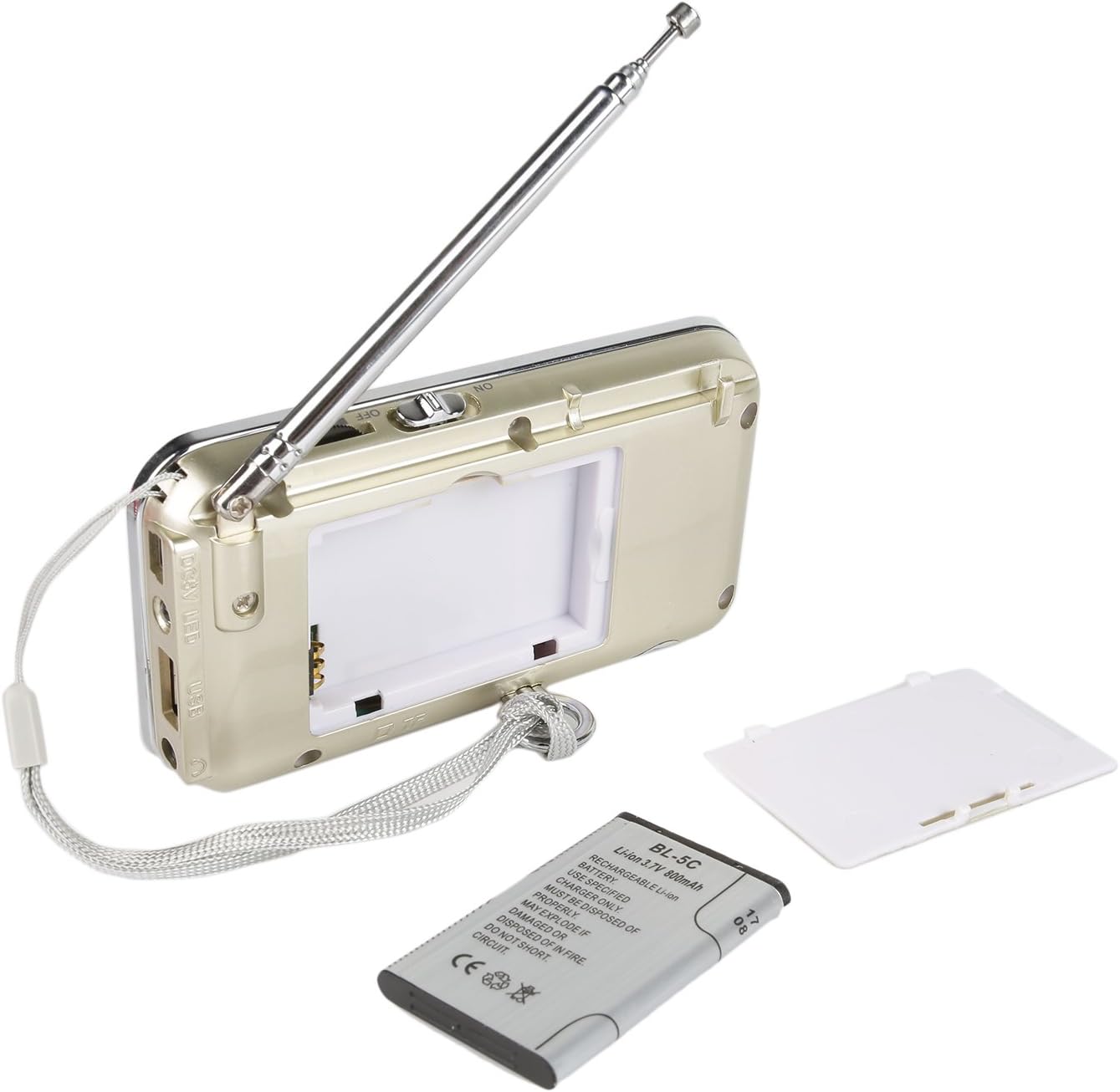
Figura 4: Iċċarġjar bil-USB - Connect the radio to a USB power source using the provided cable.
3. Inserting a Micro TF Card or USB Disk (for MP3 Playback)
- Kun żgur li r-radju jkun mitfi.
- For a Micro TF card: Gently insert the card into the TF card slot until it clicks into place.
- For a USB disk: Insert the USB disk into the USB port.
- The radio will automatically detect the storage device when powered on and switched to MP3 mode.

Figure 5: TF Card Insertion - Insert a Micro TF card into the designated slot.
Istruzzjonijiet Operattivi
1. Power On/Off
Slide the power switch located on the side of the radio to the "ON" position to power on. Slide it to "OFF" to power off.
2. Għażla tal-Mod
Agħfas il- MODALITÀ button repeatedly to cycle through the available modes: FM Radio, AM Radio, and MP3 Player (if a TF card or USB disk is inserted).
3. Tħaddim tar-Radju FM/AM
- Agħżel il-Modalità tar-Radju: Agħfas il- MODALITÀ button until "FM" or "AM" appears on the display.
- Estendi l-antenna: For optimal reception, fully extend the telescopic antenna.
- Automatic Station Scan: Agħfas fit-tul il- Preċedenti (◀◀) or Li jmiss (▶▶) button to automatically scan for and stop at the next available station.
- Irfinar Manwali: Use the numeric keypad to directly enter a frequency (e.g., for 106.7 FM, press 1-0-6-7).
- Aġġustament tal-Volum: Adjust the volume using the dedicated volume controls, typically located on the side of the device or integrated with other function buttons.
4. MP3 Playback Operation
- Select MP3 Mode: Agħfas il- MODALITÀ button until "MP3" or a track number appears on the display.
- Play/Pawsa: Agħfas il- Play/Pause (▶⏸) buttuna biex tibda jew tieqaf daqq.
- Track Li jmiss / Preċedenti: Agħfas il- Li jmiss (▶▶) buttuna biex taqbeż għall-binarju li jmiss. Agħfas il- Preċedenti (◀◀) button to go to the beginning of the current track, or press it again to go to the previous track.
- Aġġustament tal-Volum: Adjust the volume using the dedicated volume controls, typically located on the side of the device or integrated with other function buttons.
- Direct Track Selection: Use the numeric keypad to enter the track number directly.
5. Funzjoni tat-Torċa
Agħfas il- LED button to turn the built-in flashlight ON. Press it again to turn the flashlight OFF.
Manutenzjoni
- Tindif: Wipe the radio with a soft, dry cloth. Do not use liquid cleaners or solvents.
- Ħażna: Meta ma tkunx qed tuża r-radju għal perjodi twal, aħżen ir-radju f'post frisk u niexef.
- Kura tal-batterija: If the radio will not be used for a long time, remove the battery to prevent leakage. Recharge the battery periodically to maintain its lifespan.
- Kura tal-antenna: Immaniġġja l-antenna teleskopika bil-mod biex tevita li titgħawweġ jew tinkiser.
Issolvi l-problemi
| Problema | Kawża Possibbli | Soluzzjoni |
|---|---|---|
| Ir-radju ma jixgħelx. | Il-batterija hija mejta jew mhux installata sew. | Charge the battery or ensure it is inserted with correct polarity. |
| Riċeviment ħażin tar-radju. | Antenna mhux estiża, sinjal dgħajjef, jew interferenza. | Fully extend the antenna. Try repositioning the radio. Move away from electronic devices that may cause interference. |
| No sound from MP3 player. | Volume too low, incorrect mode, or no valid media. | Increase volume. Ensure MP3 mode is selected. Verify TF card/USB disk contains MP3 files u huwa mdaħħal b'mod korrett. |
| Flashlight does not work. | Battery low or flashlight not activated. | Charge the battery. Press the LED button to turn on the flashlight. |
| L-apparat jintefa bla mistenni. | Batterija baxxa. | Iċċarġja l-batterija kompletament. |
Speċifikazzjonijiet
- Ditta: Radjodità
- Mudell: RF23
- Dimensjonijiet tal-Prodott: 4.61 x 0.79 x 2.5 pulzieri
- Piż tal-oġġett: 6.7 uqija
- Sors tal-Enerġija: Li jaħdem bil-batterija (batterija tal-jone tal-litju meħtieġa)
- Tip ta 'batterija: BL-5C (Rechargeable)
- Teknoloġija tal-Konnettività: USB
- Teknoloġija tuner: AM, FM
- Bands tar-Radju Appoġġjati: AM, FM
- Medda ta' Frekwenzi: FM (87.5-108 MHz), AM (520-1710 KHz)
- Karatteristika Speċjali: Built-In Flashlight, Portable
- Apparati Kompatibbli: Earphone, Micro TF Card, USB Disk
- Manifattur: Radjodità
Garanzija u Appoġġ
For warranty information or technical support, please refer to the documentation provided with your purchase or visit the official Radioddity websit. Żomm l-irċevuta tax-xiri tiegħek bħala prova tax-xiri għal talbiet ta' garanzija.
Uffiċjal tar-Radjudità Websit: www.radioddity.com


