1. Introduzzjoni
This manual provides essential information for the safe and effective use of your Vivibright GP90 UP Portable Video Projector. Please read it thoroughly before operating the device and retain it for future reference. The Vivibright GP90 UP is a portable video projector featuring an Android 4.42 operating system, 3200 lumens brightness, and 1280x800 native resolution, designed for multimedia entertainment and presentations.
2. Istruzzjonijiet tas-Sigurtà
- Timblokkax il-fetħiet tal-ventilazzjoni. Kun żgur li jkun hemm fluss tal-arja adegwat madwar il-proġettazzjoni biex tevita li ssaħħan iżżejjed.
- Tesponix il-proġettazzjoni għax-xita jew għall-umdità biex tevita xokk elettriku jew nar.
- Evita li tħares direttament fil-lenti tal-proġekter meta l-lamp ikun mixgħul, għax id-dawl qawwi jista’ jikkawża ħsara lill-għajnejn.
- Poġġi l-proġettur fuq wiċċ stabbli u livellat biex tevita li jaqa'.
- Uża biss l-adapter tal-enerġija li jiġi mal-proġettur.
- Tippruvax tiżżarma jew issewwi l-proġettur int stess. Irreferi għal kull manutenzjoni f'idejn persunal kwalifikat.
- Żomm il-proġettur 'il bogħod minn sorsi ta' sħana u dawl tax-xemx dirett.
3. Kontenut tal-Pakkett
Ivverifika li l-oġġetti kollha huma preżenti fil-pakkett:
- Vivibright GP90 UP Projector
- Kejbil tal-Enerġija
- Remote Control (may not be included with all models)
- Manwal għall-Utent (dan id-dokument)
4. Prodott Aktarview
Familiarize yourself with the projector's components and connection ports.
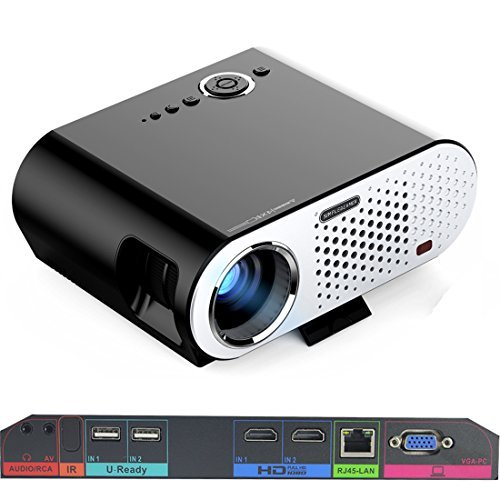
Image: The Vivibright GP90 UP projector showing its top controls, lens, and various input/output ports on the rear panel. The top features power and navigation buttons. The front has the projection lens. The rear panel includes Audio/RCA, IR receiver, two USB ports (U-Ready), two HDMI ports (HD), an RJ45-LAN port, and a VGA-PC port.
4.1 Panel ta 'Quddiem
- Lenti tal-Projezzjoni: Joħroġ l-immaġni.
4.2 Panel ta 'Fuq
- Buttuni tal-Kontroll: Power, navigation, and menu access.
4.3 Rear Panel (Input/Output Ports)
- AUDIO/RCA: Audio output and composite video input.
- IR: Riċevitur infrared għall-kontroll mill-bogħod.
- IN 1 / IN 2 (USB): Two USB ports for connecting USB storage devices.
- IN 1 / IN 2 (HDMI): Two HDMI inputs for digital video and audio sources.
- RJ45-LAN: Port Ethernet għal konnessjoni man-netwerk bil-fili.
- VGA-PC: VGA input for connecting to computers.
5. Setup
5.1 Tqegħid
- Place the projector on a flat, stable surface or mount it on a ceiling or tripod.
- Ensure the projector is positioned directly in front of the screen or wall. Avoid angled placement as horizontal keystone correction is not available.
- The optimal projection distance ranges from 1.2m to 8.5m, producing screen sizes from 35 to 280 inches. For a 100-inch image, a distance of approximately 3 meters is recommended.
5.2 Konnessjoni tal-Enerġija
- Qabbad il-kejbil tal-enerġija mad-dħul tal-enerġija tal-proġettazzjoni.
- Plug the other end of the power cable into a suitable electrical outlet (90~240V/50~60Hz).
5.3 Konnessjoni ta' Apparati ta' Input
- HDMI: Connect an HDMI cable from your source device (e.g., laptop, Blu-ray player, gaming console) to one of the projector's HDMI ports.
- USB: Insert a USB flash drive or external hard drive into a USB port to access media files.
- VGA: Connect a VGA cable from your computer to the projector's VGA-PC port.
- TA’: Use an RCA cable to connect older devices to the AV input.
- LAN: Connect an Ethernet cable to the RJ45-LAN port for a wired internet connection.
5.4 Aġġustament tal-Fokus u l-Keystone
- Fokus: Rotate the focus ring around the lens until the projected image is sharp and clear.
- Korrezzjoni Keystone: Use the manual vertical keystone correction feature (±15°) to adjust the image shape if the projector is not perfectly perpendicular to the screen. This corrects trapezoidal distortion.
6. Istruzzjonijiet Operattivi
6.1 Tixgħel/Jitfi
- Qawwa Mixgħul: Press the power button on the projector or the remote control. The indicator light will change, and the projector will start.
- Itfi: Press the power button again. Confirm shutdown if prompted. Allow the projector to cool down before unplugging.
6.2 Navigazzjoni tas-sistema operattiva Android
- The projector runs on Android 4.42. Use the remote control or connect a wireless mouse (recommended for easier navigation) to interact with the interface.
- Access pre-installed apps or download compatible applications from the app store. Note that some newer applications may not be compatible with Android 4.42.
6.3 Projezzjoni bla fili
- Wi-Fi: Connect to a wireless network via the settings menu. Supports dual-band Wi-Fi 2.4G.
- Bluetooth: Supports Bluetooth 4.0 for connecting wireless devices such as speakers. Note that Bluetooth audio output may only be available when using USB or Android sources, not HDMI.
- Wireless Push (EZCast / Miracast / Airplay): Use compatible apps on your smartphone or tablet to mirror your device's screen to the projector. Ensure your device and the projector are on the same Wi-Fi network.
6.4 Settings tal-awdjo
- The projector features built-in 4Ω, 5W stereo speakers with SRS sound technology.
- For enhanced audio, connect external speakers via the Audio Out port or wirelessly via Bluetooth (when using Android or USB sources).
7. Manutenzjoni
7.1 Tindif
- Lenti: Uża drapp artab u mingħajr suf iddisinjat speċifikament għal lentijiet ottiċi. Tużax prodotti tat-tindif li joborxu.
- Casing: Imsaħ il-barra tal-proġettazzjoni b'ċarruta ratba u niexfa. Għal ħmieġ iebes, uża ċarruta kemxejn ratba.amp drapp u mbagħad nixxef sewwa.
- Ftuħ tal-ventilazzjoni: Periodically clean the ventilation openings with a soft brush or compressed air to prevent dust buildup, which can affect performance and lifespan.
7.2 Ħażna
- Meta ma tkunx qed tużah għal perjodi twal, aħżen il-proġettur f'post frisk u niexef, 'il bogħod mix-xemx diretta u minn temperaturi estremi.
- Cover the lens with its cap to protect it from dust and scratches.
8 Issolvi l-problemi
| Problema | Kawża Possibbli | Soluzzjoni |
|---|---|---|
| L-ebda immaġni pproġettata | Qawwa mhux konnessa; Sors tad-dħul mhux magħżul; Għatu tal-lenti mwaħħal | Iċċekkja l-konnessjoni tal-enerġija; Agħżel is-sors tad-dħul korrett; Neħħi l-għatu tal-lenti |
| L-immaġni hija mċajpra | Focus not adjusted; Projector too close/far | Aġġusta ċ-ċirku tal-fokus; Aġġusta d-distanza tal-projezzjoni |
| L-immaġni hija trapezojdali | Proġettur mhux perpendikolari għall-iskrin | Adjust vertical keystone correction; Reposition projector to be centered |
| L-ebda ħoss | Volume too low; Muted; External speakers not connected/selected | Increase volume; Unmute; Check external speaker connections/settings |
| Wireless projection unstable | Weak Wi-Fi signal; Device incompatibility; Outdated Android OS | Ensure strong Wi-Fi signal; Check device compatibility with Miracast/Airplay; Consider wired connection if issues persist with older Android version. |
9. Speċifikazzjonijiet
| Karatteristika | Dettall |
|---|---|
| Brand | Vivibright |
| Mudell | GP90 UP |
| Sistema Operattiva | Android 4.42 |
| Luminożità | 3200 Lumens (LED Luminous efficiency) |
| Riżoluzzjoni Nattiva | 1280 x 800 (supports up to 1080P) |
| Proporzjon ta' Kuntrast | 3000:1 (Dynamic up to 10,000:1) |
| Daqs tal-Projezzjoni | 35-280 pulzier |
| Distanza ta' Projezzjoni | 1.2m - 8.5m |
| Tarmi Proporzjon | 1.45:1 |
| Korrezzjoni Keystone | Vertikali Manwali ± 15 ° |
| Ħajja Sors tad-Dawl | Sa 30,000 sigħat |
| Konnettività | Wi-Fi (2.4G), Bluetooth 4.0, 2x HDMI, 2x USB, VGA, AV, RJ45-LAN |
| Awdjo | Built-in 4Ω, 5W stereo speakers with SRS sound |
| Provvista tal-Enerġija | 90 ~ 240V/50 ~ 60Hz |
| Dimensjonijiet tal-Prodott | 27 x 22 x 9 ċm |
| Piż tal-oġġett | 3.17 kg |
10. Garanzija u Appoġġ
For warranty information and technical support, please refer to the documentation provided at the time of purchase or contact Vivibright customer service. Keep your purchase receipt as proof of purchase for warranty claims.


