Introduzzjoni
The Beurer HM55 Wireless Thermometer and Hygrometer is designed to monitor your indoor climate, providing real-time data on temperature and relative humidity. This device helps you maintain a comfortable and healthy environment within your home by displaying current conditions and allowing long-term monitoring via the Beurer FreshRoom app on your smartphone. This manual provides essential information for the safe and effective use of your HM55 device.
Karatteristiċi Ewlenin
- Monitors and displays current time, temperature, and relative humidity.
- Jipprovdi malajr fuqview of indoor environment quality through a colored indicator.
- Bluetooth Smart connectivity for long-term monitoring with the free Beurer FreshRoom app.
- Allows monitoring of temperature and humidity trends over time with easy-to-read graphs in the app.
- Compact and elegant design for discreet placement.
- Multi-room display function enables management of multiple Beurer indoor humidity monitors via the app.
- App features include LED brightness control and time zone settings.
Informazzjoni dwar is-Sigurtà
Please read these safety instructions carefully before using the device. Keep this manual for future reference.
Sigurtà Ġenerali
- Tesponix l-apparat għal dawl tax-xemx dirett, temperaturi estremi, jew umdità għolja.
- Keep the device away from water and other liquids. Do not immerse it.
- Tiftaħx jew tippruvax issewwi l-apparat int stess. Irreferi għal kull manutenzjoni f'idejn persunal kwalifikat.
- Dan l-apparat mhuwiex ġugarell. Żommu fejn ma jintlaħaqx mit-tfal.
- Uża l-apparat biss għall-iskop maħsub tiegħu kif deskritt f'dan il-manwal.
Sigurtà tal-batterija
- Always insert batteries with the correct polarity (+/-).
- Tħallatx batteriji qodma u ġodda, jew tipi differenti ta 'batteriji.
- Neħħi l-batteriji mħassra minnufih biex tevita t-tnixxija u l-ħsara.
- Jekk l-apparat mhux se jintuża għal perjodu estiż, neħħi l-batteriji.
- Armi l-batteriji skont ir-regolamenti lokali. Tarmix il-batteriji fin-nar.
Kontenut tal-Pakkett
Carefully unpack your Beurer HM55 and check that all components are present and undamaged.
- 1 x Beurer HM55 Thermo-Hygrometer
- 2 x 1.5V Batteriji AAA
- 1 x Manwal tal-Istruzzjonijiet (dan id-dokument)
Apparat Matulview
Familiarize yourself with the components of your Beurer HM55 device.
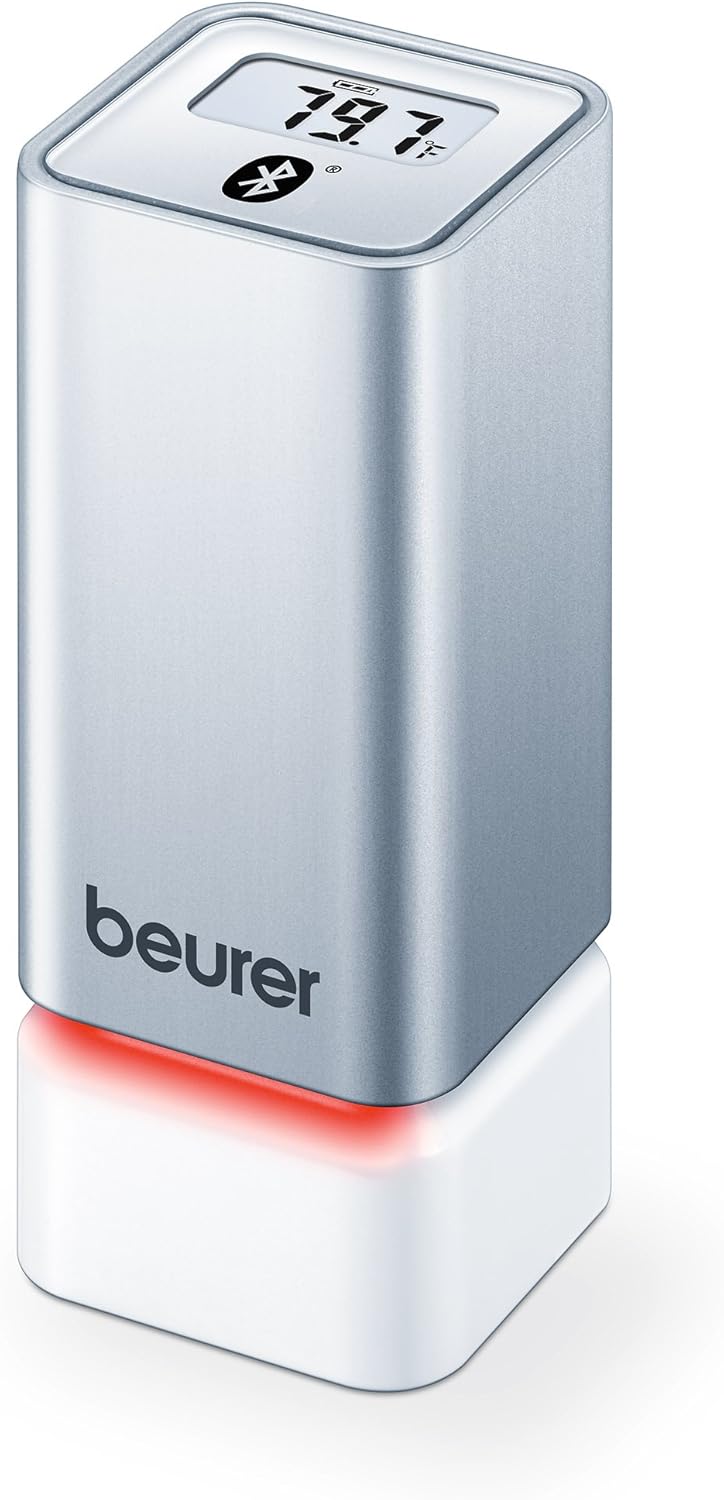
Figura 1: Quddiem view of the Beurer HM55 device, showing the display and Beurer logo.

Figura 2: Close-up of the HM55 display, indicating temperature, humidity, and Bluetooth icon.

Figura 3: The compact size of the HM55 device, shown in comparison to a hand.
- Wiri: Shows current temperature, relative humidity, and time.
- Indikatur LED: Located at the base, changes color to indicate indoor climate quality.
- Kompartiment tal-batterija: Located on the underside of the device.
- Simbolu tal-Bluetooth: Jindika konnessjoni Bluetooth attiva.
Setup
1. Daħħal Batteriji
- Locate the battery compartment on the bottom of the HM55 device.
- Iftaħ l-għatu tal-kompartiment tal-batterija.
- Daħħal iż-żewġ batteriji AAA ta' 1.5V, waqt li tiżgura l-polarità korretta (+/-).
- Close the battery compartment cover securely. The device display should activate.
2. Downloading the Beurer FreshRoom App
The Beurer FreshRoom app is required to utilize the full functionality of your HM55 device, including long-term monitoring and multi-room management. The app is compatible with iOS (version 8.0 or higher) and Android (version 4.4 or higher with Bluetooth 4.0).
- For iOS devices, download the "Beurer FreshRoom" app from the Apple App Store.
- For Android devices, download the "Beurer FreshRoom" app from the Google Play Store.
- Alternatively, scan the QR code provided in the product packaging or visit the official Beurer websit għal links diretti. Beurer Smartphone App Information

Figura 4: Example of the Beurer FreshRoom app interface on a smartphone.
3. It-tqabbil mal-Ismartphone Tiegħek
- Kun żgur li l-Bluetooth huwa attivat fuq l-ismartphone tiegħek.
- Open the Beurer FreshRoom app.
- Follow the on-screen instructions within the app to search for and connect to your HM55 device. The app will guide you through the pairing process.
- Once successfully paired, the Bluetooth symbol on the HM55 display will illuminate, and data will begin to synchronize with the app.
4. Tqegħid Inizjali
Place the HM55 in the room you wish to monitor. For accurate readings, avoid placing it:
- Near heat sources (e.g., radiators, direct sunlight).
- Near air conditioning vents or open windows.
- In areas with high airflow or drafts.
- In direct contact with moisture.
It-tħaddim tal-Apparat
Nifhmu l-Wiri
The HM55 display provides immediate readings:
- Temperatura: Displays in Celsius (°C) or Fahrenheit (°F). The unit can be changed via the app.
- Umdità Relattiva: Jidher bħala perċentwaltage (%).
- Ħin: Displays the current time, synchronized via the app.
- Ikona Bluetooth: Indicates an active connection to your smartphone.
Interpreting the Colored Climate Indicator
The LED light at the base of the HM55 provides a quick visual indication of your indoor climate:
- Aħdar: Optimal indoor climate.
- Aħmar: Poor indoor climate (e.g., too dry, too humid, or extreme temperature).
- The specific thresholds for these indicators can be customized within the Beurer FreshRoom app.

Figura 5: HM55 device showing a red LED indicator, signifying a poor indoor climate.

Figura 6: HM55 device showing a green LED indicator, signifying an optimal indoor climate.
Using the Beurer FreshRoom App
The app provides advanced features for monitoring and managing your indoor climate:
- Dejta f'ħin reali: View current temperature and humidity readings from your device.
- Dejta Storika: Access graphs and logs of temperature and humidity over various periods (e.g., hourly, daily, weekly, monthly).
- Twissijiet: Set custom minimum and maximum thresholds for temperature and humidity. Receive notifications if readings fall outside these ranges.
- Settings: Adjust device settings such as temperature unit (°C/°F), LED brightness, and time zone.
Multi-Room Function
If you have multiple Beurer HM55 devices, the FreshRoom app allows you to monitor all of them from a single interface. Each device can be assigned to a specific room for easy identification and tracking.
- Add each additional HM55 device to the app following the pairing instructions.
- Assign a unique name or room designation to each device within the app settings.
- View and compare climate data from all connected rooms on a single dashboard.
Manutenzjoni
Tindif
- Imsaħ l-apparat b'ċarruta ratba, niexfa, jew kemxejn imxarrbaamp drapp.
- Do not use abrasive cleaners, solvents, or harsh chemicals, as these can damage the surface or internal components.
- Kun żgur li l-ebda likwidu ma jidħol fl-apparat.
Sostituzzjoni tal-batterija
When the battery low indicator appears on the display or in the app, replace both AAA batteries following the instructions in the "Inserting Batteries" section.
Ħażna
If the device will not be used for an extended period, remove the batteries and store the device in a cool, dry place, away from direct sunlight and extreme temperatures.
Issolvi l-problemi
If you encounter issues with your Beurer HM55, refer to the following common problems and solutions:
| Problema | Kawża Possibbli | Soluzzjoni |
|---|---|---|
| Id-displej tal-apparat huwa vojt. | Il-batteriji huma eżawriti jew imdaħħla ħażin. | Iċċekkja l-polarità tal-batterija jew ibdel b'batteriji AAA ġodda. |
| L-app ma tistax tikkonnettja mat-tagħmir. | Bluetooth is off on smartphone; device is out of range; app issue. | Ensure Bluetooth is enabled. Move smartphone closer to the device. Restart the app or smartphone. Re-pair the device if necessary. |
| Readings appear inaccurate. | Device placement is suboptimal; environmental factors. | Relocate the device away from direct heat, cold, or drafts. Allow time for readings to stabilize after relocation. |
| LED indicator is always red. | Indoor climate is consistently outside optimal range; app settings. | Check temperature and humidity levels in the app. Adjust environmental conditions (e.g., use a humidifier/dehumidifier, adjust heating/cooling). Review and adjust alert thresholds in the app. |
Speċifikazzjonijiet Tekniċi
| Mudell | HM55 |
| Brand | Beurer |
| Provvista tal-Enerġija | 2 x 1.5V batteriji AAA |
| Konnettività | Bluetooth Smart (Bluetooth 4.0) |
| Kompatibilità tal-App | iOS 8.0 jew ogħla, Android 4.4 jew ogħla |
| Tip ta 'Immuntar | Mount Wall |
| Kulur | Fidda |
| Komponenti Inklużi | Beurer Thermo-Hygrometer |
Garanzija u Appoġġ
Beurer provides a limited warranty for this product. For detailed warranty terms and conditions, please refer to the warranty card included with your product or visit the official Beurer websit.
For technical support, troubleshooting assistance, or to inquire about replacement parts, please contact Beurer customer service. Contact information can typically be found on the Beurer websit jew fl-ippakkjar tal-prodott.
Riżorsi onlajn: For additional information and app support, visit Beurer Smartphone App Information.


