Introduzzjoni
Grazzi tax-xiriasing the Wireless Bluetooth Headset. This manual provides essential information for the proper use, setup, and maintenance of your new headset. Please read it thoroughly before use to ensure optimal performance and longevity of the product.
Kontenut tal-Pakkett
Jekk jogħġbok ivverifika li l-oġġetti kollha elenkati hawn taħt huma inklużi fil-pakkett tiegħek:
- Wireless Bluetooth Headset (2 units)
- Kejbil tal-Iċċarġjar USB (2 unitajiet)
- Manwal għall-Utent

Image: Contents of the headset package, showing one black headset and a white USB charging cable.
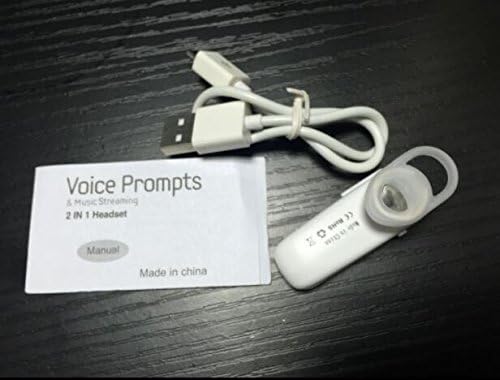
Image: Contents of the headset package, showing one white headset, a white USB charging cable, and the printed user manual.
Prodott Overview
The Wireless Bluetooth Headset is designed for convenience and portability, ideal for sports, driving, and daily use. It features a super mini design and supports voice prompts and music streaming.

Immaġni: Quddiem view of the product packaging, displaying the black wireless Bluetooth headset inside its clear plastic casing.
Speċifikazzjonijiet
| Karatteristika | Deskrizzjoni |
|---|---|
| Verżjoni Bluetooth | V3.0 + EDR |
| Appoġġ Profiles | Headset, Handsfree, A2DP |
| Talk Time/Playing Time | Sa 5 sigħat |
| Ħin ta' Standby | Sa 80 sigħat |
| Sors tal-Enerġija | Batterija tal-jone tal-Li Rechargeable inkorporata |
| Teknoloġija tal-Konnettività | Wireless |
| Fattur tal-Formola | Fil-widnejn |
| Piż tal-oġġett | 15.8 ounces (for 2 units) |
| Dimensjonijiet tal-Pakkett | 1.97 x 1.57 x 1.18 pulzieri |
| Numru tal-Mudell | Yu- TLXgo-2201 |

Image: Back of the product packaging, displaying a list of product specifications including Bluetooth version, talk time, and power source.
Setup
Iċċarġjar tal-Headset
- Qabbad it-tarf iż-żgħir tal-kejbil tal-iċċarġjar USB mal-port tal-iċċarġjar fuq il-headset.
- Qabbad it-tarf l-akbar tal-kejbil tal-iċċarġjar USB ma' sors ta' enerġija USB (eż., port USB tal-kompjuter, adapter tal-ħajt USB).
- The indicator light on the headset will illuminate during charging. It will change color or turn off once fully charged.
- Ċarġ sħiħ tipikament jieħu madwar 1-2 sigħat.
Tqabbil ma' Apparat Bluetooth
- Ensure the headset is fully charged before initial pairing.
- With the headset turned off, press and hold the Multi-function Button (MFB) for approximately 5-7 seconds until the indicator light flashes red and blue alternately. This indicates the headset is in pairing mode.
- On your Bluetooth-enabled device (smartphone, tablet, etc.), go to the Bluetooth settings and ensure Bluetooth is enabled.
- Fittex għal available devices. The headset should appear in the list, typically named "MBT2013" or similar.
- Select the headset from the list to connect. If prompted for a password, enter "0000" (four zeros).
- Once successfully paired, the indicator light will stop flashing and may show a steady blue light, and you may hear a voice prompt confirming the connection.
- The headset will automatically connect to the last paired device when turned on, if the device's Bluetooth is active and within range.
Istruzzjonijiet Operattivi
Qawwa mixgħul/mitfi
- Qawwa Mixgħul: Press and hold the Multi-function Button (MFB) for about 3 seconds until the blue indicator light flashes and you hear a voice prompt.
- Itfi: Press and hold the MFB for about 3-4 seconds until the red indicator light flashes and you hear a voice prompt.
Ġestjoni tas-Sejħiet
- Irrispondi Sejħa: Agħfas l-MFB darba.
- Tmiem Sejħa: Agħfas l-MFB darba waqt telefonata.
- Irrifjuta Sejħa: Press and hold the MFB for about 2 seconds during an incoming call.
- Isemmi mill-ġdid l-Aħħar Numru: Double-press the MFB when not on a call.
Daqq tal-Mużika
- Play/Pawsa: Press the MFB once during music playback.
Note: Volume control may be managed directly from your connected device.
Manutenzjoni
- Tindif: Uża drapp artab u niexef biex tnaddaf il-headset. Tużax kimiċi ħarxa jew materjali li joborxu.
- Ħażna: Aħżen il-headset f'post frisk u niexef 'il bogħod mix-xemx diretta u minn temperaturi estremi.
- Kura tal-batterija: To prolong battery life, charge the headset regularly, even if not in frequent use. Avoid fully discharging the battery for extended periods.
- Reżistenza għall-Ilma: This headset is not waterproof. Avoid exposure to water or excessive moisture.
Issolvi l-problemi
- Il-headset ma jixgħelx:
- Ensure the headset is fully charged. Connect it to a power source and try again.
- Ma tistax tqabbad mat-tagħmir:
- Ensure the headset is in pairing mode (red and blue lights flashing alternately). Make sure Bluetooth is enabled on your device and it is within range (typically 10 meters). Try restarting both the headset and your device.
- L-ebda ħoss jew kwalità tal-ħoss fqira:
- Check the volume levels on both the headset and your connected device. Ensure the headset is properly connected to your device. Move closer to your device to avoid interference.
- Il-headset jiskonnettja ta' spiss:
- Ensure the headset is within range of your device. Check for potential interference from other wireless devices. Try re-pairing the headset.
Informazzjoni dwar is-Sigurtà
- Do not disassemble, repair, or modify the headset. This may cause fire, electronic breakdown, or complete damage to the product.
- Keep the headset away from extreme temperatures, humidity, and corrosive substances.
- Evita li twaqqa’ l-headset jew li tissottomettih għal impatti qawwija.
- Do not expose the headset to open flames or dispose of it in fire.
- Armi l-prodott u l-batterija tiegħu b'mod responsabbli skont ir-regolamenti lokali.
Garanzija u Appoġġ
For warranty information or technical support, please refer to the contact details provided by your retailer or the manufacturer's official websit. Jekk jogħġbok żomm il-prova tax-xiri tiegħek għal talbiet ta' garanzija.


