1. Setup
1.1 Installazzjoni tal-batterija
The Insignia NS-RC03A-13 remote control requires two AAA batteries for operation. Follow these steps to install them:
- Sib l-għatu tal-kompartiment tal-batterija fuq wara tal-kontroll remot.
- Żerżaq l-għatu 'l isfel jew agħfas il-lukkett biex tiftaħu.
- Daħħal żewġ batteriji AAA, waqt li tiżgura li t-terminali pożittivi (+) u negattivi (-) ikunu allinjati sew mal-marki ġewwa l-kompartiment.
- Żerżaq l-għatu tal-kompartiment tal-batterija lura f'postu sakemm tikklikkja sew.
Immaġni: Wara view of the Insignia NS-RC03A-13 remote control, showing the battery compartment open with two AAA batteries inserted. The remote is black with gray buttons.
2. Istruzzjonijiet Operattivi
This section details the primary functions and usage of your Insignia NS-RC03A-13 remote control.
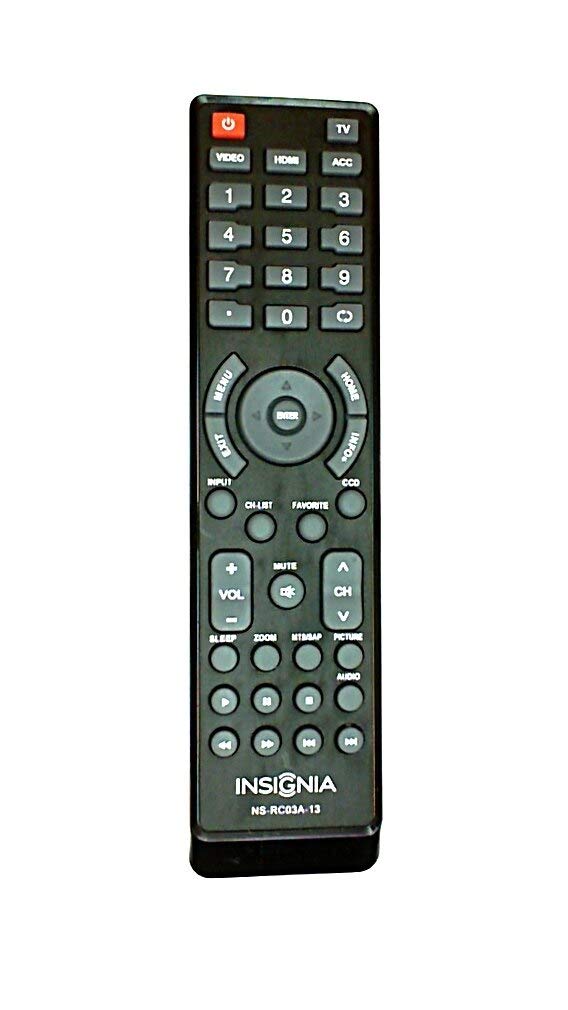
Immaġni: Quddiem view of the Insignia NS-RC03A-13 remote control, displaying all buttons and their labels. The remote is black with gray buttons and white text.
2.1 Power On/Off
Agħfas il- QAWWA button (usually located at the top left) to turn your television on or off.
2.2 Għażla tal-Input
To switch between different video sources (e.g., HDMI 1, HDMI 2, Video), press the INPUT button. Continue pressing to cycle through available inputs until your desired source is selected.
2.3 Kontroll tal-Kanal u l-Volum
- Volum: Uża l- VOL+ u VOLUM - buttons to increase or decrease the audio volume.
- Siekta: Agħfas il- MUTE button to instantly silence the television audio. Press it again to restore sound.
- Kanali: Uża l- CH + u Ċ - buttons to navigate through television channels.
- Kuxxinett tan-Numru: Directly enter channel numbers using the numeric keypad (0-9).
2.4 Navigazzjoni tal-Menu
Use the directional arrow buttons (Up, Down, Left, Right) around the DĦUL button to navigate through on-screen menus. Press DĦUL to confirm a selection. The MENU button typically opens the main menu, and ĦRUĠ jagħlaqha.
3. Manutenzjoni
Proper care ensures the longevity and optimal performance of your remote control.
- Tindif: Wipe the remote control with a soft, dry cloth. Avoid using liquid cleaners, abrasive materials, or chemical solvents, as these can damage the surface or internal components.
- Sostituzzjoni tal-batterija: Replace batteries when the remote's responsiveness decreases. Always replace both batteries at the same time with new ones of the same type (AAA).
- Ħażna: Aħżen ir-remote f'post xott, 'il bogħod mix-xemx diretta, temperaturi estremi, u umdità għolja.
- Evita Qtar: Ipproteġi r-remote minn impatt fiżiku, għax il-waqgħat jistgħu jagħmlu ħsara liċ-ċirkwiti interni.
4 Issolvi l-problemi
Jekk tiltaqa' ma' problemi bil-kontroll remot tiegħek, ipprova s-soluzzjonijiet li ġejjin:
- Ir-remote mhux qed jirrispondi:
- Iċċekkja jekk il-batteriji humiex imdaħħla sew bil-polarità xierqa.
- Ibdel il-batteriji qodma b'batteriji AAA ġodda.
- Kun żgur li m'hemm l-ebda ostaklu bejn il-kontroll remot u r-riċevitur infra-aħmar (IR) tat-TV.
- Ipponta r-remote direttament lejn ir-riċevitur IR tat-TV.
- Buttuni speċifiċi ma jaħdmux:
- Clean around the unresponsive buttons with a soft, slightly damp cloth to remove any debris or stickiness.
- If cleaning does not resolve the issue, the button mechanism may be faulty, and the remote might require replacement.
- TV not responding to input changes:
- Ensure the remote is correctly paired or compatible with your Insignia TV model.
- Ipprova agħfas il- INPUT button multiple times to cycle through all available sources.
5. Speċifikazzjonijiet
| Numru tal-Mudell | NS-RC03A-13 |
| Brand | INSINJJA |
| Apparati Kompatibbli | Televiżjoni |
| Numru Massimu ta' Apparat Appoġġjat | 1 |
| Batteriji Meħtieġa | 2 batteriji AAA |
| Kulur | Iswed |
| Karatteristika Speċjali | Ergonomiku |
| Piż tal-oġġett | 2.39 uqija |
| Dimensjonijiet tal-Pakkett | 7 x 2 x 1 pulzieri |
6. Garanzija u Appoġġ
For detailed warranty information, product registration, or technical support, please visit the official Insignia webis-sit jew ikkuntattja lid-dipartiment tas-servizz tal-konsumatur tagħhom. Żomm l-irċevuta tax-xiri tiegħek bħala prova tax-xiri għal kwalunkwe talba ta' garanzija.
Appoġġ onlajn: www.insigniaproducts.com
Nota: It-termini speċifiċi tal-garanzija jistgħu jvarjaw skont ir-reġjun u l-bejjiegħ bl-imnut.


