1. Introduzzjoni
Thank you for choosing the PatrolEyes PE-DV5-2 Body Camera. This device is designed for professional use, offering high-definition video recording, advanced night vision capabilities, and integrated GPS for reliable evidence collection. This manual will guide you through the setup, operation, and maintenance of your new body camera to ensure optimal performance and longevity.
2. Kontenut tal-Pakkett
Jekk jogħġbok ivverifika li l-oġġetti kollha huma preżenti fil-pakkett tiegħek:
- PatrolEyes PE-DV5-2 Body Camera
- Battery (Included Components)
- Iċċarġjar USB/Kejbil tad-Data
- Ċarġer tal-ħajt
- Clip tal-Immuntar
- Manwal għall-Utent (dan id-dokument)
3. Partijiet u Kontrolli
Familiarize yourself with the various parts and controls of your PatrolEyes PE-DV5-2 body camera.

Figura 3.1: Quddiem view of the PatrolEyes PE-DV5-2 body camera, highlighting the central camera lens, surrounding infrared (IR) lights for night vision, and the PatrolEyes logo at the bottom. The device has a rugged, black casing.

Figura 3.2: Front-side perspective of the PatrolEyes PE-DV5-2 body camera, providing a clearer view of the camera lens and the array of control buttons located on the side panel, including the yellow button at the top.

Figura 3.3: Ġenb view of the PatrolEyes PE-DV5-2 body camera, prominently featuring the red record button and the covered USB port for charging and data transfer.
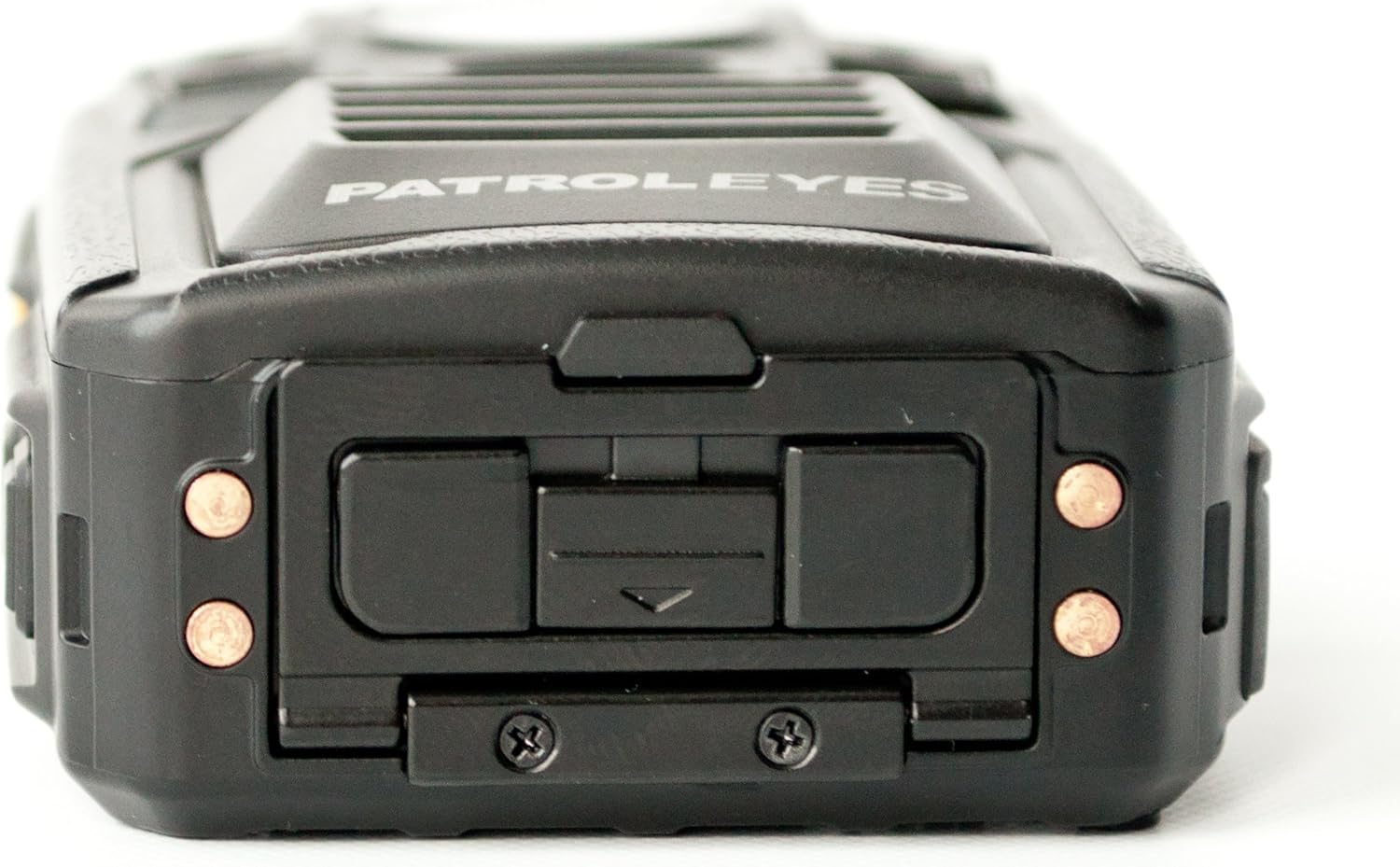
Figura 3.4: Fuq view of the PatrolEyes PE-DV5-2 body camera, displaying the GPS indicator light and other top-mounted features.

Figura 3.5: Qiegħ view of the PatrolEyes PE-DV5-2 body camera, revealing the charging contacts designed for use with a docking station.
4. Nibdew
4.1. Iċċarġjar tal-batterija
Before first use, fully charge the camera's battery. The camera comes with a rechargeable battery.
- Connect the USB charging cable to the camera's USB port.
- Plug the other end of the USB cable into the wall charger and then into a power outlet.
- Id-dawl indikatur tal-iċċarġjar se jixgħel. Se jibdel il-kulur jew jintefa ladarba l-iċċarġjar ikun komplut.
Alternatively, use a compatible docking station (sold separately) for charging.
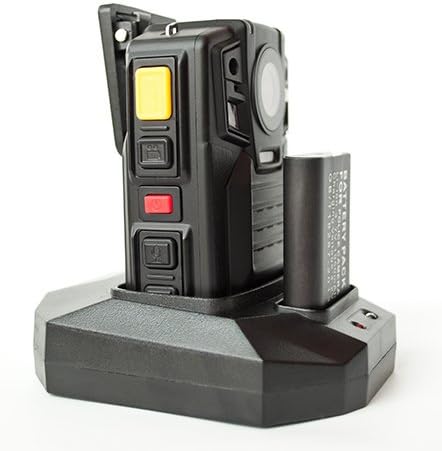
Figura 4.1: The PatrolEyes body camera securely placed in its docking station, which also features a dedicated slot for charging an additional battery pack.

Figura 4.2: Wara view of the PatrolEyes docking station, clearly showing the power input port and the USB data port for connecting to a computer.
4.2. Tixgħil / Mitfi
- Biex Tixgħel: Press and hold the Power button for a few seconds until the device vibrates and the indicator lights turn on.
- Biex Tifi: Press and hold the Power button until the device vibrates and the indicator lights turn off.
4.3. Attaching the Mounting Clip
Attach the provided mounting clip to the back of the camera. This allows you to securely fasten the camera to your uniform or gear.
5. It-tħaddim tal-Kamera
5.1. Reġistrazzjoni tal-Vidjo
The camera supports video capture resolutions of 1080p, 480p, and 720p.
- Kun żgur li l-kamera tkun mixgħula.
- Agħfas iddedikat Buttuna Rekord (often red) once to start video recording. The recording indicator light will flash.
- Agħfas il- Buttuna Rekord again to stop recording. The indicator light will stop flashing.
5.2. Teħid tar-Ritratti
The camera has an effective still resolution of 33 MP.
- While in standby mode or during video recording, press the Buttuna tar-ritratti once to capture a still image.
5.3. Night Vision (IR)
The camera features auto IR night vision with a range of 30 feet, utilizing infrared light sources.
- The camera is equipped with automatic infrared (IR) activation. In low-light conditions, the IR lights will automatically turn on to provide clear night vision footage.
5.4. Funzjonalità tal-GPS
The integrated GPS module automatically records location data with your video footage. Ensure the camera has a clear view tas-sema għall-akkwist ottimali tas-sinjal tal-GPS.
5.5. Daqq
Tista 'terġa'view recorded videos and photos directly on the camera's screen.
- Enter Playback mode via the menu or a dedicated button (refer to on-screen prompts).
- Innaviga permezz files using the directional buttons.
- Press the OK/Select button to play a video or view ritratt.
5.6. Konnessjoni ma' Kompjuter
Biex tittrasferixxi files, connect the camera to a computer using the provided USB cable.
- Ixgħel il-kamera.
- Qabbad il-kamera mal-kompjuter tiegħek billi tuża l-kejbil USB.
- The camera will appear as a removable disk drive on your computer.
- You can now access and transfer video and photo files.
6. Manutenzjoni u Kura
6.1. Tindif
- Imsaħ il-korp tal-kamera b'ċarruta ratba, damp drapp. Tużax kimiċi ħarxa jew tindif li joborxu.
- Għal-lenti, uża drapp u soluzzjoni speċjalizzati għat-tindif tal-lentijiet biex tevita l-grif.
6.2. Ħażna
- Aħżen il-kamera f'post frisk u niexef 'il bogħod mix-xemx diretta u minn temperaturi estremi.
- Ensure the battery is partially charged (around 50%) if storing for extended periods to preserve battery life.
6.3. Kura tal-batterija
- Evita li tiċċarġja l-batterija kompletament ta' spiss.
- Use only the original or approved charging accessories.
7 Issolvi l-problemi
| Problema | Kawża Possibbli | Soluzzjoni |
|---|---|---|
| Il-kamera ma tixgħelx. | Batterija baxxa jew xejn ċarġ. | Iċċarġja l-batterija kompletament. |
| Ma nistax nirrekordja vidjow/nieħu ritratti. | Storage full. | Trasferiment files to a computer and delete them from the camera. |
| Kwalità fqira tal-vidjow/immaġni. | Lenti maħmuġa; kundizzjonijiet ta’ dawl baxx. | Clean the lens; ensure IR is active in low light. |
| Il-GPS mhux qed jakkwista sinjal. | Ostakolat view tas-sema; użu fuq ġewwa. | Imxi għal żona ta 'barra miftuħa. |
| Camera not recognized by computer. | Faulty USB cable; driver issue. | Try a different USB port/cable; ensure camera is powered on. |
8. Speċifikazzjonijiet
| Karatteristika | Dettall |
|---|---|
| Numru tal-Mudell | PE-DV5-2 |
| Riżoluzzjoni tal-Qbid tal-Vidjo | 1080p, 480p, 720p |
| Riżoluzzjoni Għadha Effettiva | 33 MP |
| Frame Rata | 30 fps |
| Medda tal-Viżjoni Lejl | 30 Saqajn |
| Teknoloġija tal-Konnettività | Wireless (Wi-Fi) |
| Sors tal-Enerġija | Mħaddma bil-batterija |
| Komponenti Inklużi | Batterija |
| Klassifikazzjoni tal-Protezzjoni Internazzjonali | IP54 |
| Karatteristiċi Speċjali | Sensorju tal-Mozzjoni, Viżjoni bil-Lejl |
| Użu fuq ġewwa/barra | Ġewwa, Barra |
| Manifattur | PatrolEyes |
| L-Ewwel Data Disponibbli | 14 ta’ Mejju, 2017 |
9. Informazzjoni dwar Garanzija
PatrolEyes products typically come with a limited manufacturer's warranty. Please refer to the warranty card included with your purchase or visit the official PatrolEyes websit għal termini u kundizzjonijiet dettaljati tal-garanzija. Żomm il-prova tax-xiri tiegħek għal talbiet ta' garanzija.
10. Appoġġ għall-Klijent
For technical assistance, troubleshooting beyond this manual, or inquiries about your PatrolEyes PE-DV5-2 body camera, please contact PatrolEyes customer support. Contact information can typically be found on the manufacturer's webis-sit jew fuq l-imballaġġ tal-prodott.
Riżorsi onlajn: Visit the official PatrolEyes website for FAQs, software updates, and additional support materials.


