Introduzzjoni
Grazzi tax-xiriasing the Blackweb BWA16AA003 1000W HiFi Bluetooth Stereo System. This powerful audio system is designed to provide a rich and immersive sound experience with its front speakers and subwoofer. It features wireless Bluetooth connectivity, a digital FM radio, and a top-loading CD player, allowing you to enjoy your favorite music from various sources. This manual provides detailed instructions for setup, operation, maintenance, and troubleshooting to ensure optimal performance and longevity of your device.
Informazzjoni Importanti dwar is-Sigurtà
Please read all safety and operating instructions carefully before using this product. Keep these instructions for future reference.
- Tesponix dan l-apparat għax-xita jew l-umdità.
- Timblokkax il-fetħiet tal-ventilazzjoni. Installa skont l-istruzzjonijiet tal-manifattur.
- Tinstallax ħdejn xi sorsi tas-sħana bħal radjaturi, reġistri tas-sħana, stufi, jew apparat ieħor (inkluż amplifiers) li jipproduċu sħana.
- Ipproteġi l-korda tad-dawl milli tkun mixi jew maqrusa, partikolarment fil-plakek, fil-kontenituri tal-konvenjenza, u fil-punt fejn joħorġu mill-apparat.
- Uża biss aċċessorji/aċċessorji speċifikati mill-manifattur.
- Aqla’ dan l-apparat waqt maltempati tas-sajjetti jew meta ma jintużax għal perjodi twal ta’ żmien.
- Irreferi l-manutenzjoni kollha lil persunal tas-servizz kwalifikat. Is-servizz huwa meħtieġ meta l-apparat ikun ġie bil-ħsara b'xi mod, bħal korda tal-provvista tal-enerġija jew plagg ikun bil-ħsara, likwidu jkun inxtered jew oġġetti jkunu waqgħu fl-apparat, l-apparat ikun ġie espost għax-xita jew umdità, ma jaħdimx b'mod normali , jew twaqqgħet.
Kontenut tal-Pakkett
Carefully unpack your stereo system and ensure all items are present. If any items are missing or damaged, please contact your retailer.
- Iswedweb BWA16AA003 Main Unit
- Speaker tax-Xellug
- Kelliem it-Tajjeb
- Subwoofer
- Korda tal-Enerġija
- Manwal għall-Utent
Prodott Overview
Familiarize yourself with the main unit's controls and features.
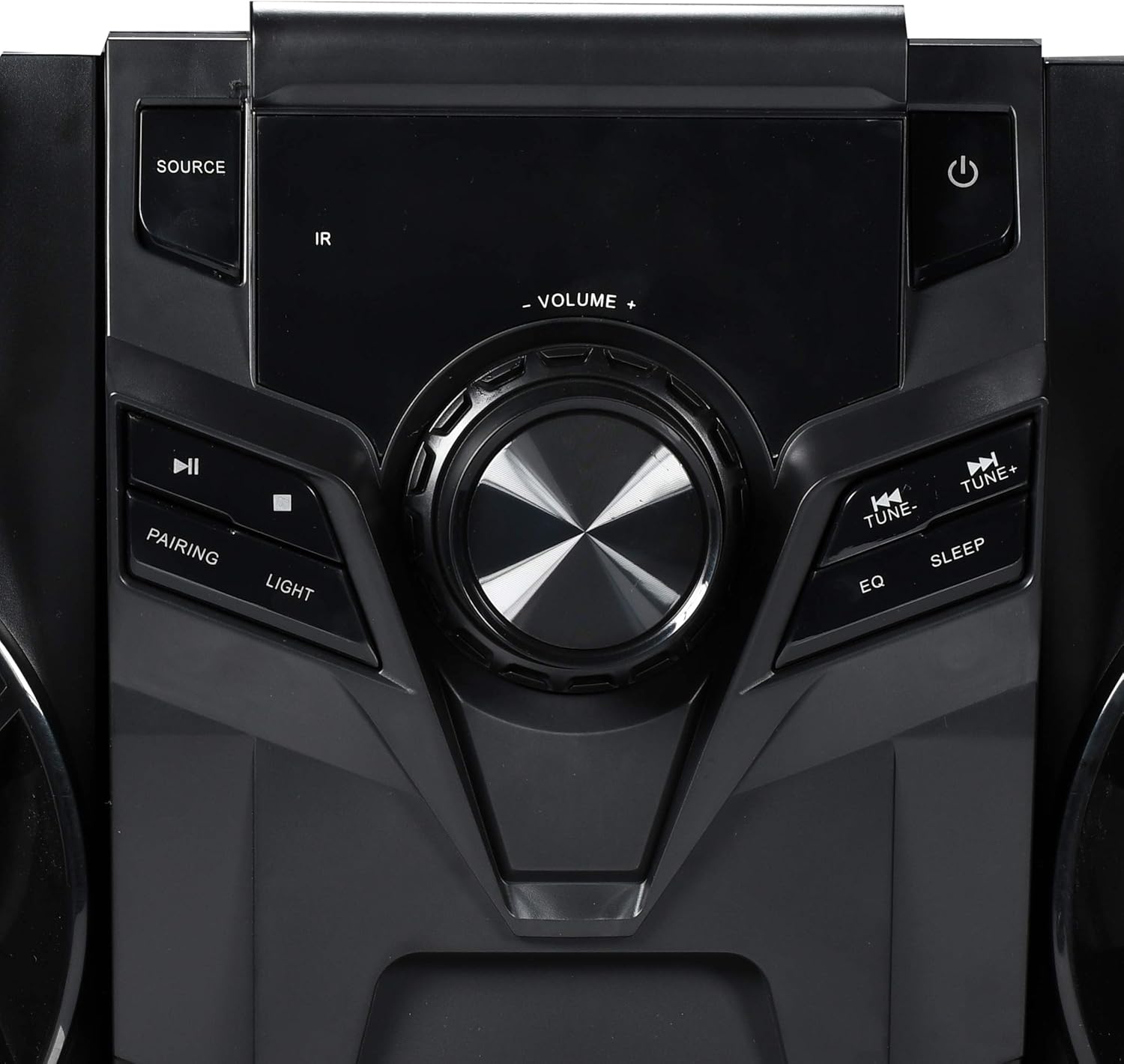
Figura 1: Kontrolli tal-Panel ta' Quddiem
This image displays the central control panel of the Blackweb BWA16AA003 stereo system. Key controls visible include the large central volume knob, a "SOURCE" button on the upper left for input selection, and a power button (represented by the universal power symbol) on the upper right. Below the source button are playback controls: a play/pause button and a pairing button for Bluetooth. Below the power button are "TUNE-" and "TUNE+" buttons for radio tuning, along with "EQ" and "SLEEP" buttons. An "IR" sensor for remote control input is also visible.
Funzjonijiet tal-Panew tal-Kontroll:
- Buttuna tal-Qawwa (⏻): Ixgħel jew jitfi s-sistema.
- Buttuna SORS: Selects the input source (e.g., CD, Bluetooth, FM Radio).
- Buttuna tal-VOLUM: Jaġġusta l-livell tal-volum ewlieni.
- Buttuna Play/Pause (⏸): Plays or pauses audio playback (CD/Bluetooth).
- PAIRING Button: Jibda l-modalità ta' tqabbil Bluetooth.
- Buttuna DAWL: Controls the multi-color LED lighting effects on the speakers.
- Buttuni TUNE- / TUNE+: Tunes FM radio frequencies or navigates tracks/chapters.
- Buttuna EQ: Iċċikla bejn il-presets tal-ekwalizzatur.
- Buttuna SLEEP: Issettja t-timer tal-irqad.
- Sensor IR: Receives signals from a compatible remote control (note: remote control not included as per specifications).
- Port USB: Located on the front or rear panel, used for charging compatible devices (charging cable sold separately).
- Trej tas-CD: Top-loading tray for inserting audio CDs.
Setup
1 Tqegħid
Place the main unit and speakers on a stable, flat surface. Ensure adequate ventilation around the unit to prevent overheating. For optimal sound, position the left and right speakers equidistant from the main unit and facing the listening area.
2. Konnessjoni tal-Ispeaker
Connect the speaker wires from the left and right speakers and the subwoofer to the corresponding speaker terminals on the rear of the main unit. Ensure correct polarity (positive to positive, negative to negative) for optimal sound quality.
3. Konnessjoni tal-Enerġija
Plug the power cord into the AC IN socket on the rear of the main unit, then plug the other end into a standard wall outlet (AC 120V~60Hz).
Istruzzjonijiet Operattivi
Qawwa mixgħul/mitfi
Agħfas il- Buttuna tal-Qawwa (⏻) on the front panel to turn the system on or off.
Għażla tas-Sors
Agħfas il- Buttuna SORS repeatedly to cycle through available input modes: CD, Bluetooth, FM Radio.
Operazzjoni Bluetooth
- Switch the system to Bluetooth mode using the Buttuna SORS. The display will indicate "BT" or "Bluetooth".
- The system will automatically enter pairing mode. If not, press the PAIRING Button. The Bluetooth indicator will flash.
- Fuq it-tagħmir tiegħek li jaħdem bil-Bluetooth (smartphone, tablet, laptop), attiva l-Bluetooth u fittex tagħmir disponibbli.
- Agħżel "Iswedweb BWA16AA003" (or similar name) from the list of devices.
- Once paired, the Bluetooth indicator will stop flashing and remain solid. You can now play audio wirelessly from your device.
Daqq ta' CD
- Switch the system to CD mode using the Buttuna SORS.
- Gently place an audio CD (CD or CD-R/RW) into the top-loading CD tray with the label side facing up.
- The system will automatically begin playing the CD. If not, press the Buttuna Play/Pause (⏸).
- Uża l- TUNE- / TUNE+ Buttons biex taqbeż it-traċċi.
Operazzjoni tar-Radju FM
- Switch the system to FM Radio mode using the Buttuna SORS.
- Extend the FM antenna fully for better reception.
- Agħfas il- TUNE- / TUNE+ Buttons to manually tune to a desired frequency.
- To auto-scan and save presets (if available), refer to the on-screen display or specific instructions for your model's auto-scan function.
Iċċarġjar USB
Connect your compatible device's USB charging cable (sold separately) to the USB port on the stereo system to charge your device.
Kontroll tad-Dawl LED
Agħfas il- Buttuna DAWL to cycle through different multi-color LED lighting effects on the speakers or to turn them off.
Aġġustament tal-Volum
Dawwar il- Buttuna tal-VOLUM clockwise to increase volume and counter-clockwise to decrease volume.
Ekwalizzatur (EQ)
Agħfas il- Buttuna EQ to cycle through various preset equalizer modes (e.g., Rock, Pop, Jazz, Classic, Flat) to optimize sound for different music genres.
Sleep Timer
Agħfas il- Buttuna SLEEP repeatedly to set a sleep timer (e.g., 15, 30, 60, 90 minutes). The system will automatically turn off after the selected time.
Manutenzjoni
Tindif
Wipe the unit with a soft, dry cloth. Do not use abrasive cleaners, waxes, or solvents as they may damage the finish. Ensure the unit is unplugged before cleaning.
Ħażna
If the unit is to be stored for an extended period, unplug it from the power outlet and store it in a cool, dry place, away from direct sunlight and extreme temperatures.
Issolvi l-problemi
Qabel ma tikkuntattja l-appoġġ għall-klijenti, jekk jogħġbok irreferi għat-tabella li ġejja għal kwistjonijiet komuni u s-soluzzjonijiet tagħhom.
| Problema | Kawża Possibbli | Soluzzjoni |
|---|---|---|
| Ebda Qawwa | Il-korda tal-enerġija mhux imqabbda sew. L-iżbokk tal-enerġija mhux qed jaħdem. | Kun żgur li l-korda tal-enerġija hija pplaggjata sew fl-unità u fis-sokit tal-ħajt. Ittestja l-iżbokk b'apparat ieħor. |
| Ebda Ħoss | Il-volum huwa baxx wisq jew siekta. Sors mhux korrett magħżul. Speaker wires not connected properly. | Żid il-volum. Press the SOURCE button to select the correct input. Check speaker wire connections at both the unit and speakers. |
| It-Tqabbil tal-Bluetooth Jonqos | Bluetooth device is too far away. Bluetooth not enabled on your device. System is not in pairing mode. | Move your Bluetooth device closer to the stereo system. Kun żgur li l-Bluetooth huwa attivat fuq it-tagħmir tiegħek. Press the PAIRING button on the stereo system. |
| CD Not Playing | CD is dirty or scratched. CD huwa mdaħħal ħażin. Sors mhux korrett magħżul. | Clean the CD with a soft cloth. Re-insert the CD with the label side facing up. Agħfas il-buttuna SOURCE biex tagħżel il-modalità CD. |
| Poor FM Reception | FM antenna not extended. Interferenza minn apparati elettroniċi oħra. | Estendi kompletament l-antenna FM. Move the unit away from other electronic devices. |
Speċifikazzjonijiet
| Brand | Iswedweb |
| Mudell | BWA16AA003 |
| Output Wattage | 1000 Watts |
| Apparati Kompatibbli | Smartphone, Tablet, Laptop |
| Teknoloġija tal-Konnettività | Bluetooth, USB |
| Tip ta' Kelliem | Stereo (with Subwoofer) |
| CD Player | Yes (CD and CD-R/RW compatible) |
| Radju FM | Yes (Digital FM with presets) |
| Port USB | Yes (for device charging) |
| Dawl LED | Multi-color LED speaker illumination |
| Dimensjonijiet (L x W x H) | 72.64 x 36.83 x 32.77 ċm (madwar 28.6 x 14.5 x 12.9 pulzieri) |
| Piż | 14.17 kg (madwar 31.24 lbs) |
Garanzija u Appoġġ
For warranty information or technical support, please refer to the documentation included with your purchase or contact Blackweb customer service. Keep your proof of purchase for warranty claims.


