1. Introduzzjoni
This manual provides essential information for setting up, operating, maintaining, and troubleshooting your Microsoft Surface Pro Model 1796. The Surface Pro is a versatile 2-in-1 device designed to function as both a high-performance laptop and a portable tablet. Please read these instructions carefully to ensure optimal use and longevity of your device.
2. Prodott Aktarview
The Microsoft Surface Pro Model 1796 features a 12.3-inch PixelSense multi-touch display, an Intel Core i5 processor, 4GB of RAM, and a 128GB SSD. It operates on Windows 10 Pro, offering a full desktop experience in a portable form factor. The device supports a detachable keyboard (Surface Pro Signature Type Cover) and a digital pen (Surface Pen), both sold separately, to enhance its functionality.

Figure 2.1: Microsoft Surface Pro in tablet mode, displaying the lock screen.
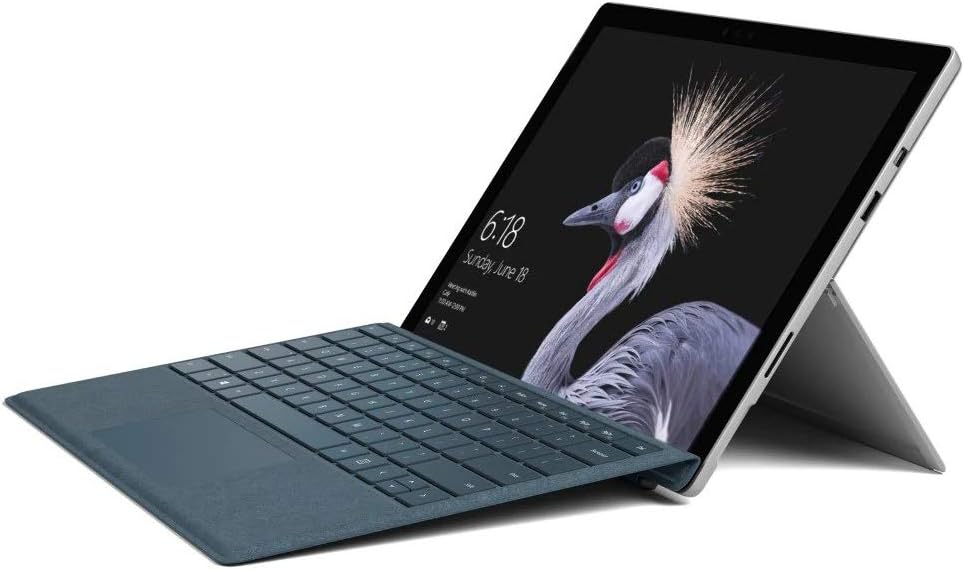
Figure 2.2: Microsoft Surface Pro with Signature Type Cover attached, configured as a laptop.

Figure 2.3: Microsoft Surface Pro tablet and detached Signature Type Cover.
3. Setup
3.1 Qawwa Inizjali
- Connect the power supply to the Surface Pro and a power outlet.
- Agħfas il-buttuna tal-qawwa li tinsab fit-tarf ta' fuq tal-apparat.
- Follow the on-screen instructions to complete the initial Windows 10 Pro setup, including language selection, network connection, and user account creation.
3.2 Aċċessorji tal-Konnessjoni
- Surface Pro Signature Type Cover: Align the Type Cover with the magnetic connector along the bottom edge of the Surface Pro until it clicks into place.
- Pinna tal-wiċċ: The Surface Pen connects via Bluetooth. Go to Settings > Apparati > Bluetooth u apparati oħra to pair the pen.
3.3 Iċċarġjar tal-Apparat
Use the provided power adapter to charge your Surface Pro. The charging port is located on the right side of the device. A full charge provides approximately 13 hours of typical device usage.
4. Istruzzjonijiet Operattivi
4.1 Navigazzjoni Bażika
- Mess: Use multi-touch gestures on the PixelSense display for navigation, zooming, and scrolling.
- Type Cover: Utilize the keyboard and trackpad for traditional laptop input.
- Pinna tal-wiċċ: Write, draw, and annotate directly on the screen.
4.2 Windows 10 Pro Features
Your Surface Pro comes with Windows 10 Pro, offering features such as:
- Bongu tal-Windows: For fast, secure, password-free sign-in using facial recognition.
- Cortana: Your personal digital assistant.
- Microsoft Edge: L-inadempjenza web browser.
- Modalità Pillola: Automatically or manually switch to a touch-optimized interface when the Type Cover is detached.
4.3 Settings tal-wiri
The 12.3-inch PixelSense display has a resolution of 2736 x 1824 pixels. You can adjust display settings such as brightness, resolution, and scaling through Settings > Sistema > Wiri.
5. Manutenzjoni
5.1 Tindif tal-Apparat
- Uża drapp ratba u mingħajr ħelu dampened with water or an approved screen cleaner to clean the display.
- For the device body, use a soft, dry cloth. Avoid harsh chemicals or abrasive materials.
5.2 Aġġornamenti tas-Software
Regularly check for and install Windows updates to ensure your device has the latest security patches and features. Go to Settings > Aġġornament u Sigurtà > Aġġornament tal-Windows.
5.3 Kura tal-Batterija
- Evita temperaturi estremi, għax jistgħu jnaqqsu l-ħajja tal-batterija.
- For optimal battery health, avoid consistently discharging the battery completely or keeping it at 100% charge for extended periods.
6 Issolvi l-problemi
6.1 Kwistjonijiet Komuni
- Apparat mhux mixgħul: Ensure the device is charged. Try holding the power button for 10-15 seconds to perform a force restart.
- L-iskrin mhux qed jirrispondi: Restart the device. If the issue persists, check for driver updates.
- Kwistjonijiet ta' prestazzjoni: Close unnecessary applications, check for Windows updates, or run a disk cleanup.
6.2 Ikkuntattja l-Appoġġ
For more complex issues or technical assistance, please visit the official Microsoft Support website or contact their customer service. Have your device's model number (FJU-00001) and serial number ready.
7. Speċifikazzjonijiet
| Karatteristika | Speċifikazzjoni |
|---|---|
| Isem tal-Mudell | FJU-00001 |
| Daqs tal-Wiri | 12.3 Pulzier |
| Riżoluzzjoni tal-Iskrin | 2736 x 1824 pixel |
| Proċessur | Intel Core i5 (2.6 GHz) |
| RAM | 4 GB DDR3 |
| Ħażna | 128 GB SSD |
| Koproċessur tal-Grafika | Intel HD Graphics 620 |
| Sistema Operattiva | Windows 10 Pro |
| Tip bla fili | 802.11b, 802.11g, 802.11n |
| Ħajja Medja tal-Batterija | 13 Sigħat |
| Piż tal-oġġett | 1.7 liri |
| Dimensjonijiet tal-Prodott | 11.5 x 0.33 x 7.93 pulzieri |
| Wara WebCam Riżoluzzjoni | 5 MP |
8. Garanzija u Appoġġ
Your Microsoft Surface Pro Model 1796 is covered by a limited hardware warranty provided by Microsoft. For detailed warranty terms and conditions, please refer to the documentation included with your purchase or visit the official Microsoft support websit. Żomm il-prova tax-xiri tiegħek għal talbiet ta' garanzija.
For technical support, driver downloads, and service information, please visit support.microsoft.com. You may need to provide your device's serial number and model information.


