1. Introduzzjoni
This manual provides detailed instructions for the Gembird MUSG-04 USB Optical Gaming Mouse. It covers product features, setup procedures, operational guidelines, maintenance tips, and troubleshooting information to ensure optimal use of your device.

Image 1.1: The Gembird MUSG-04 Gaming Mouse presented in its retail packaging, highlighting the product's design and branding.
2. Karatteristiċi tal-prodott
The Gembird MUSG-04 is designed for gaming, offering a range of features for enhanced control and customization:
- Programmable 8-Button Design: Provides extensive customization options for various in-game actions.
- DPI aġġustabbli: Quick DPI button allows on-the-fly sensitivity adjustments from 1200 to 3200 DPI.
- Ipprogrammar Makro: Dedicated software enables creation and assignment of complex macro commands to buttons.
- Illuminated Elements: Features an illuminated scroll wheel, logo, and side accents for visual feedback and aesthetic appeal.
- Ergonomic Right-Handed Design: Shaped for comfortable use during extended gaming sessions.
- Konnettività USB: Standard USB interface for broad compatibility.
- Kejbil Durabbli: 1.5-meter braided cable for reliable connection and longevity.
- Wide Operating System Support: Compatible with Windows 10 and other recent Windows operating systems.

Immaġni 2.1: Naħa A view of the Gembird MUSG-04 mouse, showcasing its ergonomic contours and button placement designed for right-handed users.
3. Kontenut tal-Pakkett
Ivverifika li l-pakkett tiegħek fih l-oġġetti li ġejjin:
- Gembird MUSG-04 USB Optical Gaming Mouse
- Manwal għall-Utent (dan id-dokument)
- Macro Programming Software (typically available via download or included on a mini-CD)

Image 3.1: The side of the Gembird MUSG-04 retail box, displaying key features and specifications of the gaming mouse.
4. Istruzzjonijiet ta' Setup
4.1. Konnessjoni tal-Ħardwer
- Sib port USB disponibbli fuq il-kompjuter tiegħek.
- Plug the USB connector of the Gembird MUSG-04 mouse into the USB port.
- Your operating system will typically detect the mouse automatically and install the necessary drivers. This process may take a few moments.
4.2. Software Installation (Optional for Macro Programming)
To utilize the programmable buttons and macro features, install the dedicated software:
- If a mini-CD is included, insert it into your computer's optical drive and follow the on-screen instructions.
- Alternatively, download the latest software from the official Gembird support websit.
- Run the installer and follow the prompts to complete the software installation.
- Ibda mill-ġdid il-kompjuter tiegħek jekk tintalab.
5. It-Tħaddim tal-Maws
5.1. Funzjonijiet tal-buttuna
The Gembird MUSG-04 features 8 buttons with default functions:
- Buttuna tax-Xellug: Funzjoni tal-ikklikkja primarja.
- Buttuna tal-lemin: Secondary click function (context menu).
- Scroll Wheel: Scrolls content up/down. Pressing it acts as a middle click.
- Buttuna DPI: Cycles through preset DPI sensitivity levels (e.g., 1200, 1600, 2400, 3200 DPI).
- Buttuni 'l Quddiem/Lura: Innaviga web paġni jew folders.
- Buttuna tan-Nar: Often used for rapid-fire actions in games.
- Makro Buttuni: Customizable via software for specific commands or macros.
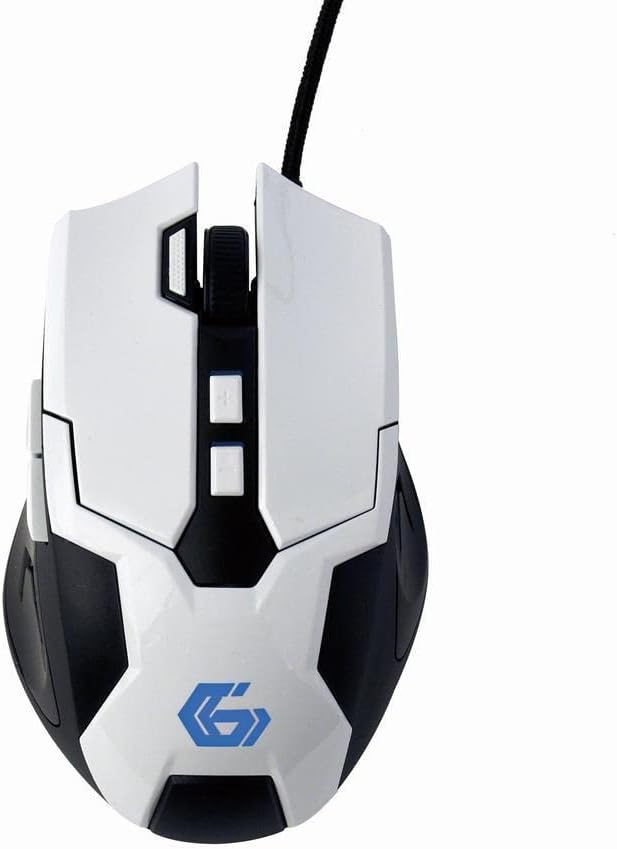
Immaġni 5.1: Minn fuq għal isfel view of the Gembird MUSG-04 mouse, illustrating the placement of its various buttons, including the left, right, scroll wheel, DPI, and side buttons. The Gembird logo is illuminated in blue.
5.2. Aġġustament tad-DPI
Agħfas il- buttuna DPI (usually located behind the scroll wheel) to cycle through the available sensitivity settings. Each press will switch to the next DPI level, indicated by a change in the mouse's illumination color or pattern (if supported).
5.3. Programmazzjoni Makro
The included macro programming software allows you to customize button functions and create complex sequences of commands. Refer to the software's built-in help or the Gembird support website for detailed instructions on macro creation and assignment.
5.4. Illuminazzjoni
The mouse features dynamic illumination on its scroll wheel, logo, and side accents. These lights may change color based on the selected DPI setting or can be customized via the macro programming software.

Image 5.2: The Gembird MUSG-04 mouse with its logo and side accents illuminated in green, demonstrating the customizable lighting feature.
6. Manutenzjoni
To ensure the longevity and optimal performance of your Gembird MUSG-04 mouse, follow these maintenance guidelines:
- Tindif: Uża drapp artab, niexef u mingħajr suf biex timsaħ il-wiċċ tal-maws. Għal ħmieġ iebes, nixxef ftit.ampLaħlaħ id-drapp bl-ilma jew b'soluzzjoni ħafifa tat-tindif. Evita kimiċi ħarxa jew materjali li joborxu.
- Sensor Ottiku: Periodically clean the optical sensor area on the underside of the mouse with a cotton swab to prevent tracking issues.
- Kura tal-Cable: Evita li tgħawweġ jew iddawwar il-kejbil tal-USB b'mod qawwi. Aħżen il-maws b'mod li jipprevjeni stress fuq il-konnessjoni tal-kejbil.
- Ħażna: Meta ma tkunx qed tużah għal perjodi twal, aħżen il-maws f'ambjent nadif u niexef 'il bogħod mix-xemx diretta u minn temperaturi estremi.
7 Issolvi l-problemi
If you encounter issues with your Gembird MUSG-04 mouse, refer to the following common problems and solutions:
- Il-Maws Mhux Jirrispondi:
- Kun żgur li l-kejbil tal-USB huwa mdaħħal sew f'port tal-USB li jaħdem.
- Ipprova qabbad il-maws ma' port USB differenti fuq il-kompjuter tiegħek.
- Ittestja l-maws fuq kompjuter ieħor biex tiddetermina jekk il-problema hijiex fil-maws jew fil-kompjuter.
- Ibda mill-ġdid il-kompjuter tiegħek.
- Moviment Erratiku tal-Kurser:
- Naddaf is-senser ottiku fuq in-naħa ta' taħt tal-maws.
- Kun żgur li qed tuża l-maws fuq wiċċ adattat (eż., mouse pad). Evita uċuħ li jirriflettu ħafna jew trasparenti.
- Iċċekkja għal xi kunflitti tas-softwer jew sewwieqa skaduti.
- Buttons Not Working/Macros Not Activating:
- Verify that the macro programming software is correctly installed and running.
- Check the button assignments within the software.
- Kun żgur li l-professjonist tas-softwerfile hija attiva.
- Illumination Not Working:
- Check software settings for illumination control.
- Ensure the mouse is receiving sufficient power from the USB port.
8. Speċifikazzjonijiet
| Karatteristika | Speċifikazzjoni |
|---|---|
| Brand | Gembird |
| Mudell | MUSG-04 |
| Teknoloġija tal-Konnettività | USB |
| Teknoloġija ta 'Sejbien tal-Moviment | Ottiċi |
| Sensittività DPI | Adjustable (1200-3200 DPI) |
| Numru ta' Buttuni | 8 (Programmabbli) |
| Tul tal-Cable | 1.5-il metru |
| Appoġġ tas-Sistema Operattiva | Windows 10 u aktar tard |
| Dimensjonijiet tal-Prodott (LxWxH) | 4.96 x 3.19 x 1.61 pulzieri (12.6 x 8.1 x 4.1 ċm) |
| Piż tal-oġġett | 8.3 uqija (235 gramma) |
9. Garanzija u Appoġġ
For warranty information, please refer to the documentation provided with your purchase or visit the official Gembird website. Technical support and driver downloads can also be found on the Gembird support portal.
For further assistance, please contact Gembird customer service through their official channels.


