1. Introduzzjoni
This manual provides essential information for the installation, operation, and maintenance of your Western Digital 1TB 3.5" SATA HDD (Model WD10EZEX). This internal hard drive is designed for desktop PC and Mac systems, offering reliable storage and performance for various applications.

Figura 1: Fuq view of the Western Digital 1TB 3.5" SATA Hard Drive.
2. Informazzjoni dwar is-Sigurtà
Observe the following safety guidelines to prevent damage to the drive or personal injury:
- Dejjem immaniġġja l-hard drive mit-truf tiegħu biex tevita li tmiss iċ-ċirkwit bord jew il-konnetturi.
- Ensure proper grounding to prevent electrostatic discharge (ESD) when handling the drive. Use an anti-static wrist strap.
- Disconnect power from your computer before installing or removing the hard drive.
- Evita li tesponi d-drajv għal temperaturi estremi, umdità, jew dawl tax-xemx dirett.
- Twaqqax id-drajv jew tissottomettixh għal xokk fiżiku.
3. Kontenut tal-Pakkett
Il-pakkett tiegħek għandu jkun fih l-oġġett li ġej:
- Western Digital 1TB 3.5" SATA HDD (Model WD10EZEX)
Note: SATA data cables, power cables, and mounting screws are typically sold separately and are not included with this OEM drive.
4. Setup
4.1. Lista ta' Kontroll ta' Qabel l-Installazzjoni
- A desktop computer with an available 3.5-inch drive bay.
- A SATA data cable.
- An available SATA power connector from your power supply.
- Mounting screws (typically M3 or 6-32 UNC).
- Tornavit Phillips ras.
- Ċinga tal-polz anti-statika (rakkomandata).
4.2. Installazzjoni Fiżika
- Itfi: Shut down your computer and disconnect the power cord from the wall outlet.
- Kawża Miftuħa: Neħħi l-pannell(i) tal-ġenb tal-kaxxa tal-kompjuter tiegħek biex taċċessa l-komponenti interni.
- Sib il-Drive Bay: Identifika drive bay ta' 3.5 pulzieri disponibbli. Xi każijiet jistgħu jeħtieġu drive caddy.
- Mount Drive: Slide the hard drive into the drive bay or caddy. Secure it with mounting screws on both sides.
- Qabbad Kejbils:
- Connect one end of the SATA data cable to the smaller port on the hard drive and the other end to an available SATA port on your motherboard.
- Connect a SATA power cable from your power supply to the larger port on the hard drive.
- Agħlaq il-Każ: Replace the computer case side panel(s) and reconnect the power cord.

Figura 2: Qiegħ view tal-hard drive, li turi l-konnetturi tad-dejta u tal-enerġija SATA.
4.3. Initial Software Setup (Windows/macOS)
After physical installation, the drive needs to be initialized and formatted by your operating system:
- Qawwa Mixgħul: Ibda l-kompjuter tiegħek.
- Aċċess għall-Ġestjoni tad-Diski (Windows): Right-click on the Start button, select "Disk Management".
- Inizjalizza d-Diska: Locate your new WD10EZEX drive (it may appear as "Unallocated Space"). Right-click on it and select "Initialize Disk". Choose MBR (Master Boot Record) for drives up to 2TB or GPT (GUID Partition Table) for drives larger than 2TB (though this 1TB drive can use either, GPT is more modern).
- Oħloq Volum Sempliċi Ġdid: Right-click on the unallocated space, select "New Simple Volume". Follow the wizard to assign a drive letter and format the drive (NTFS for Windows).
- Għal macOS: Open "Disk Utility", select the new drive, and use the "Erase" function to format it (e.g., APFS or Mac OS Extended).
For migrating an existing operating system to this new drive, Western Digital offers Acronis True Image Edition software for free download. This software enables you to copy all your data, including the operating system, to the new drive without reinstalling.
5. Tħaddim tal-Hard Drive
Once installed and formatted, your WD10EZEX drive will function as a standard storage device. You can use it for:
- Storing documents, photos, videos, and other personal files.
- Installing applications and games.
- Creating backups of your primary drive.
The 7200 RPM rotational speed and SATA 6Gb/s interface ensure efficient data transfer and responsive performance for everyday computing tasks.
6. Manutenzjoni
To ensure the longevity and optimal performance of your hard drive, consider the following maintenance tips:
- Backups regolari: Periodically back up important data to another storage device or cloud service.
- Disk Defragmentation (HDD only): For Windows users, run Disk Defragmenter occasionally to optimize file arrangement. SSDs do not require defragmentation.
- Immonitorja s-Saħħa: Use disk utility software (e.g., CrystalDiskInfo, WD Drive Utilities) to monitor the drive's S.M.A.R.T. (Self-Monitoring, Analysis and Reporting Technology) status for early detection of potential issues.
- Żomm Kessaħ: Żgura li jkun hemm fluss tal-arja adegwat fil-kaxxa tal-kompjuter tiegħek biex tevita li tissaħħan iżżejjed.
- Evita Xokk Fiżiku: Hard drives are mechanical devices; avoid moving the computer while it is operating or subjecting it to sudden impacts.
7 Issolvi l-problemi
7.1. Sewqan Mhux Rilevat
- Iċċekkja l-konnessjonijiet kollha tal-kejbil tad-dejta u tal-enerġija SATA biex tiżgura li huma siguri.
- Verify that the drive is properly seated in its bay.
- Check your computer's BIOS/UEFI settings to ensure the SATA port is enabled and the drive is recognized.
- Ensure the drive has been initialized and formatted in Disk Management (Windows) or Disk Utility (macOS).
7.2. Prestazzjoni bil-mod
- Ensure your SATA data cable is connected to a SATA 6Gb/s port on your motherboard for optimal speed.
- Iċċekkja għal proċessi fl-isfond li jikkunsmaw riżorsi tad-diska.
- Run disk defragmentation (Windows) if the drive is heavily fragmented.
- Verify the drive's health using S.M.A.R.T. monitoring tools.
7.3. Ħsejjes Mhux tas-Soltu
- Clicking, grinding, or repetitive noises can indicate a failing drive. Back up your data immediately and consider replacing the drive.
- A slight hum or whirring sound is normal for mechanical hard drives.
8. Speċifikazzjonijiet
| Karatteristika | Deskrizzjoni |
|---|---|
| Numru tal-Mudell | WD10EZEX |
| Kapaċità | 1 TB |
| Interface | SATA 6 Gb/s |
| Fattur tal-Formola | 3.5 Pulzier |
| Veloċità Rotazzjoni | 7200 RPM |
| Cache | 64 MB |
| Dimensjonijiet (LxWxH) | 5.69 x 3.92 x 0.89 pulzieri |
| Piż tal-oġġett | 15.9 uqija |
| Pjattaforma tal-Ħardwer | PC |
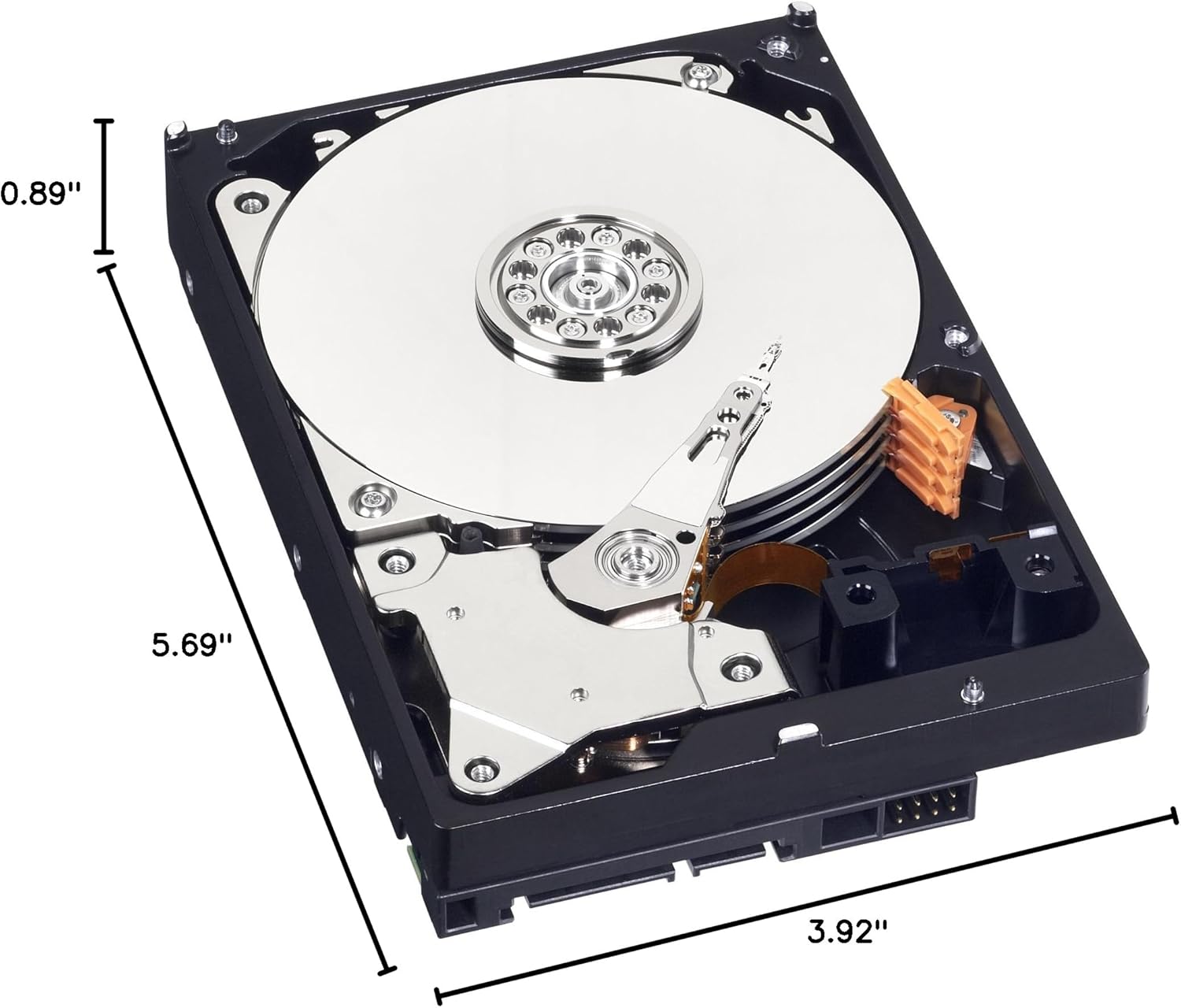
Figure 3: Dimensions of the Western Digital 1TB 3.5" SATA Hard Drive.
9. Garanzija u Appoġġ
For warranty information and technical support, please refer to the official Western Digital webis-sit jew ikkuntattja s-servizz tal-konsumatur tagħhom. Żomm il-prova tax-xiri tiegħek għal talbiet ta’ garanzija.