1. Introduzzjoni
The MS8229 is an auto-ranging digital multimeter designed for professional and home use. It combines multiple measurement functions including AC/DC voltage and current, resistance, frequency, duty cycle, and capacitance. Additionally, it features built-in sensors for sound level, light (Lux), ambient temperature, and humidity, making it a versatile 5-in-1 testing instrument. Its large dual LCD display with backlight ensures clear readings in various conditions.

Figura 1.1: Quddiem view of the MS8229 Digital Multimeter, showing the display, rotary switch, and input jacks.
2. Karatteristiċi ewlenin
- Wiri: 4000 counts, large dual LCD with backlight.
- Sensuri Integrati: Built-in Sound Level Meter, Light Meter (Lux), Ambient Temperature, and Humidity Tester.
- Core Measurements: Tests AC/DC Voltage and Current, Resistance, Frequency, Duty Cycle, and Capacitance.
- Diode & Continuity: Diode Check and Continuity Test with audible buzzer (if resistance is less than 40 ohms).
- Kejl tat-Temperatura: Type K thermocouple contact temperature measurement.
- Funzjonijiet tad-Data: Data Hold and Relative Measurement.
- Operazzjoni: Auto Ranging / Selection.
- Indikatur tal-Enerġija: Wiri ta' Batterija Baxxa.
3. Kontenut tal-Pakkett
Malli tiftaħ il-pakkett, jekk jogħġbok ivverifika li l-oġġetti kollha elenkati hawn taħt huma preżenti u f'kundizzjoni tajba:
- 1 x MASTECH MS8229 Digital Multimeter
- 1 x Test Clip (Test Leads)
- 1 x Temperature Probe (Type K Thermocouple)
- 1 x Manwal Ingliż

Figure 3.1: The MS8229 Multimeter shown with its included test leads, temperature probe, and user manual.
4. Informazzjoni dwar is-Sigurtà
Biex tiżgura t-tħaddim u s-servizz sikuri tal-miter, segwi dawn il-prekawzjonijiet ta' sigurtà:
- Always ensure the meter is in the correct function and range for the measurement being taken.
- Applikax voltage or current that exceeds the maximum rated input for the selected range.
- Oqgħod attent meta taħdem bil-voltag'il fuq minn 30V AC RMS, 42V peak, jew 60V DC. Dawn il-volumitages joħolqu periklu ta' xokk.
- Qabel ma tbiddel il-funzjonijiet jew il-firxiet, skonnettja l-wajers tat-test miċ-ċirkwit li qed jiġi ttestjat.
- Spezzjona l-wajers tat-test għal insulazzjoni bil-ħsara jew metall espost qabel l-użu. Ibdel jekk bil-ħsara.
- Tħaddimx il-miter jekk jidher li għandu l-ħsara jew jekk il-kaxxa tkun miftuħa.
- Ibdel il-batteriji hekk kif jidher l-indikatur ta' batterija baxxa biex tiżgura qari preċiż.
- Segwi l-kodiċijiet tas-sigurtà lokali u nazzjonali kollha.
5. Setup
5.1 Installazzjoni tal-batterija
The MS8229 requires three (3) 1.5V AAA batteries (not included) for operation.
- Kun żgur li l-miter ikun MITFI.
- Sib l-għatu tal-kompartiment tal-batterija fuq wara tal-miter.
- Uża tornavit biex tħoll il-kamin li jżomm l-għatu tal-batterija.
- Neħħi l-għatu.
- Daħħal tliet batteriji AAA, waqt li tosserva l-polarità korretta (+ u -) kif indikat ġewwa l-kompartiment.
- Ibdel l-għatu tal-batterija u waħħalha bil-kamin.
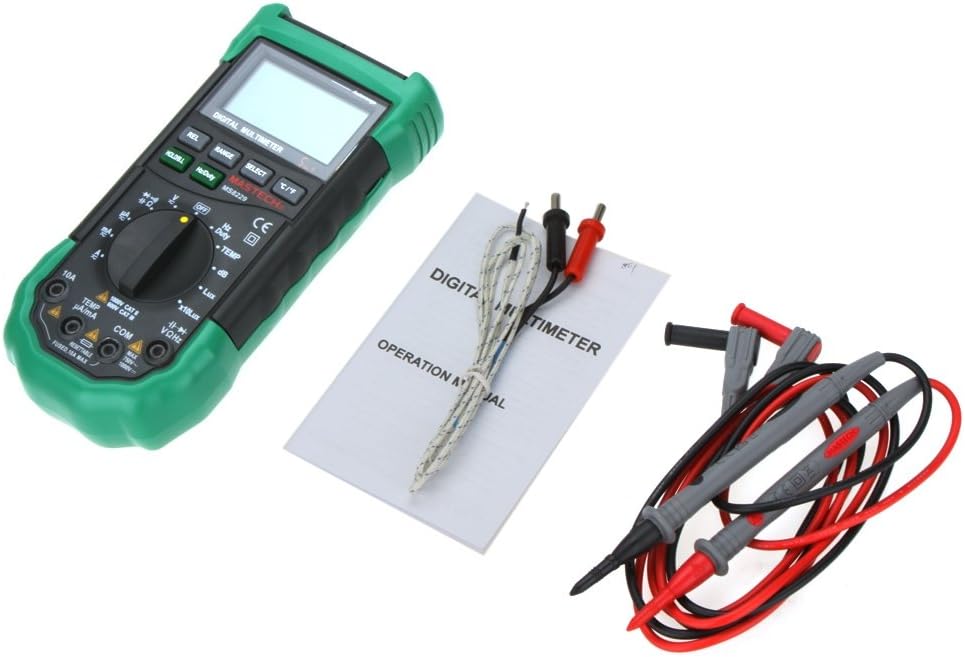
Figura 5.1: View of the battery compartment, showing the slots for three AAA batteries and the fuse location.
5.2 Konnessjoni tal-wajers tat-test
Konnessjoni xierqa tal-wajers tat-test hija kruċjali għal kejl preċiż u sikur.
- Għal ħafna mill-volumtage, resistance, frequency, capacitance, diode, and continuity measurements, insert the red test lead into the VΩHz jack and the black test lead into the COM jack.
- For current measurements (mA/µA), insert the red test lead into the TEMP µA/mA jack and the black test lead into the COM jack.
- For high current measurements (10A), insert the red test lead into the 10A jack and the black test lead into the COM jack.
- For temperature measurements, connect the Type K thermocouple probe to the TEMP µA/mA u COM jacks, observing polarity if applicable.

Figure 5.2: The MS8229 Multimeter with red and black test leads properly inserted into the input jacks.
6. Istruzzjonijiet Operattivi
The MS8229 features a rotary switch for function selection and several buttons for additional features.

Figure 6.1: The MS8229 Multimeter display showing typical readings for humidity and temperature, along with a main measurement.
6.1 Funzjonijiet tas-Swiċċ Rotatorju
Turn the rotary switch to select the desired measurement function:
- MITFI: Turns the meter off.
- V ~: AC Voltage kejl.
- V-: DC Voltage kejl.
- Ω: Kejl tar-reżistenza.
- Dajowd/Kontinwità: Diode test and Continuity test.
- Hz/Dazju: Frequency and Duty Cycle measurement.
- TEMP: Temperature measurement using the Type K thermocouple.
- dB: Sound Level measurement.
- Lux / x10Lux: Light (Illumination) measurement.
- HR: Relative Humidity measurement.
- A~: AC Current measurement (400µA to 10A).
- GĦAL-: DC Current measurement (400µA to 10A).
6.2 Funzjonijiet tal-buttuni
- HOLD/B.L: Press once to hold the current display reading. Press and hold to activate/deactivate the backlight.
- Hz/Dazju: In Frequency/Duty Cycle mode, press to toggle between Hz and Duty Cycle display.
- REL: Activates relative measurement mode, displaying the difference between the current reading and a stored reference value.
- FIRXA: Manually selects the measurement range (overrides auto-ranging).
- AGĦŻEL: Toggles between different functions within a single rotary switch position (e.g., AC/DC in voltage/current modes, Diode/Continuity).
- °C/°F: In Temperature mode, toggles between Celsius and Fahrenheit units.
6.3 Performing Measurements (ExampIL)
6.3.1 DC Voltage Kejl
- Issettja l-iswiċċ li jdur għal V-.
- Daħħal iċ-ċomb aħmar tat-test fil- VΩHz jack and the black test lead into the COM jack.
- Connect the test leads in parallel to the DC voltagIs-sors jew il-komponent li għandu jitkejjel.
- Aqra l-voltagIl-valur fuq il-wiri.
6.3.2 Kejl tar-Reżistenza
- Kun żgur li ċ-ċirkwit jew il-komponent ma jkollux l-enerġija qabel ma tkejjel ir-reżistenza.
- Issettja l-iswiċċ li jdur għal Ω.
- Daħħal iċ-ċomb aħmar tat-test fil- VΩHz jack and the black test lead into the COM jack.
- Qabbad il-wajers tat-test mal-komponent li r-reżistenza tiegħu trid titkejjel.
- Aqra l-valur tar-reżistenza fuq il-wiri.
6.3.3 Kejl tat-Temperatura
- Issettja l-iswiċċ li jdur għal TEMP.
- Connect the Type K thermocouple probe to the TEMP µA/mA u COM ġakkijiet.
- Place the tip of the thermocouple probe on or near the object/area whose temperature is to be measured.
- Agħfas il- ° C / ° F buttuna biex taqleb bejn Celsius u Fahrenheit.
- Aqra l-valur tat-temperatura fuq id-displej.
7. Manutenzjoni
7.1 Tindif
Imsaħ il-każ bl-adamp cloth and mild detergent. Do not use abrasives or solvents. Keep the input terminals free of dirt or debris.
7.2 Sostituzzjoni tal-batterija
When the low battery indicator appears on the display, replace the batteries as described in Section 5.1. Prompt battery replacement ensures continued accuracy and proper operation.
7.3 Sostituzzjoni tal-Fjus
The 10A input jack is protected by a resettable fuse. If the 10A current measurement function stops working, it indicates the fuse has tripped. Disconnect the meter from the circuit, turn it off, and wait a few moments for the fuse to reset. If the fuse continues to trip, check for short circuits or excessive current draw in your application.
7.4 Ħażna
If the meter is not to be used for an extended period, remove the batteries to prevent leakage and damage to the meter.
8 Issolvi l-problemi
If the meter does not function correctly, check the following:
- Ebda Wiri jew Wiri Dgħajjef: Iċċekkja l-installazzjoni tal-batterija u ibdel il-batteriji jekk meħtieġ.
- Qari Skorrett: Ensure the correct function and range are selected. Verify test lead connections. Check for damaged test leads.
- "OL" jew Indikazzjoni ta' Tagħbija żejda: The measured value exceeds the selected range. Switch to a higher range or ensure the input is within the meter's maximum specifications.
- Il-Kejl tal-Kurrent Mhux Jaħdem: Check if the 10A fuse has tripped (see Section 7.3). Ensure test leads are connected to the correct current input jacks.
- Continuity Buzzer Not Sounding: Ensure the resistance is below 40 ohms for the buzzer to activate.
Jekk il-problemi jippersistu, ikkuntattja l-appoġġ tal-klijent.
9. Speċifikazzjonijiet
| Tip ta' Kejl | Firxa / Valur | Eżattezza |
|---|---|---|
| DC Voltage (DCV) | 400m/4/40/400/1000V | 0.7%+2 |
| AC Voltage (ACV) | 400m/4/40/400V; 750V | 0.8%+3; 1%+3 |
| Kurrent DC (DCA) | 400/4000µ/40m/400mA; 4/10A | 1.2%+3; 2.0%+10 |
| Kurrent AC (ACA) | 400/4000µ/40m/400mA; 4/10A | 1.5%+5; 3.0%+10 |
| Reżistenza | 400/4K/40K/400K/4MΩ; 40MΩ | 1.2%+5; 2%+5 |
| Kapaċità | 40n/400n/4µ/40µ/100µF | 3.0%+3 |
| Frekwenza | 10/100/1K/10K/100KHz | 2.0%+5 |
| Temperatura | -20 ~ 1000°C; 4 ~ 1832°F | 2.0% |
| Umdità Relattiva (RH) | 20 sa 95% | 5.0% |
| Dawl (Lux) | 4,000/40,000 Lux | 5.0% |
| Livell tal-Ħsejjes (dB) | 40 ~ 100dB | 3.5% |
| Test tad-Diode | Iva | |
| Tester tal-kontinwità | Buzzer if resistance < 40 ohms | |
| Iċ-Ċiklu tax-Xogħol | 0.1% - 99.9% | 3.0% |
| Provvista tal-Enerġija | 3 * 1.5V AAA batteries (not included) | |
| Dimensjoni | 195 * 92 * 55mm | |
| Piż tal-Prodott | 390g |
10. Garanzija u Appoġġ
This product is designed for reliability and performance. For any issues or inquiries not covered in this manual, please refer to your purchase documentation for warranty details or contact the retailer/manufacturer's customer support. Keep your purchase receipt as proof of purchase.


