1. Introduzzjoni
This manual provides essential information for the installation, operation, and maintenance of your Blink XT Home Security Camera Add-on Camera (1st Gen). This camera is designed to expand your existing Blink security system, offering weatherproof outdoor and indoor monitoring capabilities with long battery life and HD video.

Stampa 1.1: Quddiem view of the Blink XT Camera highlighting key features.
2. X'inhu Inkluż
Your Blink XT Add-on Camera package typically includes:
- Blink XT Camera (1st Gen)
- 2 x AA 1.5V Lithium Batteries (pre-installed or separate)
- Kit tal-Immuntar (viti u ankri tal-ħajt)
Nota: This is an add-on camera and requires an existing Blink Sync Module and a Blink account to function. The Sync Module is not included with this add-on camera.
3. Gwida ta' Setup
3.1. Installazzjoni tal-batterija
The Blink XT camera uses two AA 1.5V Lithium batteries for power. These are typically pre-installed. If not, open the battery compartment on the back of the camera and insert the batteries, ensuring correct polarity.
3.2. Adding the Camera to Your System
- Ensure your existing Blink Sync Module is powered on and connected to your Wi-Fi network.
- Open the Blink Home Monitor app on your smartphone or tablet.
- From the home screen, tap the '+' icon (Add Device) or navigate to 'Settings' and select 'Add a Device'.
- Select 'Blink Camera' and follow the on-screen prompts to scan the QR code on the back of your camera or manually enter its serial number.
- The app will guide you through connecting the camera to your Sync Module.

Image 3.1: The Blink XT Camera positioned next to a smartphone, illustrating the integration with the mobile application.
3.3. Immuntar tal-Kamera
The Blink XT camera is weatherproof and can be mounted indoors or outdoors. Choose a location that provides the desired viewing angle and is within range of your Sync Module's signal.
- Indoor Mounting: The camera can be placed on a flat surface or mounted to a wall using the included mounting kit.
- Immuntar fuq barra: For outdoor use, ensure the camera is securely mounted to a stable surface. Consider placing it under an overhang or in a location that offers some protection from direct, prolonged exposure to extreme weather, although it is designed to be weatherproof.
Use the included screws and wall anchors to secure the camera's mounting bracket. Once the bracket is in place, attach the camera to the bracket.

Immaġni 3.2: Eksample of outdoor mounting, showing the Blink XT Camera attached to a tree.

Image 3.3: The Blink XT Camera demonstrating its weatherproof design with water droplets on its surface.
4. Kif Tħaddem il-Kamera Tiegħek
4.1. Using the Blink Home Monitor App
The Blink Home Monitor app is your primary interface for controlling and monitoring your camera. It allows you to:
- Live View: Tap the camera icon to view a live feed from your camera.
- Sejbien tal-Moviment: Adjust motion detection sensitivity and activity zones to customize alerts.
- Sistema ta' Arm/Disarm: Arm your system to enable motion detection recording or disarm it when not needed.
- View Clips: Access recorded motion clips from the cloud storage.
- Settings: Configure camera settings, including video quality, night vision, and audio.
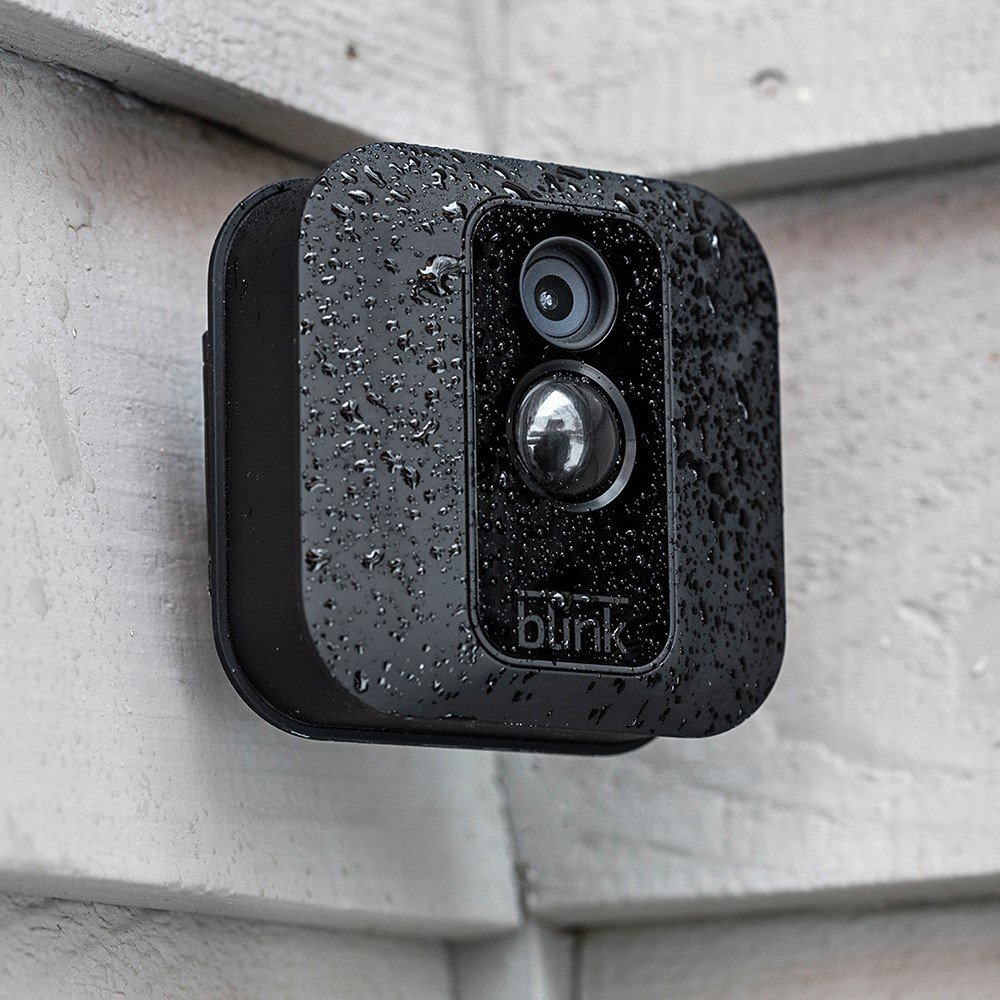
Image 4.1: A smartphone screen showing the Blink Home Monitor app interface with multiple camera feeds.
4.2. Ħażna Cloud
Blink XT cameras offer free cloud storage for motion-activated video clips. There are no monthly fees or service contracts required for this feature. Clips are stored for a limited time before being automatically deleted.
4.3. Integrazzjoni ta' Alexa
The Blink XT camera can be integrated with Alexa-enabled devices, such as Amazon Echo. This allows for voice control to arm/disarm your system, view live feeds on compatible devices, and receive motion alerts.
- Enable the Blink skill in your Alexa app.
- Link your Blink account.
- Discover your Blink devices.

Image 4.2: The Blink XT Camera positioned alongside Amazon Echo devices, demonstrating its compatibility with Alexa.
5. Manutenzjoni
5.1. Sostituzzjoni tal-batterija
The Blink XT camera boasts a battery life of up to two years under typical usage. When the batteries are low, you will receive a notification in the Blink app. Replace them with two new AA 1.5V Lithium non-rechargeable batteries. Do not use alkaline or rechargeable batteries, as they may affect performance and battery life.
5.2. Tindif tal-Kamera
To ensure optimal video quality, periodically clean the camera lens and the surrounding housing. Use a soft, dry, lint-free cloth. For stubborn dirt, a slightly damp cloth can be used, but ensure no moisture enters the battery compartment or other openings.
5.3. Weatherproofing
While the Blink XT camera is weatherproof, extreme conditions can still impact its performance or longevity. Ensure the battery compartment cover is securely closed to maintain its water resistance. If mounted outdoors, periodically check for any debris or obstructions that might block the camera's view or affect its sensors.
6 Issolvi l-problemi
| Ħruġ | Kawża Possibbli | Soluzzjoni |
|---|---|---|
| Camera not connecting to Sync Module | Out of range, Wi-Fi interference, Sync Module offline | Move camera closer to Sync Module. Check Sync Module's internet connection. Restart Sync Module. |
| Kwalità fqira tal-vidjo | Dirty lens, low light, weak Wi-Fi signal | Clean the camera lens. Ensure adequate lighting or enable night vision. Improve Wi-Fi signal strength. |
| Is-sejbien tal-moviment mhux qed jaħdem | Sensitivity too low, activity zones not set, system disarmed | Adjust motion sensitivity in the app. Configure activity zones. Ensure system is armed. |
| Ħajja qasira tal-batterija | Ħajja frekwenti views, high motion activity, incorrect battery type | Reduce live view usage. Adjust motion settings. Ensure only Lithium AA 1.5V batteries are used. |
For more detailed troubleshooting or persistent issues, refer to the Blink support websit jew ikkuntattja lis-servizz tal-konsumatur.
7. Speċifikazzjonijiet
- Mudell: Blink XT Camera Add-On (1st Gen)
- Riżoluzzjoni tal-vidjo: Sa 1080p HD
- Qasam ta View: 110 grad
- Viżjoni bil-lejl: Infrared (IR) illumination
- Sors tal-Enerġija: 2 x AA 1.5V Lithium non-rechargeable batteries
- Ħajja tal-batterija: Up to 2 years (typical usage)
- Konnettività: Wi-Fi (2.4GHz)
- Temperatura operattiva: -4°F sa 113°F (-20°C sa 45°C)
- Reżistenza għat-temp: Yes (IP65 rated)
- Kompatibilità tal-App: iOS 10.3 or higher, Android 5 Lollipop or higher
- Integrazzjoni: Amazon Alexa
8. Garanzija u Appoġġ
For information regarding the product warranty, please refer to the documentation included with your original Blink system purchase or visit the official Blink websit. It-termini u l-kundizzjonijiet tal-garanzija jistgħu jvarjaw skont ir-reġjun u d-data tax-xiri.
For technical support, FAQs, and additional resources, please visit the Blink support page on the official Blink website or Amazon's Blink store page: