Prodott Overview
The Fanvil X3S is a 2-line color screen SIP phone designed for efficient communication in office environments. It features an extra-large 320 x 240 2.4-inch color LCD for enhanced visual information and user experience. This model supports HD Voice and offers dual 10/100 Mbps network ports. It is suitable for various network setups and supports secure communication protocols.
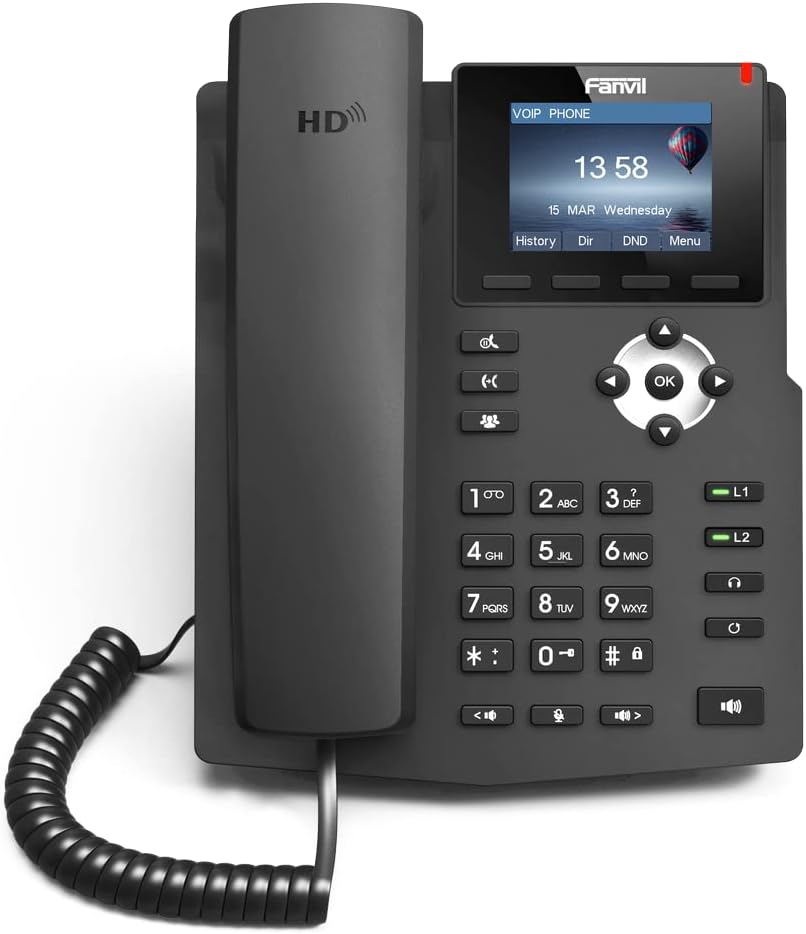
Immaġni: Quddiem view of the Fanvil X3S SIP Phone, showing the handset, keypad, navigation buttons, and color display screen. The screen displays time and date, with menu options below.
Kontenut tal-Pakkett
Qabel ma tipproċedi bl-installazzjoni, ivverifika li l-oġġetti kollha huma preżenti fil-pakkett:
- Fanvil X3S SIP Phone Unit
- Handset
- Korda tal-idejn
- Cable Ethernet
- Power Adapter (for non-PoE models)
- Desk Stand
- Gwida ta 'Installazzjoni Mgħaġġla
Setup u Installazzjoni
1. L-Immuntar tat-Telefon
- Attach the desk stand to the main unit by aligning the tabs and sliding it into place until it clicks.
- Connect the coiled handset cord to the handset and the designated handset port on the phone base.
2. Konnessjoni man-Netwerk u l-Enerġija
- Konnessjoni tan-Netwerk: Connect one end of the Ethernet cable to the LAN port on the phone and the other end to a network switch or router.
- Konnessjoni tal-Enerġija:
- If using the included power adapter: Connect the power adapter to the power port on the phone and then plug it into an electrical outlet.
- Note: This model (X3S) does not support Power over Ethernet (PoE). A power adapter is required.
3. Konfigurazzjoni Inizjali
Upon first boot, the phone will attempt to obtain an IP address via DHCP. You may need to access the phone's web interface or use the phone's menu for SIP account registration and further network settings. Refer to your VoIP service provider's instructions for specific SIP account details.
Istruzzjonijiet Operattivi
Funzjonijiet Bażiċi tas-Sejħiet
- Tagħmel Sejħa: Lift the handset, dial the number, and press the Ċempel soft key jew il- # key. Alternatively, dial the number and then lift the handset.
- Tweġiba għal Sejħa: Neħħi l-idejn jew agħfas il- Speaker buttuna.
- Tmiem Sejħa: Erġa’ poġġi l-handset jew agħfas il-buttuna Tmiem Sejħa soft key.
- Ċempil mill-ġdid: Agħfas il- Rifilja soft key to call the last dialed number.
Karatteristiċi Avvanzati
- Żomm: Waqt sejħa, agħfas Żomm soft key. Agħfasha mill-ġdid biex tkompli s-sejħa.
- Trasferiment: Waqt sejħa, agħfas Trasferiment soft key, ċempel in-numru l-ġdid, u mbagħad agħfas Trasferiment għal darb'oħra (trasferiment għama) jew stenna li l-parti twieġeb qabel ma tagħfas Trasferiment (trasferiment assistit).
- Siekta: Agħfas il- Mute buttuna biex tissettja l-mikrofonu tiegħek waqt telefonata. Agħfas mill-ġdid biex tneħħi l-istorbju.
- Speakerphone: Agħfas il- Speaker button to toggle speakerphone mode.
- Aġġustament tal-Volum: Uża l- Volum buttons during a call to adjust handset, headset, or speaker volume.
- BLF (Busy Lamp Field) Buttons: The X3S features 2 BLF buttons. These can be configured to monitor the status of other extensions (busy, ringing, available) and allow for quick dialing or call pickup. Configuration is typically done via the phone's web interface.
Manutenzjoni
Proper maintenance ensures the longevity and optimal performance of your Fanvil X3S SIP Phone.
- Tindif: Uża drapp artab u niexef biex tnaddaf il-wiċċ tat-telefon. Għal marki persistenti, neħħi ftit ċarruta.amp cloth with mild, non-abrasive cleaner can be used. Avoid using harsh chemicals, solvents, or abrasive materials.
- Ambjent: Żomm it-telefon f'ambjent niexef, 'il bogħod mix-xemx diretta, sħana eċċessiva, u umdità. Kun żgur li jkun hemm ventilazzjoni xierqa madwar l-apparat.
- Kejbils: Periodically check all connected cables (handset cord, Ethernet, power) for any signs of damage or loose connections.
- Aġġornamenti tas-Software: Regularly check the Fanvil official website for firmware updates. Keeping the firmware updated can improve performance, add new features, and address security vulnerabilities. Firmware updates are typically performed via the phone's web interface.
Issolvi l-problemi
| Problema | Kawża Possibbli | Soluzzjoni |
|---|---|---|
| It-telefon ma jixgħelx. | L-ebda konnessjoni tal-enerġija; adapter tal-enerġija difettuż. | Ensure power adapter is securely connected to the phone and a working electrical outlet. Test outlet with another device. |
| L-ebda ton tal-arloġġ. | Network connection issue; SIP account not registered. | Check Ethernet cable connection. Verify network connectivity. Ensure SIP account is correctly configured and registered (check phone display for registration status). Restart the phone. |
| Ma nistax nagħmel jew nirċievi telefonati. | SIP account not registered; network firewall issues; incorrect dial plan. | Confirm SIP account registration. Check network firewall settings (ports 5060 UDP/TCP, RTP ports). Consult your VoIP service provider for dial plan or network specific issues. |
| Kwalità awdjo fqira (eku, statiku). | Network congestion; faulty handset/headset; environmental interference. | Check network bandwidth. Try a different handset or headset. Ensure phone is not near strong electromagnetic interference sources. |
| Id-displej huwa vojt jew iffriżat. | Żball fis-softwer; problema tal-enerġija. | Unplug the power adapter, wait 10 seconds, then plug it back in to restart the phone. If issue persists, contact support. |
Speċifikazzjonijiet
| Karatteristika | Dettall |
|---|---|
| Mudell | Fanvil X3S |
| Linji SIP | 2 |
| Wiri | 2.4-inch (320x240) Color LCD |
| Vuċi HD | Appoġġjati |
| BLF Buttons | 2 |
| Portijiet tan-Netwerk | Doppju 10/100 Mbps Ethernet |
| Appoġġ PoE | No (External Power Adapter Required) |
| Għażliet ta 'Installazzjoni | Desktop / Wall-mount |
| Dimensjonijiet (L x W x H) | 2.52 x 8.82 x 10.98 pulzieri (6.4 x 22.4 x 27.9 ċm) |
| Piż tal-oġġett | 1.65 liri (0.75 kg) |
| Manifattur | Fanvil |
Garanzija u Appoġġ
For warranty information, please refer to the warranty card included with your product or visit the official Fanvil websit. It-termini u l-kundizzjonijiet tal-garanzija jistgħu jvarjaw skont ir-reġjun.
For technical support, firmware updates, and additional resources, please visit the Fanvil support portal:
Fanvil Official Support Websit
When contacting support, please have your product model (X3S) and serial number ready.


