1. Introduzzjoni
The EMEET PIXY is a sophisticated dual-camera AI-powered PTZ (Pan-Tilt-Zoom) 4K webcam designed for high-quality video streaming, online meetings, and content creation. It integrates advanced AI features for intelligent tracking, autofocus, and audio processing to enhance your visual and auditory experience.

Image: EMEET PIXY Dual-Camera AI-Powered PTZ 4K Webcam overview.
2. Setup
2.1 X'hemm fil-Kaxxa

Image: Contents of the EMEET PIXY product packaging.
- EMEET PIXY Webcam x 1
- Webcam Clip x 1
- 5 ft USB 2.0 C-C Cable x 1
- Type-C to A adapter x 1
- Manwal għall-Utent x 1
2.2 Installazzjoni Fiżika
The EMEET PIXY can be mounted using the included webcam clip or a tripod (sold separately).
- Bl-użu tal- Webcam Clip: Waħħal il- webcam clip to the bottom of the PIXY camera. Place the camera with the clip securely on top of your monitor or laptop screen. Adjust the angle as needed.
- L-użu ta' Tripod: The camera base features a standard tripod screw mount. Attach the PIXY directly to a compatible tripod for flexible positioning.

Image: Demonstrates various mounting options and adjustable heights for the EMEET PIXY.
2.3 Konnessjoni
Connect the EMEET PIXY to your computer using the provided USB-C to C cable. If your computer only has USB-A ports, use the included Type-C to A adapter.
- Plug the USB-C end of the cable into the camera.
- Plug the other end (USB-C or USB-A with adapter) into an available USB port on your computer.
- The camera is plug-and-play and should be recognized by your operating system automatically.
2.4 Installazzjoni tas-Softwer
For full control and advanced features, download and install the EMEET STUDIO software from the official EMEET website. EMEET STUDIO is compatible with Windows 10+ (64-bit) and macOS 10.14+.

Image: EMEET PIXY connected to a laptop, showing the EMEET STUDIO software interface and USB connection.
3. Istruzzjonijiet Operattivi
3.1 Dual-Camera AI-Powered PTZ Features
The EMEET PIXY features a unique dual-camera system for enhanced performance:
- 4K Main Imaging Camera: Equipped with a 1/2.55" Sony sensor and PDAF focus for ultra-clear UHD 4K@30FPS video.
- Auxiliary AI Camera: Detects face position to optimize autofocus and exposure, ensuring flawless skin tones in various lighting conditions.
- PDAF & AI Autofocus: Combined for rapid 0.2s focusing, significantly faster than conventional webkammijiet.

Image: Diagram highlighting the 4K imaging camera and AI-assisted camera components of the EMEET PIXY.

Image: Visual comparison demonstrating the rapid 0.2s autofocus speed of EMEET PIXY.
3.2 Intelligent Tracking and Gesture Control
The PIXY utilizes a 3-chip AI system for smooth and responsive tracking:
- 3-Chip AI: Dedicated chips for imaging, AI assistance (motion prediction, lighting), and PTZ control (310° pan / 180° tilt).
- Kontroll tal-ġesti: Activate features by holding an open palm centered for 2 seconds.

Image: EMEET PIXY showcasing its intelligent auto-tracking capabilities and effortless gesture control.

Image: EMEET PIXY demonstrating face tracking for seamless Switch 2 gameplay, with PTZ movement indicated.
3.3 EMEET STUDIO Control Software
The EMEET STUDIO software provides comprehensive control over your PIXY webcam:
- Pożizzjonijiet issettjati minn qabel: Instantly switch between predefined camera angles.
- Modalità Whiteboard: Automatically detects whiteboards for optimal framing; manual adjustment available.
- Modalità ta' Privatezza: Activate by tilting the PIXY downward, or via timer/app settings.
- FOV Adjustment: Qasam ta View is adjustable in 1080P & 2K 30FPS modes; locked in 4K 30FPS & 1080P 60FPS for stability.
- AIGC: Built-in Artificial Intelligence Generated Content for creating shot lists and movements.
- Modalità Ritratt: Instantly rotate PIXY and flip the image for mobile-ready content.

Image: EMEET STUDIO software interface displaying preset positions and PTZ control options for the EMEET PIXY.

Image: EMEET PIXY in whiteboard mode, showing automatic identification and manual adjustment features.

Image: EMEET PIXY demonstrating privacy mode activation by tilting the camera or through software settings.
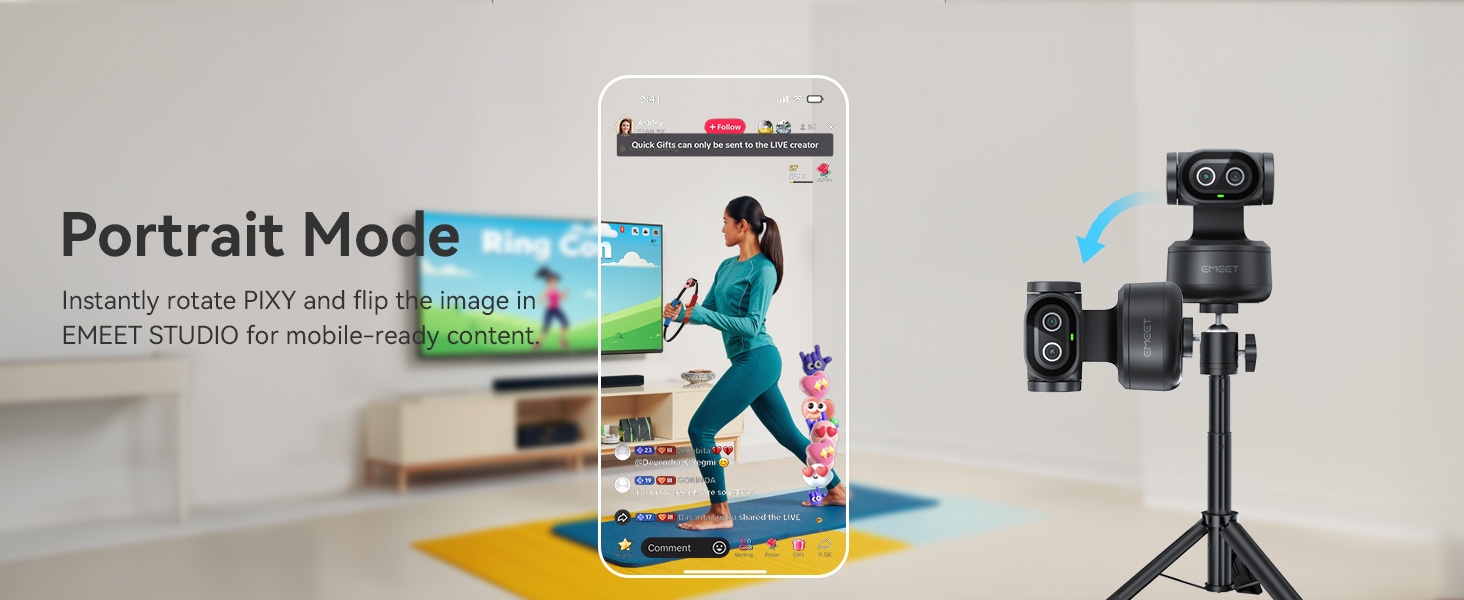
Image: EMEET PIXY in portrait mode, optimized for mobile content creation with image flipping.
3.4 3-Mic Array for Multiple Scenes
The EMEET PIXY features a triple-microphone array with various audio modes:
- Modalità Live: Filters steady background noise (e.g., fans, AC) for clear live streams.
- Modalità ta' Kanċellazzjoni tal-Istorbju: Blocks both steady hums and sudden sounds (e.g., keyboard clicks, door slams) for podcasts, courses, and recordings.
- Original Sound Mode: Captures full ambient detail for music and singing.

Image: Diagram showing the triple-microphone array and different audio modes (Live, Noise Canceling, Original Sound) of the EMEET PIXY.
3.5 Kompatibilità
The EMEET PIXY is compatible with a wide range of platforms and operating systems:
- Pjattaformi: OBS, Twitch, YouTube, Facebook, XSplit, ManyCam, Switch 2 Camera, Xbox, PS5 (requires external capture card).
- Rekwiżiti tas-Sistema: Windows 10+ (64-bit, not ARM), macOS 10.14+.

Image: EMEET PIXY integrated into a live streaming setup, highlighting compatibility with various platforms.
4. Manutenzjoni
To ensure optimal performance and longevity of your EMEET PIXY webcam, segwi dawn il-linji gwida tal-manutenzjoni:
- Tindif tal-Lenti: Gently wipe the camera lenses with a soft, lint-free cloth. Avoid using harsh chemicals or abrasive materials that could scratch the lens.
- Tneħħija tat-Trab: Use a soft brush or compressed air to remove dust from the camera body and microphone grilles.
- Ħażna: When not in use, store the camera in a clean, dry place away from direct sunlight and extreme temperatures. Utilize the privacy mode or cover the lens to protect it from dust and accidental activation.
- Kura tal-Cable: Evita li tgħawweġ jew iddawwar il-kejbil USB b'mod eċċessiv biex tevita l-ħsara.
5 Issolvi l-problemi
If you encounter issues with your EMEET PIXY, refer to the following common troubleshooting steps:
- Kamera Mhux Rilevata:
- Ensure the USB cable is securely connected to both the camera and your computer.
- Ipprova qabbad ma 'port USB differenti.
- Ibda mill-ġdid il-kompjuter tiegħek.
- Check your computer's device manager (Windows) or System Information (macOS) to see if the camera is listed.
- Kwalità Fqira tal-Immaġni:
- Ensure the camera lens is clean and free of smudges.
- Check your lighting conditions. Adequate lighting is crucial for optimal image quality.
- Open EMEET STUDIO and adjust brightness, contrast, and other image settings.
- Verify that the camera is set to the desired resolution (e.g., 4K) in your application settings.
- Ebda Awdjo jew Kwalità Awdjo Fqira:
- Ensure the PIXY is selected as the default microphone in your computer's sound settings and your video conferencing application.
- Check the microphone mode in EMEET STUDIO (Live, Noise Canceling, Original Sound) and select the most appropriate one for your environment.
- Kun żgur li l-mikrofonu ma jkunx siekta.
- AI Tracking Issues:
- Ensure you are within the recommended tracking range and that your face is clearly visible to the camera.
- Avoid rapid, jerky movements that might cause the camera to lose track.
- Check EMEET STUDIO settings to ensure tracking is enabled and configured correctly.
6. Speċifikazzjonijiet
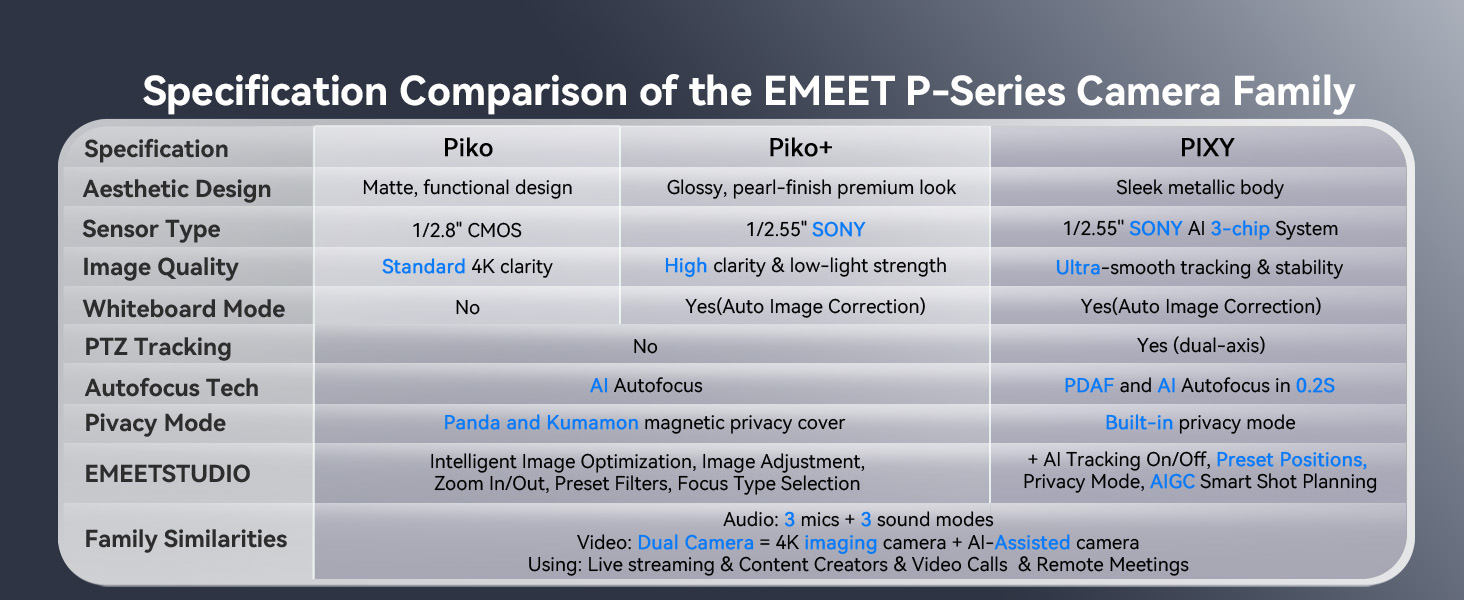
Image: Comparison table of EMEET P-Series camera specifications, including PIXY.
| Karatteristika | Dettall |
|---|---|
| Dimensjonijiet tal-Prodott | 2.09 x 2.09 x 2.87 pulzieri |
| Piż tal-oġġett | 11.3 uqija |
| Numru tal-Mudell tal-Oġġett | E3138 |
| Brand | EMEET |
| Teknoloġija tas-Sensor tar-Ritratti | SONY |
| Riżoluzzjoni tal-Qbid tal-Vidjo | 4K |
| Tul Fokali Massimu | 3000 Millimetru |
| Apertura massima | 1.8 f |
| Tip ta' Memorja Flash | NOT Available, Rely on Your PC/Mac |
| Format tal-Qbid tal-Vidjo | YUY2 / MJPEG |
| Format awdjo appoġġjat | AAC, PCM |
| Daqs tal-Iskrin | 3.8 Pulzier |
| Teknoloġija tal-Konnettività | USB |
7. Garanzija u Appoġġ
- Garanzija: EMEET provides a 2-year exclusive warranty for this product.
- Appoġġ Tekniku: Lifetime professional technical team support is available. For assistance, please visit the official EMEET websit jew ikkuntattja lis-servizz tal-konsumatur tagħhom.


