Introduzzjoni
The Yaesu FT-25R is a robust and reliable 144 MHz VHF FM handheld transceiver designed for clear and efficient communication. This manual provides essential information for the safe and effective operation of your device, covering setup, basic functions, and maintenance.
Informazzjoni dwar is-Sigurtà
- Aqra l-istruzzjonijiet kollha: Before operating the transceiver, thoroughly read and understand all instructions provided in this manual.
- Antenna safety: Never touch the antenna during transmission. Avoid operating the transceiver near unshielded blasting caps or in explosive atmospheres.
- Kura tal-batterija: Use only the specified battery pack and charger. Do not short-circuit, incinerate, or disassemble the battery pack.
- Espożizzjoni għall-ilma: While the FT-25R has an IP54 rating for dust and splash protection, avoid submerging the unit in water.
- Protezzjoni tas-smigħ: Prolonged exposure to high volume levels can cause hearing damage. Adjust the volume to a comfortable level.
Kontenut tal-Pakkett
Ivverifika li l-pakkett tiegħek fih l-oġġetti li ġejjin:
- Yaesu FT-25R Transceiver Unit
- Antenna
- Pakkett tal-batterija
- Ċarġer tal-batterija
- Clip taċ-ċinturin
- Manwal għall-Utent (dan id-dokument)
Prodott Overview
Familiarize yourself with the various parts of your FT-25R transceiver.
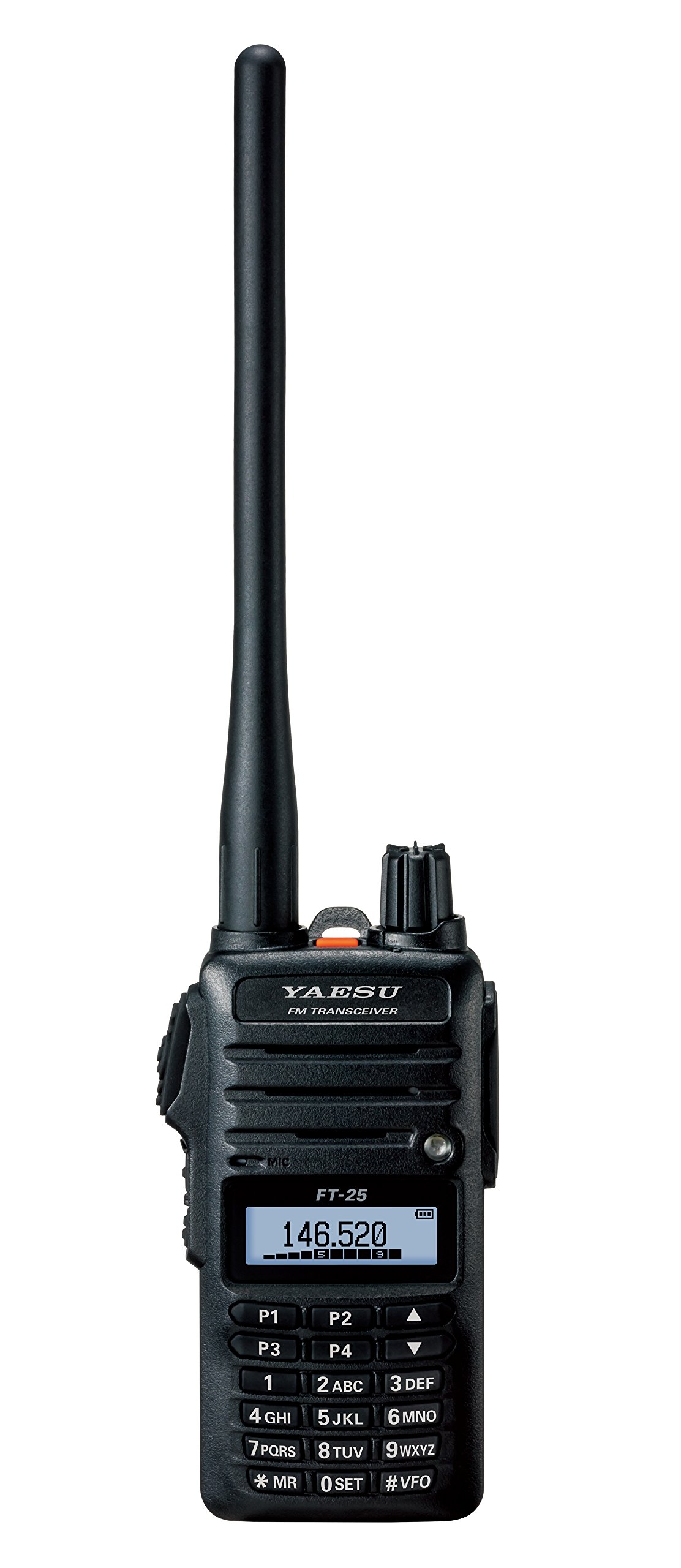
Figura 1: Quddiem view of the Yaesu FT-25R transceiver, showing the antenna, volume/power knob, display, and keypad. The display shows "146.520" MHz, indicating the current operating frequency. The keypad includes numerical inputs and function keys like P1-P4, MR, SET, and VFO.
Komponenti Ewlenin:
- Antenna: Għat-trażmissjoni u r-riċeviment ta' sinjali tar-radju.
- Pum tal-Volum/Qawwa: Jikkontrolla l-qawwa ON/OFF u l-volum tal-awdjo.
- Display LCD: Shows frequency, channel number, battery status, and other operational indicators.
- Tastiera: Used for frequency entry, channel selection, and accessing various functions.
- Buttuna PTT (Agħfas biex Titkellem): Located on the side, press to transmit.
- Speaker/Jack tal-Mikrofonu: Għal aċċessorji awdjo esterni.
Setup
1. Installazzjoni u Iċċarġjar tal-batterija:
- Ensure the transceiver is powered off.
- Align the battery pack with the battery compartment on the back of the transceiver.
- Żerżaq il-pakkett tal-batterija f'postu sakemm tikklikkja sew.
- Connect the battery charger to a power outlet and then to the charging port on the transceiver or battery pack.
- Allow the battery to charge fully before first use (refer to charger indicator for status).
2. Antenna Attachment:
- Screw the supplied antenna clockwise onto the antenna connector on the top of the transceiver until it is finger-tight. Do not overtighten.
3. Belt Clip Installation:
- Attach the belt clip to the designated area on the back of the transceiver using the provided screws.
Operazzjoni Bażika
1. Power On/Off and Volume:
- To power on, rotate the Volume/Power knob clockwise until it clicks.
- To adjust volume, continue rotating the knob.
- Biex titfi, dawwar il-pum kontra l-arloġġ sakemm tikklikkja.
2. Frequency Selection (VFO Mode):
- Agħfas il- #VFO key to enter VFO (Variable Frequency Oscillator) mode.
- Use the numeric keypad to directly enter the desired frequency (e.g., 146520 for 146.520 MHz).
- Inkella, uża l- UP/ISĦU arrow keys (above 2ABC and 5JKL) to tune the frequency in steps.
3. Trażmissjoni u Riċeviment:
- To receive, simply listen to the speaker. The display will show the current frequency.
- Biex tittrażmetti, agħfas u żomm il-buttuna PTT button on the side of the transceiver. Speak clearly into the microphone.
- Irrilaxxa l- PTT button to return to receive mode.
Karatteristiċi Avvanzati
1. Memory Channel Programming:
- Tune to the desired frequency in VFO mode.
- Agħfas il- *MR key to enter Memory Recall mode.
- Select an empty memory channel using the UP/ISĦU ċwievet tal-vleġeġ.
- Agħfas u żomm il- *MR key again until you hear a beep, indicating the frequency is saved.
2. Skennjar:
- The FT-25R supports various scanning functions (e.g., VFO scan, Memory scan). Consult the full manual for detailed instructions on activating and customizing scan modes.
3. Squelch Adjustment:
- The squelch circuit mutes background noise when no signal is present. Adjust the squelch level via the menu (0SET key) to an appropriate level where noise is suppressed but weak signals can still be received.
Manutenzjoni
- Tindif: Uża artab, damp drapp biex tnaddaf il-barra tat-transceiver. Tużax kimiċi ħarxa jew prodotti tat-tindif li joborxu.
- Kura tal-batterija: To prolong battery life, avoid overcharging or completely discharging the battery frequently. Store the transceiver and battery in a cool, dry place when not in use for extended periods.
- Antenna: Periodically check the antenna connection for tightness.
Issolvi l-problemi
| Problema | Kawża Possibbli | Soluzzjoni |
|---|---|---|
| Ebda qawwa | Batterija skargata jew installata ħażin. | Iċċarġja l-batterija jew erġa' installaha b'mod korrett. |
| Ma jistax jittrażmetti jew jirċievi | Incorrect frequency, squelch too high, or antenna not connected. | Verify frequency, adjust squelch, check antenna connection. |
| Kwalità fqira tal-awdjo | Low battery, weak signal, or external interference. | Charge battery, move to an area with better signal, check for interference sources. |
Speċifikazzjonijiet
| Karatteristika | Dettall |
|---|---|
| Brand | YAESU |
| Numru tal-Mudell | FT-25R |
| Medda ta' Frekwenzi | 144 MHz VHF (Mono Band) |
| Piż tal-oġġett | 8.4 uqija (madwar 238 gramma) |
| Dimensjonijiet tal-Prodott | 3 x 1.5 x 5 pulzieri (madwar 7.6 x 3.8 x 12.7 ċm) |
| Klassifikazzjoni tal-Protezzjoni Internazzjonali | IP54 (Dust and Splash Protection) |
| Numru ta 'Kanali | 1 |
| UPC | 702685259222, 788026159512 |
Garanzija u Appoġġ
The Yaesu FT-25R transceiver comes with a 3-Sena Garanzija from the date of purchase. This warranty covers manufacturing defects under normal use. For warranty claims or technical support, please contact your authorized Yaesu dealer or visit the official Yaesu websit għal informazzjoni dwar is-servizz.
For further assistance, refer to the comprehensive user manual available on the Yaesu support portal or contact customer service.


