Introduzzjoni
This user manual provides essential information for the safe and effective operation of your APA 16623 Digital Workshop Battery Charger. This microprocessor-controlled battery charger is designed for various types of lead-acid batteries, including AGM, Gel, Wet, and Maintenance-Free batteries, and aims to extend battery life. It features advanced automatic protection mechanisms against overheating, short circuits, and reverse polarity. The integrated multi-function indicator provides real-time feedback on charging progress and overall battery health. Please read this manual thoroughly before first use and keep it for future reference.
Istruzzjonijiet tas-Sigurtà
Dejjem osserva l-prekawzjonijiet ta' sigurtà li ġejjin biex tevita korriment jew ħsara lill-apparat:
- Aqra l-istruzzjonijiet kollha qabel ma tuża l-ċarġer.
- Tesponix il-ċarġer għax-xita jew kundizzjonijiet imxarrbin.
- Uża biss f'żoni b'ventilazzjoni tajba.
- Kun żgur li l-ċarġer huwa skonnettjat mill-provvista tal-enerġija qabel ma tagħmel jew tkisser konnessjonijiet mal-batterija.
- Evita xrar jew fjammi ħdejn il-batterija waqt l-iċċarġjar, għax il-batteriji jistgħu jipproduċu gassijiet splussivi.
- Ilbes protezzjoni għall-għajnejn u ilbies protettiv meta taħdem bil-batteriji.
- Żomm fejn ma jintlaħaqx mit-tfal.
- Tiċċarġjax batteriji ffriżati.
- Jekk il-korda tal-enerġija tkun bil-ħsara, għandha tiġi sostitwita mill-manifattur, mill-aġent tas-servizz tiegħu, jew minn persuni kwalifikati bl-istess mod biex jiġi evitat periklu.
Prodott Overview
The APA 16623 charger features a robust design with intuitive controls and a clear digital display.

Figura 1: Quddiem view of the APA 16623 Digital Workshop Battery Charger with its red and black housing and attached battery clamps.

Figura 2: Close-up view of the charger's control panel, showing the digital display, various indicator lights for charging status, battery type selection, and current settings.

Figura 3: Wara view of the charger demonstrating the integrated storage for the power cable and battery clamps, ensuring neat and compact storage.
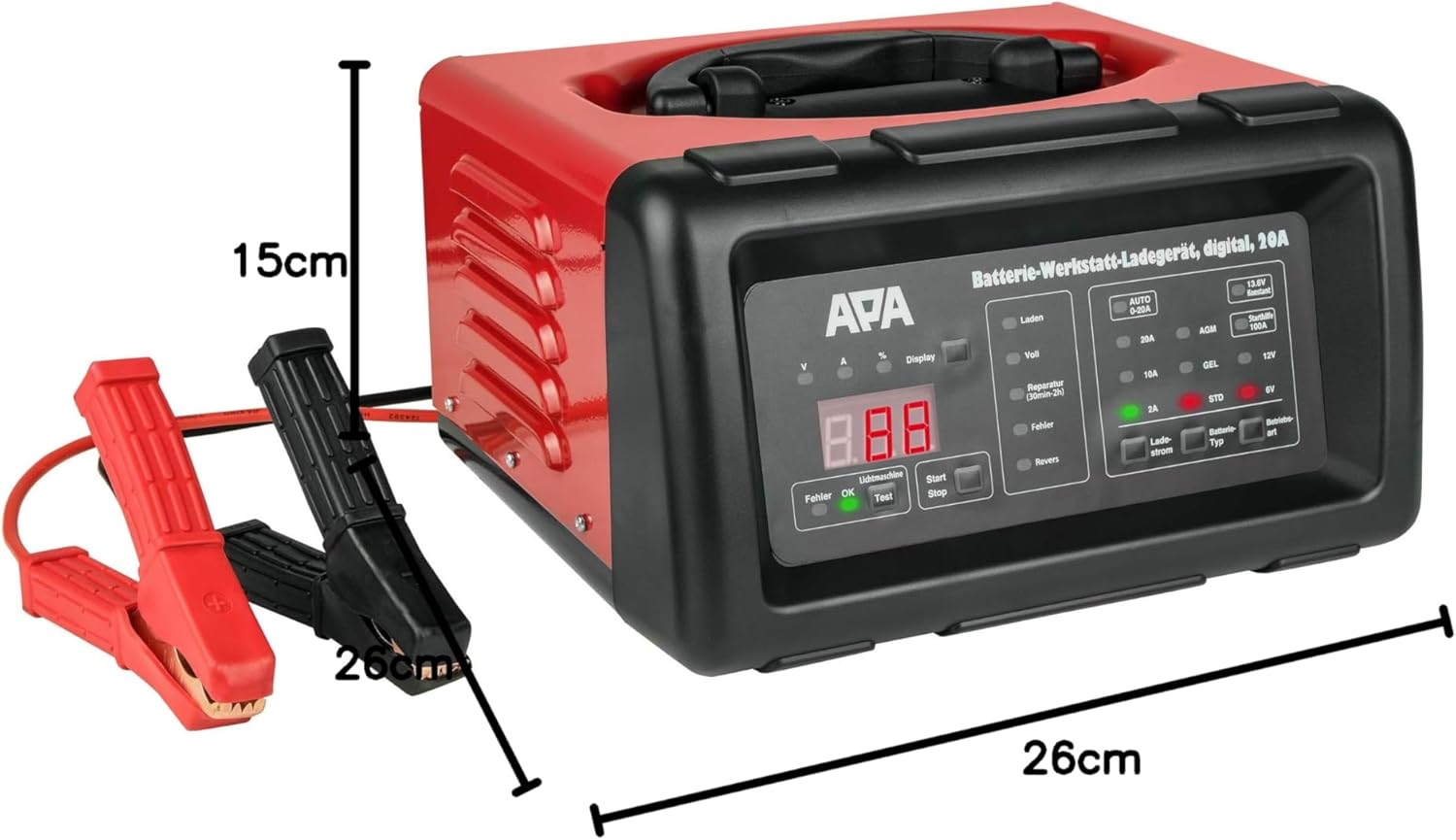
Figura 4: The battery charger shown with its approximate dimensions: 26 cm width, 26 cm depth, and 15 cm height, providing a clear idea of its compact size.
Setup
- Ippakkja: Oħroġ bir-reqqa l-ċarġer u l-aċċessorji kollha mill-imballaġġ.
- Spezzjona: Check the charger and cables for any signs of damage. Do not use if damaged.
- Pjazzament: Poġġi l-ċarġer fuq wiċċ stabbli u ċatt f'żona ventilata sew, 'il bogħod mix-xemx diretta, sorsi ta' sħana, u umdità.
- Tħejjija tal-Batterija: Kun żgur li t-terminali tal-batterija huma nodfa u ħielsa mill-korrużjoni. Jekk meħtieġ, naddafhom b'pinzell tal-wajer.
Istruzzjonijiet Operattivi
1. Connecting the Charger to the Battery
- Kun żgur li l-ċarġer huwa skonnettjat mis-sokit tal-enerġija AC.
- Connect the RED (+) positive clamp għat-terminal pożittiv (+) tal-batterija.
- Connect the BLACK (-) negative clamp to the negative (-) battery terminal. For vehicles, connect the black clamp to the vehicle chassis away from the battery and fuel line if the battery is still in the vehicle.
- Kun żgur li l-konnessjonijiet huma siguri.
2. Connecting to Power and Selecting Mode
- Plug the charger's power cord into a standard 240V AC power outlet.
- Id-displej diġitali se jixgħel.
- Use the "Battery Type" button to select the appropriate battery type (AGM, GEL, STD) and voltage (6V or 12V). The charger automatically detects the voltage for 12V batteries.
- Use the "Charge Current" button to select the desired charging current (2A, 10A, or 20A). For most applications, the "AUTO 0-20A" mode is recommended, which automatically adjusts the current.
- Press the "Start/Stop" button to begin charging. The display will show charging progress and battery status.
3. Proċess tal-Iċċarġjar
The charger features a multi-stagProċess tal-iċċarġjar elettroniku:
- Desulfazzjoni: If a deeply discharged or sulfated battery is detected, the charger may enter a desulfation phase (indicated by "Reparatur" on the display, lasting 30min-2h).
- Bidu artab: Gradually increases current to protect the battery.
- Ħlas Bulk: Charges the battery at the maximum selected current until it reaches approximately 80% capacity.
- Ħlas ta' Assorbiment: Charges at a decreasing current until the battery is fully charged.
- Float/Maintenance Charge: Once fully charged ("Voll" indicated), the charger switches to a maintenance mode, providing a small current to keep the battery at optimal charge.
4. Jump Start Function (100A)
The charger can provide a temporary boost for starting a vehicle with a discharged battery.
- Ensure the charger is connected to the battery and power as described above.
- Select the "Starthilfe 100A" (Jump Start 100A) mode.
- Attempt to start the vehicle. Do not crank for more than 5 seconds. Wait at least 1 minute between attempts.
- Once the vehicle starts, disconnect the charger from the AC outlet first, then disconnect the clamps from the battery/chassis.
5. Skonnettjar tal-Ċarġer
- Press the "Start/Stop" button to stop charging.
- Unplug the charger from the AC power outlet.
- Disconnect the BLACK (-) negative clamp from the battery/chassis.
- Skonnettja l-Aħmar (+) pożittiv clamp mit-terminal tal-batterija.
Manutenzjoni
- Tindif: Naddaf il-barra tal-ċarġer b'ċarruta ratba u niexfa. Tużax prodotti tat-tindif jew solventi li joborxu.
- Spezzjoni tal-Cable: Spezzjona regolarment il-kejbils tal-iċċarġjar u l-kliewiampIċċekkja għal kwalunkwe sinjal ta’ ħsara, tfarrik, jew korrużjoni. Ibdel jekk meħtieġ.
- Ħażna: Store the charger in a cool, dry place when not in use. Utilize the integrated cable storage to keep cables tidy.
- Ventilazzjoni: Kun żgur li l-fetħiet tal-ventilazzjoni huma nodfa mit-trab u l-fdalijiet biex tevita li jisħnu żżejjed.
Issolvi l-problemi
| Problema | Kawża Possibbli | Soluzzjoni |
|---|---|---|
| Il-ċarġer ma jixgħelx. | No power supply; faulty outlet; damaged power cord. | Check power connection; try a different outlet; inspect power cord for damage. |
| "Fehler" (Error) indicator lights up. | Reverse polarity connection; short circuit; battery fault. | Iċċekkja clamp connections (red to +ve, black to -ve); inspect cables for shorts; test battery condition. |
| Il-batterija mhix qed tiċċarġja. | Incorrect mode selected; poor connection; deeply discharged battery. | Verify battery type and voltage selection; ensure clamps are securely connected; allow time for desulfation mode if applicable. |
| Charger overheats. | Ventilazzjoni ħażina; tagħbija eċċessiva. | Ensure adequate ventilation around the charger; reduce charging current if possible. |
Speċifikazzjonijiet
| Karatteristika | Speċifikazzjoni |
|---|---|
| Brand | APA |
| Mudell | 16623 |
| Input Voltage | 240V AC |
| Ħruġ Voltage | 6V / 12V DC |
| Kurrent tal-Iċċarġjar | 2A, 10A, 20A (Automatic 0-20A) |
| Aqbeż Bidu Kurrenti | 100A |
| Tipi ta' Batteriji | AGM, Gel, Wet, Maintenance-Free Lead-Acid Batteries |
| Ħin tal-Iċċarġjar | Approx. 2 hours (depending on battery size and discharge level) |
| Materjal | Akkomodazzjoni tal-plastik |
| Dimensjonijiet (L x W x H) | 26 ċm x 26 ċm x 15 ċm (madwar) |
| Piż | 5783 Grams (approx. 5.78 kg) |
| Konformità tas-Sigurtà | UL (as per specification) |
Garanzija u Appoġġ
For warranty information and technical support, please refer to the documentation provided with your purchase or contact APA customer service. Keep your proof of purchase for any warranty claims.
Manifattur: EAL GmbH


